
Security-OAuth2.0 密码模式之客户端实现
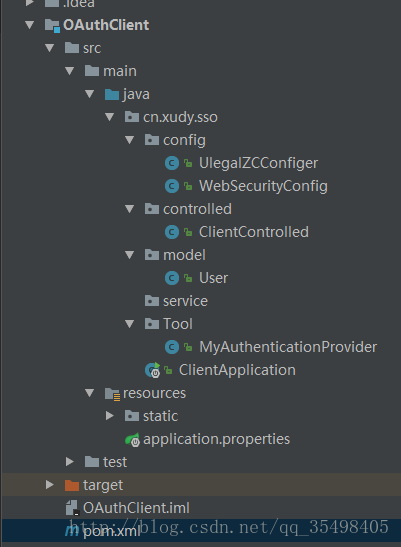
我的OAuth2.0 客户端项目目录
pom 的配置
<?xml version="1.0" encoding="UTF-8"?>

<project xmlns="http://maven.apache.org/POM/4.0.0"

         xmlns:xsi="http://www.w3.org/2001/XMLSchema-instance"

         xsi:schemaLocation="http://maven.apache.org/POM/4.0.0 http://maven.apache.org/xsd/maven-4.0.0.xsd">

    <parent>

        <artifactId>OauthText</artifactId>

        <groupId>OauthText</groupId>

        <version>1.0-SNAPSHOT</version>

    </parent>

    <modelVersion>4.0.0</modelVersion>

    <artifactId>OAuthClient</artifactId>

     <dependencies>

         <dependency>

             <groupId>org.springframework.security.oauth</groupId>

             <artifactId>spring-security-oauth2</artifactId>

         </dependency>

         <dependency>

             <groupId>org.springframework.boot</groupId>

             <artifactId>spring-boot-starter-security</artifactId>

         </dependency>

     </dependencies>

</project>
核心配置UlegalZCConfiger
    @Bean

    public OAuth2RestOperations restTemplate() {

        AccessTokenRequest atr = new DefaultAccessTokenRequest();

        OAuth2RestTemplate template = new OAuth2RestTemplate(resource(), new DefaultOAuth2ClientContext(atr));

        ResourceOwnerPasswordAccessTokenProvider provider = new ResourceOwnerPasswordAccessTokenProvider();

        template.setAccessTokenProvider(provider);

        return template;

    }

    private ResourceOwnerPasswordResourceDetails resource() {

        ResourceOwnerPasswordResourceDetails resource = new ResourceOwnerPasswordResourceDetails();

        resource.setClientId("000000");

        resource.setClientSecret("0000000");

        resource.setAccessTokenUri("http://192.168.100.1000:56/oauth/token");// Oauth2.0 服务端链接

        resource.setScope(Arrays.asList("read","write"));// 读写权限

        resource.setUsername("0000000");

        resource.setPassword("0000000");

        resource.setGrantType("password");// Oauth2.0 使用的模式 为密码模式

        return resource;

    }
上图username 和password 要与服务端自定义验证的账户和密码相同。setClientId和setClientSecret要与服务端数据库配置一样。如下字段

之后为前端拦截验证
package cn.xudy.sso.config;

import cn.xudy.sso.Tool.MyAuthenticationProvider;

import org.springframework.beans.factory.annotation.Autowired;

import org.springframework.context.annotation.Bean;

import org.springframework.context.annotation.Configuration;

import org.springframework.security.authentication.AuthenticationManager;

import org.springframework.security.config.annotation.authentication.builders.AuthenticationManagerBuilder;

import org.springframework.security.config.annotation.method.configuration.EnableGlobalMethodSecurity;

import org.springframework.security.config.annotation.web.builders.HttpSecurity;

import org.springframework.security.config.annotation.web.configuration.WebSecurityConfigurerAdapter;

/**

 * Created by Joe on 2017/8/8.

 */

@Configuration

@EnableGlobalMethodSecurity(prePostEnabled = true)//开启security注解

public class WebSecurityConfig extends WebSecurityConfigurerAdapter {

    @Bean

    @Override

    protected AuthenticationManager authenticationManager() throws Exception {

        return super.authenticationManager();

    }

    @Autowired

    private MyAuthenticationProvider provider;//自定义验证

    @Override

    protected void configure(HttpSecurity http) throws Exception {

        // 全部通过

//        http.csrf().disable().authorizeRequests()

//                .anyRequest()

//                .permitAll();

        //允许所有用户访问"/"和"/home" 条件判断

        http.csrf().disable()

                .authorizeRequests()

                .antMatchers("/login", "/page-login.html").permitAll()

                //其他地址的访问均需验证权限

                .antMatchers("/*.html").authenticated()

                .and()

                .formLogin()

                //指定登录页是"/login"

                .loginPage("/login")

                .defaultSuccessUrl("/otherPage")//登录成功后默认跳转到"/index.html"

                .permitAll()

                .and()

                .logout()

                .logoutUrl("/logout")

                .logoutSuccessUrl("/login")//退出登录后的默认url是"/login"

                .invalidateHttpSession(true)

                .permitAll();

    }

    @Autowired

    public void configureGlobal(AuthenticationManagerBuilder auth) throws Exception {

        //将验证过程交给自定义验证工具

        auth.authenticationProvider(provider);

    }

}
如果为条件验证,前端请求的话经过次方法,自定义验证代码WebSecurityConfig
 /**

     * 自定义验证方式

     */

    @Override

    public Authentication authenticate(Authentication authentication) throws AuthenticationException {

        String username = authentication.getName();

        String password = (String) authentication.getCredentials();

        System.out.println("=-=-=-=-=:"+username);

          // 假装请求数据库

        User user=new User();

        Collection<? extends GrantedAuthority> authorities = AuthorityUtils.commaSeparatedStringToAuthorityList("USER");

        return new UsernamePasswordAuthenticationToken(user, password, authorities);

    }

    @Override

    public boolean supports(Class<?> arg0) {

        return true;

    }
这是ClientControlled 请求
@RestController

public class ClientControlled {

    @Autowired

    private OAuth2RestOperations oauthRestTemplate;

    @PostMapping(value = "/login")

    public String  saveCuringEvidence(@RequestBody User user ){

        System.out.println("---------------------Client"+user.getUsername());

        //  重点请求服务端

        oauthRestTemplate.postForEntity("http://192.168.1.100:9595/log",user,String.class);

        return user.getUsername();

    }

}
最后建议先看看我写的服务端 两方配套使用
http://www.cnblogs.com/memoryXudy/p/7805178.html
Security-OAuth2.0 密码模式之客户端实现的更多相关文章
- oauth2.0密码模式详解
oauth2.0密码模式 欢迎关注博主公众号「Java大师」, 专注于分享Java领域干货文章http://www.javaman.cn/sb2/oauth-password 如果你高度信任某个应用, ...
- Spring Security OAuth2 Demo —— 密码模式(Password)
前情回顾 前几节分享了OAuth2的流程与授权码模式和隐式授权模式两种的Demo,我们了解到授权码模式是OAuth2四种模式流程最复杂模式,复杂程度由大至小:授权码模式 > 隐式授权模式 > ...
- IdentityServer4:IdentityServer4+API+Client+User实践OAuth2.0密码模式(2)
一.密码模式实操 仍然使用第一节的代码:做如下改动: 1.授权服务端 前面我们使用项目:Practice.IdentityServer作为授权服务器 修改项目的Config.cs类: 添加测试用户,并 ...
- webapi之owin的oauth2.0密码模式_01概述
一般在webapi接口中,为了防止接口被随意调用,都会验证用户身份. 然而不能每次调用接口都需要用户输入用户名密码来验证,这时就需要授权颁发令牌了,持有令牌就可以访问接口,接口也能验证令牌身份. 简单 ...
- springboot+spring security +oauth2.0 demo搭建(password模式)(认证授权端与资源服务端分离的形式)
项目security_simple(认证授权项目) 1.新建springboot项目 这儿选择springboot版本我选择的是2.0.6 点击finish后完成项目的创建 2.引入maven依赖 ...
- 基于spring boot2.0+spring security +oauth2.0+ jwt微服务架构
github地址:https://github.com/hankuikuide/microservice-spring-security-oauth2 项目介绍 该项目是一个演示项目,主要演示了,基于 ...
- Spring Cloud Security OAuth2.0 认证授权系列(一) 基础概念
世界上最快的捷径,就是脚踏实地,本文已收录[架构技术专栏]关注这个喜欢分享的地方. 前序 最近想搞下基于Spring Cloud的认证授权平台,总体想法是可以对服务间授权,想做一个基于Agent 的无 ...
- Spring Security OAuth2.0认证授权二:搭建资源服务
在上一篇文章[Spring Security OAuth2.0认证授权一:框架搭建和认证测试](https://www.cnblogs.com/kuangdaoyizhimei/p/14250374. ...
- Spring Security OAuth2.0认证授权四:分布式系统认证授权
Spring Security OAuth2.0认证授权系列文章 Spring Security OAuth2.0认证授权一:框架搭建和认证测试 Spring Security OAuth2.0认证授 ...
随机推荐
- 2015年传智播客JavaEE 第168期就业班视频教程day45-ERP项目-0107-其他子系统
一套ERP系统中一定会有CRM,不可能说我所有数据都是散着放的,你想用就随便写一个.你出去和人聊,一定得说我这里有什么有什么,然后你就可以和人说你做的是进销存.人家要问CRM或者说财务系统你就说那不是 ...
- 21.Merge Two Sorted Lists (List)
Merge two sorted linked lists and return it as a new list. The new list should be made by splicing t ...
- js高级——构造函数,实例对象和原型对象——prototype、__proto__和constructor构造器
一.前言 了解JavaScript面向对象,需要先了解三个名词: 构造函数,实例对象和原型对象. 注意:JavaScript中没有类(class)的概念,取而代之的是构造函数,两者类似却又有很大的差别 ...
- VS2015解决方案资源管理器空白,不显示内容
解决方法: 1.先关闭vs: 2.把C:/Users/<users name>/AppData/Local/Microsoft/VisualStudio/14.0/ComponentMod ...
- nat转发
http://www.revsys.com/writings/quicktips/nat.html https://www.alibabacloud.com/zh/product/nat?spm=a3 ...
- jetty tutorial
http://www.eclipse.org/jetty/documentation/current/embedding-jetty.html#d0e18726 Version: 9.2.2-SNAP ...
- Android应用开发环境的搭建和使用
主要包括Android SDK.Android开发工具:也包括如何使用Android提供的ADB.DDMS.AAPT.DX等工具,掌握这些工具是开发Android应用的基础技能. 1.Android的 ...
- git和码云的使用
什么是码云 快速入门 Git入门 码云是开源中国社区2013年推出的基于 Git 的完全免费的代码托管服务,这个服务是基于 Gitlab 开源软件所开发的,我们在 Gitlab 的基础上做了大量的改进 ...
- CentOS 7上源码编译安装和配置LNMP Web+phpMyAdmin服务器环境
CentOS 7上源码编译安装和配置LNMP Web+phpMyAdmin服务器环境 什么是LNMP? LNMP(别名LEMP)是指由Linux, Nginx, MySQL/MariaDB, PHP/ ...
- 四)Spring + Quartz
使用Quartz默认配置 <?xml version="1.0" encoding="UTF-8"?> <beans xmlns=" ...