
【转】上传jar包到nexus私服
原文:https://my.oschina.net/lujianing/blog/297128
1通过网页上传
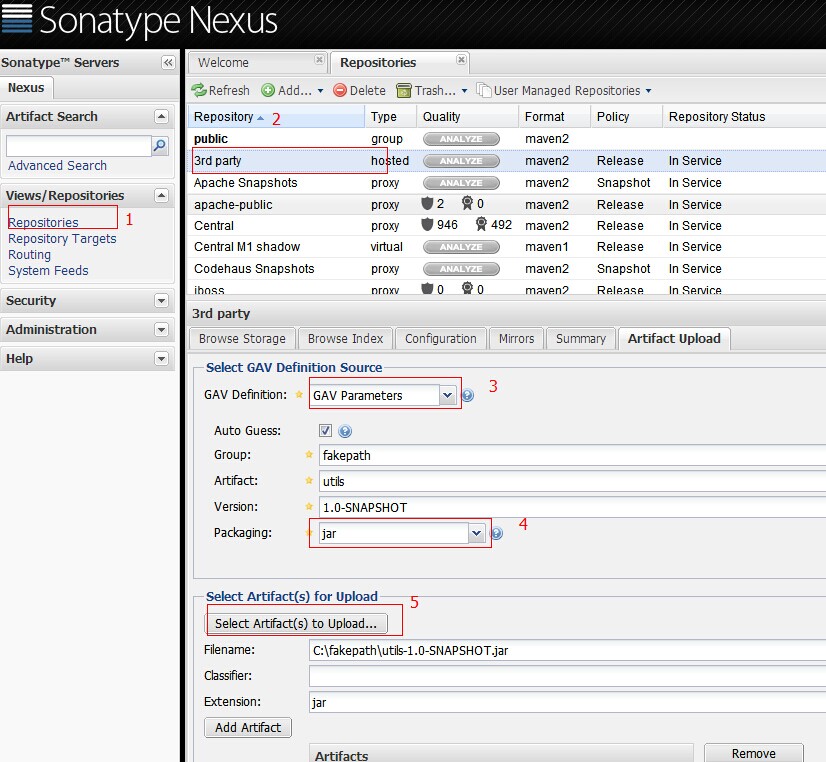
这种方法只是上传了jar包。通过maven引用当前jar,不能取得jar的依赖
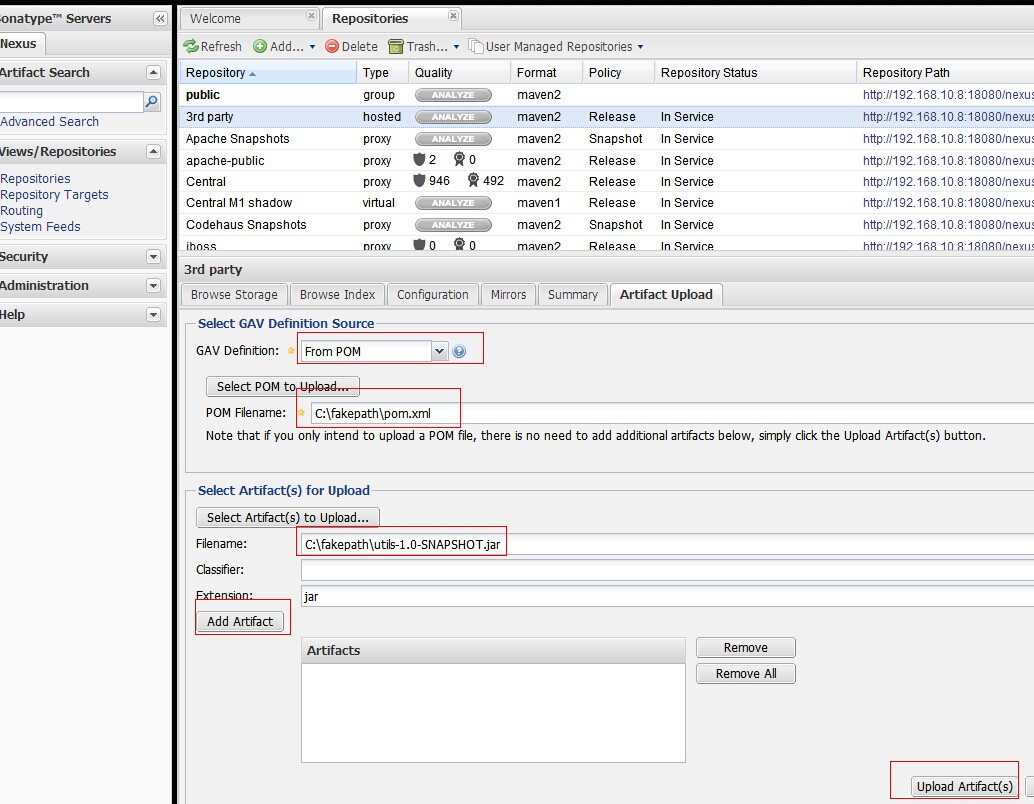
from pom的方式,选择pom文件,以及jar。通过maven引入jar时,会自动加载jar的依赖
2通过maven的方式depoly
在maven的conf/setting.xml 配置nexus私服的管理账号
在servers标签下添加server
   <server>

      <id>nexus-snapshots</id>

      <username>repouser</username>

      <password>repopwd</password>

    </server>
id可自己定义一个名称 以及私服的管理管的账号密码
在mirrors和profiles下配置nexus私服
<mirrors>

    <mirror>

      <!--This sends everything else to /public -->

      <id>nexus</id>

      <mirrorOf>*</mirrorOf>

      <url>http://192.168.10.8:18080/nexus/content/repositories/releases/</url>

    </mirror>

  </mirrors>

  <profiles>

    <profile>

      <id>nexus</id>

      <!--Enable snapshots for the built in central repo to direct -->

      <!--all requests to nexus via the mirror -->

      <repositories>

        <repository>

            <id>nexus</id>

            <name>local private nexus</name>

            <url>http://192.168.10.8:18080/nexus/content/groups/public</url>

            <releases><enabled>true</enabled><updatePolicy>always</updatePolicy>

            <checksumPolicy>warn</checksumPolicy></releases>

            <snapshots><enabled>false</enabled></snapshots>

        </repository>

      </repositories>

      <pluginRepositories>

        <pluginRepository>

            <id>nexus</id>

            <name>local private nexus</name>

            <url>http://192.168.10.8:18080/nexus/content/groups/public</url>

            <releases><enabled>true</enabled><updatePolicy>always</updatePolicy>

            <checksumPolicy>warn</checksumPolicy></releases>

            <snapshots><enabled>false</enabled></snapshots>

        </pluginRepository>

       </pluginRepositories>

    </profile>

  </profiles>

  <activeProfiles>

    <!--make the profile active all the time -->

    <activeProfile>nexus</activeProfile>

  </activeProfiles>
在项目的pom.xml中配置
 <distributionManagement>

        <repository>

            <id>nexus-releases</id>

            <name>Nexus Release Repository</name>

            <url>http://192.168.10.8:18080/nexus/content/repositories/releases/</url>

        </repository>

        <snapshotRepository>

            <id>nexus-snapshots</id>

            <name>Nexus Snapshot Repository</name>

            <url>http://192.168.10.8:18080/nexus/content/repositories/snapshots/</url>

        </snapshotRepository>

    </distributionManagement>
id与settings.xml中的server的id对应
当项目package后
mvn deploy就可以将jar上传到nexus私服
上传jar至Nexus Repository Manager失败问题总结
参考:https://my.oschina.net/skyzwg/blog/846195
上传一直各种原因失败。于是逐步排查,总结出了几个小Tips:
创建的仓库类型一定要是hosted类型的,否则无法上传(之前一直报405)
Snapshot库发布的版本必须以SNAPSHOT结尾
release发布的版本不能以SNAPSHOT结尾
【转】上传jar包到nexus私服的更多相关文章
- maven上传jar包到nexus私服后的存放路径 以及 使用IDEA上传jar包的步骤
maven上传jar包到nexus私服的方法,网上大神详解很多,那么上传后的jar包存放到哪里了呢? 在下使用nexus3.2.1版本,在本地搭建了私服,使用maven上传jar包.最后结果如下: 点 ...
- (转)上传jar包到nexus私服
场景:在使用私服Nexus时候经常需要上传jar包,但是对上传jar包的方式不是很熟悉,所以很有必要学习下. 1 通过网页上传 GAV Definition:选择GAV Parameters 输入JA ...
- 上传jar包到nexus私服
摘要 通过网页和maven两种方式,上传本地的jar到nexus私服,以及引用jar时,自动引用依赖 1通过网页上传 这种方法只是上传了jar包.通过maven引用当前jar,不能取得jar的依赖 ...
- Maven第四篇【私有仓库、上传jar包、引用私服jar包、上传本地项目到私服】
搭建私有服务器 前面已经说过了,我们使用Maven的使用,如果需要导入相对应的jar包,Maven首先会在我们的本地仓库中寻找->私有仓库->中心仓库- 然而,我们的本地仓库常常没有想要的 ...
- 上传jar包至nexus
上传命令: mvn deploy:deploy-file -DgroupId=com.xxx -DartifactId=xxx-pdf -Dversion=16.10.0 -Dpackaging=ja ...
- 上传jar包至maven私服
1.maven环境变量配置(新建系统变量,编辑Path) 2.修改maven的setting文件 2.1 私服的用户配置 2.2 私服镜像配置 2.3 (我也不知道是啥) <profile> ...
- 上传jar包到nexus
注释掉: org.springframework.boot.autoconfigure.EnableAutoConfiguration=com.meeno.boot.oa.OaAutoConfigur ...
- Nexus3.0搭建私服上传JAR包 Windows10
背景 近期换了一个项目组,用的是公司自研产品,涉及到很多内部JAR包引用,版本号很多,每次更新都是产品部给出jar包,项目组成员各自复制一套本地替换,来了新人各种安装配置,复杂度太高,这不,我一来,又 ...
- 实测Maven上传jar包到私服的方法归纳
Hello,各位小伙伴大家好,我是小栈君.好久不见,最近因为工作的缘故,导致了更新变慢,但是小栈君也在积极的做素材的规划,毕竟学习知识点的归纳和提炼需要一定的时间. 所以还请大家多多见谅,下一期的分享 ...
随机推荐
- 系统分析与设计 homework2
1. 简述瀑布模型.增量模型.螺旋模型(含原型方法)的优缺点. 瀑布模型 优点: 降低了软件开发的复杂度,提高软件开发过程中的透明性,提高软件开发的可管理性. 为项目提供了按阶段划分的检查点. 当前一 ...
- JSON 解析的可抛弃
先看例子, json文件中有些元素不是我们想要的,在反序列化时可以当它们不存在,下面例子抛弃了 aaa.ccc这两节. package main import ( "encoding ...
- 关于JAVA项目报表选型过程
本人一直在走.NET技术路线,考虑到后期公司搞JAVA项目,也算是进行技术灾备,开始对JAVA技术进行关注.万事开头难,也是上来一头包.没办法,顶着上吧.上面开始分给我任务了.就是对后期项目报表进行方 ...
- IDEA 2017.2.2 环境下使用JUnit
JUnit:单元测试框架,测试对象为一个类中的方法. JUnit不是Javase的一部分,想要使用需要导入jar包,在IntelliJ IDEA 中自带JUnit插件. JUnit 版本有3.X 4. ...
- Bzoj2780: [Spoj]8093 Sevenk Love Oimaster
题目 传送门 Sol 就是广义\(sam\) 然后记录下每个状态属于哪些串,开\(set\)维护 \(parent\)树上启发式合并一下就好了 # include <bits/stdc++.h& ...
- JS 和 a href className JS编写顺序与运行顺序 字符串或变量嵌入中括号 代替 点号 代表属性
JS 和 a href 在href里面注意分号结尾, 引号闭合 <a href="javascript:;">空链接</a> <a href=&quo ...
- 008Spring & JPA & Hibernate & MySQL
01下载免安装版MySQL 02安装MySQL a)将MySQL压缩包解压到合适的位置,以C:\programmer\Tools\mysql-5.7.20-winx64路径为例: b)新建系统变量,变 ...
- (WPF) Textbox 每次输入触发事件处理
1. Code behind. protected void TextBox1_TextChanged(object sender, EventArgs e) { Label1.Text = Ser ...
- Java期中项目杂七杂八
这是一篇草稿,嗯,等结项以后大概可能会整理其中的一部分吧…… 杂项 1. 用Idea创建Maven项目:直接选就行:至于商定好的Eclipse要怎么做再说…… 2. 联网依赖:选择我们最熟的okhtt ...
- IEC62304软件维护框架
软件维护计划的任务 建立接收.记录.评估.解决和追踪医疗器械软件发行后的反馈 制定确认反馈是否是问题的标准 使用风险管理过程 使用配置管理过程 制定升级.补丁以及遗留问题修正计划 问题和修改分析的任务 ...