
Elasticsearch之中文分词器插件es-ik(博主推荐)
前提
什么是倒排索引?
Elasticsearch之分词器的作用
Elasticsearch之分词器的工作流程
Elasticsearch之停用词
Elasticsearch之中文分词器
Elasticsearch之几个重要的分词器
elasticsearch官方默认的分词插件
1、elasticsearch官方默认的分词插件,对中文分词效果不理想。
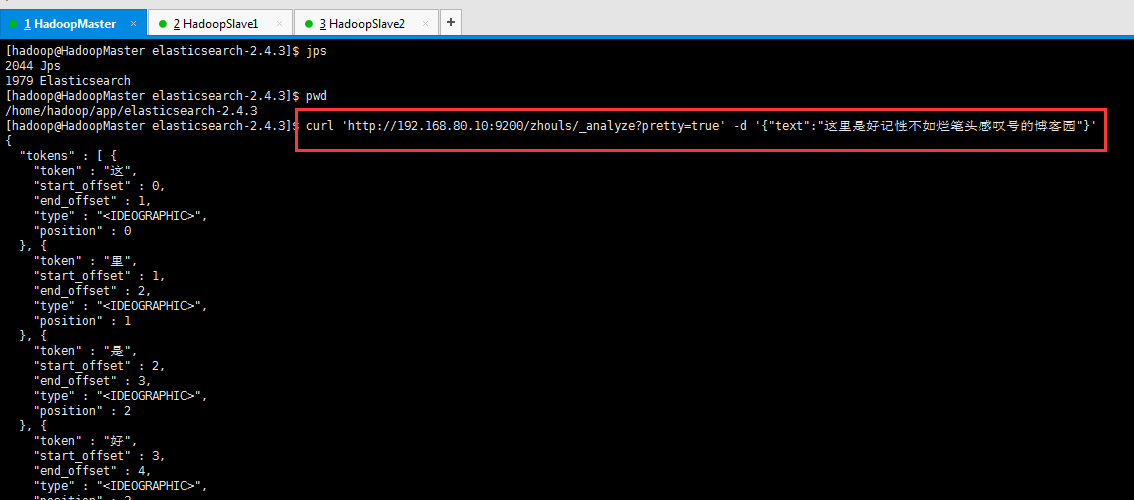
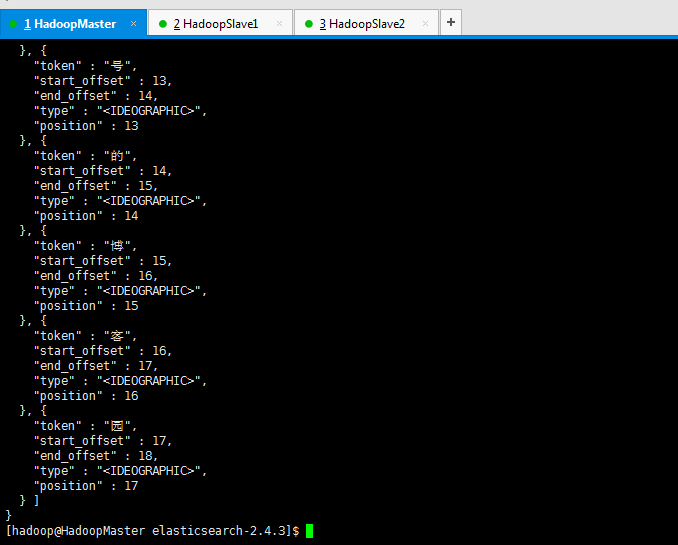
比如,我现在,拿个具体实例来展现下,验证为什么,es官网提供的分词插件对中文分词而言,效果差。
[hadoop@HadoopMaster elasticsearch-2.4.3]$ jps
2044 Jps
1979 Elasticsearch
[hadoop@HadoopMaster elasticsearch-2.4.3]$ pwd
/home/hadoop/app/elasticsearch-2.4.3
[hadoop@HadoopMaster elasticsearch-2.4.3]$ curl 'http://192.168.80.10:9200/zhouls/_analyze?pretty=true' -d '{"text":"这里是好记性不如烂笔头感叹号的博客园"}'
{
"tokens" : [ {
"token" : "这",
"start_offset" : 0,
"end_offset" : 1,
"type" : "<IDEOGRAPHIC>",
"position" : 0
}, {
"token" : "里",
"start_offset" : 1,
"end_offset" : 2,
"type" : "<IDEOGRAPHIC>",
"position" : 1
}, {
"token" : "是",
"start_offset" : 2,
"end_offset" : 3,
"type" : "<IDEOGRAPHIC>",
"position" : 2
}, {
"token" : "好",
"start_offset" : 3,
"end_offset" : 4,
"type" : "<IDEOGRAPHIC>",
"position" : 3
}, {
"token" : "记",
"start_offset" : 4,
"end_offset" : 5,
"type" : "<IDEOGRAPHIC>",
"position" : 4
}, {
"token" : "性",
"start_offset" : 5,
"end_offset" : 6,
"type" : "<IDEOGRAPHIC>",
"position" : 5
}, {
"token" : "不",
"start_offset" : 6,
"end_offset" : 7,
"type" : "<IDEOGRAPHIC>",
"position" : 6
}, {
"token" : "如",
"start_offset" : 7,
"end_offset" : 8,
"type" : "<IDEOGRAPHIC>",
"position" : 7
}, {
"token" : "烂",
"start_offset" : 8,
"end_offset" : 9,
"type" : "<IDEOGRAPHIC>",
"position" : 8
}, {
"token" : "笔",
"start_offset" : 9,
"end_offset" : 10,
"type" : "<IDEOGRAPHIC>",
"position" : 9
}, {
"token" : "头",
"start_offset" : 10,
"end_offset" : 11,
"type" : "<IDEOGRAPHIC>",
"position" : 10
}, {
"token" : "感",
"start_offset" : 11,
"end_offset" : 12,
"type" : "<IDEOGRAPHIC>",
"position" : 11
}, {
"token" : "叹",
"start_offset" : 12,
"end_offset" : 13,
"type" : "<IDEOGRAPHIC>",
"position" : 12
}, {
"token" : "号",
"start_offset" : 13,
"end_offset" : 14,
"type" : "<IDEOGRAPHIC>",
"position" : 13
}, {
"token" : "的",
"start_offset" : 14,
"end_offset" : 15,
"type" : "<IDEOGRAPHIC>",
"position" : 14
}, {
"token" : "博",
"start_offset" : 15,
"end_offset" : 16,
"type" : "<IDEOGRAPHIC>",
"position" : 15
}, {
"token" : "客",
"start_offset" : 16,
"end_offset" : 17,
"type" : "<IDEOGRAPHIC>",
"position" : 16
}, {
"token" : "园",
"start_offset" : 17,
"end_offset" : 18,
"type" : "<IDEOGRAPHIC>",
"position" : 17
} ]
}
[hadoop@HadoopMaster elasticsearch-2.4.3]$
总结
如果直接使用Elasticsearch的朋友在处理中文内容的搜索时,肯定会遇到很尴尬的问题——中文词语被分成了一个一个的汉字,当用Kibana作图的时候,按照term来分组,结果一个汉字被分成了一组。
这是因为使用了Elasticsearch中默认的标准分词器,这个分词器在处理中文的时候会把中文单词切分成一个一个的汉字,因此引入es之中文的分词器插件es-ik就能解决这个问题。
如何集成IK分词工具
总的流程如下:
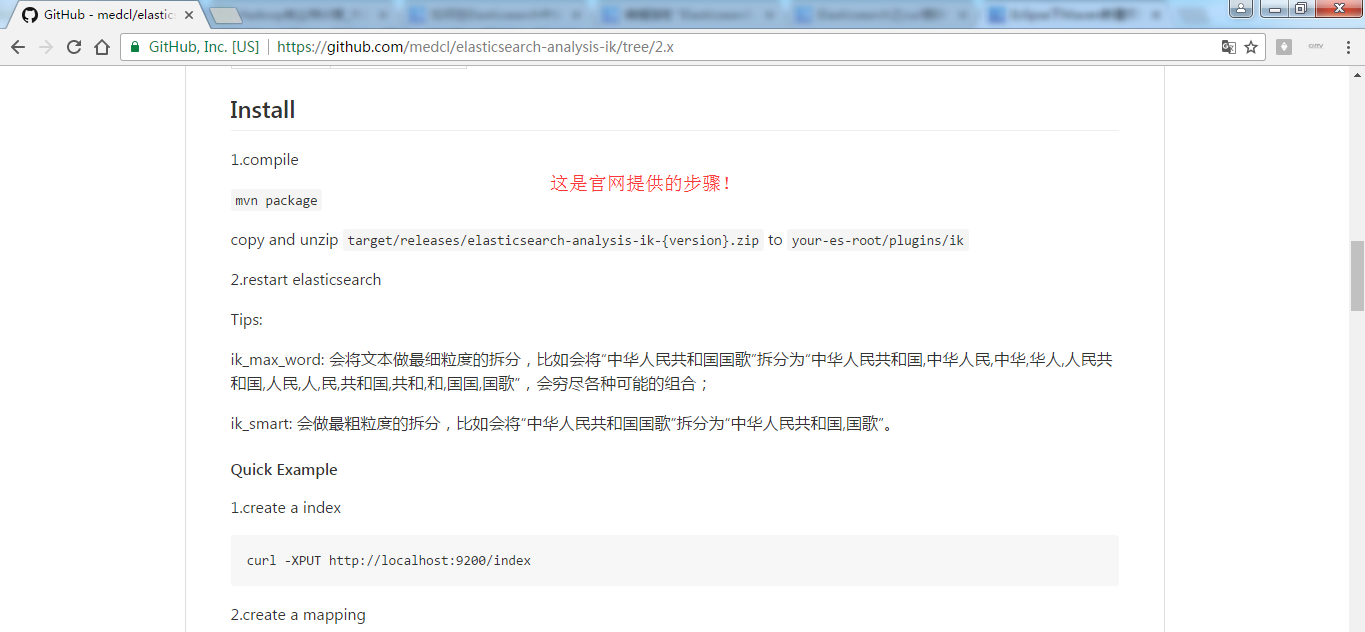
第一步:下载es的IK插件https://github.com/medcl/elasticsearch-analysis-ik/tree/2.x
第二步:使用maven对下载的es-ik源码进行编译(mvn clean package -DskipTests)
第三步:把编译后的target/releases下的elasticsearch-analysis-ik-1.10.3.zip文件拷贝到ES_HOME/plugins/ik目录下面,然后使用unzip命令解压
如果unzip命令不存在,则安装:yum install -y unzip
第四步:重启es服务
第五步:测试分词效果: curl 'http://your ip:9200/zhouls/_analyze?analyzer=ik_max_word&pretty=true' -d '{"text":"这里是好记性不如烂笔头感叹号的博客们"}'
注意:若你是单节点的es集群的话,则只需在一台部署es-ik。若比如像我这里的话,是3台,则需在三台都部署es-ik,且配置要一样。
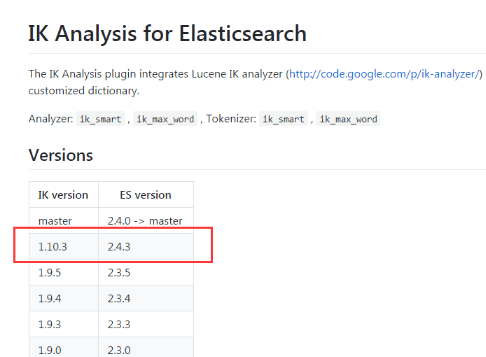
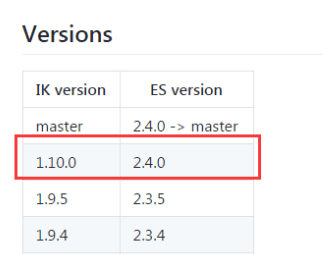
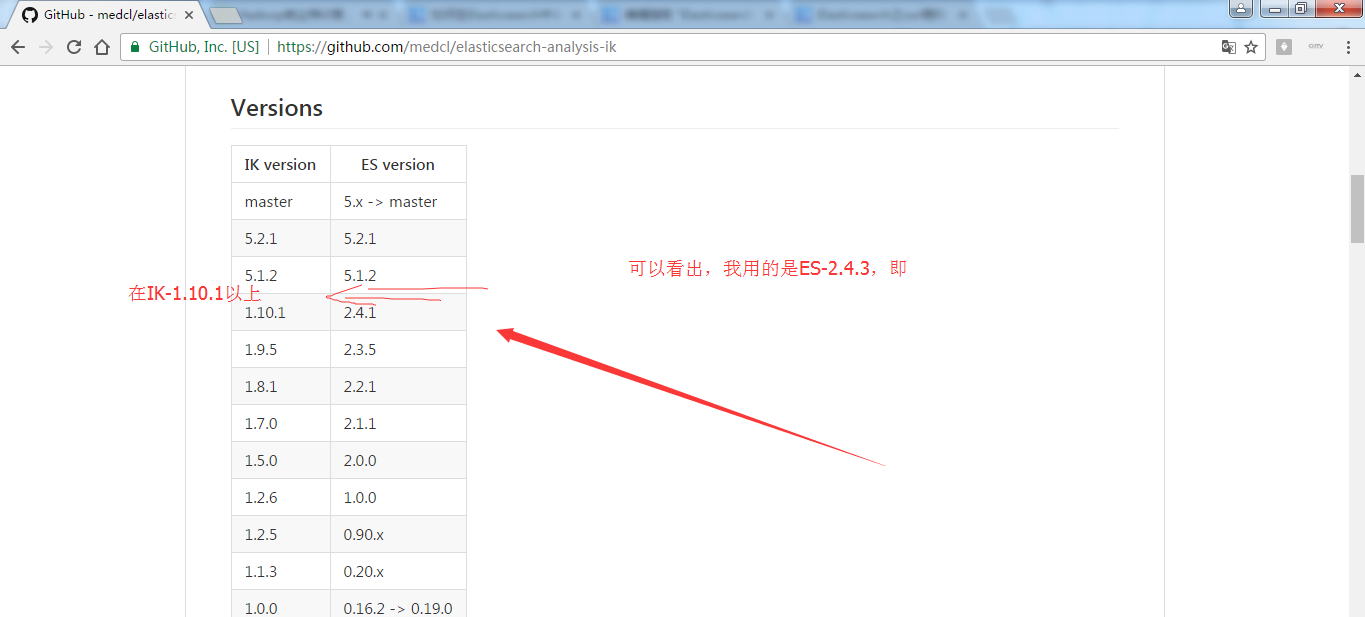
elasticsearch-analysis-ik-1.10.0.zip 对应于 elasticsearch-2.4.0
elasticsearch-analysis-ik-1.10.3.zip 对应于 elasticsearch-2.4.3


我这里,已经给大家准备好了,以下是我的CSDN账号。下载好了,大家可以去下载。
http://download.csdn.net/detail/u010106732/9890897

http://download.csdn.net/detail/u010106732/9890918
https://github.com/medcl/elasticsearch-analysis-ik/tree/v1.10.0
第一步: 在浏览器里,输入https://github.com/

第二步:https://github.com/search?utf8=%E2%9C%93&q=elasticsearch-ik
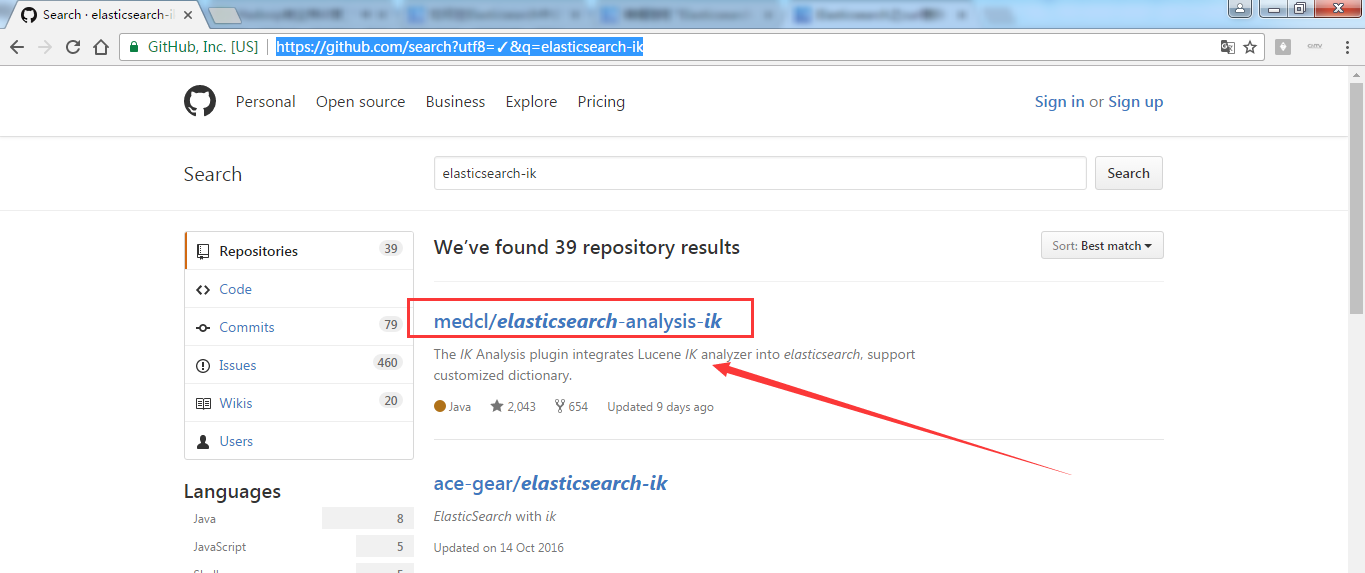
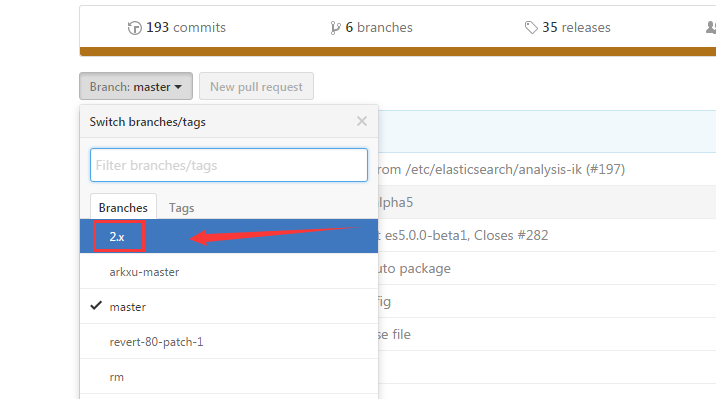
第三步:https://github.com/medcl/elasticsearch-analysis-ik ,点击2.x 。当然也有一些人在用2.4.0版本,都适用。若你是使用5.X,则自己对号入座即可,这个很简单。
第四步:https://github.com/medcl/elasticsearch-analysis-ik/tree/2.x 得到
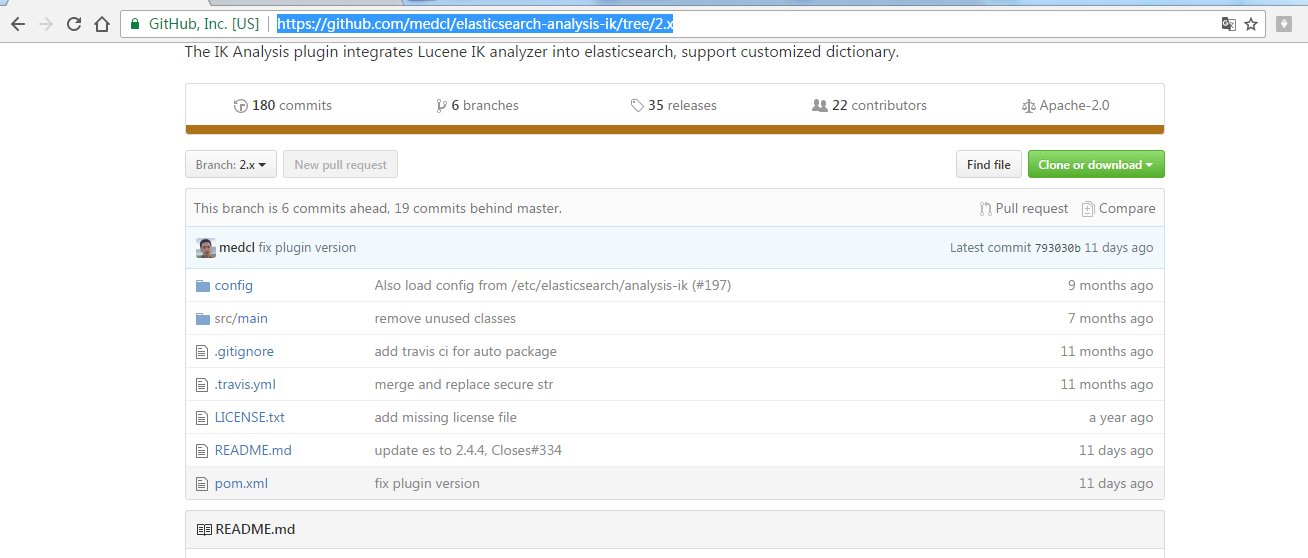
第五步:找到之后,点击,下载,这里选择离线安装。
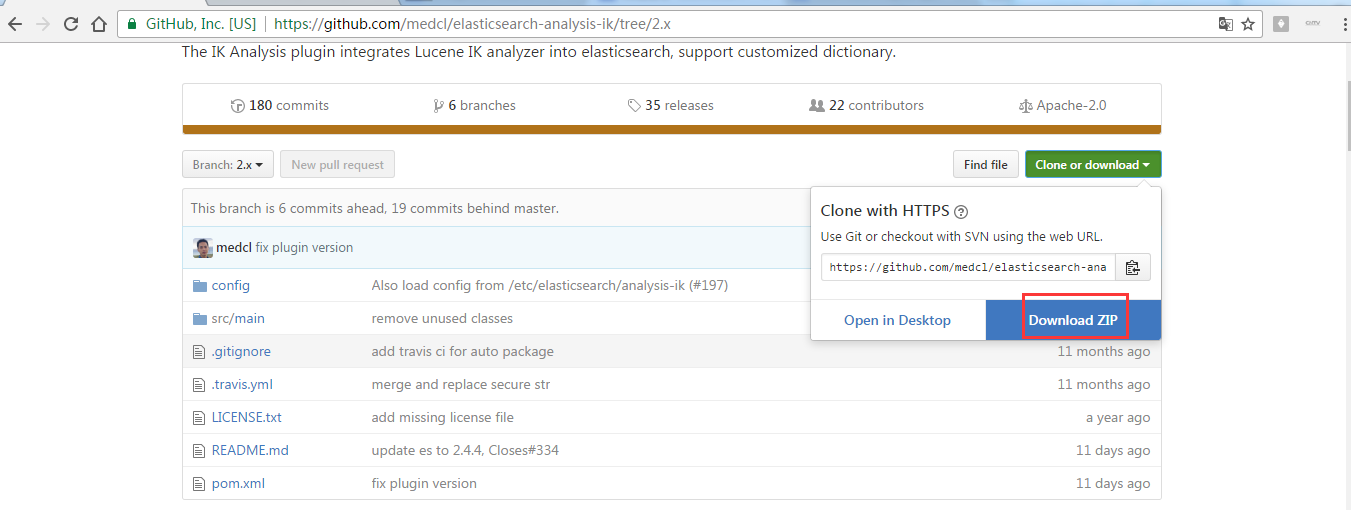

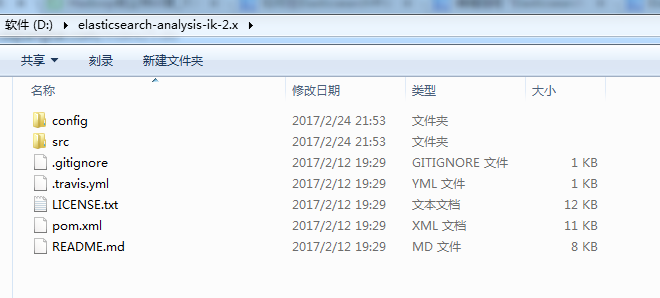
第六步:将Elasticsearch之中文分词器插件es-ik的压缩包解压下,初步认识下其目录结构,比如我这里放到D盘下来认识下。并为后续的maven编译做基础。
第七步:用本地安装好的maven来编译
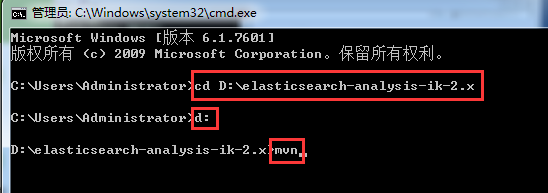
Microsoft Windows [版本 6.1.7601]
版权所有 (c) 2009 Microsoft Corporation。保留所有权利。
C:\Users\Administrator>cd D:\elasticsearch-analysis-ik-2.x
C:\Users\Administrator>d:
D:\elasticsearch-analysis-ik-2.x>mvn
得到,
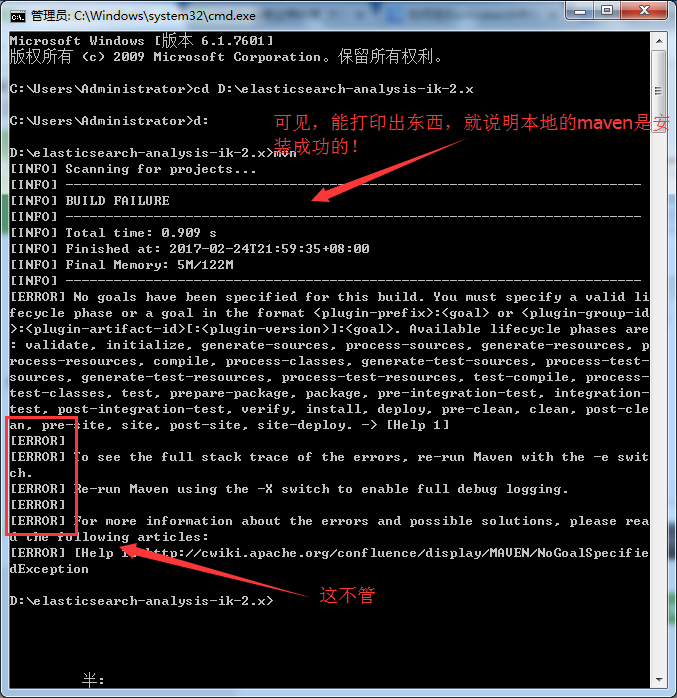
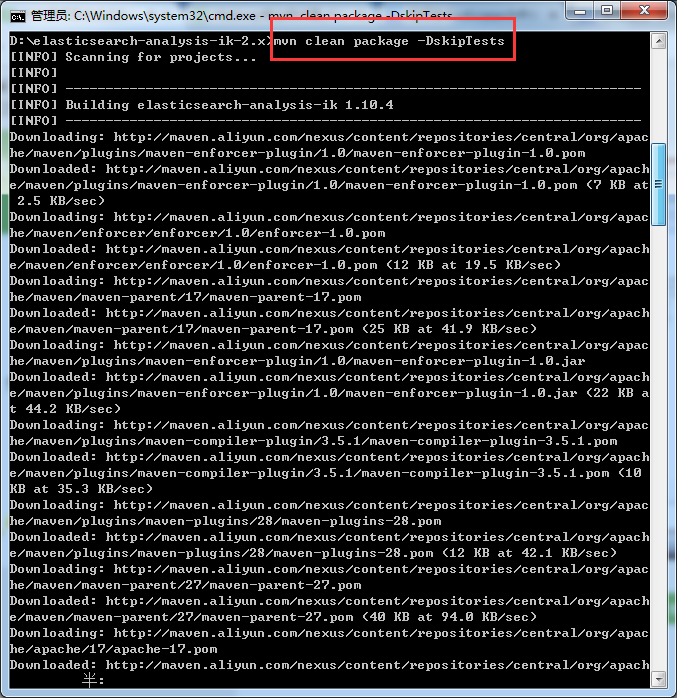
D:\elasticsearch-analysis-ik-2.x>mvn clean package -DskipTests
[INFO] Scanning for projects...
[INFO]
[INFO] ------------------------------------------------------------------------
[INFO] Building elasticsearch-analysis-ik 1.10.4
[INFO] ------------------------------------------------------------------------
Downloading: http://maven.aliyun.com/nexus/content/repositories/central/org/apac
he/maven/plugins/maven-enforcer-plugin/1.0/maven-enforcer-plugin-1.0.pom
Downloaded: http://maven.aliyun.com/nexus/content/repositories/central/org/apach
e/maven/plugins/maven-enforcer-plugin/1.0/maven-enforcer-plugin-1.0.pom (7 KB at
2.5 KB/sec)
Downloading: http://maven.aliyun.com/nexus/content/repositories/central/org/apac
he/maven/enforcer/enforcer/1.0/enforcer-1.0.pom
Downloaded: http://maven.aliyun.com/nexus/content/repositories/central/org/apach
e/maven/enforcer/enforcer/1.0/enforcer-1.0.pom (12 KB at 19.5 KB/sec)
Downloading: http://maven.aliyun.com/nexus/content/repositories/central/org/apac
he/maven/maven-parent/17/maven-parent-17.pom
Downloaded: http://maven.aliyun.com/nexus/content/repositories/central/org/apach
e/maven/maven-parent/17/maven-parent-17.pom (25 KB at 41.9 KB/sec)
Downloading: http://maven.aliyun.com/nexus/content/repositories/central/org/apac
he/maven/plugins/maven-enforcer-plugin/1.0/maven-enforcer-plugin-1.0.jar
Downloaded: http://maven.aliyun.com/nexus/content/repositories/central/org/apach
e/maven/plugins/maven-enforcer-plugin/1.0/maven-enforcer-plugin-1.0.jar (22 KB a
t 44.2 KB/sec)
Downloading: http://maven.aliyun.com/nexus/content/repositories/central/org/apac
he/maven/plugins/maven-compiler-plugin/3.5.1/maven-compiler-plugin-3.5.1.pom
Downloaded: http://maven.aliyun.com/nexus/content/repositories/central/org/apach
e/maven/plugins/maven-compiler-plugin/3.5.1/maven-compiler-plugin-3.5.1.pom (10
KB at 35.3 KB/sec)
Downloading: http://maven.aliyun.com/nexus/content/repositories/central/org/apac
he/maven/plugins/maven-plugins/28/maven-plugins-28.pom
Downloaded: http://maven.aliyun.com/nexus/content/repositories/central/org/apach
e/maven/plugins/maven-plugins/28/maven-plugins-28.pom (12 KB at 42.1 KB/sec)
Downloading: http://maven.aliyun.com/nexus/content/repositories/central/org/apac
he/maven/maven-parent/27/maven-parent-27.pom
Downloaded: http://maven.aliyun.com/nexus/content/repositories/central/org/apach
e/maven/maven-parent/27/maven-parent-27.pom (40 KB at 94.0 KB/sec)
Downloading: http://maven.aliyun.com/nexus/content/repositories/central/org/apac
he/apache/17/apache-17.pom
Downloaded: http://maven.aliyun.com/nexus/content/repositories/central/org/apach
需要等待一会儿,这个根据自己的网速快慢。

Downloaded: http://maven.aliyun.com/nexus/content/repositories/central/org/apach
e/maven/maven-archiver/2.4/maven-archiver-2.4.jar (20 KB at 19.8 KB/sec)
Downloading: http://maven.aliyun.com/nexus/content/repositories/central/org/apac
he/maven/shared/maven-repository-builder/1.0-alpha-2/maven-repository-builder-1.
0-alpha-2.jar
Downloaded: http://maven.aliyun.com/nexus/content/repositories/central/org/apach
e/maven/maven-project/2.0.4/maven-project-2.0.4.jar (107 KB at 84.7 KB/sec)
Downloaded: http://maven.aliyun.com/nexus/content/repositories/central/org/codeh
aus/plexus/plexus-utils/2.0.1/plexus-utils-2.0.1.jar (217 KB at 158.7 KB/sec)
Downloaded: http://maven.aliyun.com/nexus/content/repositories/central/org/apach
e/maven/shared/maven-repository-builder/1.0-alpha-2/maven-repository-builder-1.0
-alpha-2.jar (23 KB at 16.4 KB/sec)
Downloaded: http://maven.aliyun.com/nexus/content/repositories/central/org/apach
e/maven/maven-model/2.0.4/maven-model-2.0.4.jar (79 KB at 54.3 KB/sec)
Downloaded: http://maven.aliyun.com/nexus/content/repositories/central/org/apach
e/maven/maven-artifact/2.0.4/maven-artifact-2.0.4.jar (79 KB at 52.9 KB/sec)
[INFO] Reading assembly descriptor: D:\elasticsearch-analysis-ik-2.x/src/main/as
semblies/plugin.xml
[INFO] Building zip: D:\elasticsearch-analysis-ik-2.x\target\releases\elasticsea
rch-analysis-ik-1.10.4.zip
[INFO] ------------------------------------------------------------------------
[INFO] BUILD SUCCESS
[INFO] ------------------------------------------------------------------------
[INFO] Total time: 01:22 min
[INFO] Finished at: 2017-02-25T14:48:40+08:00
[INFO] Final Memory: 35M/609M
[INFO] ------------------------------------------------------------------------
D:\elasticsearch-analysis-ik-2.x>

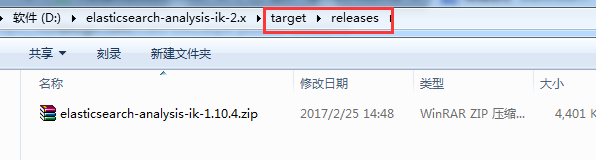
成功,得到。
这里,需要本地(即windows系统)里,提前安装好maven,需要来编译。若没安装的博友,请移步,见
Eclipse下Maven新建项目、自动打依赖jar包(包含普通项目和Web项目)
最后得到是,

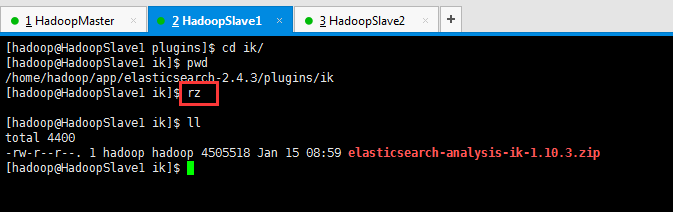
第八步:将最后编译好的,分别上传到3台机器里。$ES_HOME/plugins/ik 目录下,注意需要新建ik目录。

[hadoop@HadoopSlave1 elasticsearch-2.4.3]$ pwd
/home/hadoop/app/elasticsearch-2.4.3
[hadoop@HadoopSlave1 elasticsearch-2.4.3]$ ll
total 56
drwxrwxr-x. 2 hadoop hadoop 4096 Feb 22 01:37 bin
drwxrwxr-x. 3 hadoop hadoop 4096 Feb 22 22:43 config
drwxrwxr-x. 3 hadoop hadoop 4096 Feb 22 07:07 data
drwxrwxr-x. 2 hadoop hadoop 4096 Feb 22 01:37 lib
-rw-rw-r--. 1 hadoop hadoop 11358 Aug 24 2016 LICENSE.txt
drwxrwxr-x. 2 hadoop hadoop 4096 Feb 25 05:15 logs
drwxrwxr-x. 5 hadoop hadoop 4096 Dec 8 00:41 modules
-rw-rw-r--. 1 hadoop hadoop 150 Aug 24 2016 NOTICE.txt
drwxrwxr-x. 4 hadoop hadoop 4096 Feb 22 06:02 plugins
-rw-rw-r--. 1 hadoop hadoop 8700 Aug 24 2016 README.textile
[hadoop@HadoopSlave1 elasticsearch-2.4.3]$ cd plugins/
[hadoop@HadoopSlave1 plugins]$ ll
total 8
drwxrwxr-x. 5 hadoop hadoop 4096 Feb 22 06:02 head
drwxrwxr-x. 8 hadoop hadoop 4096 Feb 22 06:02 kopf
[hadoop@HadoopSlave1 plugins]$ mkdir ik
[hadoop@HadoopSlave1 plugins]$ pwd
/home/hadoop/app/elasticsearch-2.4.3/plugins
[hadoop@HadoopSlave1 plugins]$ ll
total 12
drwxrwxr-x. 5 hadoop hadoop 4096 Feb 22 06:02 head
drwxrwxr-x. 2 hadoop hadoop 4096 Feb 25 06:18 ik
drwxrwxr-x. 8 hadoop hadoop 4096 Feb 22 06:02 kopf
[hadoop@HadoopSlave1 plugins]$ cd ik/
[hadoop@HadoopSlave1 ik]$ pwd
/home/hadoop/app/elasticsearch-2.4.3/plugins/ik
[hadoop@HadoopSlave1 ik]$ rz
[hadoop@HadoopSlave1 ik]$ ll
total 4400
-rw-r--r--. 1 hadoop hadoop 4505518 Jan 15 08:59 elasticsearch-analysis-ik-1.10.3.zip
[hadoop@HadoopSlave1 ik]$
第九步:关闭es服务进程

[hadoop@HadoopSlave1 ik]$ jps
1874 Elasticsearch
2078 Jps
[hadoop@HadoopSlave1 ik]$ kill -9 1874
[hadoop@HadoopSlave1 ik]$ jps
2089 Jps
[hadoop@HadoopSlave1 ik]$
第十步:使用unzip命令解压,如果unzip命令不存在,则安装:yum install -y unzip。
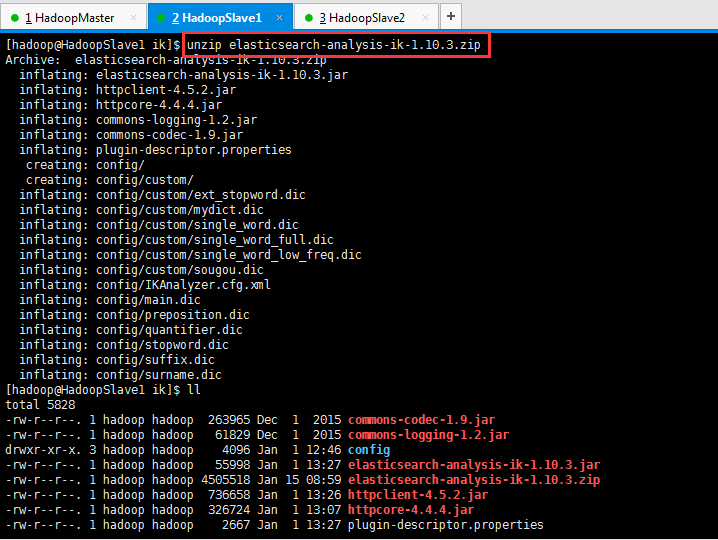
[hadoop@HadoopSlave1 ik]$ unzip elasticsearch-analysis-ik-1.10.3.zip
Archive: elasticsearch-analysis-ik-1.10.3.zip
inflating: elasticsearch-analysis-ik-1.10.3.jar
inflating: httpclient-4.5.2.jar
inflating: httpcore-4.4.4.jar
inflating: commons-logging-1.2.jar
inflating: commons-codec-1.9.jar
inflating: plugin-descriptor.properties
creating: config/
creating: config/custom/
inflating: config/custom/ext_stopword.dic
inflating: config/custom/mydict.dic
inflating: config/custom/single_word.dic
inflating: config/custom/single_word_full.dic
inflating: config/custom/single_word_low_freq.dic
inflating: config/custom/sougou.dic
inflating: config/IKAnalyzer.cfg.xml
inflating: config/main.dic
inflating: config/preposition.dic
inflating: config/quantifier.dic
inflating: config/stopword.dic
inflating: config/suffix.dic
inflating: config/surname.dic
[hadoop@HadoopSlave1 ik]$ ll
total 5828
-rw-r--r--. 1 hadoop hadoop 263965 Dec 1 2015 commons-codec-1.9.jar
-rw-r--r--. 1 hadoop hadoop 61829 Dec 1 2015 commons-logging-1.2.jar
drwxr-xr-x. 3 hadoop hadoop 4096 Jan 1 12:46 config
-rw-r--r--. 1 hadoop hadoop 55998 Jan 1 13:27 elasticsearch-analysis-ik-1.10.3.jar
-rw-r--r--. 1 hadoop hadoop 4505518 Jan 15 08:59 elasticsearch-analysis-ik-1.10.3.zip
-rw-r--r--. 1 hadoop hadoop 736658 Jan 1 13:26 httpclient-4.5.2.jar
-rw-r--r--. 1 hadoop hadoop 326724 Jan 1 13:07 httpcore-4.4.4.jar
-rw-r--r--. 1 hadoop hadoop 2667 Jan 1 13:27 plugin-descriptor.properties
[hadoop@HadoopSlave1 ik]$
同理,其他两台也是。

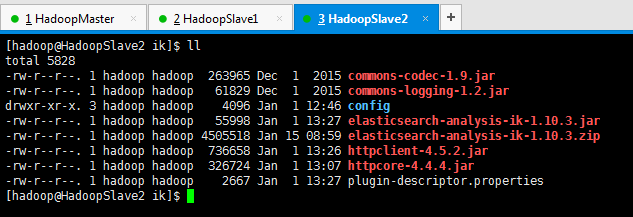
第十一步:重启三台机器的es服务进程


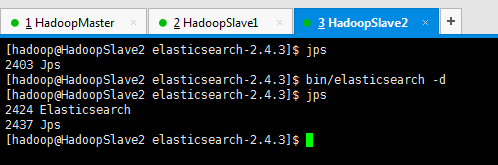

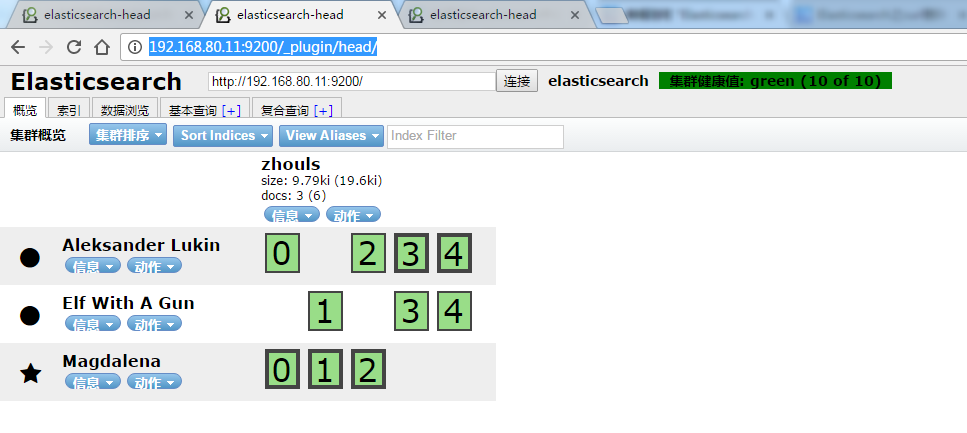
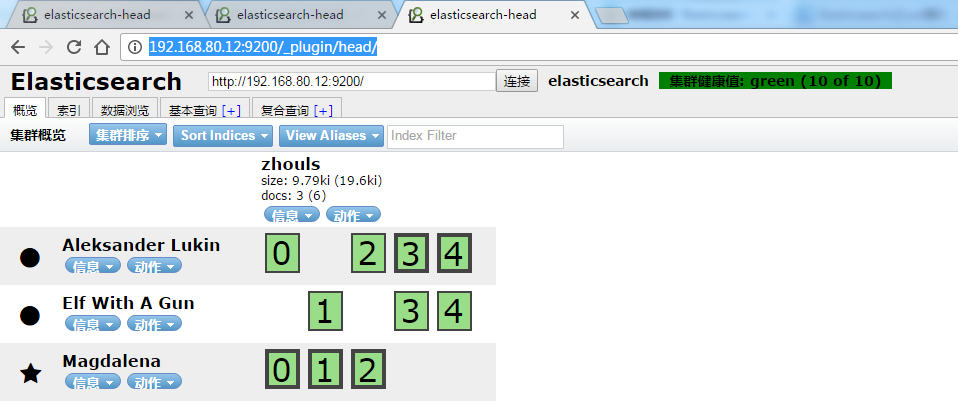
其实,若想更具体地,看得,es安装中文分词器es-ik之后,的变化情况,直接,在$ES_HOME下,执行bin/elasticsearch。当然,我这里只是给你展示下而已,还是用bin/elasticsearch -d在后台启动吧!

第十二步:测试,安装了es中文分词插件es-ik之后的对中文分词效果
ik_max_word方式来分词测试
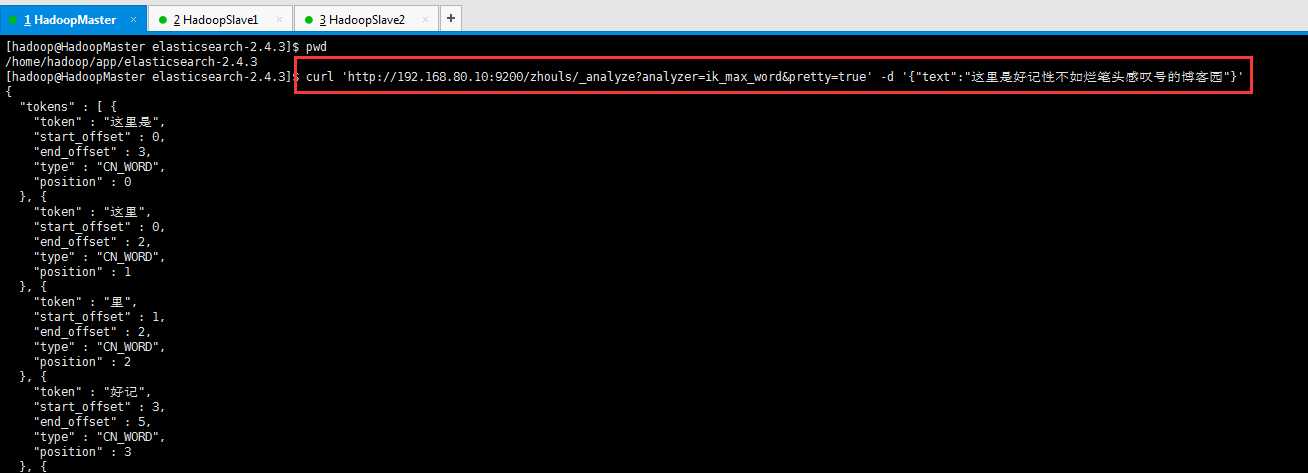
[hadoop@HadoopMaster elasticsearch-2.4.3]$ pwd
/home/hadoop/app/elasticsearch-2.4.3
[hadoop@HadoopMaster elasticsearch-2.4.3]$ curl 'http://192.168.80.10:9200/zhouls/_analyze?analyzer=ik_max_word&pretty=true' -d '{"text":"这里是好记性不如烂笔头感叹号的博客园"}'
{
"tokens" : [ {
"token" : "这里是",
"start_offset" : 0,
"end_offset" : 3,
"type" : "CN_WORD",
"position" : 0
}, {
"token" : "这里",
"start_offset" : 0,
"end_offset" : 2,
"type" : "CN_WORD",
"position" : 1
}, {
"token" : "里",
"start_offset" : 1,
"end_offset" : 2,
"type" : "CN_WORD",
"position" : 2
}, {
"token" : "好记",
"start_offset" : 3,
"end_offset" : 5,
"type" : "CN_WORD",
"position" : 3
}, {
"token" : "记性",
"start_offset" : 4,
"end_offset" : 6,
"type" : "CN_WORD",
"position" : 4
}, {
"token" : "不如",
"start_offset" : 6,
"end_offset" : 8,
"type" : "CN_WORD",
"position" : 5
}, {
"token" : "烂",
"start_offset" : 8,
"end_offset" : 9,
"type" : "CN_CHAR",
"position" : 6
}, {
"token" : "笔头",
"start_offset" : 9,
"end_offset" : 11,
"type" : "CN_WORD",
"position" : 7
}, {
"token" : "笔",
"start_offset" : 9,
"end_offset" : 10,
"type" : "CN_WORD",
"position" : 8
}, {
"token" : "头",
"start_offset" : 10,
"end_offset" : 11,
"type" : "CN_CHAR",
"position" : 9
}, {
"token" : "感叹号",
"start_offset" : 11,
"end_offset" : 14,
"type" : "CN_WORD",
"position" : 10
}, {
"token" : "感叹",
"start_offset" : 11,
"end_offset" : 13,
"type" : "CN_WORD",
"position" : 11
}, {
"token" : "叹号",
"start_offset" : 12,
"end_offset" : 14,
"type" : "CN_WORD",
"position" : 12
}, {
"token" : "叹",
"start_offset" : 12,
"end_offset" : 13,
"type" : "CN_WORD",
"position" : 13
}, {
"token" : "号",
"start_offset" : 13,
"end_offset" : 14,
"type" : "CN_CHAR",
"position" : 14
}, {
"token" : "博客园",
"start_offset" : 15,
"end_offset" : 18,
"type" : "CN_WORD",
"position" : 15
}, {
"token" : "博客",
"start_offset" : 15,
"end_offset" : 17,
"type" : "CN_WORD",
"position" : 16
}, {
"token" : "园",
"start_offset" : 17,
"end_offset" : 18,
"type" : "CN_CHAR",
"position" : 17
} ]
}
[hadoop@HadoopMaster elasticsearch-2.4.3]$
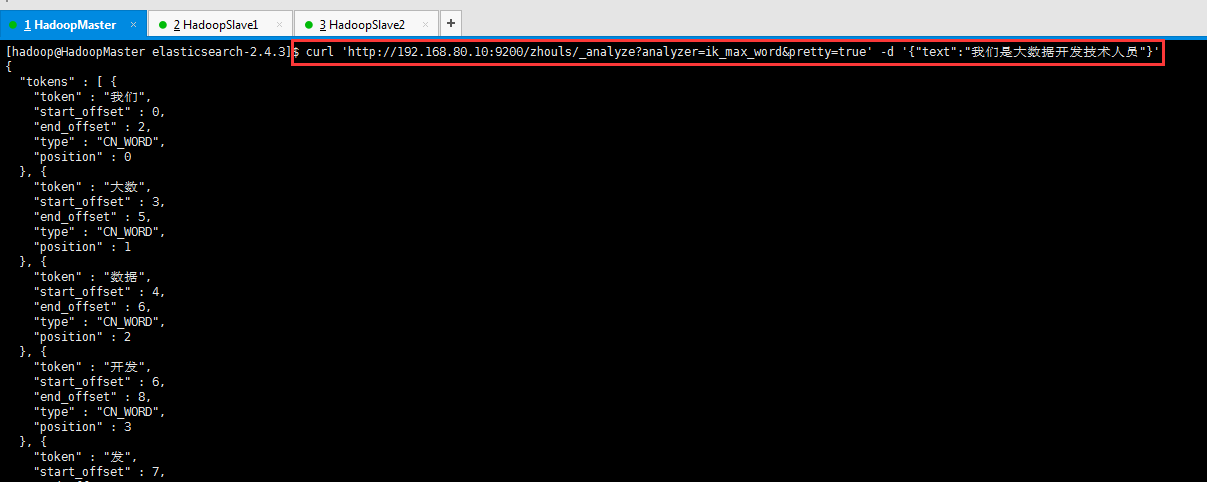
[hadoop@HadoopMaster elasticsearch-2.4.3]$ curl 'http://192.168.80.10:9200/zhouls/_analyze?analyzer=ik_max_word&pretty=true' -d '{"text":"我们是大数据开发技术人员"}'
{
"tokens" : [ {
"token" : "我们",
"start_offset" : 0,
"end_offset" : 2,
"type" : "CN_WORD",
"position" : 0
}, {
"token" : "大数",
"start_offset" : 3,
"end_offset" : 5,
"type" : "CN_WORD",
"position" : 1
}, {
"token" : "数据",
"start_offset" : 4,
"end_offset" : 6,
"type" : "CN_WORD",
"position" : 2
}, {
"token" : "开发",
"start_offset" : 6,
"end_offset" : 8,
"type" : "CN_WORD",
"position" : 3
}, {
"token" : "发",
"start_offset" : 7,
"end_offset" : 8,
"type" : "CN_WORD",
"position" : 4
}, {
"token" : "技术人员",
"start_offset" : 8,
"end_offset" : 12,
"type" : "CN_WORD",
"position" : 5
}, {
"token" : "技术",
"start_offset" : 8,
"end_offset" : 10,
"type" : "CN_WORD",
"position" : 6
}, {
"token" : "人员",
"start_offset" : 10,
"end_offset" : 12,
"type" : "CN_WORD",
"position" : 7
} ]
}
[hadoop@HadoopMaster elasticsearch-2.4.3]$
可以看出,成功分词了且效果更好!
其实,啊,为什么“是”没有了呢?是因为es的中文分词器插件es-ik的过滤停止词的贡献!请移步,如下
Elasticsearch之IKAnalyzer的过滤停止词
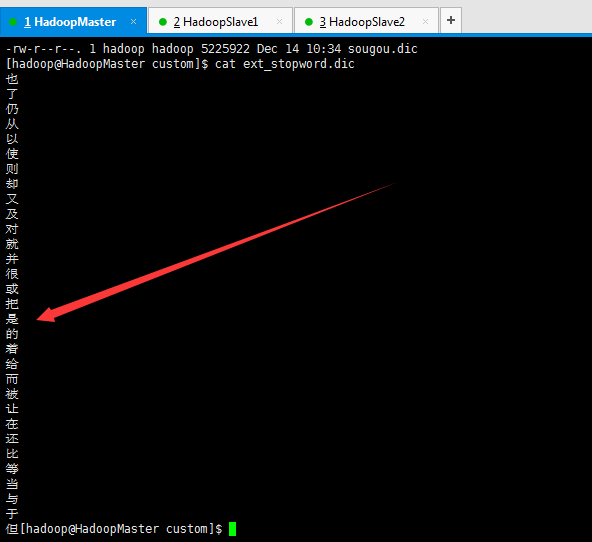
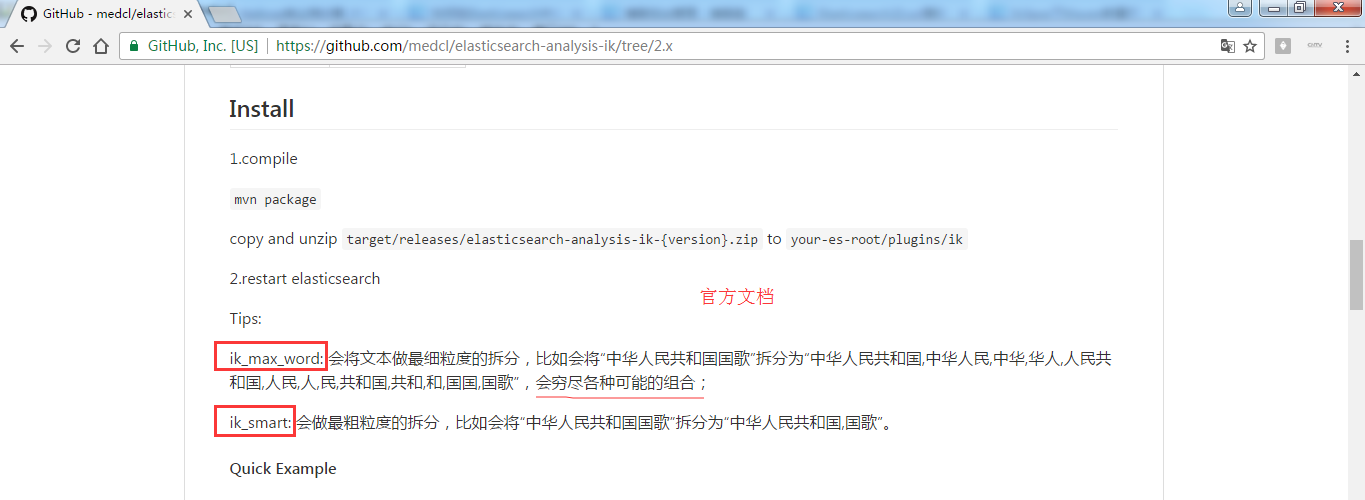
es官方文档提供的ik_max_word和ik_smart解释
https://github.com/medcl/elasticsearch-analysis-ik/tree/2.x
ik_smart方式来分词测试
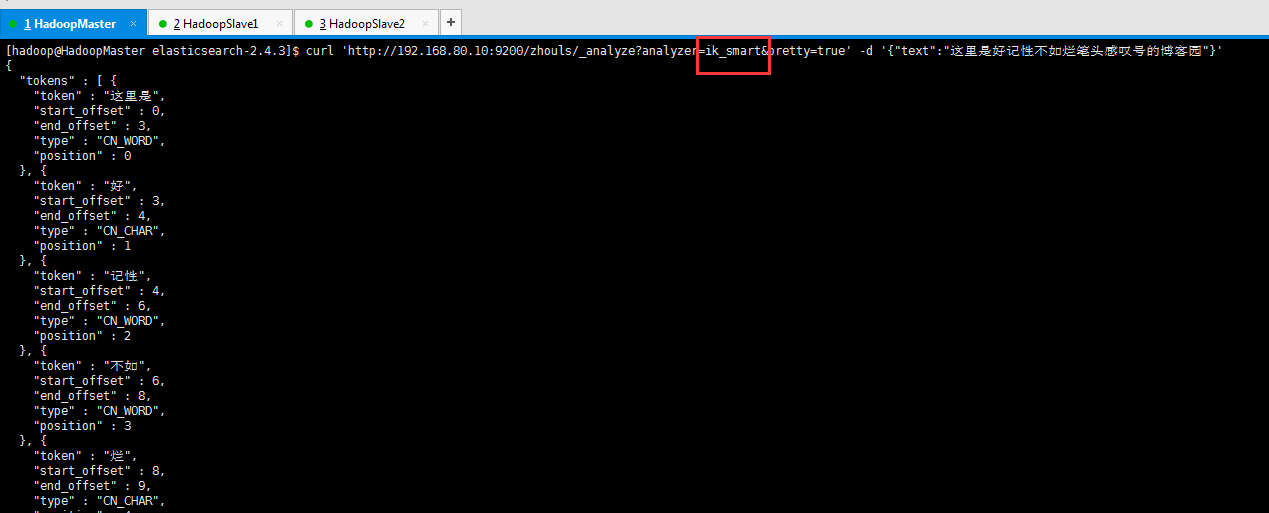
[hadoop@HadoopMaster elasticsearch-2.4.3]$ curl 'http://192.168.80.10:9200/zhouls/_analyze?analyzer=ik_smart&pretty=true' -d '{"text":"这里是好记性不如烂笔头感叹号的博客园"}'
{
"tokens" : [ {
"token" : "这里是",
"start_offset" : 0,
"end_offset" : 3,
"type" : "CN_WORD",
"position" : 0
}, {
"token" : "好",
"start_offset" : 3,
"end_offset" : 4,
"type" : "CN_CHAR",
"position" : 1
}, {
"token" : "记性",
"start_offset" : 4,
"end_offset" : 6,
"type" : "CN_WORD",
"position" : 2
}, {
"token" : "不如",
"start_offset" : 6,
"end_offset" : 8,
"type" : "CN_WORD",
"position" : 3
}, {
"token" : "烂",
"start_offset" : 8,
"end_offset" : 9,
"type" : "CN_CHAR",
"position" : 4
}, {
"token" : "笔头",
"start_offset" : 9,
"end_offset" : 11,
"type" : "CN_WORD",
"position" : 5
}, {
"token" : "感叹号",
"start_offset" : 11,
"end_offset" : 14,
"type" : "CN_WORD",
"position" : 6
}, {
"token" : "博客园",
"start_offset" : 15,
"end_offset" : 18,
"type" : "CN_WORD",
"position" : 7
} ]
}
[hadoop@HadoopMaster elasticsearch-2.4.3]$
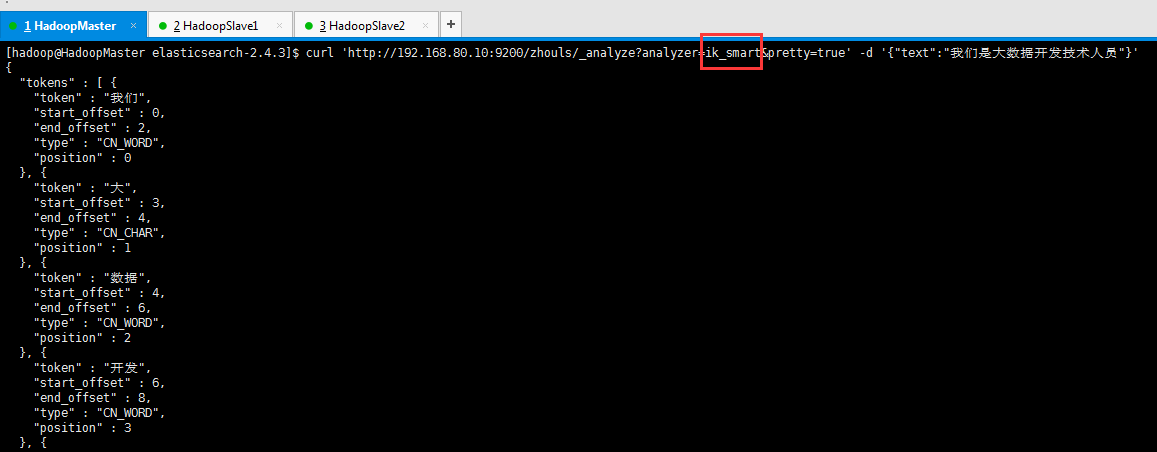
[hadoop@HadoopMaster elasticsearch-2.4.3]$ curl 'http://192.168.80.10:9200/zhouls/_analyze?analyzer=ik_smart&pretty=true' -d '{"text":"我们是大数据开发技术人员"}'
{
"tokens" : [ {
"token" : "我们",
"start_offset" : 0,
"end_offset" : 2,
"type" : "CN_WORD",
"position" : 0
}, {
"token" : "大",
"start_offset" : 3,
"end_offset" : 4,
"type" : "CN_CHAR",
"position" : 1
}, {
"token" : "数据",
"start_offset" : 4,
"end_offset" : 6,
"type" : "CN_WORD",
"position" : 2
}, {
"token" : "开发",
"start_offset" : 6,
"end_offset" : 8,
"type" : "CN_WORD",
"position" : 3
}, {
"token" : "技术人员",
"start_offset" : 8,
"end_offset" : 12,
"type" : "CN_WORD",
"position" : 4
} ]
}
[hadoop@HadoopMaster elasticsearch-2.4.3]$
Elasticsearch之中文分词器插件es-ik(博主推荐)的更多相关文章
- 【自定义IK词典】Elasticsearch之中文分词器插件es-ik的自定义词库
Elasticsearch之中文分词器插件es-ik 针对一些特殊的词语在分词的时候也需要能够识别 有人会问,那么,例如: 如果我想根据自己的本家姓氏来查询,如zhouls,姓氏“周”. 如 ...
- Elasticsearch之中文分词器插件es-ik的自定义热更新词库
不多说,直接上干货! 欢迎大家,关注微信扫码并加入我的4个微信公众号: 大数据躺过的坑 Java从入门到架构师 人工智能躺过的坑 Java全栈大联盟 ...
- elasticsearch安装中文分词器插件smartcn
原文:http://blog.java1234.com/blog/articles/373.html elasticsearch安装中文分词器插件smartcn elasticsearch默认分词器比 ...
- Elasticsearch之中文分词器插件es-ik的自定义词库
它在哪里呢? 非常重要! [hadoop@HadoopMaster custom]$ pwd/home/hadoop/app/elasticsearch-2.4.3/plugins/ik/config ...
- 沉淀再出发:ElasticSearch的中文分词器ik
沉淀再出发:ElasticSearch的中文分词器ik 一.前言 为什么要在elasticsearch中要使用ik这样的中文分词呢,那是因为es提供的分词是英文分词,对于中文的分词就做的非常不好了 ...
- ElasticSearch安装中文分词器IK
1.安装IK分词器,下载对应版本的插件,elasticsearch-analysis-ik中文分词器的开发者一直进行维护的,对应着elasticsearch的版本,所以选择好自己的版本即可.IKAna ...
- 如何给Elasticsearch安装中文分词器IK
安装Elasticsearch安装中文分词器IK的步骤: 1. 停止elasticsearch 2.2的服务 2. 在以下地址下载对应的elasticsearch-analysis-ik插件安装包(版 ...
- elasticsearch教程--中文分词器作用和使用
概述 本文都是基于elasticsearch安装教程 中的elasticsearch安装目录(/opt/environment/elasticsearch-6.4.0)为范例 环境准备 ·全新最小 ...
- ElasticSearch安装中文分词器IKAnalyzer
# ElasticSearch安装中文分词器IKAnalyzer 本篇主要讲解如何在ElasticSearch中安装中文分词器IKAnalyzer,拆分的每个词都是我们熟知的词语,从而建立词汇与文档 ...
随机推荐
- jQuery中的ajax用法案例
什么是 AJAX? AJAX = 异步 JavaScript 和 XML(Asynchronous JavaScript and XML). 简短地说,在不重载整个网页的情况下,AJAX 通过后台加载 ...
- 关于移动端rem 布局的一些总结
1.rem是什么? rem(font size of the root element)是指相对于根元素的字体大小的单位 2.为什么web app要使用rem? 实现强大的屏幕适配布局(淘宝,腾讯,网 ...
- 配置项目使用weblogic的JNDI数据源
项目结构构:Spring Framework + SpirngMVC + SpringData JPA + Maven 1.在weblogic的控制台界面中配置数据源(假定我们配置的数据源的名称为da ...
- PL/SQL developer 可以连接本地数据库,但是不可以连接远程数据库的解决方法
修改Oracle_home目录下的 network\ADMIN\tnsnames.ora 文件, 在其中增加远程数据库对应的记录,类似下边这样: .2_orcl = (DESCRIPTION = (A ...
- MUI极简的JS函数
模块:utils http://dev.dcloud.net.cn/mui/util/#event mui.init(); mui框架将很多功能配置都集中在mui.init方法中,要使用某项功能,只需 ...
- 阿里云搭建SVN服务器
1:安装svn apt-get install subversion 2. 开启svn服务器 svnserve -d 检查是否开启:ps aux | grep svnserve 若出现如下内容: wk ...
- 使用docx4j编程式地创建复杂的Word(.docx)文档
原文链接:Create complex Word (.docx) documents programatically with docx4j 原文作者:jos.dirksen 发表日期:2012年2月 ...
- RSA library
- Go Configure Support hot reloading.
Go Configure – Josh Betz https://josh.blog/2017/04/go-configure Go Configure APRIL 27, 2017 # DEVELO ...
- 解决Uploadify 3.2上传控件加载导致的GET 404 Not Found问题
http://www.uploadify.com/forum/#/discussion/7329/uploadify-v3-bug-unecessary-request-when-there-is-n ...