
IOS NSBundle的使用,注意mainBundle和Custom Bundle的区别
1、[NSBundle mainBundle],文件夹其实是Group,如左侧的树形文件管理器
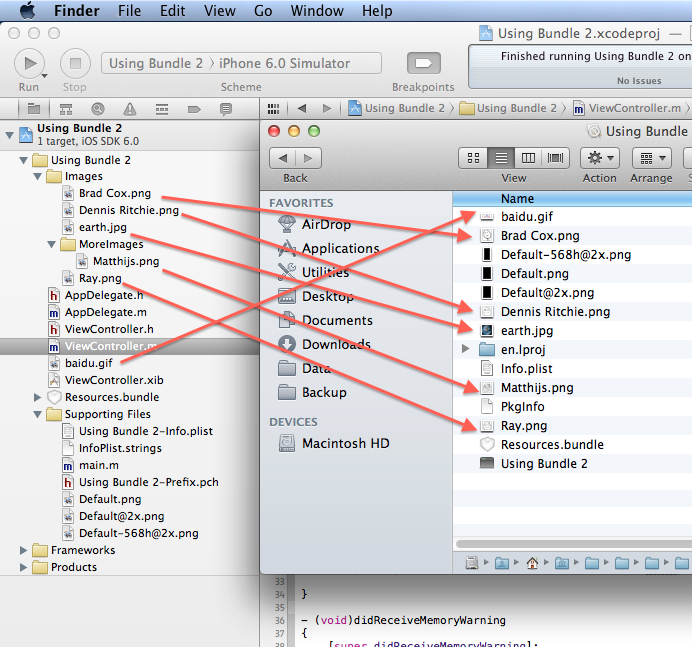
Build之后,文件直接就复制到了根目录下,于是读取的方法,应该是这样:
NSString *earth = [[NSBundle mainBundle] pathForResource:@"Brad Cox" ofType:@"png"]; |
2、使用文件夹的时候,Build结果
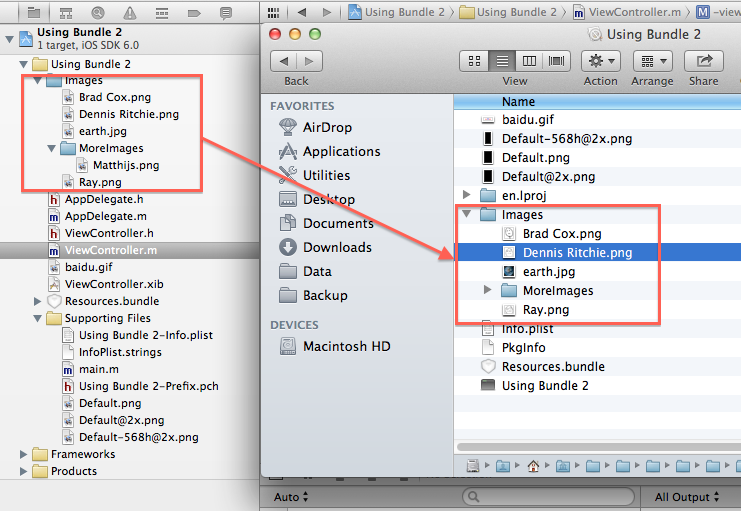
依然使用同样的方法,不需要制定文件夹路径
//inDirectory参数可有可无
NSString *earth = [[NSBundle mainBundle] pathForResource:@"Matthijs" ofType:@"png" inDirectory:@"Images/MoreImages"];

NSString *earth = [[NSBundle mainBundle] pathForResource:@"Matthijs" ofType:@"png"];
编译之后,mainBundle的资源都是放到RootFolder下,所以,可以直接访问,不要指定内部路径
3、使用其他的Bundle
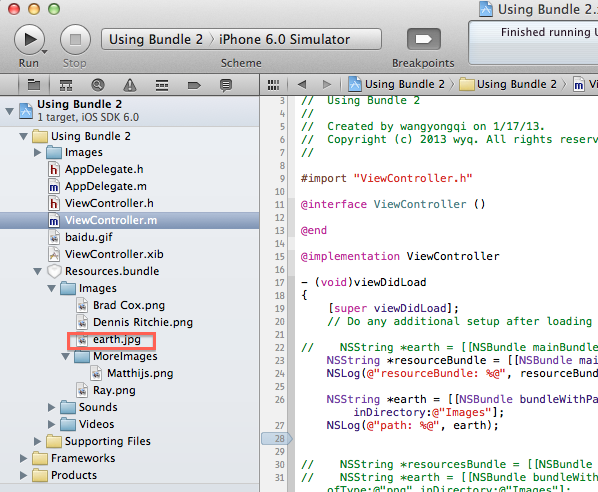
NSString *resourceBundle = [[NSBundle mainBundle] pathForResource:@"Resources" ofType:@"bundle"];

NSLog(@"resourceBundle: %@", resourceBundle);
NSString *earth = [[NSBundlebundleWithPath:resourceBundle] pathForResource:@"Matthijs"ofType:@"jpg"inDirectory:@"Images/MoreImages"];

NSLog(@"path: %@", earth);
使用Custom bundle,访问内部的子文件夹,需要指定inDirectory参数,这个mainBundle不同,这是为何?
注意:Since

bundles other than the main bundle can have folders embedded inside them, to access

files inside folders of a bundle other than the main bundle it is best to use the pathFor

Resource:ofType:inDirectory: method of NSBundle to explicitly specify the folder in

which a specific file/resource exists.
原文地址:http://www.cnblogs.com/iihe602/archive/2013/01/17/2865280.html
IOS NSBundle的使用,注意mainBundle和Custom Bundle的区别的更多相关文章
- NSBundle的使用,注意mainBundle和Custom Bundle的区别
1.[NSBundle mainBundle],文件夹其实是Group,如左侧的树形文件管理器 Build之后,文件直接就复制到了根目录下,于是读取的方法,应该是这样: NSString *earth ...
- 【转】NSBundle的使用,注意mainBundle和Custom Bundle的区别
1.[NSBundle mainBundle],文件夹其实是Group,如左侧的树形文件管理器 Build之后,文件直接就复制到了根目录下,于是读取的方法,应该是这样: NSString *earth ...
- IOS NSBundle 的理解和 mainBundle 类方法详解
常看到类似的 NSString *file = [[NSBundle mainBundle] pathForResource:name ofType:nil]; 这样的代码,用来获取 file 的完全 ...
- iOS 关于nil和Nil及null与<null>的区别
问题是这样的. NSDictionary *sample = [NSJSONSerialization JSONObjectWithData:received options:NSJSONReadin ...
- iOS 杂笔-20(UIView和CALayer的区别与联系)
iOS 杂笔-20(UIView和CALayer的区别与联系) 每个 UIView 内部都有一个 CALayer 在背后提供内容的绘制和显示,并且 UIView 的尺寸样式都由内部的 Layer 所提 ...
- iOS [[NSBundle mainBundle] pathForResource:@"" ofType:@""]无法获取到文件
将一个文件导入到工程中后,用[[NSBundle mainBundle] pathForResource:@"" ofType:@""]来获取到该文件时,一直无 ...
- iOS:NSBundle的具体介绍
NSBundle介绍:它是一个单例类,用来加载资源 bundle是一个目录,其中包含了程序会使用到的资源. 这些资源包含了如图像,声音,编译好的代码,nib文件(用户也会把bundle称为plug-i ...
- NSBundle的理解和mainBundle的基本介绍
一.NSBundle NSBundle是cocoa为bundle提供的一个类,bundle是一个目录,其中包含了程序会使用到的资源. 这些资源包含了如图像.声音.编译好的代码.nib文件.(用户也会把 ...
- IOS NSBundle使用(访问文件夹)
NSBundle的相关信息 1.一个NSBundle代表一个文件夹,利用NSBundle能访问对应的文件夹 2.利用mainBundle就可以访问软件资源包中的任何资源 3.模拟器应用程序的安装路径: ...
随机推荐
- (转)关于EntityFramework中连接字符串的说明
1. 基本格式 <connectionStrings> <add name="MyEntities" connectionString="metadat ...
- [转]Birdfont 2.10 发布,字体编辑器
最近在忙大数据.黑天鹅算法实盘测试 许久没有更新字库方面的资料,汗一个... 今天转一个 :Birdfont 2.10 发布,字体编辑器 字体编辑器,向来很少,除了fontlab的几个昂贵的商业版,就 ...
- Java面向对象---重写(Override)与重载(Overload)
一.重写(Override) 重写是子类对父类的允许访问的方法的实现过程进行重新编写, 返回值和形参都不能改变.即外壳不变,核心重写! 重写的好处在于子类可以根据需要,定义特定于自己的行为. 也就是说 ...
- Spring整合Quartz定时发送邮件
功能描述:刚开始接触Quartz,试着用Quartz整合spring实现每隔一分钟发送一封邮件连续发送10次 核心jar: 邮件发送:commons-email-1.2.jar mail.jar(必须 ...
- IDEA,与gradle引入jar包报错
Warning:<i><b>root project 'netty_lecture': Unable to resolve additional project configu ...
- bzoj1605 / P2905 [USACO08OPEN]农场危机Crisis on the Farm
P2905 [USACO08OPEN]农场危机Crisis on the Farm 发现总步数$k<=30$,考虑用$k$瞎搞 设$f[u][i][j]$表示已经吹$u$次哨,全体奶牛向右走$i ...
- 20145325张梓靖 《Java程序设计》第3周学习总结
20145325张梓靖 <Java程序设计>第3周学习总结 教材学习内容总结 类与对象 类,就相当于设计图纸,用"new"创建的对象,就是依据设计图做成的成品:设计图纸 ...
- [BZOJ1901]Dynamic Rankings
Description 给定一个含有n个数的序列a[1],a[2],a[3]……a[n],程序必须回答这样的询问:对于给定的i,j,k,在a[i],a[i+1 ],a[i+2]……a[j]中第k小的数 ...
- 2018-2019 Russia Open High School Programming Contest (Unrated, Online Mirror, ICPC Rules, Teams Preferred)
前言 有一场下午的cf,很滋磁啊,然后又和dalao(见右面链接)组队打了,dalao直接带飞我啊. 这是一篇题解,也是一篇总结,当然,让我把所有的题目都写个题解是不可能的了. 按照开题顺序讲吧. 在 ...
- json.dump()和json.load()
import json,time # save data to json file def store(data): with open('data.json', 'w') as fw: # 将字典转 ...