
Django框架基于session的登录/注销实现
博主最近想基于Django框架开发一个测试平台,第一版先实现查看下载自动化的测试报告文件
第一步:前端框架
网上选择一款开源boostrap的前端框架 AdminLTE,这里给个链接 https://adminlte.io/
第二步:实现登录/注销功能
需要加入对登录状态的校验,准备引入session
1、base.html 基于开源框架:
 <!DOCTYPE html>

 <html lang="zh-cn">

 <head>

   <meta charset="utf-8">

   <meta http-equiv="X-UA-Compatible" content="IE=edge">

   <title>xx</title>

   <!-- Tell the browser to be responsive to screen width -->

   <meta content="width=device-width, initial-scale=1, maximum-scale=1, user-scalable=no" name="viewport">

   <link rel="stylesheet" href="/static/bower_components/bootstrap/dist/css/bootstrap.min.css">

   <!-- Font Awesome -->

   <link rel="stylesheet" href="/static/bower_components/font-awesome/css/font-awesome.min.css">

   <!-- Ionicons -->

   <link rel="stylesheet" href="/static/bower_components/Ionicons/css/ionicons.min.css">

   <!-- Theme style -->

   <link rel="stylesheet" href="/static/dist/css/AdminLTE.min.css">

   <link rel="stylesheet" href="/static/dist/css/skins/skin-blue.min.css">

   <link rel="icon" href="/static/icon/icon-a.png">

   <!-- Google Font -->

   <link rel="stylesheet"

         href="https://fonts.googleapis.com/css?family=Source+Sans+Pro:300,400,600,700,300italic,400italic,600italic">

 </head>

 {% block starter %}

 {% endblock %}

 {% block login %}

 {% endblock %}

 <script src="/static/bower_components/jquery/dist/jquery.min.js"></script>

 <!-- Bootstrap 3.3.7 -->

 <script src="/static/bower_components/bootstrap/dist/js/bootstrap.min.js"></script>

 <!-- AdminLTE App -->

 <script src="/static/dist/js/adminlte.min.js"></script>

 <!-- Optionally, you can add Slimscroll and FastClick plugins.

      Both of these plugins are recommended to enhance the

      user experience. -->

 </html>
2、登录页面
 {% extends 'base.html' %}

 {% block login %}

 <body class="hold-transition login-page">

 <div class="login-box">

   <div class="login-logo">

     <a href="/login"><b>自动化</b>平台</a>

   </div>

   <!-- /.login-logo -->

   <div class="login-box-body">

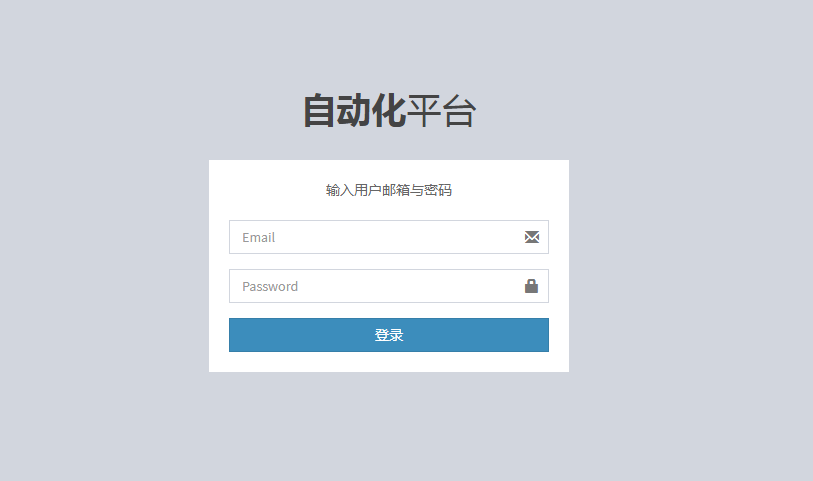
     <p class="login-box-msg">输入用户邮箱与密码</p>

     <form method="post">

       {% csrf_token %}

       <div class="form-group has-feedback">

         {{ uf.email }}

         <span class="glyphicon glyphicon-envelope form-control-feedback"></span>

       </div>

       <div class="form-group has-feedback">

         {{ uf.password }}

         <span class="glyphicon glyphicon-lock form-control-feedback"></span>

       </div>

       <div class="row">

         <div class="col-xs-12">

           <button type="submit" class="btn btn-primary btn-block btn-flat">登录</button>

         </div>

         <!-- /.col -->

       </div>

     </form>

   </div>

   <!-- /.login-box-body -->

 </div>

 </div>

 {% endblock %}
3、首页
 {% extends 'base.html' %}

 {% block starter %}

 <body class="hold-transition skin-blue sidebar-mini">

 <div class="wrapper">

 <!-- Main Header -->

   <header class="main-header">

     <!-- Logo -->

     <a href="/index" class="logo">

       <!-- mini logo for sidebar mini 50x50 pixels -->

       <span class="logo-mini"><b>自</span>

       <!-- logo for regular state and mobile devices -->

       <span class="logo-lg"><b>自</b>动化平台</span>

     </a>

     <!-- Header Navbar -->

     <nav class="navbar navbar-static-top" role="navigation">

       <!-- Sidebar toggle button-->

       <a href="#" class="sidebar-toggle" data-toggle="push-menu" role="button">

         <span class="sr-only">Toggle navigation</span>

       </a>

       <!-- Navbar Right Menu -->

       <div class="navbar-custom-menu">

         <ul class="nav navbar-nav">

           <!-- User Account Menu -->

           <li class="dropdown user user-menu">

             <!-- Menu Toggle Button -->

             <a href="#" class="dropdown-toggle" data-toggle="dropdown">

               <!-- hidden-xs hides the username on small devices so only the image appears. -->

               <i class="fa fa-user"></i>

               <span class="hidden-xs">{{ username }}</span>

             </a>

           </li>

           <li>

              <a href="/logout">

                 <i class="fa fa-sign-out"></i>

                 <span class="hidden-xs">登出</span>

              </a>

           </li>

           <li>

              <a href="/admin">

                 <i class="fa fa-gears"></i>

                 <span class="hidden-xs">后台</span>

              </a>

           </li>

         </ul>

       </div>

     </nav>

   </header>

   <!-- Left side column. contains the logo and sidebar -->

   <aside class="main-sidebar">

     <!-- sidebar: style can be found in sidebar.less -->

     <section class="sidebar">

       <!-- Sidebar Menu -->

       <ul class="sidebar-menu" data-widget="tree">

         <li class="header">菜单</li>

         <!-- Optionally, you can add icons to the links -->

         <li class="active">

             <a href="#"><i class="fa fa-link"></i> <span>模板</span></a>

         </li>

         <li class="treeview">

           <a href="#"><i class="fa fa-link"></i> <span>接口模块</span>

             <span class="pull-right-container">

                 <i class="fa fa-angle-left pull-right"></i>

               </span>

           </a>

           <ul class="treeview-menu">

             {% for path in paths %}

             <li><a href="/paths/{{ path.path_id }}">{{ path.path }}</a></li>

             {% endfor %}

           </ul>

         </li>

         <li>

             <a href="xx"><i class="fa fa-link"></i> <span>禅道</span></a>

         </li>

         <li>

             <a href="xx"><i class="fa fa-link"></i> <span>Jenkins</span></a>

         </li>

       </ul>

       <!-- /.sidebar-menu -->

     </section>

     <!-- /.sidebar -->

   </aside>

   <!-- Content Wrapper. Contains page content -->

   <div class="content-wrapper">

     {% block paths %}

     {% endblock %}

   </div>

   <!-- /.content-wrapper -->

   <!-- Control Sidebar -->

   <aside class="control-sidebar control-sidebar-dark">

     <!-- Create the tabs -->

     <ul class="nav nav-tabs nav-justified control-sidebar-tabs">

       <li class="active"><a href="#control-sidebar-home-tab" data-toggle="tab"><i class="fa fa-home"></i></a></li>

       <li><a href="#control-sidebar-settings-tab" data-toggle="tab"><i class="fa fa-gears"></i></a></li>

     </ul>

     <!-- Tab panes -->

     <div class="tab-content">

       <!-- Home tab content -->

       <div class="tab-pane active" id="control-sidebar-home-tab">

         <h3 class="control-sidebar-heading">Recent Activity</h3>

         <ul class="control-sidebar-menu">

           <li>

             <a href="javascript:;">

               <i class="menu-icon fa fa-birthday-cake bg-red"></i>

               <div class="menu-info">

                 <h4 class="control-sidebar-subheading">Langdon's Birthday</h4>

                 <p>Will be 23 on April 24th</p>

               </div>

             </a>

           </li>

         </ul>

         <!-- /.control-sidebar-menu -->

         <h3 class="control-sidebar-heading">Tasks Progress</h3>

         <ul class="control-sidebar-menu">

           <li>

             <a href="javascript:;">

               <h4 class="control-sidebar-subheading">

                 Custom Template Design

                 <span class="pull-right-container">

                     <span class="label label-danger pull-right">70%</span>

                   </span>

               </h4>

               <div class="progress progress-xxs">

                 <div class="progress-bar progress-bar-danger" style="width: 70%"></div>

               </div>

             </a>

           </li>

         </ul>

         <!-- /.control-sidebar-menu -->

       </div>

       <!-- /.tab-pane -->

       <!-- Stats tab content -->

       <div class="tab-pane" id="control-sidebar-stats-tab">Stats Tab Content</div>

       <!-- /.tab-pane -->

       <!-- Settings tab content -->

       <div class="tab-pane" id="control-sidebar-settings-tab">

         <form method="post">

           <h3 class="control-sidebar-heading">General Settings</h3>

           <div class="form-group">

             <label class="control-sidebar-subheading">

               Report panel usage

               <input type="checkbox" class="pull-right" checked>

             </label>

             <p>

               Some information about this general settings option

             </p>

           </div>

           <!-- /.form-group -->

         </form>

       </div>

       <!-- /.tab-pane -->

     </div>

   </aside>

   <!-- /.control-sidebar -->

   <!-- Add the sidebar's background. This div must be placed

   immediately after the control sidebar -->

   <div class="control-sidebar-bg"></div>

 </body>

 {% endblock %}
4、views.py
 # -*- coding: utf-8 -*-

 from __future__ import unicode_literals

 from django.shortcuts import render, render_to_response

 from django.http import HttpResponse, HttpResponseRedirect, StreamingHttpResponse

 from django.views.decorators.csrf import csrf_exempt

 from django.template import RequestContext

 from models import User, Path, File

 from form import UserForm

 import random

 # Create your views here.

 # 基础页面

 def base(request):

     return render(request, "base.html")

 # 开始页面

 def starter(request):

     return render(request, "starter.html")

 # 首页

 def index(request):

     # 判断是否有session

     username = request.session.get("username")

     if username:

         report_paths = Path.objects.all()

         paths = []

         for x, y in enumerate(report_paths):

             path = {

                 "path_id": x + 1,

                 "path": y.path

             }

             paths.append(path)

         return render(request, "index.html", {"paths": paths,

                                               "username": username})

     else:

         # 如果没有session,重定向到路由 /login/, 返回表单

         uf = UserForm(request.POST)

         return HttpResponseRedirect("/login/", {"uf": uf})

 # 登录

 @csrf_exempt

 def login(request):

     if request.method == "POST":

         uf = UserForm(request.POST)

         if uf.is_valid():

             email = uf.cleaned_data["email"]

             password = uf.cleaned_data["password"]

             user = User.objects.filter(email=email, password=password)

             # print user[0].username

             if user:

                 request.session["username"] = user[0].username

                 # 校验通过,重定向到/index/

                 return HttpResponseRedirect("/index/")

             else:

                 uf = UserForm(request.POST)

                 return render(request, "login.html", {"uf": uf})

     else:

         uf = UserForm(request.POST)

         return render(request, "login.html", {"uf": uf})

 # 注销

 def logout(request):

     del request.session["username"]  # 删除session

     uf = UserForm(request.POST)

     return HttpResponseRedirect("/login/", {"uf": uf})
5、启动进入登录页面
6、登录成功后:
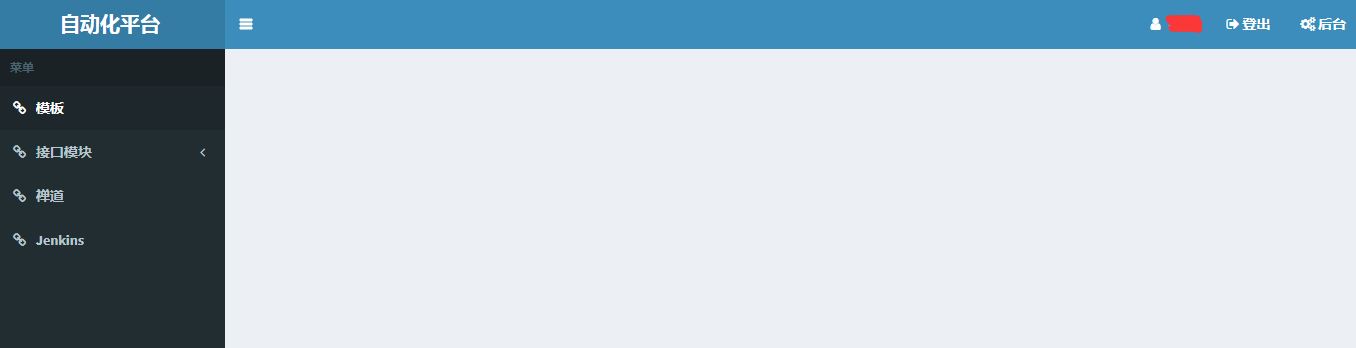
代码中加了一部分的注释、继续完善平台功能
Django框架基于session的登录/注销实现的更多相关文章
- 第三百一十三节,Django框架,Session
第三百一十三节,Django框架,Session Django中默认支持Session,其内部提供了5种类型的Session供开发者使用: 1.数据库(默认)2.缓存3.文件4.缓存+数据库5.加密c ...
- python测试开发django-43.session机制(登录/注销)
前言 当我们登录访问一个网站时,服务器需要识别到你已经登录了,才有相应的权限访问登录之后的页面.用户退出登录后,将无权限访问再访问登录后的页面. 从登录到退出的一整个流程,可以看成是与服务器的一次会话 ...
- django框架--cookie/session
目录 一.http协议无状态问题 二.会话跟踪技术--cookie 1.对cookie的理解 2.cookie的使用接口 3.cookie的属性 4.使用cookie的问题 三.会话跟踪技术--ses ...
- 十一 Django框架,Session
Django中默认支持Session,其内部提供了5种类型的Session供开发者使用: 1.数据库(默认)2.缓存3.文件4.缓存+数据库5.加密cookie 1.数据库Session,保存在数据库 ...
- Django基础之Session版登录验证
from functools import wraps def check_login(func): @wraps(func) def inner(request, *args, **kwargs): ...
- 关于在django框架里取已登录用户名字的问题
在 views里取值是这样的 request.user.username而在模板页面取值是这样的:{{request.user}} 判断是否通过验证是这样的 {% if request.user.is ...
- Django框架中session存储到redis中的配置
本文链接:https://blog.csdn.net/linqunbin/article/details/94786313————————————————版权声明:本文为CSDN博主「linqunbi ...
- Django框架之cookie和session及开发登录功能
1.cookie是什么? Web应用程序是使用HTTP协议传输数据的.HTTP协议是无状态的协议.一旦数据交换完毕,客户端与服务器端的连接就会关闭,再次交换数据需要建立新的连接.这就意味着服务器无法从 ...
- Django框架详细介绍---cookie、session、自定义分页
1.cookie 在HTTP协议介绍中提到,该协议是无状态的,也就是每次请求都是独立的,它的执行情况和结果与前面的请求和之后的请求都无直接关系,它不会受前面的请求响应情况直接影响,也不会直接影响后面的 ...
随机推荐
- 【HTTP header】【Access-Control-Allow-Credentials】跨域Ajax请求时是否带Cookie的设置
1. 无关Cookie跨域Ajax请求 客户端 以 Jquery 的 ajax 为例: $.ajax({ url : 'http://remote.domain.com/corsrequest', d ...
- Android 性能测试工具- GT
GT(随 身调)是APP的随身调测平台,它是直接运行在手机上的“集成调测环境”(IDTE, Integrated Debug&Test Environment).利用GT,仅凭一部手机,无需连 ...
- js 的正则表达式 部分展示test()方法的验证功能
<!DOCTYPE html> <html> <head> <meta charset="utf-8"> <title> ...
- Python开发【Tornado】:异步Web服务(一)
异步Web服务 前言: 到目前为止,我们已经看到了许多使Tornado成为一个Web应用强有力框架的功能.它的简单性.易用性和便捷性使其有足够的理由成为许多Web项目的不错的选择.然而,Tornado ...
- Python-Select/Poll/Epoll使用
select select最早于1983年出现在4.2BSD中,它通过一个select()系统调用来监视多个文件描述符的数组,当select()返回后,该数组中就绪的文件描述符便会被内核修改标志位,使 ...
- JavaScript如何把字符串中每个单词首字母转化为大写
先上代码,再做解释. 思路分析: 1. 首先先把字符串中的单词转化为小写(toLowerCase),再对其进行截取(split),截取依据为按照空格截取: 2. 此时经过步骤一之后得到的东西是一个数组 ...
- spring自定义事务同步器(二):借助redisson实现自己的同步器
1. 借助redis的java客户端redisson实现自己的事物同步器 @Override public void lockWithinCurrentTransaction(Object key) ...
- java.lang.UnsatisfiedLinkError: org.apache.hadoop.util.NativeCrc32.nativeComputeChunkedSumsByteArray(II[BI[BIILjava/lang/String;JZ)V
环境: Spark2.1.0 .Hadoop-2.7.5 代码运行系统:Win 7在运行Spark程序写出文件(savaAsTextFile)的时候,我遇到了这个错误: // :: ERROR U ...
- [py]类属性和实例属性
默认类和实例的内置属性一致 class A: """测试类""" name = "maotai" def __init_ ...
- Qt编译出错:“Cannot find file...... .pro."
刚接触Qt,使用Qt5.7时,出现如下编译错误: 其实原因很简单,就是Qt工程目录不能有“中文”.“全角符字符”[暂时发现这两种情况].