
Arcgis api for javascript学习笔记 - 不改变默认端口(6080)情况下,外网访问Arcgis Server 发布的接口
Arcgis Server发布的地图服务地址默认端口号是6080,假设本机上只对80端口做了外网映射,在IIS中部署了一个网站绑定了80端口,那么网站中某个页面通过arcgis api for js 加载Arcgis Server发布的地图服务就无法加载出来了。
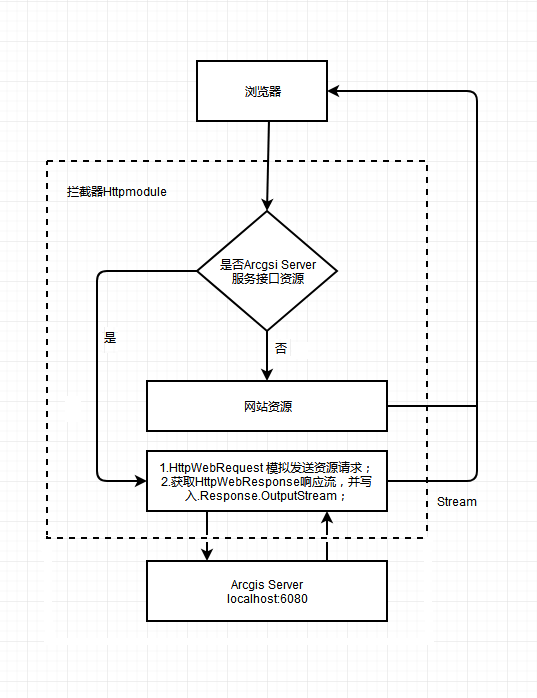
在此情况下,可以将Arcgis Server发布的地图服务地址Url设为网站的特定地址,然后通过拦截器拦截特定地址,在拦截器中用HttpWebRequest访问localhost:6080,将HttpWebResponse响应流写入Response.OutputStream中。
(其实就是类似于反向代理,将地图服务接口的请求转发到Arcgis Server 的Web服务器)
例:
服务器局域网地址为:192.168.1.100
服务器80端口映射外网地址为:61.135.169.125
服务器在IIS中部署网站绑定的端口为:80
服务器Arcgis Server发布的地图服务地址端口为:6080
现在如果想通过arcgis js api 加载 服务接口 192.168.1.100:6080/arcgis/rest/services/test/service1/FeatureServer/0;
如果在内网中访问,下面的代码地图加载出来没问题。
var myFeatureLayer0 = new FeatureLayer("http://192.168.1.100:6080/arcgis/rest/services/test/service1/FeatureServer/0", { "id": "myFeatureLayer0", "opacity": 0.5, "outFields": ["*"], "mode": FeatureLayer.MODE_ONDEMAND });
但是如果在外网访问因为无法访问6080端口,所以必须通过80端口的网站通过模拟HttpWebRequest模拟请求 192.168.1.100:6080/arcgis/rest/services/test/service1/FeatureServer/0 ,然后返回客户端
html页面代码:
var myFeatureLayer0 = new FeatureLayer("http://61.135.169.125/arcgis/rest/services/test/service1/FeatureServer/0", { "id": "myFeatureLayer0", "opacity": 0.5, "outFields": ["*"], "mode": FeatureLayer.MODE_ONDEMAND });
HttpModule拦截器代码:
    public class ArcgsiServerUrlMappingModule : IHttpModule

    {

        public void Init(HttpApplication application)

        {

            application.BeginRequest += this.Application_BeginRequest; //注册事件

        }

        private void Application_BeginRequest(Object source, EventArgs e)

        {

            HttpApplication application = (HttpApplication)source;

            string url = application.Context.Request.RawUrl;

            if (url.StartsWith("/arcgis/rest/services"))

            {

                url = "http://192.168.1.100:6080" + url;

                HttpWebRequest hwRequest = (HttpWebRequest)WebRequest.Create(url);

                hwRequest.UserAgent = "User-Agent:Mozilla/4.0 (compatible; MSIE 6.0; Windows NT 5.2; .NET CLR 1.0.3705";

                hwRequest.Accept = "*/*";

                hwRequest.KeepAlive = true;

                hwRequest.Headers.Add("Accept-Language", "zh-cn,en-us;q=0.5");

                using (HttpWebResponse hwResponse = (HttpWebResponse)hwRequest.GetResponse())

                {

                    Stream hwStream = hwResponse.GetResponseStream();

                    byte[] buffer = new byte[];

                    int count = ;

                    while ((count = hwStream.Read(buffer, , buffer.Length)) > )

                    {

                        application.Context.Response.OutputStream.Write(buffer, , count);

                    }

                    application.Context.Response.ContentType = hwResponse.ContentType;

                    application.Context.Response.End();

                }

            }

        }

        public void Dispose() { }

    }
HttpModule需要在Web.config中的<system.webServer>节点配置相关节点才能起到拦截请求的作用,在次不做说明。
附设计流程图
Arcgis api for javascript学习笔记 - 不改变默认端口(6080)情况下,外网访问Arcgis Server 发布的接口的更多相关文章
- Arcgis api for javascript学习笔记(4.5版本) - 获取FeatureLayer中的graphics集合
在Arcgis api for javascript 3.x 版本中,我们可以直接通过某个FeatureLayer对象中的graphics属性获取要素集合. graphics属性 但是在4.x版本中, ...
- Arcgis api for javascript学习笔记(4.5版本) - 本地部署及代理配置
在开发过程中,由于api的文件比较多,没必要每个项目都将api加入到解决方案中.况且在VS中如果将api加入解决方案,在编写css或js代码时,由于智能提示需要扫描脚本等文件,会导致VS很卡.所以个人 ...
- Arcgis api for javascript学习笔记(3.2X版本)-初步尝试
Arcgis api for javascript(3.22版本)官方地址 :https://developers.arcgis.com/javascript/3/ 1. 根据官方示例实现一个简单地图 ...
- Arcgis api for javascript学习笔记(4.5版本) - 点击多边形(Polygon)并高亮显示
在现在的 arcgis_js_v45_api 版本中并没有直接提供点击Polygon对象高亮显示.需要实现如下几个步骤: 1.点击地图时,获取Polygon的Graphic对象: 2.对获取到的Gra ...
- Arcgis api for javascript学习笔记(4.6版本) - 二维MapView中的FeatureLayer显示标注
4.6版本api的FeatureLayer中有提供 labelsVisible 和 labelingInfo 两个属性,设置这两个属性可以实现显示将属性中某个字段作为标注.但是这两个属性只针对三维Sc ...
- Arcgis api for javascript学习笔记-控制地图缩放比例尺范围(3.2X版本与4.6版本)
Ⅰ. 在3.X版本中,设置Map对象的 "maxScale" 和 "minScale" 属性 <!DOCTYPE html> <html> ...
- Arcgis api for javascript学习笔记(4.5版本)-三维地图实现弹窗功能
1. 对于Graphic对象,在初始化Graphic对象时设置popupTemplate属性,即可实现点击Graphic时显示弹窗. <!DOCTYPE html> <html> ...
- Arcgis api for javascript学习笔记(4.5版本)-三维地图的飞行效果
其实就只是用到了 view.goTo() 函数,再利用 window.setInterval() 函数(定时器)定时执行goTo().代码如下: <!DOCTYPE html> < ...
- Arcgis api for javascript学习笔记(4.5版本)-三维地图并叠加天地图标注
1.三维地图实现 在官网的demo中就有三维地图的实现,如下图所示 <!DOCTYPE html> <html> <head> <meta charset=& ...
随机推荐
- 格式化时间的一个好方法(补充moment)
/** * * 格式化时间 * @param {*} time * @param {*} fmt * @returns * time(new Date(), 'yyyy/MM/dd') ==> ...
- POJ 1862 Stripies 贪心+优先队列
http://poj.org/problem?id=1862 题目大意: 有一种生物能两两合并,合并之前的重量分别为m1和m2,合并之后变为2*sqrt(m1*m2),现在给定n个这样的生物,求合并成 ...
- Eclipse手动配置svn
1.在Eclipse根目录下建一个任意文件夹(如plugin),在该文件夹下建一个以该插件名命名的文件夹(如SVN).2.将下载下的插件文件解压,plugins和features文件夹复制到该文件夹下 ...
- Android界面相关的类
Android界面相关的类 Window Activity的显示界面对象,并作为顶层View被加入到WindowManager中.Window提供了标准的UI显示策略:界面背景.标题区域.默认的事件处 ...
- 3dmax入门
动画 自己主动关键帧 设置关键帧 路径绑定 材质M打开 渲染f10 骨骼绑定. ..
- C语言18个经典问题答录
原文地址:转载:C语言18个经典问题答录作者:lloo 1.这样的初始化有什么问题?char *p = malloc(10); 编译器提示"非法初始式" 云云. 答:这个声明是静态 ...
- 从零开始使用git第二篇:git的日常操作
从零开始使用git 第二篇:git的日常操作 第一篇:从零开始使用git第一篇:下载安装配置 第二篇:从零开始使用git第二篇:git实践操作 第三篇:从零开始使用git第三篇:git撤销操作.分支操 ...
- 使用jquery.qrcode生成二维码实现微信分享功能
前言: 最近有个这样的需求,在pc端的商品详情页增加分享功能. 微博分享.QQ好友分享.QQ空间分享这些都很常见.但是微信分享我还没有手动写过(以前改过). 最终效果如下图: 解决方案:使用jquer ...
- vuex概念总结及简单使用实例
原文 简书原文:https://www.jianshu.com/p/0546983f5997 大纲 1.什么是Vuex 2.什么是“状态管理模式”? 3.什么情况下应该使用 Vuex? 4.Vuex和 ...
- BUFSIZ
转http://www.judymax.com/archives/262 今天在看示例程序时冒出来一句args = emalloc(BUFSIZ); BUFSIZ是什么意思,查了一下才明白. 这是st ...