
CentOS7 Vim自动补全插件----YouCompleteMe安装与配置
最近刚装了新系统CentOS7,想要把编码环境配置一下,使用Vim编写程序少不了使用自动补全插件,我以前用的是neocomplcache+code_complete+omnicppcomplete。但在网上搜索时,看到了YouCompleteMe,说YCM更好用一些。个人也喜欢新鲜事物,故决定安装YCM。但安装过程遇到了不少坑,网上的教程有不同的安装方法,基本都试遍了。最终在倒腾了一下午的情况下终于弄好了,现在把可行的安装配置方法贴出来,以供需要的人参考。
YouCompleteMe:一个随键而全的、支持模糊搜索的、高速补全的插件。YCM 由 google 公司搜索项目组的软件工程师 Strahinja Val Markovic 所开发,YCM 后端调用 libclang(以获取AST,当然还有其他语言的语义分析库)、前端由 C++ 开发(以提升补全效 率)、外层由 python 封装(以成为 vim 插件),它可能是我见过安装最复杂的 vim 插件了。
要安装YouCompleteMe ,vim须支持python。看是否支持,可以在vim中:version 查看, 如果python前有+号,就是支持,减号就是不支持。
如果不支持,需要以编译安装方式重新安装vim。编译配置选项:
./configure --with-features=huge --enable-pythoninterp --enable-python3interp --enable-luainterp --enable-multibyte --enable-sniff --enable-fontset
一、安装vundle插件
步骤一:
[zhupengfei@localhost ~]$ git clone https://github.com/gmarik/vundle.git ~/.vim/bundle/vundle^C
步骤二: 在.vimrc中配置
[zhupengfei@localhost ~]$ vim .vimrc
set nocompatible              " be iMproved, required

filetype off                  " required

" set the runtime path to include Vundle and initialize

set rtp+=~/.vim/bundle/vundle/

call vundle#rc()

" alternatively, pass a path where Vundle should install plugins

"let path = '~/some/path/here'

"call vundle#rc(path)

" let Vundle manage Vundle, required

Plugin 'gmarik/vundle'

" The following are examples of different formats supported.

" Keep Plugin commands between here and filetype plugin indent on.

" scripts on GitHub repos

Plugin 'tpope/vim-fugitive'

Plugin 'Lokaltog/vim-easymotion'

Plugin 'tpope/vim-rails.git'

" The sparkup vim script is in a subdirectory of this repo called vim.

" Pass the path to set the runtimepath properly.

Plugin 'rstacruz/sparkup', {'rtp': 'vim/'}

" scripts from http://vim-scripts.org/vim/scripts.html

Plugin 'L9'

Plugin 'FuzzyFinder'

" scripts not on GitHub

Plugin 'git://git.wincent.com/command-t.git'

" git repos on your local machine (i.e. when working on your own plugin)

Plugin 'file:///home/gmarik/path/to/plugin'

" ...

filetype plugin indent on     " required

Bundle 'Valloric/YouCompleteMe'
步骤三:保存退出,打开vim,输入 :BundleInstall 进行自动安装。
进程如下,+号表示已经安装,>表示正在安装。
[zhupengfei@localhost ~]$ vim
:BundleInstall
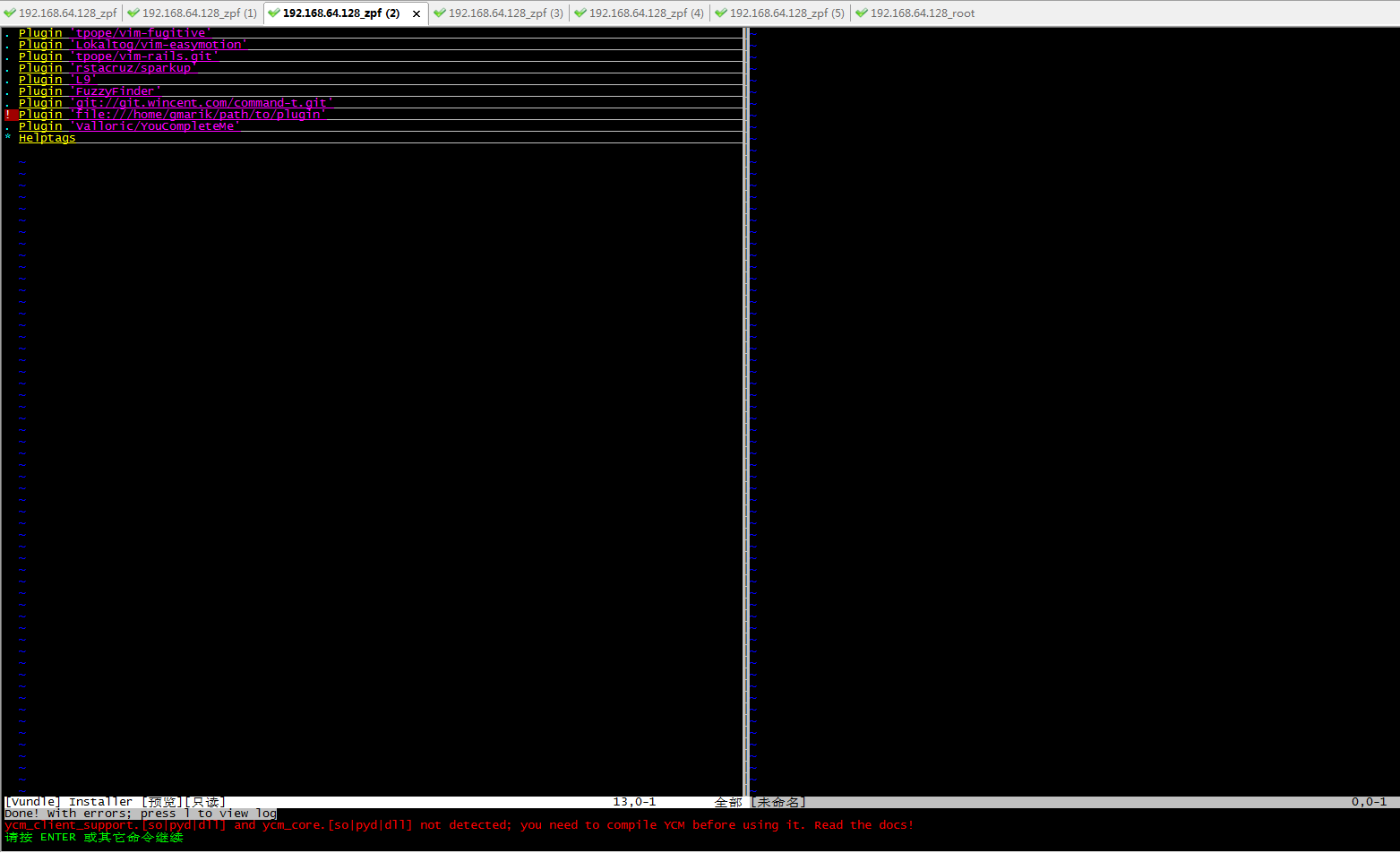
安装时有个错误,这是正常的,因为ycm需要手动编译出库文件。
Done! With errors; press l to view log
ycm_client_support.[so|pyd|dll] and ycm_core.[so|pyd|dll] not detected; you need to compile YCM before using it. Read the docs!
二、安装配置YouCompleteMe
步骤四: 然后到.vim/bundle/YouCompleteMe 下执行命令:
./install.sh --clang-completer
参数是为了支持c/c++的补全
[zhupengfei@localhost YouCompleteMe]$ ./install.sh --clang-complete
然后可能还会出现报错:
Some folders in /home/sky-tm/.vim/bundle/YouCompleteMe/third_party/ycmd/third_party are empty; you probably forgot to run: git submodule update --init --recursive
若出现此错误,则按照提示来,继续输入命令:
git submodule update --init --recursive
[zhupengfei@localhost YouCompleteMe]$git submodule update --init --recursive
等此命令更新完成后,再此执行命令:
./install.sh --clang-completer
[zhupengfei@localhost YouCompleteMe]$ ./install.sh --clang-complete
安装完成后,进行一些简单的配置就可以使用了。
YouCompleteMe进行补全时需要查找一个 ycm_global_ycm_extra_conf文件。可以每次在工作目录中放置这个文件,也可以设置全局。全局设置要在.vimrc中添加一行即可。
注:.ycm_extra_conf.py 是个隐藏文件,路径在~/.vim/bundle/YouCompleteMe/third_party/ycmd/cpp/ycm/.ycm_extra_conf.py
let g:ycm_global_ycm_extra_conf = '~/.vim/bundle/YouCompleteMe/third_party/ycmd/cpp/ycm/.ycm_extra_conf.py '
关于.vimrc的配置就不贴了,网上有很多,可以根据个人的喜好进行配置。
CentOS7 Vim自动补全插件----YouCompleteMe安装与配置的更多相关文章
- 【转】Vim自动补全插件----YouCompleteMe安装与配置
原文网址:http://www.cnblogs.com/zhongcq/p/3630047.html 使用Vim编写程序少不了使用自动补全插件,在Linux下有没有类似VS中的Visual Assis ...
- Vim自动补全插件----YouCompleteMe安装与配置
Vim自动补全插件----YouCompleteMe安装与配置 使用Vim编写程序少不了使用自动补全插件,在Linux下有没有类似VS中的Visual Assist X这么方便快捷的补全插件呢?以前用 ...
- CentOS 7下的Vim自动补齐插件YouCompleteMe安装及配置
备注:现在对于 YouCompleteMe 的安装应采用更为简单的方法,即利用 Vundle 来安装这个插件.具体方法可见: Vundle 主页 YouCompleteMe 主页 而 .vimrc 的 ...
- 如何安装vim自动补全插件YouCompleteMe(YCM)
Vim是全平台上一个高度可拓展的编辑器.它本身只是一个简陋的编辑器,但是因为有各种插件而变得强大.使用Vim编写代码就不免遇到代码补全的问题.常用的代码补全插件有两个:日本人shougo写的neoco ...
- vim自动补全插件YouCompleteMe
前言 Valloric/YouCompleteMe可以说是vim安装最复杂的插件之一,但是一旦装好,却又是非常好用的.YouCompleteMe简称ycm 在安装折腾的过程中,我再一次的体会到,除了官 ...
- vim自动补全插件YouCompleteMe的安装及配置
原文地址: http://blog.csdn.net/shixuehancheng/article/details/46289811
- VIM 代码自动补全, YouCompleteMe安装及配置
效果 下载 使用Vundle安装 YCM 1. 安装Vundle window用户安装vundle参考这里:Windows下 vundle的安装和使用 2.
- Vim自动补全神器–YouCompleteMe
YouCompleteMe的特别之处 基于语义补全 总所周知,Vim是一款文本编辑器.也就是说,其最基础的工作就是编辑文本,而不管该文本的内容是什么.在Vim被程序员所使用后,其慢慢的被肩负了与IDE ...
- VIM自动补全插件 - YouCompleteMe--"大神级vim补全插件"
VIM自动补全插件 - YouCompleteMe 序言 vim 之所以被称为编辑器之神多半归功于其丰富的可DIY的灵活插件功能,( 例如vim下的这款神级般的代码补全插件YouCompleteMe) ...
随机推荐
- eclipes 常用的快捷键 , 修改字体
内容辅助键 Alt+/ 自动补齐main方法 main 然后 Alt+/ 自动补齐输出语句 syso 然后 Alt+/ 格式化Ctrl+Shift+f 代码区域右键 -- Source – Fo ...
- Fast exit from dram self-refresh
Embodiments of the invention describe a dynamic random access memory (DRAM) device that may abort a ...
- Qt保存界面配置到注册表
//需要使用QSetting #include<QSettings> 声明函数 protected: void closeEvent(QCloseEvent *event); privat ...
- BeagleBone Black第八课板:建立Eclipse编程环境
BBB第八课板:建立Eclipse编程环境 最近建立了一个新的编程环境.感觉很方便,给大家分享.除了先前BBB董事会远程桌面直接写shell脚本或C外部程序,经Debain 7.5根据该制度还试图用编 ...
- C# WPF MVVM QQ密码管家项目(8,完结篇:自动输入QQ号、密码)
原文:C# WPF MVVM QQ密码管家项目(8,完结篇:自动输入QQ号.密码) 目录: 1,界面设计 2,数据模型的建立与数据绑定 3,添加QQ数据 4,修改QQ数据 5,删除QQ数据 6,密码选 ...
- 在.net core项目中想使用类似iis上面虚拟目录的功能
事实上iis是不支持.net core mvc项目虚拟目录的.你在iis上发布网站 然后在wwwroot目录上创建虚拟目录,指向硬盘其他位置上的文件夹,是不会有效果的. 正确的处理方式应该是修改静态文 ...
- 静态库、动态库,dll文件、lib文件,隐式链接、显式链接浅见
静态链接.动态链接 静态库和动态库分别应用在静态链接方式和动态链接方式中,所谓静态链接方式是指在程序执行之前完成所有的链接工作,把静态库一起打包合入,生成一个可执行的目标文件(EXE文件).所谓动态链 ...
- 使用 LaTex 制作个人简历(CV,英文版)
\documentclass[12pt]{article} \textwidth=6.5in \textheight=9in \topmargin=-1.1in \headheight=0in \he ...
- Google CFO 辞职信
Google CFO 辞职信 After nearly 7 years as CFO, I will be retiring from Google to spend more time with ...
- DELPHI7中 TObjectList sort排序问题
网上收集了一点东西 TOBJECTLIST里,有自带的排序功能 TLIST,TSTRINGLIST也有,MS是一样的 SORT里有一个参数: Compare:TListSortCompare 那我们先 ...