
SurfaceView加载长图
1:SurfaceView加载长图,移到。可以充当背景 效果截图
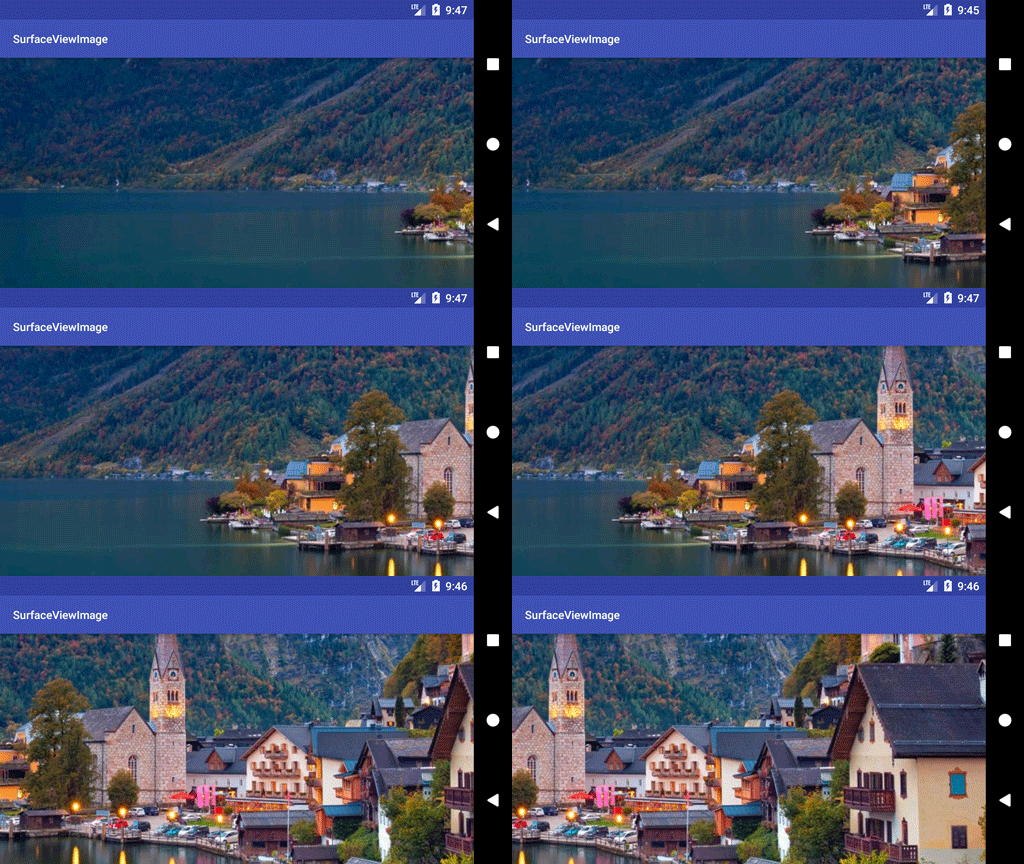
2:View (淡入淡出动画没实现:记录下)
package com.guoxw.surfaceviewimage;

import android.content.Context;

import android.graphics.Bitmap;

import android.graphics.BitmapFactory;

import android.graphics.Canvas;

import android.graphics.Color;

import android.graphics.Paint;

import android.graphics.Rect;

import android.util.AttributeSet;

import android.util.Log;

import android.view.SurfaceHolder;

import android.view.SurfaceView;

import java.util.Timer;

import java.util.TimerTask;

/**

 * Created by guoxw on 2017/12/6.

 * SurfaceView 加载长图缓慢移动显示,充当背景。

 */

public class SurfaceViewImage extends SurfaceView implements SurfaceHolder.Callback {

    private static final String TAG = "SurfaceViewTest1";

    private SurfaceHolder surfaceHolder = null;

    private int imageH = 0, imageW = 0;

    private Bitmap bitmap = null;

    private Paint mBitPaint = null;

    /***每次移动相对于起始点的距离*/

    private int gap = 0;

    private Timer timer;

    private TimerTask timerTask;

    private int surfaceW, surfaceH;

    private ScroListener scroListener = null;

    private Canvas canvas;

    /***设置透明度  0-255 */

    private int alphaValueAdd = 0;

    private int alphaValueDec = 255;

    private boolean isVisibility = true;

    private int transType = 1;

    public SurfaceViewImage(Context context, AttributeSet attrs) {

        super(context, attrs);

        Log.d(TAG, "SurfaceViewTest1: ");

        bitmap = BitmapFactory.decodeResource(getResources(), R.drawable.bannerbg2);

        imageH = bitmap.getHeight();

        imageW = bitmap.getWidth();

        mBitPaint = new Paint();

        mBitPaint.setColor(Color.RED);

        mBitPaint.setAlpha(alphaValueDec);

        Log.d(TAG, "SurfaceViewTest1: --寛高:" + imageW + "--" + imageH);

        surfaceHolder = getHolder();

        surfaceHolder.addCallback(this);

    }

    private void imageDraw() {

        Log.d(TAG, "imageDraw: ");

        switch (transType) {

            case 1:

                canvas = surfaceHolder.lockCanvas(new Rect(0, 0, surfaceW, surfaceW));

                if (gap < (imageW - surfaceW)) {

                    if (alphaValueAdd <= 255) {

                        alphaValueAdd += 5;

                    } else {

                        gap += 1;

                    }

                } else if (gap >= (imageW - surfaceW)) {

                    alphaValueDec -= 5;

                    scroListener.scroTopListener();

                    if (alphaValueDec == 0) {

                        Log.d(TAG, "imageDraw: 次数- 000");

                        // scroListener.scroTopListener();

                    }

                }

                if (alphaValueAdd <= 255) {

                    mBitPaint.setAlpha(alphaValueAdd);

                } else {

                    mBitPaint.setAlpha(alphaValueDec);

                }

                Rect srcRect = new Rect(0 + gap, 1000, surfaceW + gap, surfaceH + 1000);

                Rect dstRect = new Rect(0, 0, surfaceW, surfaceH);

                Log.d(TAG, "imageDraw: image数据alpha值:--" + alphaValueDec);

                canvas.drawBitmap(bitmap, srcRect, dstRect, mBitPaint);

                surfaceHolder.unlockCanvasAndPost(canvas);

                break;

            case 2:

                break;

            case 3:

                break;

        }

    }

    public void setBitmap(Bitmap bitmap) {

        resetImageData();

        this.bitmap = bitmap;

    }

    private void resetImageData() {

        imageH = bitmap.getHeight();

        imageW = bitmap.getWidth();

        gap = 0;

        alphaValueDec = 255;

        alphaValueAdd = 0;

    }

    /**

     * 移动完时,设置监听,更换image

     * @param scroListener

     */

    public void setScroListener(ScroListener scroListener) {

        this.scroListener = scroListener;

    }

    @Override

    public void surfaceCreated(SurfaceHolder holder) {

        surfaceH = getHeight();

        surfaceW = getWidth();

        Log.d(TAG, "surfaceCreated: 控件的寛高:" + surfaceW + "---" + surfaceH); // 1196*574

        timer = new Timer();

        timerTask = new TimerTask() {

            @Override

            public void run() {

                while (isVisibility) {

                    imageDraw();

                }

            }

        };

        timer.schedule(timerTask, 100, 60);

    }

    @Override

    public void surfaceChanged(SurfaceHolder holder, int format, int width, int height) {

        Log.d(TAG, "surfaceChanged: ");

    }

    @Override

    public void surfaceDestroyed(SurfaceHolder holder) {

        Log.d(TAG, "surfaceDestroyed: ");

        try {

            Canvas canvas = surfaceHolder.lockCanvas(null);

            canvas.drawColor(Color.BLACK);

            surfaceHolder.unlockCanvasAndPost(canvas);

        } catch (Exception ex) {

        }

    }

    public interface ScroListener {

        void scroTopListener();

    }

    public void destory() {

        if (timer != null) {

            timer.cancel();

            timerTask = null;

            timer = null;

        }

    }

}
3.修改下
public class SurfaceViewImage extends SurfaceView implements SurfaceHolder.Callback {

    private static final String TAG = "SurfaceViewTest1";

    private SurfaceHolder surfaceHolder = null;

    private int imageH = 0, imageW = 0;

    private Bitmap bitmap = null;

    private Paint mBitPaint = null;

    /***每次移动相对于起始点的距离*/

    private int gap = 0;

    private int oneGap=2;

    private Timer timer;

    private TimerTask timerTask;

    private int surfaceW, surfaceH;

    private Canvas canvas;

    public  boolean isDraw = false;

    /*** 正方向移动完毕后,反向移动,如此循环*/

    private boolean PosDirection=true;

    public SurfaceViewImage(Context context, AttributeSet attrs) {

        super(context, attrs);

        Log.d(TAG, "SurfaceViewTest1: ");

        bitmap = BitmapFactory.decodeResource(getResources(), R.drawable.banner2);

        imageH = bitmap.getHeight();

        imageW = bitmap.getWidth();

        mBitPaint = new Paint();

        mBitPaint.setColor(Color.RED);

        Log.d(TAG, "SurfaceViewTest1: --寛高:" + imageW + "--" + imageH);

        surfaceHolder = getHolder();

        surfaceHolder.addCallback(this);

    }

    private void imageDraw() {

                if(isDraw){

                    canvas = surfaceHolder.lockCanvas(new Rect(0, 0, surfaceW, imageH));

                    if(PosDirection){

                        if (gap < (imageW - surfaceW)) {

                            gap += oneGap;

                        } else if (gap >= (imageW - surfaceW)) {

                            PosDirection=false;

                        }

                    }else {

                        if (gap >0) {

                            gap -= oneGap;

                        } else if (gap <=0) {

                            PosDirection=true;

                        }

                    }

                    Rect srcRect = new Rect(0 + gap, 0, surfaceW + gap, imageH);

                    Rect dstRect = new Rect(0, 0, surfaceW, surfaceH);

                    canvas.drawBitmap(bitmap, srcRect, dstRect, mBitPaint);

                    surfaceHolder.unlockCanvasAndPost(canvas);

        }

    }

    public void setBitmap(Bitmap bitmap) {

        Log.d(TAG, "setBitmap: change photo");

        isDraw = false;

        try {

            Thread.sleep(100);

            //this.bitmap.recycle();

            Log.d(TAG, "setBitmap: change photo1");

            this.bitmap = bitmap;

            resetImageData();

            Log.d(TAG, "setBitmap: change photo2");

        } catch (InterruptedException e) {

            e.printStackTrace();

        }

        isDraw = true;

        Log.d(TAG, "setBitmap: change photo3");

    }

    private void resetImageData() {

        imageH = bitmap.getHeight();

        imageW = bitmap.getWidth();

        gap = 0;

    }

    @Override

    public void surfaceCreated(SurfaceHolder holder) {

        Log.d(TAG, "surfaceCreated: ");

        //if(bitmap==null){

        //    bitmap = BitmapFactory.decodeResource(getResources(), R.drawable.banner2);

       // }

        surfaceH = getHeight();

        surfaceW = getWidth();

        isDraw=true;

        timer = new Timer();

        timerTask = new TimerTask() {

            @Override

            public void run() {

                if (isDraw) {

                    imageDraw();

                }

            }

        };

        timer.schedule(timerTask, 300, 50);

    }

    @Override

    public void surfaceChanged(SurfaceHolder holder, int format, int width, int height) {

        Log.d(TAG, "surfaceChanged: ");

    }

    @Override

    public void surfaceDestroyed(SurfaceHolder holder) {

        Log.d(TAG, "surfaceDestroyed: ");

        isDraw=false;

        try {

            Thread.sleep(60);

            // Canvas canvas = surfaceHolder.lockCanvas(null);

            // canvas.drawColor(Color.BLACK);

           // surfaceHolder.unlockCanvasAndPost(canvas);

            timerTask.cancel();

            timer.cancel();

            timerTask=null;

            timer=null;

          //  bitmap.recycle();

          //  bitmap=null;

        } catch (InterruptedException ex) {

            ex.printStackTrace();

        }

    }

}
Code:
https://pan.baidu.com/s/1o7XYOsy SurfaceViewImage.zip
SurfaceView加载长图的更多相关文章
- Android内存优化————加载长图
项目中总会遇到加载长图的需求,图片的长度可能是手机长度的很多倍,也就是需要通过滑动来查看图片.比较简单的实现方式就是使用ScrollView来加载长图,但是这样做有一个很严重的问题,就是内存消耗严重. ...
- ImageView加载长图(适用不需要缩放的情况)
此案例适用于加载网络长图且图片的宽和高已知的情况.由于ImageView加载图片有一个4096*4096的限制,所以对于巨长图的加载比较麻烦,需要我们自己去手动处理. 有两种解决方案:第一种就是比较l ...
- Android 高清加载巨图方案 拒绝压缩图片
Android 高清加载巨图方案 拒绝压缩图片 转载请标明出处: http://blog.csdn.net/lmj623565791/article/details/49300989: 本文出自:[张 ...
- Unity使用脚本进行批量动态加载贴图
先描述一下我正在做的这个项目,是跑酷类音游. 那么跑酷类音游在绘制跑道上的时候,就要考虑不同的砖块显示问题.假设我有了一个节奏列表,那么我们怎么将不同的贴图贴到不同的砖块上去呢? 我花了好几个小时才搞 ...
- 简易仿ios菊花加载loading图
原文链接:https://mp.weixin.qq.com/s/wBbQgOfr59wntNK9ZJ5iRw 项目中经常会用到加载数据的loading显示图,除了设计根据app自身设计的动画loadi ...
- React-Native 之 GD (二十)removeClippedSubviews / modal放置的顺序 / Android 加载git图\动图 / 去除 Android 中输入框的下划线 / navigationBar
1.removeClippedSubviews 用于提升大列表的滚动性能.需要给行容器添加样式overflow:’hidden’.(Android已默认添加此样式)此属性默认开启 这个属性是因为在早期 ...
- H5异步加载多图
异步加载多图(可能没啥用,加载慢)(图片预加载,提前给浏览器缓存图片) 1. 用一个计数变量记录需要加载的图片个数 2. 用new Image()去加载,加载完给此对象的src赋值要加载的url路径( ...
- Android 高清加载巨图方案, 拒绝压缩图片
源地址:http://blog.csdn.net/lmj623565791/article/details/49300989 一.概述 距离上一篇博客有段时间没更新了,主要是最近有些私事导致的,那么就 ...
- django模型层优化(关联对象) 懒加载和预加载 +长链接
懒加载 存在于外键和多对多关系不检索关联对象的数据调用关联对象会再次查询数据库 问题根源 查看django orm的数据加载,两次. 查询user,查询menu 预加载的方法 预加载单个关联对象--s ...
随机推荐
- eas之设置单元格可编辑
for(int i=0;i<kdtEntrys.getRowCount();i++){ kdtEntrys.getRow(i).getCell("orgUnit").g ...
- eas之设定table选择模式
tblMain.getSelectManager().setSelectMode(0);--不能选择 tblMain.getSelectManager().setSelectMode(1);--选择 ...
- Bamboo Django Celery定时任务和时间设置
1.Celery加入定时任务 Celery除了可以异步执行任务之外,还可以定时执行任务.在实例代码的基础上写个测试方法: 1 #coding:utf-8 2 from celery.task.sche ...
- 在MySQL的表中增加一列
MySql中增加一列 如果想在一个已经建好的表中添加一列,可以用: alter table TABLE_NAME add column NEW_COLUMN_NAME varchar(45) not ...
- jquery源码分析(二)——架构设计
要学习一个库首先的理清它整体架构: 1.jQuery源码大致架构如下:(基于 jQuery 1.11 版本,共计8829行源码)(21,94) 定义了一些变量和函数jQu ...
- Atcoder AGC031B Reversi (DP计数)
简单的计数题.(总算做出一道AGC的B题了,然而这场比赛我忘记打了233333) 题目链接: https://atcoder.jp/contests/agc031/tasks/agc031_b 题意: ...
- lucene_03_索引的增删改查
lucene索引的添加见 http://www.cnblogs.com/getchen/p/8615276.html 入门代码. 公共代码 public <T extends Query> ...
- wordpress常见问题
一.WordPress新手必须注意的两个设置 第一 :设置里面的媒体--关闭wordpress缩略图功能如果开启了三种缩略图,博客上传的图片就会生成不同大小的三份,而基本上博客又没有使用,这样下来严重 ...
- 转载 - Tarjan算法(求SCC)
出处:http://blog.csdn.net/xinghongduo/article/details/6195337 说到以Tarjan命名的算法,我们经常提到的有3个,其中就包括本文所介绍的求强连 ...
- 0929误删除innodb ibdata数据文件
今天在群里看到有人说不熟悉innodb把ibdata(数据文件)和ib_logfile(事务日志)文件误删除了.不知道怎么解决.当时我也不知道怎么办.后来查阅相关资料.终找到解决方法.其实恢复也挺简单 ...