
Elasticsearch教程(三),IK分词器安装 (极速版)
如果只想快速安装IK,本教程管用。下面看经过。
简介:
- 下面讲有我已经打包并且编辑过的zip包,你可以在下面下载即可。
- 当前讲解的IK分词器 包的 version 为1.8。
一、下载zip包。
下面有附件链接【ik-安装包.zip】,下载即可。
二、上传zip包。
下载后解压缩,如下图。
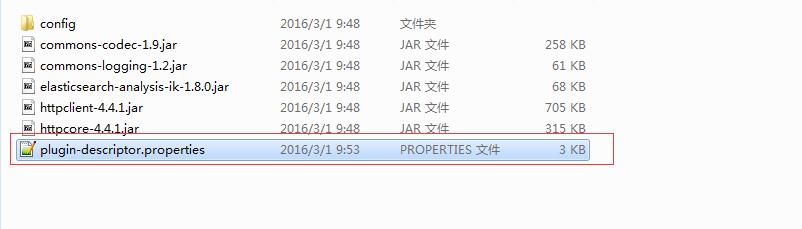
打开修改修改好后打成zip包。
# 'elasticsearch.version' version of elasticsearch compiled against
# You will have to release a new version of the plugin for each new
# elasticsearch release. This version is checked when the plugin
# is loaded so Elasticsearch will refuse to start in the presence of
# plugins with the incorrect elasticsearch.version.
#把这个版本号改成你对应的版本即可,如你的版本是2.2.0,就改成2.2.0
elasticsearch.version=2.0.0
/elasticsearch-2.0.0/plugins
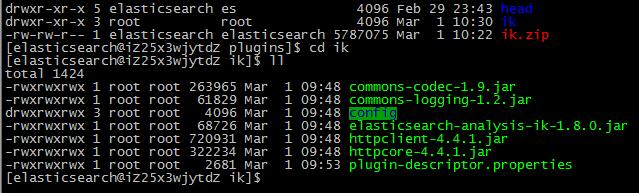
在plugins/目录下上传,并且解压缩。此处注意目录结构必须是这样,如下图:
三、启动测试
呃,我们发现报错了。
[elasticsearch@iZ25x3wjytdZ elasticsearch-2.0.0]$ ./bin/elasticsearch
[2016-03-01 10:32:02,958][INFO ][node ] [Landslide] version[2.0.0], pid[11109], build[de54438/2015-10-22T08:09:48Z]
[2016-03-01 10:32:02,959][INFO ][node ] [Landslide] initializing ...
Exception in thread "main" java.lang.IllegalStateException: Unable to initialize plugins
Likely root cause: java.nio.file.FileSystemException: /home/elasticsearch/es/elasticsearch-2.0.0/plugins/ik.zip/plugin-descriptor.properties: Not a directory
at sun.nio.fs.UnixException.translateToIOException(UnixException.java:91)
at sun.nio.fs.UnixException.rethrowAsIOException(UnixException.java:102)
at sun.nio.fs.UnixException.rethrowAsIOException(UnixException.java:107)
at sun.nio.fs.UnixFileSystemProvider.newByteChannel(UnixFileSystemProvider.java:214)
at java.nio.file.Files.newByteChannel(Files.java:317)
at java.nio.file.Files.newByteChannel(Files.java:363)
at java.nio.file.spi.FileSystemProvider.newInputStream(FileSystemProvider.java:380)
at java.nio.file.Files.newInputStream(Files.java:108)
at org.elasticsearch.plugins.PluginInfo.readFromProperties(PluginInfo.java:86)
at org.elasticsearch.plugins.PluginsService.getPluginBundles(PluginsService.java:306)
at org.elasticsearch.plugins.PluginsService.(PluginsService.java:112)
at org.elasticsearch.node.Node.(Node.java:144)
at org.elasticsearch.node.NodeBuilder.build(NodeBuilder.java:145)
at org.elasticsearch.bootstrap.Bootstrap.setup(Bootstrap.java:170)
at org.elasticsearch.bootstrap.Bootstrap.init(Bootstrap.java:270)
at org.elasticsearch.bootstrap.Elasticsearch.main(Elasticsearch.java:35)
一看我们就知道,他去找plugins/ik.zip 下的配置文件对吧。
解决方案是把这个ZIP包删除即可。
删除后再次启动。
[elasticsearch@iZ25x3wjytdZ elasticsearch-2.0.0]$ ./bin/elasticsearch
[2016-03-01 10:32:02,958][INFO ][node ] [Landslide] version[2.0.0], pid[11109], build[de54438/2015-10-22T08:09:48Z]
[2016-03-01 10:32:02,959][INFO ][node ] [Landslide] initializing ...
Exception in thread "main" java.lang.IllegalStateException: Unable to initialize plugins
Likely root cause: java.nio.file.FileSystemException: /home/elasticsearch/es/elasticsearch-2.0.0/plugins/ik.zip/plugin-descriptor.properties: Not a directory
at sun.nio.fs.UnixException.translateToIOException(UnixException.java:91)
at sun.nio.fs.UnixException.rethrowAsIOException(UnixException.java:102)
at sun.nio.fs.UnixException.rethrowAsIOException(UnixException.java:107)
at sun.nio.fs.UnixFileSystemProvider.newByteChannel(UnixFileSystemProvider.java:214)
at java.nio.file.Files.newByteChannel(Files.java:317)
at java.nio.file.Files.newByteChannel(Files.java:363)
at java.nio.file.spi.FileSystemProvider.newInputStream(FileSystemProvider.java:380)
at java.nio.file.Files.newInputStream(Files.java:108)
at org.elasticsearch.plugins.PluginInfo.readFromProperties(PluginInfo.java:86)
at org.elasticsearch.plugins.PluginsService.getPluginBundles(PluginsService.java:306)
at org.elasticsearch.plugins.PluginsService.(PluginsService.java:112)
at org.elasticsearch.node.Node.(Node.java:144)
at org.elasticsearch.node.NodeBuilder.build(NodeBuilder.java:145)
at org.elasticsearch.bootstrap.Bootstrap.setup(Bootstrap.java:170)
at org.elasticsearch.bootstrap.Bootstrap.init(Bootstrap.java:270)
at org.elasticsearch.bootstrap.Elasticsearch.main(Elasticsearch.java:35)
我们从启动就看的出来,IK分词器安装成功。
[2016-03-01 10:34:28,803][INFO ][plugins ] [Big Wheel] loaded [analysis-ik], sites [head]
测试:
http://123.57.163.79:9200/_analyze?analyzer=ik&pretty=true&text=sojson在线工具真好用
{
"tokens" : [ {
"token" : "sojson",
"start_offset" : 0,
"end_offset" : 6,
"type" : "ENGLISH",
"position" : 0
}, {
"token" : "在线",
"start_offset" : 6,
"end_offset" : 8,
"type" : "CN_WORD",
"position" : 1
}, {
"token" : "工具",
"start_offset" : 8,
"end_offset" : 10,
"type" : "CN_WORD",
"position" : 2
}, {
"token" : "真好",
"start_offset" : 10,
"end_offset" : 12,
"type" : "CN_WORD",
"position" : 3
}, {
"token" : "好用",
"start_offset" : 11,
"end_offset" : 13,
"type" : "CN_WORD",
"position" : 4
} ]
}
Elasticsearch教程(三),IK分词器安装 (极速版)的更多相关文章
- elasticsearch安装ik分词器(极速版)
简介:下面讲有我已经打包并且编辑过的zip包,你可以在下面下载即可. 1.下载zip包.elasticsearch-analysis-ik-1.8.0.jar下面有附件链接[ik-安装包.zip],下 ...
- 七、Elasticsearch+elasticsearch-head的安装+Kibana环境搭建+ik分词器安装
一.安装JDK1.8 二.安装ES 三个节点:master.slave01.slave02 1.这里下载的是elasticsearch-6.3.1.rpm版本包 https://www.elastic ...
- elasticsearch 之IK分词器安装
IK分词器地址:https://github.com/medcl/elasticsearch-analysis-ik 安装好ES之后就可以安装分词器插件了 记住选择ES对应的版本 对应的有版本选择下载 ...
- 【ELK】【docker】【elasticsearch】2.使用elasticSearch+kibana+logstash+ik分词器+pinyin分词器+繁简体转化分词器 6.5.4 启动 ELK+logstash概念描述
官网地址:https://www.elastic.co/guide/en/elasticsearch/reference/current/docker.html#docker-cli-run-prod ...
- Elasticsearch 7.x - IK分词器插件(ik_smart,ik_max_word)
一.安装IK分词器 Elasticsearch也需要安装IK分析器以实现对中文更好的分词支持. 去Github下载最新版elasticsearch-ik https://github.com/medc ...
- Elasticsearch拼音和ik分词器的结合应用
一.创建索引时,自定义拼音分词和ik分词 PUT /my_index { "index": { "analysis": { "analyzer&quo ...
- Elasticsearch教程(二),IK分词器安装
elasticsearch-analysis-ik 是一款中文的分词插件,支持自定义词库,也有默认的词库. 开始安装. 1.下载 下载地址为:https://github.com/medcl/ela ...
- linux(centos 7)下安装elasticsearch 5 的 IK 分词器
(一)到IK 下载 对应的版本(直接下载release版本,避免mvn打包),下载后是一个zip压缩包 (二)将压缩包上传至elasticsearch 的安装目录下的plugins下,进行解压,运行如 ...
- Elasticsearch入门之从零开始安装ik分词器
起因 需要在ES中使用聚合进行统计分析,但是聚合字段值为中文,ES的默认分词器对于中文支持非常不友好:会把完整的中文词语拆分为一系列独立的汉字进行聚合,显然这并不是我的初衷.我们来看个实例: POST ...
随机推荐
- 优化web前端性能的几个方法
1 减少http请求, a. 合并脚本跟样式文件,如可以把多个 CSS 文件合成一个,把多个 JS 文件合成一个. b. CSS Sprites 利用 CSS background 相关元素进行背景图 ...
- Nano
Nano命令指南 今天在输命令时,无意中输入了nano,对这个命令不太熟悉,结果不知道如何才能退出,保存,赶快查了一下资料,原来是这样的啊. 打开文件与新建文件 使用nano打开或新建文件,只需键入: ...
- Linux Mint---更新软件源
安装完系统之后第一件事情就是更新软件源,为接下来的各种工作作准备,这个也很简单,直接打开software source设置一下, 然后打开software manager更新一下就好了.
- 信息传递(NOIP2015)(寻找最小环。。)
原题传送门 这是一道寻找最小环的题目. 在做的时候给每一个点染色.. 防止再做已经搜过的点(优化) v[]表示是否访问的过,以及第一次访问该点的时间. u[]表示染色.. 这道题还可以用拓补排序做. ...
- Opengl场景中加光照包含几个步骤
http://zuoye.baidu.com/question/44e2a82d7ad5c0e1d33ddb9a40e0bf86.html Opengl场景中加光照包含几个步骤,各个步骤实现用的函数 ...
- VS MFC 按键导入BMP图片
1. 图片导入资源: 2.实现代码: 直接给CButton加图片的方法: 1.在资源编辑器中添加一个按钮.把它的Bitmap属性设为true 2.在按钮上点右键,添加一个变量m_Btn(CButton ...
- java基础练习 16
public class Sixtheen { /*利用递归方法求5!.*/ public static void main(String[] args){ System.out.println(&q ...
- PHPUnit安装(无需PEAR)
转自:http://www.cnblogs.com/bourneli/articles/2447155.html phpunit源代码下载:http://pear.phpunit.de/ 如何 ...
- 开始gentoo之旅
买了一台i7笔记本,dell 15游戏匣7559,老笔记本dell n4030装了gentoo. 用了两天,先用着,再慢慢学内核编译.
- [BZOJ2084][Poi2010]Antisymmetry 二分+hash
2084: [Poi2010]Antisymmetry Time Limit: 10 Sec Memory Limit: 259 MBSubmit: 812 Solved: 503[Submit] ...