
SpringBoot学习9:springboot整合thymeleaf
1、创建maven项目,添加项目所需依赖
<!--springboot项目依赖的父项目-->

    <parent>

        <groupId>org.springframework.boot</groupId>

        <artifactId>spring-boot-starter-parent</artifactId>

        <version>2.0.0.RELEASE</version>

    </parent>

    <dependencies>

        <!--注入springboot启动器-->

        <dependency>

            <groupId>org.springframework.boot</groupId>

            <artifactId>spring-boot-starter-web</artifactId>

        </dependency>

        <!--注入springboot对thymeleaf视图技术的支持-->

        <dependency>

            <groupId>org.springframework.boot</groupId>

            <artifactId>spring-boot-starter-thymeleaf</artifactId>

        </dependency>

    </dependencies>
2、创建controller
package com.bjsxt.controller;

import org.springframework.stereotype.Controller;

import org.springframework.ui.Model;

import org.springframework.web.bind.annotation.RequestMapping;

/**

 * Created by Administrator on 2019/2/8.

 */

@Controller

public class IndexController {

    @RequestMapping("/toIndex")

    public String toIndex(Model model){

        model.addAttribute("msg","index页面");

        return "index";

    }

}
3、创建thymeleaf模版文件index.html
目录位置:src/main/resources/templates
templates:该目录是安全的。意味着该目录下的内容是不允许外界直接访问的。
<!DOCTYPE html>

<html lang="en">

<head>

    <meta charset="UTF-8">

    <title>thymeleaf</title>

</head>

<body>

    <span th:text="${msg}"></span>

    <hr>

    <span th:text="hello"></span>

</body>

</html>
4、创建启动器,启动在浏览器中访问
package com.bjsxt;

import org.springframework.boot.SpringApplication;

import org.springframework.boot.autoconfigure.SpringBootApplication;

/**

 * Created by Administrator on 2019/2/8.

 */

@SpringBootApplication

public class App {

    public static void main(String[] args){

        SpringApplication.run(App.class,args);

    }

}
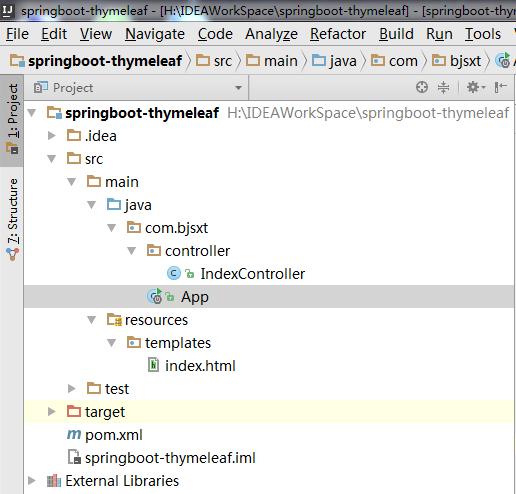
目录结构
SpringBoot学习9:springboot整合thymeleaf的更多相关文章
- SpringBoot学习- 4、整合JWT
SpringBoot学习足迹 1.Json web token(JWT)是为了网络应用环境间传递声明而执行的一种基于JSON的开发标准(RFC 7519),该token被设计为紧凑且安全的,特别适用于 ...
- SpringBoot学习- 3、整合MyBatis
SpringBoot学习足迹 1.下载安装一个Mysql数据库及管理工具,同类工具很多,随便找一个都可以,我在windows下做测试项目习惯使用的是haosql 它内部集成了MySql-Front管理 ...
- SpringBoot学习- 5、整合Redis
SpringBoot学习足迹 SpringBoot项目中访问Redis主要有两种方式:JedisPool和RedisTemplate,本文使用JedisPool 1.pom.xml添加dependen ...
- 【Java Web开发学习】Spring4整合thymeleaf视图解析
[Java Web开发学习]Spring4整合thymeleaf视图解析 目录 1.简单介绍2.简单例子 转载:https://www.cnblogs.com/yangchongxing/p/9111 ...
- SpringBoot学习- 8、整合Shiro
SpringBoot学习足迹 Shiro是什么,引自百度百科:Apache Shiro是一个强大且易用的Java安全框架,执行身份验证.授权.密码和会话管理.使用Shiro的易于理解的API,您可以快 ...
- springboot学习笔记-4 整合Druid数据源和使用@Cache简化redis配置
一.整合Druid数据源 Druid是一个关系型数据库连接池,是阿里巴巴的一个开源项目,Druid在监控,可扩展性,稳定性和性能方面具有比较明显的优势.通过Druid提供的监控功能,可以实时观察数据库 ...
- springboot学习笔记-3 整合redis&mongodb
一.整合redis 1.1 建立实体类 @Entity @Table(name="user") public class User implements Serializable ...
- springboot学习四:整合mybatis
在application.properties加入配置 ## Mybatis 配置 mybatis.typeAliasesPackage=org.spring.springboot.domain my ...
- springboot学习三:整合jsp
在pom.xml加入jstl <!--springboot tomcat jsp 支持开启--> <dependency> <groupId>org.apache. ...
- 十一、springboot(六)整合Thymeleaf
1.添加jar包依赖 <dependency> <groupId>org.springframework.boot</groupId> <artifactId ...
随机推荐
- VS 快速插入无参构造器
输入ctor后 点击两次Tab键,即可快速插入无参构造器.
- (转)mysql5.6.7多实例安装、配置的详细讲解分析及shell启动脚本的编写
一.mysql安装 1.下载mysql数据库源码包: wget http://cdn.mysql.com/Downloads/MySQL-5.6/mysql-5.6.27.tar.gz 2.安装mys ...
- DEDE图集手工上传图片,加入水印
DEDE的图集手工上传图片,是一个非常好用的flash上传图片工具.但是如果我们希望上传的图片,带有自己网站指定的水印,却发现没有达到我们的要求--那么如果我们确实希望上传的图片,带有水印,怎么办?以 ...
- mysql关闭严格模式
通过配置文件修改: linux找my.cnf文件 window的修改办法是找my.ini sql_mode=NO_ENGINE_SUBSTITUTION,STRICT_TRANS_TABLES ub ...
- hash冲突解决和javahash冲突解决
其实就是四种方法的演变 1.开放定址法 具体就是把数据的标志等的对长度取模 有三种不同的取模 线性探测再散列 给数据的标志加增量,取模 平方探测再散列 给数据的标志平方,取模 随机探测再散列 把数据的 ...
- Day6上 括号匹配专项
滑稽的题 T1 #include<iostream> #include<cstring> #include<queue> #include<algorithm ...
- php删除服务器所有session踢掉所有在线用户linux
注意:如果要删除服务器上所有session,重启php服务是解决不了问题的,php的session是持久化的. 有效解决办法: 删除 /tmp 下的所有文件(默认php的session文件是在/tmp ...
- 未能解析引用的程序集......因为它对不在当前目标框架“.NETFramework,Version=v4.0,Profile=Client”中的
解决方法:资源管理器下点击项目名(右键)属性--将.NET Framework 4 Client Profile改成.NET Framework 4 . 传送门:http://bbs.csdn.net ...
- .net core 共享 .Net Forms Authentication cookie
Asp.net 项目迁移到 asp.net core 项目后需要 兼容以前老的项目的登录方式. Forms Authentication cookie 登录. 从网上搜集到关于这个问题的解决思路都没有 ...
- js 判断浏览器类型
前言 工作中需要用到判断浏览器类型,网上找到的内容不怎么全,故在此进行一下总结. 一.不同浏览器及版本下User-Agent信息 待续.....欢迎补充 二.根据User-Agent信息进行判断 参考 ...