
SpringBoot学习9:springboot整合thymeleaf
1、创建maven项目,添加项目所需依赖
<!--springboot项目依赖的父项目-->

    <parent>

        <groupId>org.springframework.boot</groupId>

        <artifactId>spring-boot-starter-parent</artifactId>

        <version>2.0.0.RELEASE</version>

    </parent>

    <dependencies>

        <!--注入springboot启动器-->

        <dependency>

            <groupId>org.springframework.boot</groupId>

            <artifactId>spring-boot-starter-web</artifactId>

        </dependency>

        <!--注入springboot对thymeleaf视图技术的支持-->

        <dependency>

            <groupId>org.springframework.boot</groupId>

            <artifactId>spring-boot-starter-thymeleaf</artifactId>

        </dependency>

    </dependencies>
2、创建controller
package com.bjsxt.controller;

import org.springframework.stereotype.Controller;

import org.springframework.ui.Model;

import org.springframework.web.bind.annotation.RequestMapping;

/**

 * Created by Administrator on 2019/2/8.

 */

@Controller

public class IndexController {

    @RequestMapping("/toIndex")

    public String toIndex(Model model){

        model.addAttribute("msg","index页面");

        return "index";

    }

}
3、创建thymeleaf模版文件index.html
目录位置:src/main/resources/templates
templates:该目录是安全的。意味着该目录下的内容是不允许外界直接访问的。
<!DOCTYPE html>

<html lang="en">

<head>

    <meta charset="UTF-8">

    <title>thymeleaf</title>

</head>

<body>

    <span th:text="${msg}"></span>

    <hr>

    <span th:text="hello"></span>

</body>

</html>
4、创建启动器,启动在浏览器中访问
package com.bjsxt;

import org.springframework.boot.SpringApplication;

import org.springframework.boot.autoconfigure.SpringBootApplication;

/**

 * Created by Administrator on 2019/2/8.

 */

@SpringBootApplication

public class App {

    public static void main(String[] args){

        SpringApplication.run(App.class,args);

    }

}
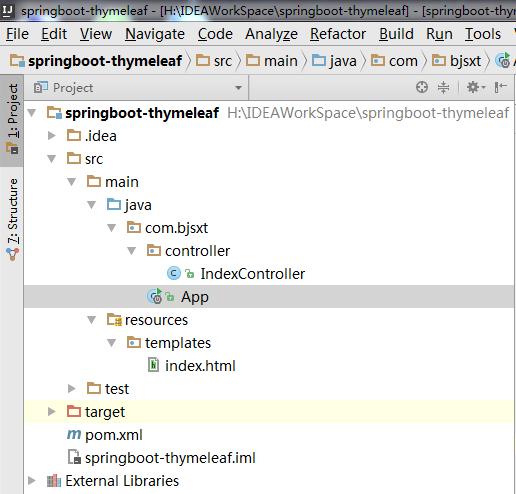
目录结构
SpringBoot学习9:springboot整合thymeleaf的更多相关文章
- SpringBoot学习- 4、整合JWT
SpringBoot学习足迹 1.Json web token(JWT)是为了网络应用环境间传递声明而执行的一种基于JSON的开发标准(RFC 7519),该token被设计为紧凑且安全的,特别适用于 ...
- SpringBoot学习- 3、整合MyBatis
SpringBoot学习足迹 1.下载安装一个Mysql数据库及管理工具,同类工具很多,随便找一个都可以,我在windows下做测试项目习惯使用的是haosql 它内部集成了MySql-Front管理 ...
- SpringBoot学习- 5、整合Redis
SpringBoot学习足迹 SpringBoot项目中访问Redis主要有两种方式:JedisPool和RedisTemplate,本文使用JedisPool 1.pom.xml添加dependen ...
- 【Java Web开发学习】Spring4整合thymeleaf视图解析
[Java Web开发学习]Spring4整合thymeleaf视图解析 目录 1.简单介绍2.简单例子 转载:https://www.cnblogs.com/yangchongxing/p/9111 ...
- SpringBoot学习- 8、整合Shiro
SpringBoot学习足迹 Shiro是什么,引自百度百科:Apache Shiro是一个强大且易用的Java安全框架,执行身份验证.授权.密码和会话管理.使用Shiro的易于理解的API,您可以快 ...
- springboot学习笔记-4 整合Druid数据源和使用@Cache简化redis配置
一.整合Druid数据源 Druid是一个关系型数据库连接池,是阿里巴巴的一个开源项目,Druid在监控,可扩展性,稳定性和性能方面具有比较明显的优势.通过Druid提供的监控功能,可以实时观察数据库 ...
- springboot学习笔记-3 整合redis&mongodb
一.整合redis 1.1 建立实体类 @Entity @Table(name="user") public class User implements Serializable ...
- springboot学习四:整合mybatis
在application.properties加入配置 ## Mybatis 配置 mybatis.typeAliasesPackage=org.spring.springboot.domain my ...
- springboot学习三:整合jsp
在pom.xml加入jstl <!--springboot tomcat jsp 支持开启--> <dependency> <groupId>org.apache. ...
- 十一、springboot(六)整合Thymeleaf
1.添加jar包依赖 <dependency> <groupId>org.springframework.boot</groupId> <artifactId ...
随机推荐
- 人工智能和机器学习 AI&ML howto
我关心的AI.ML的分支领域: 我的博客:Deep Learning 和 Knowledge Graph howto (有关DL&KG的资料都在这里) https://www.cnblogs. ...
- C++中遇到的各种小问题
lpcwstr类型问题 在使用VS2010开发C++程序时,由于系统默认字符集是unicode字符集,造成与早期的字符串格式不兼容问题 ①Properties — Configuration Prop ...
- Cgroup blkio简介和测试(使用fio测试)
Cgroup blkio简介和测试(使用fio测试) 因需要对docker镜像内的进程对磁盘读写的速度进行限制,研究了下Cgroup blkio,并使用fio对其iops/bps限速进行测试. Cgr ...
- 转:MVC中的文件上传
上传文件与与上传数据区别 上传数据主要指json等简单字符串,上传文件指的是上传word.excel图片等.在上传数据的时候enctype默认为第一个application/x-www-form-ur ...
- 拿到返回值,Callable示例
- 基于vue2+nuxt构建的高仿饿了么(2018版)
前言 高仿饿了么,以nuxt作为vue的服务端渲染,适合刚接触或者准备上vue ssr的同学参考和学习 项目地址如遇网络不佳,请移步国内镜像加速节点 效果演示 查看demo请戳这里(请用chrome手 ...
- 微信小程序电商实战-入门篇
小程序开发工具有新版本更新啦!开发体验更好了,详情可以查看微信公众平台-小程序https://mp.weixin.qq.com/debug/wxadoc/dev/devtools/devtools.h ...
- 关于jqeury中attr()和prop()方法
在平时工作中老会被一样的问题困住,浪费时间,这里做一个简要笔记. 在使用jquery给元素设置属性的时候,如果是一般的div,p等正常元素设置属性的话,使用attr()足以,但是在给拥有checked ...
- canvas制作雪花效果
<!DOCTYPE html><html> <head> <meta http-equiv="Content-type" conte ...
- Java—继承
继承 继承是类与类的一种关系,是一种“is a”的关系.注意:java中的继承是单继承,一个类只有一个父类. 继承的好处:子类拥有父类的所有属性和方法(private修饰的无效),实现代码的复用 语法 ...