
phpcms编辑器添加一键排版控件
CKEditor添加一键排版插件实例,
大家都知道phpcms也是ckeditor编辑器,那么如果增加这个一键排版这个牛逼功能呢
增加好了后,效果图是这样的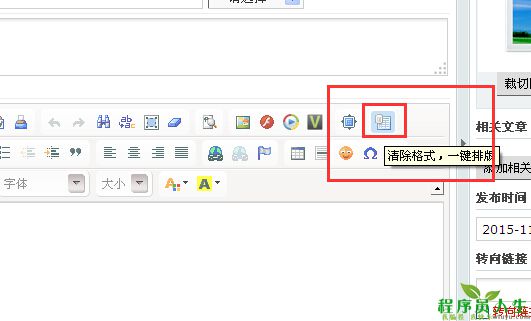
废话不多说,直接说步骤
第一步:config.js中statics\js\ckeditor\config.js中注册autoformat控件
config.extraPlugins = 'capture,videoforpc,flashplayer,autoformat';
第二步,在statics\js\ckeditor\plugins 新建文件夹autoformat
第三步,在statics\js\ckeditor\plugins\autoformat新建文件plugin.js
写入如下内容
(function() {
CKEDITOR.plugins.add('autoformat', {
requires: ['styles', 'button'],
init: function(a) {
a.addCommand('autoformat', CKEDITOR.plugins.autoformat.commands.autoformat);
a.ui.addButton('autoformat', {
label: "清除格式,一键排版",
command: 'autoformat',
//这个autoformat.gif是你的插件图标,放在同目录下
icon: this.path + "autoformat.gif"
});
}
});
CKEDITOR.plugins.autoformat = {
commands: {
autoformat: {
exec: function(a) {
var _html = a.getData();
//清除样式代码
_html = _html.replace(/<div/ig, '<p');
_html = _html.replace(/<\/div>/ig, '</p>');
_html = _html.replace(/<strong[^>]*>/ig, '');
_html = _html.replace(/<\/strong>/ig, '');
_html = _html.replace(/<em[^>]*>/ig, '');
_html = _html.replace(/<\/em>/ig, '');
_html = _html.replace(/<u[^>]*>/ig, '');
_html = _html.replace(/<\/u>/, '');
_html = _html.replace(/<li[^>]*>/ig, '');
_html = _html.replace(/<\/li>/ig, '');
_html = _html.replace(/<span[^>]*>/ig, '');
_html = _html.replace(/<\/span>/ig, '');
_html = _html.replace(/ /ig, '');
_html = _html.replace(/ /ig, '');
_html = _html.replace(/<p><\/p>/ig, '');
_html = _html.replace(/<a/ig, '<a rel="nofollow"');
//将p标签替换成<br />
_html = _html.replace(/<p[^>]*>/ig, '');
_html = _html.replace(/<\/p>/ig, '<br />');
_html = _html.replace(/<br \/><br \/>/ig, '<br />');
_html = _html.replace(/[\n]/ig, '');
//按<br />分组,将换行<br>全部替换成p标签
bb = _html.split("<br />");
aa = '';
for (var i = 0; i < bb.length; i++) {
aa = aa + '<p>' + bb[i] + '</p>';
}
//首行缩进
_html = aa.replace(/<p[^>]*>/ig, '<p> ');
_html = _html.replace(/<p> <\/p>/ig, '');
_html = _html.replace(/<p><\/p>/ig, '');
//在这里执行你将_html中的空行替换掉的操作
a.setData(_html);
}
}
}
};
})();
写到这里,就完成啦,完成了CKEditor添加一键排版插件
但是,到这里再phpcms里面,还是不能直接用的,在别的系统里面是可以的。因为phpcms的编辑器控件是需要单独选择的,还需要修改phpcms文件
打开phpcms/libs/classes/form.class.php
搜索['Maximize'] 在它的后面加上 ['autoformat'],就可以了。
转自:http://www.wfuyu.com/biji/25066.html
原文是程序员人生。
phpcms编辑器添加一键排版控件的更多相关文章
- Add an Item to the Navigation Control 将项目添加到导航控件
In this lesson, you will learn how to add an item to the navigation control. For this purpose, the N ...
- 百度地图API示例之添加定位相关控件
代码 <!DOCTYPE html> <html> <head> <meta http-equiv="Content-Type" cont ...
- C#构架之基础学习----动态添加窗体和 控件
仿照窗体应用程序编写: 任务一:生成一个Form类的窗体对象frm using System.Windows.Forms; //using指令使用Form对象创建所需的命名空间 //如 ...
- 在WPF中添加Windows Form控件(包括 ocx控件)
首先,需要向项目中的reference添加两个dll,一个是.NET库中的System.Windows.Forms,另外一个是WindowsFormsIntegration,它的位置一般是在C:\ ...
- Unity编辑器 - 鼠标悬停在控件上时改变鼠标样式
Unity编辑器 - 鼠标悬停在控件上时改变鼠标样式 摘自Unity文档 EditorGUIUtility.AddCursorRect public static void AddCursorRect ...
- Unity编辑器 - 使用GL绘制控件
Unity编辑器 - 使用GL绘制控件 控件较为复杂时,可能造成界面卡顿,在EditorGUI中也可以灵活使用GL绘制来提升性能. 以绘制线段为例: using UnityEngine; using ...
- Unity编辑器 - DragAndDrop拖拽控件
Unity编辑器 - DragAndDrop拖拽控件 Unity编辑器的拖拽(DragAndDrop)在网上能找到的资料少,自己稍微研究了一下,写了个相对完整的案例,效果如下 代码: object d ...
- IOS 当一个控件被添加到父控件中会调用(didMoveToSuperview)
/** * 当一个控件被添加到父控件中就会调用 */ - (void)didMoveToSuperview { if (self.group.opened) { self.nameView.image ...
- QT5:第二章 布局排版控件
一.简介 在QT组件面板中有Layouts和Spacers两个组件面板 注意:布局排版控件不显示 1.Layouts(布局) Vertical Layout:垂直方向布局,组件自动在垂直方向上分布 H ...
随机推荐
- Android学习记录(9)—Android之Matrix的用法
Matrix ,中文里叫矩阵,高等数学里有介绍,在图像处理方面,主要是用于平面的缩放.平移.旋转等操作. 首先介绍一下矩阵运算.加法和减法就不用说了,对应位相加就好.图像处理,主要用到的是乘法 .下面 ...
- 《Cracking the Coding Interview》——第5章:位操作——题目8
2014-03-19 06:33 题目:用一个byte数组来模拟WxH的屏幕,每个二进制位表示一个像素.请设计一个画水平线的函数. 解法:一个点一个点地画就可以了.如果要优化的话,其实可以把中间整字节 ...
- Pascal 基础教程
Pascal现在还有人想学习吗?先给出一本不错的Pascal教程,Object Pascal的教程我日后给出. Pascal基础教程 第一课 初识PASCAL语言 …… ...
- iOS笔记061 - 二维码的生成和扫描
二维码 生成二维码 二维码可以存放纯文本.名片或者URL 生成二维码的步骤: 导入CoreImage框架 通过滤镜CIFilter生成二维码 1.创建过滤器 2.恢复滤镜的默认属性 3.设置内容 4. ...
- css3 skew坐标轴笔记
transform是css3中对于性能来说是比较安全的 在二维空间里面,skew有两个属性值:skewX,skewY,图形的变化也就是针对这两个值来操作: transform: skewX(45deg ...
- python - web自动化测试 - 元素操作 - 窗口切换
# -*- coding:utf-8 -*- ''' @project: web学习 @author: Jimmy @file: 元素操作-切换.py @ide: PyCharm Community ...
- 一个初学者的辛酸路程-继续Django
问题1:HTTP请求过来会先到Django的那个地方? 先到urls.py ,里面写的是对应关系,1个URL对应1个函数名. 如果发URL请求过来,到达这里,然后帮你去执行指定的函数,函数要做哪些事 ...
- 【志银】Win764位配置Github环境及将代码部署到Github pages-志银强势总结
(软件及教程下载分享:链接:http://pan.baidu.com/s/1dFysay9 密码:pug0) 1-安装Git-2.9.2-64-bit.exe(解压安装文件,运行安装程序,除了记得修改 ...
- python作业:HAproxy配置文件操作(第三周)
一.作业需求: 1. 根据用户输入输出对应的backend下的server信息 2. 可添加backend 和sever信息 3. 可修改backend 和sever信息 4. 可删除backend ...
- opencv3.1+cmake+mingw5.3+QT5编译
太不容易了! 想要访问opencv的官网貌似要FQ才行.下载了opencv3.2版本,发现cmake在download opencv_ffmpeg.dll的地方超时了. 于是搜索一番,发现很多编译op ...