
Unity编辑器 - DragAndDrop拖拽控件
Unity编辑器 - DragAndDrop拖拽控件
Unity编辑器的拖拽(DragAndDrop)在网上能找到的资料少,自己稍微研究了一下,写了个相对完整的案例,效果如下
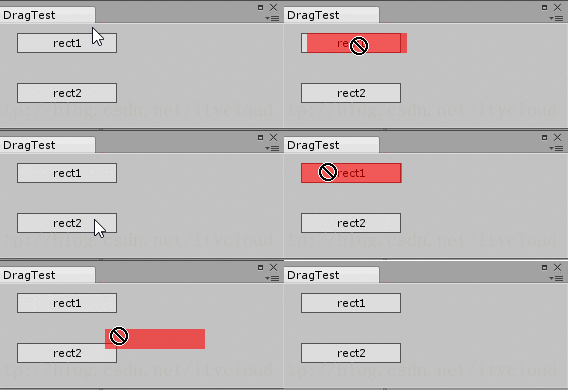
代码:
object dragData = "dragData";

Vector2 offset;

Color col = new Color(1, 0, 0, 0.6f);

Rect rect1 = new Rect(20, 10, 100, 20);

Rect rect2 = new Rect(20, 60, 100, 20);

Rect drect;

bool isDraging;

int cid;

private void OnGUI() {

    GUI.Box(rect1, "rect1");

    GUI.Box(rect2, "rect2");

    Event e = Event.current;

    cid = GUIUtility.GetControlID(FocusType.Passive);

    switch (e.GetTypeForControl(cid)) {

        case EventType.MouseDown:

            if (rect1.Contains(e.mousePosition))

                GUIUtility.hotControl = cid;

            break;

        case EventType.MouseUp:

            if (GUIUtility.hotControl == cid)

                GUIUtility.hotControl = 0;

            break;

        case EventType.MouseDrag:

            Debug.Log("MouseDrag");

            if (GUIUtility.hotControl == cid && rect1.Contains(e.mousePosition)) {

                DragAndDrop.PrepareStartDrag();

                //DragAndDrop.objectReferences = new Object[] { };

                DragAndDrop.SetGenericData("dragflag", dragData);

                DragAndDrop.StartDrag("dragtitle");

                offset = e.mousePosition - rect1.position;

                drect = rect1;

                isDraging = true;

                e.Use();

            }

            break;

        case EventType.DragUpdated:

            Debug.Log("DragUpdated");

            drect.position = e.mousePosition - offset;

            if (rect2.Contains(e.mousePosition)) {

                DragAndDrop.visualMode = DragAndDropVisualMode.Generic;

                drect = rect2;

            }

            e.Use();

            break;

        case EventType.DragPerform:

            Debug.Log("DragPerform");

            DragAndDrop.AcceptDrag();

            Debug.Log("DragPerform : " + DragAndDrop.GetGenericData("dragflag"));

            e.Use();

            break;

        case EventType.DragExited:

            Debug.Log("DragExited");

            isDraging = false;

            if (GUIUtility.hotControl == cid)

                GUIUtility.hotControl = 0;

            e.Use();

            break;

    }

    if (isDraging) {

        EditorGUI.DrawRect(drect, col);

    }

}
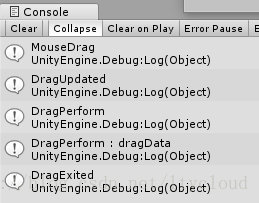
事件调用顺序
Unity编辑器 - DragAndDrop拖拽控件的更多相关文章
- 【C#/WPF】GridSplitter 分割布局,拖拽控件分隔栏以改变控件尺寸
需求:界面由多部分控件组成,想要拖拽控件之间的分隔栏以改变尺寸. MainWindow.xaml: <Grid> <Grid.ColumnDefinitions> <Co ...
- Unity编辑器 - 鼠标悬停在控件上时改变鼠标样式
Unity编辑器 - 鼠标悬停在控件上时改变鼠标样式 摘自Unity文档 EditorGUIUtility.AddCursorRect public static void AddCursorRect ...
- Unity编辑器 - 使用GL绘制控件
Unity编辑器 - 使用GL绘制控件 控件较为复杂时,可能造成界面卡顿,在EditorGUI中也可以灵活使用GL绘制来提升性能. 以绘制线段为例: using UnityEngine; using ...
- flutter Draggable Widget拖拽控件
Draggable Widget Draggable控件负责就是拖拽,父层使用了Draggable,它的子元素就是可以拖动的,子元素可以实容器,可以是图片.用起来非常的灵活. 参数说明: data: ...
- Flutter 拖拽控件Draggable
Flutter提供了强大的拖拽控件,可以灵活定制,并且非常简单.下面作一个拖拽的案例. Draggable Widget Draggable控件负责就是拖拽,父层使用了Draggable,它的子元素就 ...
- ios-将代码创建的视图控件放入拖拽控件的下面
如图所示 图片是拖拽上去的imageView,橘黄色控件是在代码中创建的添加上去的,此时黄色view在imageView 上方 调用方法bringSubviewToFront:试图将imageView ...
- H5实现多图片预览上传,可点击可拖拽控件介绍
版权声明:欢迎转载,请注明出处:http://blog.csdn.net/weixin_36380516 在做图片上传时发现一个蛮好用的控件,支持多张图片同时上传,可以点击选择图片,也可以将图片拖拽到 ...
- Flutter 拖拽控件Draggable看这一篇就够了
注意:无特殊说明,Flutter版本及Dart版本如下: Flutter版本: 1.12.13+hotfix.5 Dart版本: 2.7.0 Draggable系列组件可以让我们拖动组件. Dragg ...
- 拖拽控件java版
Button vv = new Button("vvvv"); DragSource.getDefaultDragSource().createDefaultDragGestur ...
随机推荐
- Vue--- 一点车项目 连接数据库 数据使用
Vue--- 一点车项目 连接数据库 数据使用 后台服务器 返回数据 处理 created 这个钩子在实例被创建之后被调用: async created(){ // 分类 catelist { le ...
- 【Django笔记三】Django2.0配置mysql模型
一.环境版本信息: 操作系统:windows10 Django版本:2.0.5 Python版本:3.6.4 Mysql版本: 5.5.53 安装mysql 二.安装Mysqlclient: 1. ...
- LAMP+Varnish的实现
基于Keepalived+Varnish+Nginx实现的高可用LAMP架构 注意:各节点的时间需要同步(ntpdate ntp1.aliyun.com),关闭firewalld(systemctl ...
- 前台页面上传data image图片,java后台接收图片保存
最近在项目中有这么一个需求,就是上传一个视频文件,然后要获取视频文件的第一帧图片,这个可以通过canvas获取得到,得到的是一个dataURL,之后还要将这个图片上传到云,这个时候如何操作就不清楚了, ...
- 简单json---转树形json
var data = [ {"fileName":"navone","layFilterId":"layadmin-system- ...
- go加密算法:非对称加密(二)--Hash
关于一些加密算法的应用和信息,可以在以下博客中查找到: https://www.cnblogs.com/charlesblc/p/6130141.html // MyHash package main ...
- Django图书管理系统(单表操作)
以下内容需要掌握: Python3 以及前端:HTML,CSS,jQuery,BootStrap,Django,JavaScript 开启Django新项目: 1,settings.py 数据库选择: ...
- ruby中的三目操作符和include?操作
三目操作符:口?口:口 问号前面的是布尔型的判断,true的话执行第二个方块的语句,false的话执行第三个方块的语句例如:value =(nil ? 0 : 1)p value=>1 .inc ...
- java instanceof 的理解
简单来说,java 中的instanceof 运算符是用来在运行时指出对象是否是特定类的一个实例.instanceof通过返回一个布尔值来指出,这个对象是否是这个特定类或者是它的子类的一个实例. 用法 ...
- Go语言的接口与反射
美女图片没啥用,就是为了好看 本文还在完善中... go总体而言是一门比较好入门的语言,许多特性都很精简易懂,但是接口与反射除外.他们真的让人头疼,不知道是自身资质问题还是怎么着,总是觉得很多书上写的 ...