
【代码笔记】iOS-离线地图
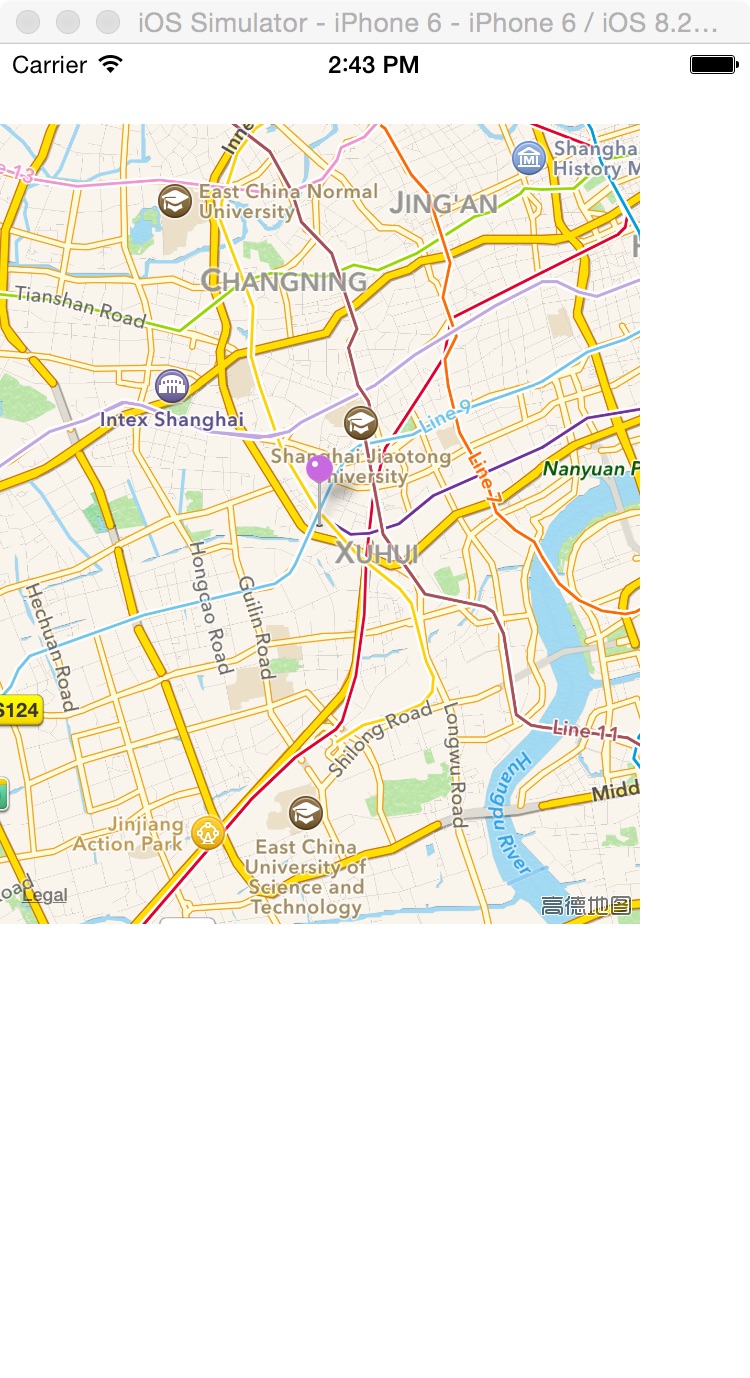
一,效果图。
二,工程图。

三,代码。
ViewController.h

#import <UIKit/UIKit.h>

#import <CoreLocation/CoreLocation.h>

#import "MapLocation.h"

@interface ViewController : UIViewController

<MKMapViewDelegate>

{

    MKMapView *_mapView;

    NSString *addressString;

}

@end
ViewController.m
#import "ViewController.h"

@interface ViewController ()

@end

@implementation ViewController

- (void)viewDidLoad {

    [super viewDidLoad];

    // Do any additional setup after loading the view.

    //调用系统自带的高德地图

    //显示当前某地的离线地图

    _mapView = [[MKMapView alloc] init];

    _mapView.frame = CGRectMake(0, 40, 320,400);

    _mapView.delegate = self;

    _mapView.mapType = MKMapTypeStandard;

    [self.view addSubview:_mapView];

    addressString=@"光启城";

    NSLog(@"---addressString---%@",addressString);

    [self geocodeQuery];

}

- (void)geocodeQuery{

    if (addressString == nil || [addressString length] == 0) {

        return;

    }

    CLGeocoder *geocoder = [[CLGeocoder alloc] init];

    [geocoder geocodeAddressString:addressString completionHandler:^(NSArray *placemarks, NSError *error) {

        NSLog(@"查询记录数:%ld",[placemarks count]);

        if ([placemarks count] > 0) {

            [_mapView removeAnnotations:_mapView.annotations];

        }

        for (int i = 0; i < [placemarks count]; i++) {

            CLPlacemark* placemark = placemarks[i];

            //调整地图位置和缩放比例

            MKCoordinateRegion viewRegion = MKCoordinateRegionMakeWithDistance(placemark.location.coordinate, 10000, 10000);

            [_mapView setRegion:viewRegion animated:YES];

            MapLocation *annotation = [[MapLocation alloc] init];

            annotation.streetAddress = placemark.thoroughfare;

            annotation.city = placemark.locality;

            annotation.state = placemark.administrativeArea;

            annotation.zip = placemark.postalCode;

            annotation.coordinate = placemark.location.coordinate;

            [_mapView addAnnotation:annotation];

        }

    }];

}

#pragma mark Map View Delegate Methods

- (MKAnnotationView *) mapView:(MKMapView *)theMapView viewForAnnotation:(id <MKAnnotation>) annotation {

    MKPinAnnotationView *annotationView

    = (MKPinAnnotationView *)[_mapView dequeueReusableAnnotationViewWithIdentifier:@"PIN_ANNOTATION"];

    if(annotationView == nil) {

        annotationView = [[MKPinAnnotationView alloc] initWithAnnotation:annotation

                                                         reuseIdentifier:@"PIN_ANNOTATION"];

    }

    annotationView.pinColor = MKPinAnnotationColorPurple;

    annotationView.animatesDrop = YES;

    annotationView.canShowCallout = YES;

    return annotationView;

}

- (void)mapView:(MKMapView *)mapView didUpdateUserLocation:(MKUserLocation *)userLocation

{

    _mapView.centerCoordinate = userLocation.location.coordinate;

}

- (void)mapViewDidFailLoadingMap:(MKMapView *)theMapView withError:(NSError *)error {

    NSLog(@"error : %@",[error description]);

}

@end
MapLocation.h
#import <MapKit/MapKit.h>

@interface MapLocation : NSObject<MKAnnotation>

//街道信息属性

@property (nonatomic, copy) NSString *streetAddress;

//城市信息属性

@property (nonatomic, copy) NSString *city;

//州、省、市信息

@property (nonatomic, copy) NSString *state;

//邮编

@property (nonatomic, copy) NSString *zip;

//地理坐标

@property (nonatomic, readwrite) CLLocationCoordinate2D coordinate;

@end
MapLocation.m
//地图调用函数

#import "MapLocation.h"

@implementation MapLocation

- (NSString *)title {

    return @"您的位置!";

}

- (NSString *)subtitle {

    NSMutableString *ret = [NSMutableString new];

    if (_state)

        [ret appendString:_state];

    if (_city)

        [ret appendString:_city];

    if (_city && _state)

        [ret appendString:@", "];

    if (_streetAddress && (_city || _state || _zip))

        [ret appendString:@" • "];

    if (_streetAddress)

        [ret appendString:_streetAddress];

    if (_zip)

        [ret appendFormat:@", %@", _zip];

    return ret;

}

@end
【代码笔记】iOS-离线地图的更多相关文章
- [转]ArcGIS移动客户端离线地图的几种解决方案
原文地址:http://blog.chinaunix.net/uid-10914615-id-3023158.html 移动GIS中,通常将数据分为两大类:basemap layer和operatio ...
- [转]MBTiles 离线地图演示 - 基于 Google Maps JavaScript API v3 + SQLite
MBTiles 是一种地图瓦片存储的数据规范,它使用SQLite数据库,可大大提高海量地图瓦片的读取速度,比通过瓦片文件方式的读取要快很多,适用于Android.IPhone等智能手机的离线地图存储. ...
- 支持WEB、Android、IOS的地图解决方案
转自原文 支持WEB.Android.IOS的地图解决方案 工具链 GIS工具集 OpenGeo Suite 包含PostGIS, GeoServer, GeoWebCache, OpenLayers ...
- 【BIGEMAP一键离线地图服务】
地址:http://www.bigemap.com/offlinemaps/ 首页 离线地图 代码示例 项目案例 开发文档 关于我们 [BIGEMAP一键离线服务] 1.快速搭建离线地图服务2 ...
- Web GIS 离线地图
Web GIS 离线地图 1,基于瓦片的离线地图下载 博客园 阿凡卢 提供了离线地图的下载工具,下载地址:http://pan.baidu.com/s/1hqvQr7e 具体使用见 参考资料2 阿凡卢 ...
- iOS原生地图开发详解
在上一篇博客中:http://my.oschina.net/u/2340880/blog/414760.对iOS中的定位服务进行了详细的介绍与参数说明,在开发中,地位服务往往与地图框架结合使用,这篇博 ...
- iOS原生地图开发进阶——使用导航和附近兴趣点检索
iOS原生地图开发进阶——使用导航和附近兴趣点检索 iOS中的mapKit框架对国际化的支持非常出色.在前些篇博客中,对这个地图框架的基础用法和标注与覆盖物的添加进行了详细的介绍,这篇博客将介绍两个更 ...
- ArcGIS for Android示例解析之离线地图-----LocalTiledLayer
转自:http://blog.csdn.net/wozaifeiyang0/article/details/7327423 LocalTiledLayer 看到这个标题是否是很激动,如题,该示例就是添 ...
- IOS开发笔记 IOS如何访问通讯录
IOS开发笔记 IOS如何访问通讯录 其实我是反对这类的需求,你说你读我的隐私,我肯定不愿意的. 幸好ios6.0 以后给了个权限控制.当打开app的时候你可以选择拒绝. 实现方法: [plain] ...
随机推荐
- 【Swift学习】Swift编程之旅---构造方法(十八)
初始化是为了使用某个类.结构体或枚举类型的实例而进行的准备过程.这个过程包括为每个存储的属性设置一个初始值,然后执行新实例所需的任何其他设置或初始化. 初始化是通过定义构造器(Initialize ...
- position属性absolute与relative 详解
最近一直在研究javascript脚本,熟悉DOM中CSS样式的各种定位属性,以前对这个属性不太了解,从网上找到两篇文章感觉讲得很透彻,收藏下来,唯恐忘记.一.解读absolute与relative ...
- JQuery01
一:JQuery 1 JQuery知识 *:就是让我们学会调用JQ插件,其实内部就是对JS的封装. *:jquery里面有三个文件, 第2个和第3个其实里面的内容是一样的,只是第三个对其进行了压缩,使 ...
- C语言学习020:可变参数函数
顾名思义,可变参数函数就是参数数量可变的函数,即函数的参数数量是不确定的,比如方法getnumbertotal()我们即可以传递一个参数,也可以传递5个.6个参数 #include <stdio ...
- 替换html元素
html: <div id='divContainer'> <div id='divBeReplaced'>被替换的元素</div> </div> 1. ...
- JavaScript星形评分
<!DOCTYPE html> <html xmlns="http://www.w3.org/1999/xhtml"> <head> <m ...
- 基于MVC4+EasyUI的Web开发框架经验总结(3)- 使用Json实体类构建菜单数据
最近花了不少时间在重构和进一步提炼我的Web开发框架上,力求在用户体验和界面设计方面,和Winform开发框架保持一致,而在Web上,我主要采用EasyUI的前端界面处理技术,走MVC的技术路线,在重 ...
- C# 如何调用WebServer函数
WebServer(ASMX)服务程序网站的编写简单总结. WebServer中遇到的问题 编写WebServer程序VS运行调试时如果出现 System.Data.OracleClient.Orac ...
- iOS阶段学习第18天笔记(Plist-Archiver-归档与解归档操作)
iOS学习(OC语言)知识点整理 一.归档与解归档的操作 1)归档是一个过程,将一个或多个对象存储起来,以便以后可以还原,包括将对象存入文件,以后再读取 将数据对象归档成plist文件 2)plist ...
- Scalaz(26)- Lens: 函数式不可变对象数据操作方式
scala中的case class是一种特殊的对象:由编译器(compiler)自动生成字段的getter和setter.如下面的例子: case class City(name:String, pr ...