
HTML的checkbox和radio的美化
checkbox和radio的美化
checkbox:
<style type="text/css">

    input[type="checkbox"]

    {

        display: none;

    }

        input[type="checkbox"] + label

        {

            display: inline-block;

            position: relative;

            border: solid 2px #99a1a7;

            width: 35px;

            height: 35px;

            line-height: 35px;

            border-radius: 4px;

        }

        input[type="checkbox"]:checked + label:after

        {

            content: '\2714';

            font-size: 25px;

            color: #99a1a7;

            width: 35px;

            height: 35px;

            line-height: 35px;

            position: absolute;

            text-align: center;

            background-color: #e9ecee;

        }

    .tab

    {

        margin-top: 20px;

        margin-bottom: 20px;

        width: 100%;

    }

        .tab td

        {

            border: solid 1px #f99;

            font-size: 25px;

            line-height: 39px;

        }

</style>

<table class="tab" cellpadding="0" cellspacing="0" style="border-collapse: collapse;">

    <tr>

        <td>

            <div align="center" style="float: left; height: 39px; width: 39px;">

                <input id="ck101" type="checkbox" />

                <label for="ck101"></label>

            </div>

            <div style="float: left; height: 39px; line-height: 39px; font-size: 25px; margin-left: 10px; margin-right: 20px;">

                测试101

            </div>

            <div align="center" style="float: left; height: 39px; width: 39px;">

                <input id="ck102" type="checkbox" />

                <label for="ck102"></label>

            </div>

            <div style="float: left; height: 39px; line-height: 39px; font-size: 25px; margin-left: 10px; margin-right: 20px;">

                测试102

            </div>

            测试

        </td>

        <td></td>

    </tr>

    <tr>

        <td style="text-align: center;">

            <div style="display: inline-block;">

                <div align="center" style="float: left; height: 39px; width: 39px;">

                    <input id="ck103" type="checkbox" />

                    <label for="ck103"></label>

                </div>

                <div style="float: left; height: 39px; line-height: 39px; font-size: 25px; margin-left: 10px; margin-right: 20px;">

                    测试103

                </div>

                <div align="center" style="float: left; height: 39px; width: 39px;">

                    <input id="ck104" type="checkbox" />

                    <label for="ck104"></label>

                </div>

                <div style="float: left; height: 39px; line-height: 39px; font-size: 25px; margin-left: 10px; margin-right: 20px;">

                    测试104

                </div>

                测试

            </div>

        </td>

        <td>测试

        </td>

    </tr>

</table>

<div style="border: solid 1px #f99; height: 39px; margin-top: 20px; margin-bottom: 20px;">

    <div align="center" style="float: left; height: 39px; width: 39px;">

        <input id="ck201" type="checkbox" />

        <label for="ck201"></label>

    </div>

    <div style="float: left; height: 39px; line-height: 39px; font-size: 25px; margin-left: 10px; margin-right: 20px;">

        测试201

    </div>

    <div align="center" style="float: left; height: 39px; width: 39px;">

        <input id="ck202" type="checkbox" />

        <label for="ck202"></label>

    </div>

    <div style="float: left; height: 39px; line-height: 39px; font-size: 25px; margin-left: 10px;">

        测试202

    </div>

</div>
radio:
<style type="text/css">

    input[type="radio"]

    {

        display: none;

    }

        input[type="radio"] + label

        {

            display: inline-block;

            position: relative;

            border: solid 2px #99a1a7;

            width: 25px;

            height: 25px;

            line-height: 25px;

            padding: 5px;

            border-radius: 19.5px;

        }

        input[type="radio"]:checked + label:after

        {

            content: ' ';

            font-size: 25px;

            color: #99a1a7;

            width: 25px;

            height: 25px;

            line-height: 25px;

            position: absolute;

            text-align: center;

            background-color: #99a1a7;

            border-radius: 12.5px;

        }

        input[type="radio"]:checked + label

        {

            background-color: #e9ecee;

        }

    .tab

    {

        margin-top: 20px;

        margin-bottom: 20px;

        width: 100%;

    }

        .tab td

        {

            border: solid 1px #f99;

            font-size: 25px;

            line-height: 39px;

        }

</style>

<table class="tab" cellpadding="0" cellspacing="0" style="border-collapse: collapse;">

    <tr>

        <td>

            <div align="center" style="float: left; height: 39px; width: 39px;">

                <input id="rd101" name="rd" type="radio" />

                <label for="rd101"></label>

            </div>

            <div style="float: left; height: 39px; line-height: 39px; font-size: 25px; margin-left: 10px; margin-right: 20px;">

                测试101

            </div>

            <div align="center" style="float: left; height: 39px; width: 39px;">

                <input id="rd102" name="rd" type="radio" />

                <label for="rd102"></label>

            </div>

            <div style="float: left; height: 39px; line-height: 39px; font-size: 25px; margin-left: 10px; margin-right: 20px;">

                测试102

            </div>

            测试

        </td>

        <td></td>

    </tr>

    <tr>

        <td style="text-align: center;">

            <div style="display: inline-block;">

                <div align="center" style="float: left; height: 39px; width: 39px;">

                    <input id="rd103" name="rd" type="radio" />

                    <label for="rd103"></label>

                </div>

                <div style="float: left; height: 39px; line-height: 39px; font-size: 25px; margin-left: 10px; margin-right: 20px;">

                    测试103

                </div>

                <div align="center" style="float: left; height: 39px; width: 39px;">

                    <input id="rd104" name="rd" type="radio" />

                    <label for="rd104"></label>

                </div>

                <div style="float: left; height: 39px; line-height: 39px; font-size: 25px; margin-left: 10px; margin-right: 20px;">

                    测试104

                </div>

                测试

            </div>

        </td>

        <td>测试

        </td>

    </tr>

</table>

<div style="border: solid 1px #f99; height: 39px; margin-top: 20px; margin-bottom: 20px;">

    <div align="center" style="float: left; height: 39px; width: 39px;">

        <input id="rd201" name="rd" type="radio" />

        <label for="rd201"></label>

    </div>

    <div style="float: left; height: 39px; line-height: 39px; font-size: 25px; margin-left: 10px; margin-right: 20px;">

        测试201

    </div>

    <div align="center" style="float: left; height: 39px; width: 39px;">

        <input id="rd202" name="rd" type="radio" />

        <label for="rd202"></label>

    </div>

    <div style="float: left; height: 39px; line-height: 39px; font-size: 25px; margin-left: 10px;">

        测试202

    </div>

</div>
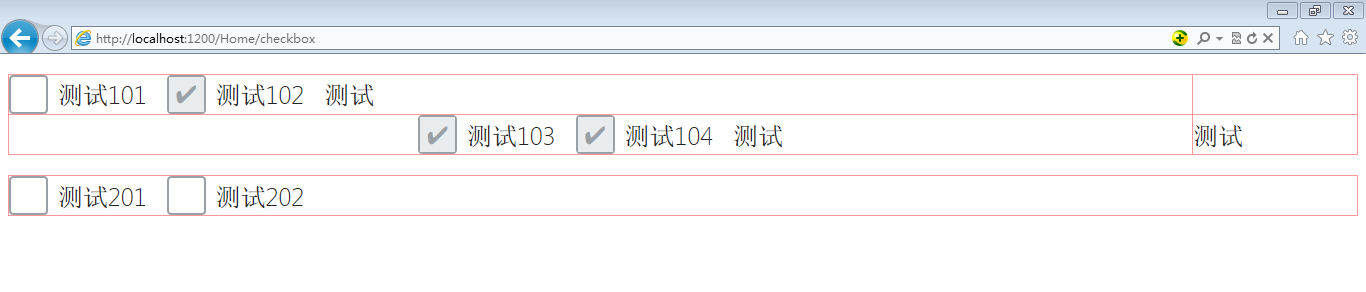
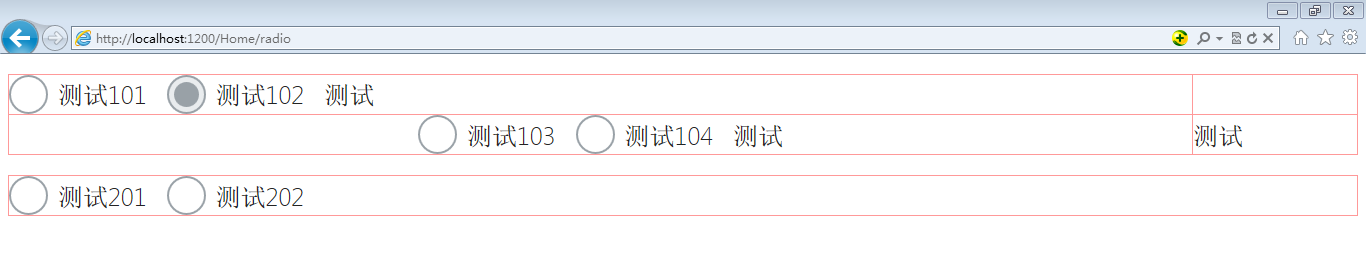
效果图:
HTML的checkbox和radio的美化的更多相关文章
- css input checkbox和radio样式美化
参考:https://segmentfault.com/a/1190000004553258 http://www.haorooms.com/post/css_mh_ck_radio 思路都一样的,先 ...
- jquery插件:select、checkbox、radio的美化
引用文件: <script src=”/InputPick/jqInputFormat.js” type=”text/javascript”></script> <li ...
- [原创]纯JS实现网页中多选复选框checkbox和单选radio的美化效果
图片素材: 最终效果图: <html><title> 纯JS实现网页中多选复选框checkbox和单选radio的美化效果</title><head>& ...
- input美化 checkbox和radio样式
input美化 checkbox和radio样式 看惯了input[checkbox]和input[radio]默认样式,有没有想要改变一下呢?比如下面的样式: 比起html默认的样式,上图这些 ...
- 论checkbox和radio的样式美化问题
如果你下定决心要改变现有的默认的checkbox和radio的样式,那么我目前有两种办法: 1.自己动手写一个,也就是自己写代码实现将input的checkbox和radio默认的样式隐藏掉,使用绝对 ...
- checkbox和radio的样式美化问题
如果你下定决心要改变现有的默认的checkbox和radio的样式,那么我目前有两种办法: 1.自己动手写一个,也就是自己写代码实现将input的checkbox和radio默认的样式隐藏掉,使用绝对 ...
- 利用纯CSS美化checkbox和radio和滑动按钮的实现
W3C提供的CheckBox和radio的原始样式非常的丑,而且在不同的额浏览器表现还不一样,使用常规的方法添加样式没法进行修改样式 一, 单选按钮 <html> <head> ...
- 自定义表单样式之checkbox和radio
1,起因 最近在工作中要实现自定义式的radio样式,而我们通常使用的时默认的样式,因为自己实在想不到解决的方法,于是开始搜索,最终看到了不错的解决办法,可以完美解决我们遇到的问题. 2,原理 大家都 ...
- Css实现checkbox及radio样式自定义
前言 checkbox和radio样式自定义在网页中是很常见的, 比如在进行表单输入时性别的选择,用户注册时选择已阅读用户协议.随着用户对产品体验要求越来越高,我们都会对checkbox和radio重 ...
随机推荐
- 每周一书-《Bootstrap基础教程》
首先说明,本周活动有效时间为8月15日到21日.本周为大家送出的书是有电子工业出版,贺臣/陈鹏编著的<Bootsrap基础教程>,为前端入门必读书籍. 下面是从书中摘录的内容. “ Boo ...
- JavaScript很牛
几年前,我从来没有想过现在的JavaScript竟然会变得几乎无处不在.下面是几个要关注JavaScript的原因. 首先,我认为JavaScript能够得到普及的主要原因之一是,JavaScript ...
- [.net 面向对象编程基础] (22) 事件
[.net 面向对象编程基础] (22) 事件 事件(Event)是学习.net面向对象编程很重要的一部分,在学习事件之前,我们实际上已经在很多地方使用了事件,比如控件的click事件等,这些都是. ...
- [MFC] 梳理一个简单的图片处理桌面软件中用到的MFC控件技巧
前言 前些天应好友之拖,帮忙设计一个简单的图像处理的小软件.朋友把核心算法封装好了,但是是用openCV类似于console的编程环境,要我在此基础上改成MFC桌面程序.下图是做成之后的效果: 我是 ...
- Stealth视频教程学习笔记(第二章)
Stealth视频教程学习笔记(第二章) 本文是对Unity官方视频教程Stealth的学习笔记.在此之前,本人整理了Stealth视频的英文字幕,并放到了优酷上.本文将分别对各个视频进行学习总结,提 ...
- [译]C++, Java和C#的编译过程解析
1.1.1 摘要 我们知道计算机不能直接理解高级语言,它只能理解机器语言,所以我们必须要把高级语言翻译成机器语言,这样计算机才能执行高级语言编写的程序,在接下来的博文中,我们将介绍非托管和托管语音的编 ...
- lua表排序
对于lua的table排序问题,一般的按照value值来排序,使用table.sort( needSortTable , func)即可(可以根据自己的需要重写func,否则会根据默认来:默认的情形之 ...
- lua table序列化和反序列化
function serialize(obj) local lua = "" local t = type(obj) if t == "number" then ...
- 谷歌大牛 Rob Pike 的 5 个编程原则
谷歌大牛 Rob Pike 的 5 个编程原则 简介: Rob Pike,目前谷歌公司最著名的软件工程师之一,曾是贝尔实验室Unix开发团队成员,Plan9操作系统开发的主要领导人,Inferno操作 ...
- java 线程协作 yield()
yield():方法的定义 调用yield方法会让当前线程交出CPU权限,让CPU去执行其他的线程. 但是yield不能控制具体的交出CPU的时间,另外,yield方法只能让拥有相同优先级的线程有获取 ...