
objective-c高德地图时时定位
本人开发的开发者技术变现资源聚集地,大家支持下,下面是网址
https://www.baiydu.com
这篇随笔是对上一遍servlet接口的实现。
一、项目集成高德地图
应为我这个项目使用了cocopods这个第三方库管理工具,所以只需要很简单的步骤,就能将高德地图集成到项目中,如果你没使用过这工具,那就直接下载对应的sdk导入即可,因为这个工具的安装还是比较麻烦的,需要翻墙。 既然我用的这种方式,下面我就贴相关的使用接图。
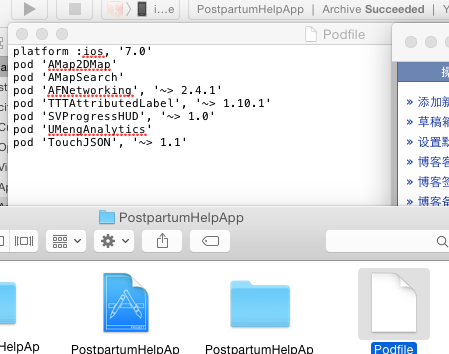
如果你项目中已经安装好了cocopods那么你只需直接在podfile中增加 pod 'Amap2DMap' 和 pod 'AmapSearch' 这两句即可, 第一个涉及到的地图功能主要是定位,地图展示...
第二个涉及到的主要功能是GPS定位,这里为什么要使用第二个? 因为我们传递参数时需要给servlet传递一个当前城市的名称,就需要它来执行一个逆地理编码获取城市名,
然后在打开打开终端 cd 拖入项目文件夹 pod install稍等即可安装。
二、时时定位
引入高德地图两个类。
#import <AMapSearchKit/AMapSearchAPI.h>
#import <MAMapKit/MAMapKit.h>
下面截图所需代理及涉及到的参数。。

上面截图中关于我们实现这个功能需要使用到的代理只有一个高德地图的:MAMapViewDelegate
1、在didFinishLaunchingWithOptions授权高德地图
[MAMapServices sharedServices].apiKey = (NSString *)APIKey;
2、启动时时定位,间隔时间为15秒 类中有时时定位的代理,但是被我使用代码控制了的,因为系统自带的不能控制定位间隔时间
_nstimer=[NSTimer scheduledTimerWithTimeInterval:15 target:self selector:@selector(timerFired:) userInfo:nil repeats:NO];
3、MAMapViewDelegate 代理实现的方法,服务人员时时定位,经纬度提交高德云图库
↓下面这个方法提示使用APP的人员是否允许该应用使用定位功能。
- (void)mapViewWillStartLocatingUser:(MAMapView *)mapView

{

    if(![CLLocationManager locationServicesEnabled]){

        UIAlertView * alertView = [[UIAlertView alloc]initWithTitle:@"定位失败" message:@"请在手机设置中开启定位功能\n开启步骤:设置 > 隐私 > 位置 > 定位服务" delegate:self cancelButtonTitle:@"确定" otherButtonTitles:nil, nil];

        [alertView show];

        return;

    }else{

        if ([CLLocationManager authorizationStatus] != kCLAuthorizationStatusAuthorizedAlways) {

            UIAlertView * alertView = [[UIAlertView alloc]initWithTitle:@"定位失败" message:@"请在手机设置中开启定位功能\n开启步骤:设置 > 隐私 > 位置 > 定位服务下《***》应用" delegate:self cancelButtonTitle:@"确定" otherButtonTitles:nil, nil];

            [alertView show];

            return;

        }

    }

}
↓下面的代码是时时定位的,15秒一次,并且将定位后的经纬度提交到高德云图库中去
- (void)mapView:(MAMapView *)mapView didUpdateUserLocation:(MAUserLocation *)userLocation

{

    _mapView=nil;

      [_nstimer invalidate];

    if ([WDUser currentUser].userType==) {

        longitude=[NSString stringWithFormat:@"%f%@", mapView.userLocation.coordinate.longitude,@","];//@"106.546128";//

        latitude= [NSString stringWithFormat:@"%f", mapView.userLocation.coordinate.latitude];

        locationGroup=[NSString stringWithFormat:@"%@%@",longitude,latitude];

        NSString *healtherName=[NSString stringWithFormat:@"%d,康复师",[WDUser currentUser].healterLoginTypes];

        NSMutableDictionary *postParameterDic=[[NSMutableDictionary alloc]init];

        [postParameterDic setObject:@"?" forKey:@"tableid"];

        [postParameterDic setObject:@"?" forKey:@"key"];

        NSMutableDictionary *dataDictionary=[[NSMutableDictionary alloc]init];

        NSString *yunClouldReturnId=[NSString stringWithFormat:@"%d",[WDUser currentUser].healtherClouldMapId];

        [dataDictionary setObject:yunClouldReturnId forKey:@"_id"];

        [dataDictionary setObject:healtherName forKey:@"_name"];

        [dataDictionary setObject:locationGroup forKey:@"_location"];//点后6位 格式示例:104.394729,31.125698

        NSString *dateStr=[AFDataDefine shareGetStr:dataDictionary];

        [postParameterDic setObject:dateStr forKey:@"data"];

        // 设置返回格式

        AFHTTPRequestOperationManager *postManager = [AFHTTPRequestOperationManager manager];

        postManager.responseSerializer.acceptableContentTypes =  [NSSet setWithObjects:@"text/html",@"charset=UTF-8",@"Content-Type",@"application/x-www-form-urluncoded",nil];;

        postManager.requestSerializer = [AFJSONRequestSerializer serializer];

        postManager.responseSerializer = [AFHTTPResponseSerializer serializer];

        [postManager GET:@"http://yuntuapi.amap.com/datamanage/data/update" parameters:postParameterDic success:^(AFHTTPRequestOperation *operation, id responseObject)

         {

             //  NSString *result = [[NSString alloc] initWithData:responseObject encoding:NSUTF8StringEncoding];

               [_nstimer invalidate];

            _nstimer=[NSTimer scheduledTimerWithTimeInterval: target:self selector:@selector(timerFired:) userInfo:nil repeats:NO];

         } failure:^(AFHTTPRequestOperation *operation, NSError *error) {

             //  NSLog(@"1");

               [_nstimer invalidate];

            _nstimer=[NSTimer scheduledTimerWithTimeInterval: target:self selector:@selector(timerFired:) userInfo:nil repeats:NO];

         }

         ];

    }

  else

  {

        [_nstimer invalidate];

     _nstimer=[NSTimer scheduledTimerWithTimeInterval: target:self selector:@selector(timerFired:) userInfo:nil repeats:NO];

  }

}
↓下面的代码是timer控件调用的方法
-(void)timerFired:(NSTimer *)timer{

    [_nstimer invalidate];

    _mapView=[[MAMapView alloc]init];

    _mapView.userTrackingMode = ,

    _mapView.showsUserLocation = YES;

    _mapView.userTrackingMode = MAUserTrackingModeNone;

    _mapView.delegate=self;

}
↓下面的代码是应用进入后台,以及从后台进入前台时的定位处理
- (void)applicationDidEnterBackground:(UIApplication *)application {//在后台

      _mapView=nil;

     UIApplication *app = [UIApplication sharedApplication];

         __block UIBackgroundTaskIdentifier bgTask = [app beginBackgroundTaskWithExpirationHandler:^{

             dispatch_async(dispatch_get_main_queue(), ^{

                 if (bgTask != UIBackgroundTaskInvalid) {

                     [app endBackgroundTask:bgTask];

                     bgTask = UIBackgroundTaskInvalid;

                 }

             });

         }];

         dispatch_async(dispatch_get_global_queue(DISPATCH_QUEUE_PRIORITY_DEFAULT, ), ^{

          [_nstimer invalidate];

           _nstimer=[NSTimer scheduledTimerWithTimeInterval: target:self selector:@selector(timerFired:) userInfo:nil repeats:NO];

             [[NSRunLoop currentRunLoop] addTimer:_nstimer forMode:NSRunLoopCommonModes];

             [[NSRunLoop currentRunLoop] run];

             dispatch_async(dispatch_get_main_queue(), ^{

                 if (bgTask != UIBackgroundTaskInvalid) {

                     [app endBackgroundTask:bgTask];

                     bgTask = UIBackgroundTaskInvalid;

                 }

             });

         });

      }

- (void)applicationWillEnterForeground:(UIApplication *)application {//在前台

   _mapView=nil;

    [_nstimer invalidate];

   _nstimer=[NSTimer scheduledTimerWithTimeInterval: target:self selector:@selector(timerFired:) userInfo:nil repeats:NO];

    [[NSRunLoop currentRunLoop] addTimer:_nstimer forMode:NSRunLoopCommonModes];

}
上面的方法实现的主要功能就是时时定位,然后网高德云图中传递服务人员的位置经纬度,它们针对的是服务人员。
4:被服务人员跳转服务人员页面,提交经纬度和地理位置给 servlet接口处理。
这个方法针对的是被服务人员,因为被服务人员也需要提供自己当前经纬度,但是不是时时提供,只是跳转到服务人员页面时,才提供,而且是直接调用servlet写的接口,
而且被服务人员还需要提供当前城市的名称,所以这里还需要使用一个GPS定位,通过经纬度去查询地理位置名称。
↓下面的代码是申明高德地图
 _longitude=[[NSString alloc]init];

            _latitude=[[NSString alloc]init];

            computeFrame=self.LeftButton.frame;

            self.mapView=[[MAMapView alloc]initWithFrame:CGRectMake(, , , )];

            self.mapView.userTrackingMode = ,

            _mapView.showsUserLocation = YES;

            self.mapView.userTrackingMode = MAUserTrackingModeNone;

            self.mapView.delegate=self;
↓下面的代码主要是GPS定位获取城市名称。
- (void)mapViewDidStopLocatingUser:(MAMapView *)mapView

{

    _longitude=[NSString stringWithFormat:@"%f",mapView.userLocation.location.coordinate.longitude];//@"106.546128";//

    _latitude= [NSString stringWithFormat:@"%f",mapView.userLocation.location.coordinate.latitude];          //@"29.559153";

    [WDUser currentUser].longitude=_longitude;

    [WDUser currentUser].latitude=_latitude;

    [[WDUser currentUser] saveUserInfo];

    _search = [[AMapSearchAPI alloc] initWithSearchKey:@"?" Delegate:self];

    AMapReGeocodeSearchRequest *regeoRequest = [[AMapReGeocodeSearchRequest alloc] init];

    regeoRequest.searchType = AMapSearchType_ReGeocode;

    regeoRequest.location =[AMapGeoPoint locationWithLatitude:[_latitude floatValue] longitude:[_longitude floatValue]];

    regeoRequest.radius = ;

    regeoRequest.requireExtension = YES;

    //发起逆地理编码

    [_search AMapReGoecodeSearch: regeoRequest];

}

//逆编码查询代理

- (void)onReGeocodeSearchDone:(AMapReGeocodeSearchRequest *)request response:(AMapReGeocodeSearchResponse *)response

{

    if(response.regeocode != nil)

    {

        _compantAddress=response.regeocode.addressComponent;

        _currentCityName=_compantAddress.province;

        _currentCityName=  [_currentCityName stringByReplacingOccurrencesOfString:@"市" withString:@""];

        _currentCityName=  [_currentCityName stringByReplacingOccurrencesOfString:@"省" withString:@""];

        [ WDUser currentUser].currentCity=_currentCityName;

        [[WDUser currentUser] saveUserInfo];

        [SVProgressHUD dismiss];

    }

    else{

        showMessage(@"请检查网是否畅通!");

    }

}

- (void)mapView:(MAMapView *)mapView didUpdateUserLocation:(MAUserLocation *)userLocation

{

    mapView.showsUserLocation = NO;

}//联系客户
最后服务人员将这些获取的参数提交到servlet处理。
本人创业做的一款androidApp, 下载量已经有2000多万,各种当前热门的网络手机奖励红包全部集成,另外还有热门电影和淘宝高额优惠券!很适合各类型的用户。

objective-c高德地图时时定位的更多相关文章
- Android Studio之高德地图实现定位和3D地图显示
在应用开发中,地图开发是经常需要使用的“组件”,国内比较出名的是就是百度地图和高德地图. 此博客讲的是高德地图实现定位和3D地图显示,并标注相应位置,话不多说,先看看效果,在上代码. 效果如图: 首先 ...
- [OC][地图] 高德地图之定位初探(一)
使用前的说明 高德地图开放平台的iOS定位模块网址-->http://lbs.amap.com/api/ios-location-sdk/summary/ 高德地图有Web端.android平台 ...
- Unity与Android交互-Unity接入高德地图实现定位以及搜索周边的功能(使用Android Studio)详细操作
刚进公司给安排的任务就是Unity接入高德地图,算是踩了不少坑总算做出来了,抽点时间写个博客记录一下 废话不多说 先上效果图 获取定位并根据手机朝向显示周边信息 使用的Unity ...
- vue2使用高德地图vue-amap定位以及AMapUI标注
前言 最近在vue里使用了高德地图vue-amap以及AMapUI,我在这里就说下如何在vue2里引入vue-amap和AmapUI以及使用定位 (在这里默认你已经安装了vue-cli) 安装 npm ...
- iOS高德地图SDK定位和搜索附近信息的具体使用
1.显示地图.定位.显示当前位置. 导入你需要的功能的头文件,申明全局变量,代理方法等等. 初始化地图,在控制器即将显示额时候打开定位和跟踪用户,这里对参数不懂的话康忙进去都有注释. 对了.i ...
- js高德地图手机定位
<!DOCTYPE HTML PUBLIC "-//W3C//DTD HTML 4.01 Transitional//EN"> <html> <hea ...
- cordova 配置 高德地图sdk定位
获取 sha1 打开 cmd 1. cd .android 2. keytool -list -v -keystore debug.keystore 3. 输入密钥: android 4. 复制 sh ...
- Android学习十一:高德地图使用
写这篇文章主要有三个目的: 1.使用高德地图api定位 2.获取天气数据 3.编程练手 文件结构 清单文件信息说明: <?xml version="1.0" encoding ...
- 高德地图添加marker及反地理编码获取POI
项目中集成百度.高德.腾讯地图已是司空见惯的事情,今天我总结了一下项目中用到的高德地图常用的功能: 1.展示高德地图并定位显示定位图标: 2.添加实时大头针: 3.反地理编码获取周围兴趣点 效果如下: ...
随机推荐
- WebApi系列~QQ互联的引入(QConnectSDK)
回到目录 感谢与改进 首先要感谢张善友老兄为大家封装的这个DLL,它将QQ官方的相关API都集成到了这个里面,这对于开发人员来说,是个福音,有人会说,为什么QQ官方没有提供.net版的SDK呢,在这里 ...
- EF架构~引入规约(Specification)模式,让程序扩展性更强
回到目录 规约(Specification)模式:第一次看到这东西是在microsoft NLayer项目中,它是微软对DDD的解说,就像petshop告诉了我们MVC如何使用一样,这个规约模式最重要 ...
- struts2学习笔记之七:Result类型
一:关于Struts2的type类型,也就是Result类型,他们都实现了共同的接口Result,都实现了execute方法 他们体现了策略模式,具体Result类型参见:struts-default ...
- Atitit数据库层次架构表与知识点 attilax 总结
Atitit数据库层次架构表与知识点 attilax 总结 第一阶段,大概理论(三五天 数据库的类型,网状,层次,树形数据库,kv数据库.Oodb Er模型 sql 并发控制与lock Acid ...
- 《PHP Manual》阅读笔记1
1.phpinfo() 从 PHP 获取系统信息. 2.$_SERVER 只是 PHP 自动全局化的变量之一.它包含了 web 服务器提供的所有信息,被称为超全局变量. 3.htmlspecialch ...
- C语言数组空间的初始化详解
数组空间的初始化就是为每一个标签地址赋值.按照标签逐一处理.如果我们需要为每一个内存赋值,假如有一个int a[100];我们就需要用下标为100个int类型的空间赋值.这样的工作量是非常大的,我们就 ...
- 了解HTML表单之13个表单控件
目录 传统控件 button select option optgroup textarea fieldset legend label 新增控件 datalist keygen output pro ...
- 《BI那点儿事》Microsoft 时序算法——验证神奇的斐波那契数列
斐波那契数列指的是这样一个数列 0, 1, 1, 2, 3, 5, 8, 13, 21, 34, 55, 89, 144, 233,377,610,987,1597,2584,4181,6765,10 ...
- [Qt5] How to connect c++ with QML
Qt5处于过度阶段,架构繁琐,学习成本不低.尤其是UI代码竟然被重写,变了天. Qt中的c++可能是连接OPENCV与QML的一个不错的桥梁,在此学习这部分实用的技术. Reference: http ...
- $.when(deferreds)
作者:禅楼望月(http://www.cnblogs.com/yaoyinglong ) 1 引子 上一篇博文中介绍的Deferred,它表示一个延迟对象.但是很多时候,我们需要在多个延迟对象(异步代 ...