
Python游戏开发——打砖块
打砖块游戏向来大家也不会很陌生,今天来用python来开发一下这个小游戏
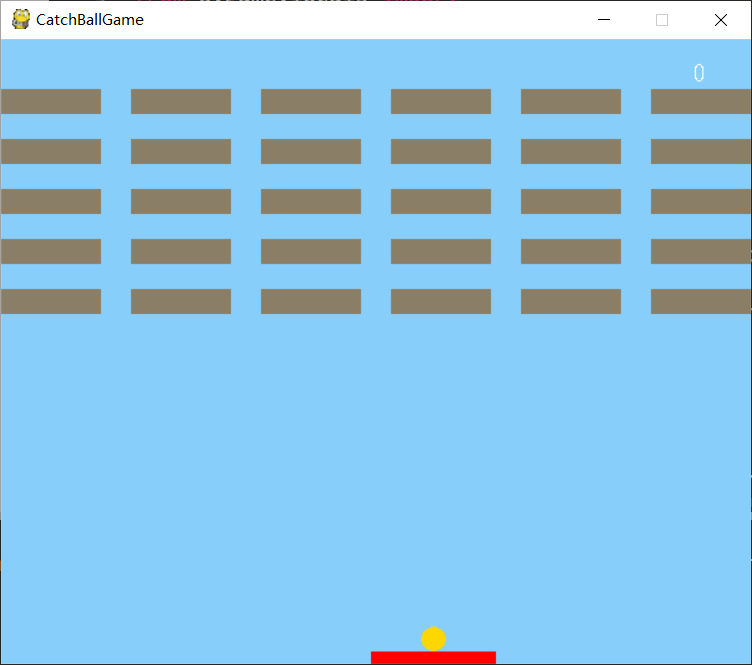
1.引用对应数据库
import pygame

from pygame.locals import *

import sys,random,time,math
2.设计游戏窗口初始数据
定义窗口内容,内容主要包括屏幕大小、标题、背景颜色。
def __init__(self,*args,**kw):

        self.window_length = 600

        self.window_wide = 500

        #绘制游戏窗口,设置窗口尺寸

        self.game_window = pygame.display.set_mode((self.window_length,self.window_wide))

        #设置游戏窗口标题

        pygame.display.set_caption("CatchBallGame")

        #定义游戏窗口背景颜色参数

        self.window_color = (135,206,250)

    def backgroud(self):

        #绘制游戏窗口背景颜色

        self.game_window.fill(self.window_color)
3.设计球类
class Ball(object):

    '''创建球类'''

    def __init__(self,*args,**kw):

        #设置球的半径、颜色、移动速度参数

        self.ball_color = (255,215,0)

        self.move_x = 1

        self.move_y = 1

        self.radius = 10

    def ballready(self):

        #设置球的初始位置、

        self.ball_x = self.mouse_x

        self.ball_y = self.window_wide-self.rect_wide-self.radius

        #绘制球,设置反弹触发条件

        pygame.draw.circle(self.game_window,self.ball_color,(self.ball_x,self.ball_y),self.radius)

    def ballmove(self):

        #绘制球,设置反弹触发条件

        pygame.draw.circle(self.game_window,self.ball_color,(self.ball_x,self.ball_y),self.radius)

        self.ball_x += self.move_x

        self.ball_y -= self.move_y

        #调用碰撞检测函数

        self.ball_window()

        self.ball_rect()

        #每接5次球球速增加一倍

        if self.distance < self.radius:

            self.frequency += 1

            if self.frequency == 5:

                self.frequency = 0

                self.move_x += self.move_x

                self.move_y += self.move_y

                self.point += self.point

        #设置游戏失败条件

        if self.ball_y > 520:

            self.gameover = self.over_font.render("Game Over",False,(0,0,0))

            self.game_window.blit(self.gameover,(100,130))

            self.over_sign = 1
4.设计球拍类
class Rect(object):

    '''创建球拍类'''

    def __init__(self,*args,**kw):

        #设置球拍颜色参数

        self.rect_color = (255,0,0)

        self.rect_length = 100

        self.rect_wide = 10

    def rectmove(self):

        #获取鼠标位置参数

        self.mouse_x,self.mouse_y = pygame.mouse.get_pos()

        #绘制球拍,限定横向边界

        if self.mouse_x >= self.window_length-self.rect_length//2:

            self.mouse_x = self.window_length-self.rect_length//2

        if self.mouse_x <= self.rect_length//2:

            self.mouse_x = self.rect_length//2

        pygame.draw.rect(self.game_window,self.rect_color,((self.mouse_x-self.rect_length//2),(self.window_wide-self.rect_wide),self.rect_length,self.rect_wide))
5.设计砖块类
class Brick(object):

    def __init__(self,*args,**kw):

        #设置砖块颜色参数

        self.brick_color = (139,126,102)

        self.brick_list = [[1,1,1,1,1,1],[1,1,1,1,1,1],[1,1,1,1,1,1],[1,1,1,1,1,1],[1,1,1,1,1,1]]

        self.brick_length = 80

        self.brick_wide = 20

    def brickarrange(self):

        for i in range(5):

            for j in range(6):

                self.brick_x = j*(self.brick_length+24)

                self.brick_y = i*(self.brick_wide+20)+40

                if self.brick_list[i][j] == 1:

                    #绘制砖块

                    pygame.draw.rect(self.game_window,self.brick_color,(self.brick_x,self.brick_y,self.brick_length,self.brick_wide))

                    #调用碰撞检测函数

                    self.ball_brick()

                    if self.distanceb < self.radius:

                        self.brick_list[i][j] = 0

                        self.score += self.point

        #设置游戏胜利条件

        if self.brick_list == [[0,0,0,0,0,0],[0,0,0,0,0,0],[0,0,0,0,0,0],[0,0,0,0,0,0],[0,0,0,0,0,0]]:

            self.win = self.win_font.render("You Win",False,(0,0,0))

            self.game_window.blit(self.win,(100,130))

            self.win_sign = 1
6.设计分数类
class Score(object):

    '''创建分数类'''

    def __init__(self,*args,**kw):

        #设置初始分数

        self.score = 0

        #设置分数字体

        self.score_font = pygame.font.SysFont('arial',20)

        #设置初始加分点数

        self.point = 1

        #设置初始接球次数

        self.frequency = 0

    def countscore(self):

        #绘制玩家分数

        my_score = self.score_font.render(str(self.score),False,(255,255,255))

        self.game_window.blit(my_score,(555,15))

class GameOver(object):

    '''创建游戏结束类'''

    def __init__(self,*args,**kw):

        #设置Game Over字体

        self.over_font = pygame.font.SysFont('arial',80)

        #定义GameOver标识

        self.over_sign = 0

class Win(object):

    '''创建游戏胜利类'''

    def __init__(self,*args,**kw):

        #设置You Win字体

        self.win_font = pygame.font.SysFont('arial',80)

        #定义Win标识

        self.win_sign = 0
7.设计碰撞事件类
class Collision(object):

    '''碰撞检测类'''

    #球与窗口边框的碰撞检测

    def ball_window(self):

        if self.ball_x <= self.radius or self.ball_x >= (self.window_length-self.radius):

            self.move_x = -self.move_x

        if self.ball_y <= self.radius:

            self.move_y = -self.move_y

    #球与球拍的碰撞检测

    def ball_rect(self):

        #定义碰撞标识

        self.collision_sign_x = 0

        self.collision_sign_y = 0

        if self.ball_x < (self.mouse_x-self.rect_length//2):

            self.closestpoint_x = self.mouse_x-self.rect_length//2

            self.collision_sign_x = 1

        elif self.ball_x > (self.mouse_x+self.rect_length//2):

            self.closestpoint_x = self.mouse_x+self.rect_length//2

            self.collision_sign_x = 2

        else:

            self.closestpoint_x = self.ball_x

            self.collision_sign_x = 3

        if self.ball_y < (self.window_wide-self.rect_wide):

            self.closestpoint_y = (self.window_wide-self.rect_wide)

            self.collision_sign_y = 1

        elif self.ball_y > self.window_wide:

            self.closestpoint_y = self.window_wide

            self.collision_sign_y = 2

        else:

            self.closestpoint_y = self.ball_y

            self.collision_sign_y = 3

        #定义球拍到圆心最近点与圆心的距离

        self.distance = math.sqrt(math.pow(self.closestpoint_x-self.ball_x,2)+math.pow(self.closestpoint_y-self.ball_y,2))

        #球在球拍上左、上中、上右3种情况的碰撞检测

        if self.distance < self.radius and self.collision_sign_y == 1 and (self.collision_sign_x == 1 or self.collision_sign_x == 2):

            if self.collision_sign_x == 1 and self.move_x > 0:

                self.move_x = - self.move_x

                self.move_y = - self.move_y

            if self.collision_sign_x == 1 and self.move_x < 0:

                self.move_y = - self.move_y

            if self.collision_sign_x == 2 and self.move_x < 0:

                self.move_x = - self.move_x

                self.move_y = - self.move_y

            if self.collision_sign_x == 2 and self.move_x > 0:

                self.move_y = - self.move_y

        if self.distance < self.radius and self.collision_sign_y == 1 and self.collision_sign_x == 3:

            self.move_y = - self.move_y

        #球在球拍左、右两侧中间的碰撞检测

        if self.distance < self.radius and self.collision_sign_y == 3:

            self.move_x = - self.move_x

    #球与砖块的碰撞检测

    def ball_brick(self):

        #定义碰撞标识

        self.collision_sign_bx = 0

        self.collision_sign_by = 0

        if self.ball_x < self.brick_x:

            self.closestpoint_bx = self.brick_x

            self.collision_sign_bx = 1

        elif self.ball_x > self.brick_x+self.brick_length:

            self.closestpoint_bx = self.brick_x+self.brick_length

            self.collision_sign_bx = 2

        else:

            self.closestpoint_bx = self.ball_x

            self.collision_sign_bx = 3

        if self.ball_y < self.brick_y:

            self.closestpoint_by = self.brick_y

            self.collision_sign_by = 1

        elif self.ball_y > self.brick_y+self.brick_wide:

            self.closestpoint_by = self.brick_y+self.brick_wide

            self.collision_sign_by = 2

        else:

            self.closestpoint_by = self.ball_y

            self.collision_sign_by = 3

        #定义砖块到圆心最近点与圆心的距离

        self.distanceb = math.sqrt(math.pow(self.closestpoint_bx-self.ball_x,2)+math.pow(self.closestpoint_by-self.ball_y,2))

        #球在砖块上左、上中、上右3种情况的碰撞检测

        if self.distanceb < self.radius and self.collision_sign_by == 1 and (self.collision_sign_bx == 1 or self.collision_sign_bx == 2):

            if self.collision_sign_bx == 1 and self.move_x > 0:

                self.move_x = - self.move_x

                self.move_y = - self.move_y

            if self.collision_sign_bx == 1 and self.move_x < 0:

                self.move_y = - self.move_y

            if self.collision_sign_bx == 2 and self.move_x < 0:

                self.move_x = - self.move_x

                self.move_y = - self.move_y

            if self.collision_sign_bx == 2 and self.move_x > 0:

                self.move_y = - self.move_y

        if self.distanceb < self.radius and self.collision_sign_by == 1 and self.collision_sign_bx == 3:

            self.move_y = - self.move_y

        #球在砖块下左、下中、下右3种情况的碰撞检测

        if self.distanceb < self.radius and self.collision_sign_by == 2 and (self.collision_sign_bx == 1 or self.collision_sign_bx == 2):

            if self.collision_sign_bx == 1 and self.move_x > 0:

                self.move_x = - self.move_x

                self.move_y = - self.move_y

            if self.collision_sign_bx == 1 and self.move_x < 0:

                self.move_y = - self.move_y

            if self.collision_sign_bx == 2 and self.move_x < 0:

                self.move_x = - self.move_x

                self.move_y = - self.move_y

            if self.collision_sign_bx == 2 and self.move_x > 0:

                self.move_y = - self.move_y

        if self.distanceb < self.radius and self.collision_sign_by == 2 and self.collision_sign_bx == 3:

            self.move_y = - self.move_y

        #球在砖块左、右两侧中间的碰撞检测

        if self.distanceb < self.radius and self.collision_sign_by == 3:

            self.move_x = - self.move_x
8.主函数
class Main(GameWindow,Rect,Ball,Brick,Collision,Score,Win,GameOver):

    '''创建主程序类'''

    def __init__(self,*args,**kw):

        super(Main,self).__init__(*args,**kw)

        super(GameWindow,self).__init__(*args,**kw)

        super(Rect,self).__init__(*args,**kw)

        super(Ball,self).__init__(*args,**kw)

        super(Brick,self).__init__(*args,**kw)

        super(Collision,self).__init__(*args,**kw)

        super(Score,self).__init__(*args,**kw)

        super(Win,self).__init__(*args,**kw)

        #定义游戏开始标识

        start_sign = 0

        while True:

            self.backgroud()

            self.rectmove()

            self.countscore()

            if self.over_sign == 1 or self.win_sign == 1:

                break

            #获取游戏窗口状态

            for event in pygame.event.get():

                if event.type == pygame.QUIT:

                    sys.exit()

                if event.type == MOUSEBUTTONDOWN:

                    pressed_array = pygame.mouse.get_pressed()

                    if pressed_array[0]:

                        start_sign = 1

            if start_sign == 0:

                self.ballready()

            else:

                self.ballmove()

            self.brickarrange()

            #更新游戏窗口

            pygame.display.update()

            #控制游戏窗口刷新频率

            time.sleep(0.010)

if __name__ == '__main__':

    pygame.init()

    pygame.font.init()

    catchball = Main()
Python游戏开发——打砖块的更多相关文章
- Coco2d-x android win7 Python 游戏开发环境的搭建
1:我用的电脑配置 win7 3 核 内存8G 桌面.一直想学习Coco2d 游戏开发,所以,一个星期后,需要找到,最终建立了一个良好的环境 2:我使用的版本号版本号,至于建筑android开发环境略 ...
- 【1】【MOOC】Python游戏开发入门-北京理工大学【第二部分-游戏开发之框架】
学习地址链接:http://www.icourse163.org/course/0809BIT021E-1001873001?utm_campaign=share&utm_medium=and ...
- Python游戏开发:pygame游戏开发常用数据结构
一.数组与列表 数组可以理解为简化的列表.像我们之前使用的pygame.sprite.Group这样的精灵组,也是一个列表.列表的元素是可变的,它具有添加.删除.搜索.排序等多种方法. 1.一维列表 ...
- python游戏开发之俄罗斯方块(一):简版
编程语言:python(3.6.4) 主要应用的模块:pygame (下面有源码,但是拒绝分享完整的源码,下面的代码整合起来就是完整的源码) 首先列出我的核心思路: 1,图像由"核心变量&q ...
- Python游戏开发入门
Pygame简介与安装 1.Pygame安装 pip install pygame2.检测pygame是否安装成功 python -m pygame.examples.aliens Pygame最小开 ...
- python游戏开发:pygame事件与设备轮询
一.pygame事件 1.简介 pygame事件可以处理游戏中的各种事情.其实在前两节的博客中,我们已经使用过他们了.如下是pygame的完整事件列表: QUIT,ACTIVEEVENT,KEYDOW ...
- 【4】【MOOC】Python游戏开发入门-北京理工大学【第三部分-游戏开发之机制(色彩与绘图)】
学习地址链接:http://www.icourse163.org/course/0809BIT021E-1001873001?utm_campaign=share&utm_medium=and ...
- 【3】【MOOC】Python游戏开发入门-北京理工大学【第三部分-游戏开发之机制(事件处理机制)】
学习地址链接:http://www.icourse163.org/course/0809BIT021E-1001873001?utm_campaign=share&utm_medium=and ...
- 【2】【MOOC】Python游戏开发入门-北京理工大学【第三部分-游戏开发之机制(屏幕绘制机制)】
学习地址链接:http://www.icourse163.org/course/0809BIT021E-1001873001?utm_campaign=share&utm_medium=and ...
随机推荐
- SpringBoot(三) 配置文件 篇章
SpringBoot 配置文件默认为application.properties,但是本章节主要讲解yaml文件配置,因为现在的趋势是使用yaml,它是类似于标准通用标记语言的子集XML的数据描述语言 ...
- webpack管理资源(loader操作)
1.加载css npm install --save-dev style-loader css-loader webpack.config.js文件中: const path = require('p ...
- MIME格式解析
- 邮件例子 一个MIME格式的邮件例子如下: Return-Path: <mlemos@acm.org> To: Manuel Lemos <mlemos@linux.local& ...
- vue组件懒加载
vue2组件懒加载浅析 一. 什么是懒加载 懒加载也叫延迟加载,即在需要的时候进行加载,随用随载. 二.为什么需要懒加载 在单页应用中,如果没有应用懒加载,运用webpack打包后的文件将会异常的大, ...
- 网页解析 -- bs4 和 xpath 的简单使用
bs4 BeautifulSoup 是一个可以从HTML或XML文件中提取数据的Python库,它的使用方式相对于正则来说更加的简单方便 中文文档:https://beautifulsoup.read ...
- 渗透测试学习 二十、 其他漏洞汇总之PHP相关漏洞
大纲: PHP相关漏洞 JSP相关漏洞 其他漏洞汇总 PHP相关漏洞 文件包含漏洞 php://input等伪协议利用 代码执行漏洞 变量覆盖漏洞 文件包含漏洞 程序开发人员一般会把重复使用的函数写到 ...
- Lnmp架构部署动态网站环境.2019-7-2-1.1
一.Mysql简介 Mysql数据库: 1.社区版 2.商业版 3.cluster集群 Mysql安装方式 1.编译安装 2.yum/rpm 3.二进制包,直接解压,无需编译 二.Mysql安装部署 ...
- zip unzip 压缩解压缩命令
直接上例子: mkdir test1 touch test1/1.txt touch test1/2.txt zip -r test1.zip test1 #-r 参数是包含文件夹下的文件 un ...
- Docker 类面试题(常见问题)
Docker 常见问题汇总 镜像相关 1.如何批量清理临时镜像文件? 可以使用sudo docker rmi $(sudo docker images -q -f danging=true)命令 ...
- 监控类shell脚本
1)开头加解释器:#!/bin/bash 2)语法缩进,使用四个空格:多加注释说明. 3)命名建议规则:变量名大写.局部变量小写,函数名小写,名字体现出实际作用. 4)默认变量是全局的,在函数中变量l ...