
SpringBoot:2.SpringBoot整合Thymeleaf模板引擎渲染web视图
在Web开发过程中,Spring Boot可以通过@RestController来返回json数据,那如何渲染Web页面?Spring Boot提供了多种默认渲染html的模板引擎,主要有以下几种:
- Thymeleaf
- FreeMarker
- Velocity
- Groovy
- Mustache
Spring Boot 推荐使用这些模板引擎来代替 Jsp,Thymeleaf 只是其中一种,下面我们来简单聊聊Thymeleaf及实践一下如何整合Spring Boot和Thymeleaf。
1.Thymeleaf 介绍
Thymeleaf简单的说,就是一款用于渲染 XML/XHTML/HTML5 内容的模板引擎,可用于Web与非Web环境中的应用开发。
2.实践Spring Boot整合Thymeleaf
2.1 构建Spring Boot项目
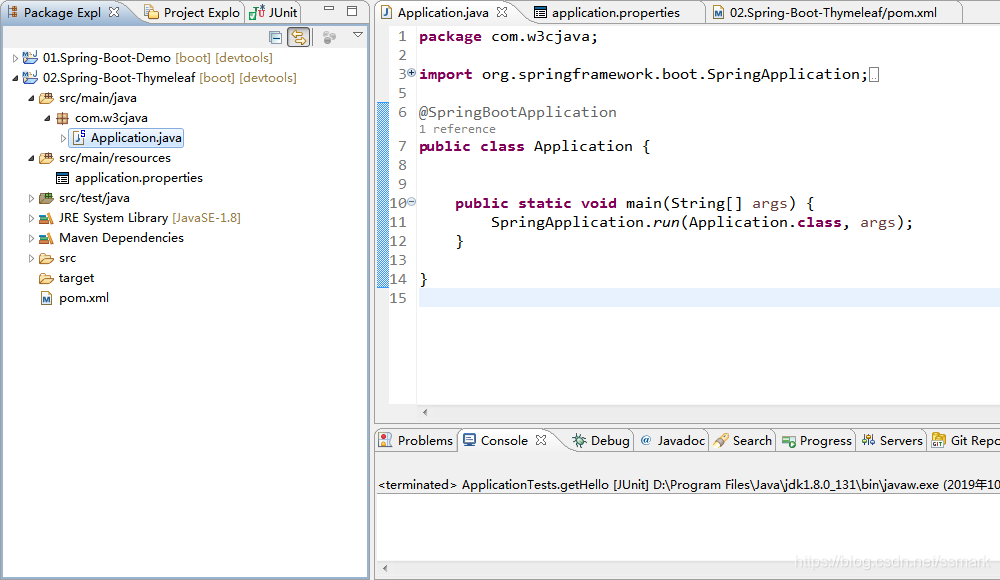
我们以SpringBoot:1.开启SpringBoot之旅的源码作为基础修改,项目名为:02.Spring-Boot-Thymeleaf 仅保留Application.java启动类,其他都去除。
基本的目录结构
Application.java
package com.w3cjava;

import org.springframework.boot.SpringApplication;

import org.springframework.boot.autoconfigure.SpringBootApplication;

@SpringBootApplication

public class Application {

	public static void main(String[] args) {

		SpringApplication.run(Application.class, args);

	}

}
pom.xml
<?xml version="1.0" encoding="UTF-8"?>

<project xmlns="http://maven.apache.org/POM/4.0.0" xmlns:xsi="http://www.w3.org/2001/XMLSchema-instance"

	xsi:schemaLocation="http://maven.apache.org/POM/4.0.0 https://maven.apache.org/xsd/maven-4.0.0.xsd">

	<modelVersion>4.0.0</modelVersion>

	<parent>

		<groupId>org.springframework.boot</groupId>

		<artifactId>spring-boot-starter-parent</artifactId>

		<version>2.1.9.RELEASE</version>

		<relativePath/> <!-- lookup parent from repository -->

	</parent>

	<groupId>com.w3cjava</groupId>

	<artifactId>02.Spring-Boot-Thymeleaf</artifactId>

	<version>0.1</version>

	<name>02.Spring-Boot-Thymeleaf</name>

	<description>Thymeleaf project for Spring Boot</description>

	<properties>

		<java.version>1.8</java.version>

		<maven-jar-plugin.version>3.0.0</maven-jar-plugin.version>

	</properties>

	<dependencies>

		<!-- 支持web的模块依赖 -->

	    <dependency>

	        <groupId>org.springframework.boot</groupId>

	        <artifactId>spring-boot-starter-web</artifactId>

	        <!-- 排除tomcat依赖 -->

	        <exclusions>

	            <exclusion>

	                <groupId>org.springframework.boot</groupId>

	                <artifactId>spring-boot-starter-tomcat</artifactId>

	            </exclusion>

	        </exclusions>

	    </dependency>

	    <!-- jetty依赖 -->

	    <dependency>

	        <groupId>org.springframework.boot</groupId>

	        <artifactId>spring-boot-starter-jetty</artifactId>

	    </dependency>

		<!-- 测试模块依赖 -->

		<dependency>

			<groupId>org.springframework.boot</groupId>

			<artifactId>spring-boot-starter-test</artifactId>

			<scope>test</scope>

		</dependency>

		<!-- 热部署依赖 -->

	    <dependency>

	        <groupId>org.springframework.boot</groupId>

	        <artifactId>spring-boot-devtools</artifactId>

	        <optional>true</optional>

	    </dependency>

	</dependencies>

	<build>

		<plugins>

			<plugin>

				<groupId>org.springframework.boot</groupId>

				<artifactId>spring-boot-maven-plugin</artifactId>

			</plugin>

		</plugins>

	</build>

</project>
2.2 引入Thymeleaf依赖
<!-- thymeleaf模板引擎依赖 -->

<dependency>

    <groupId>org.springframework.boot</groupId>

    <artifactId>spring-boot-starter-thymeleaf</artifactId>

</dependency>
2.3 构建IndexController
package com.w3cjava.controller;

import org.springframework.stereotype.Controller;

import org.springframework.ui.ModelMap;

import org.springframework.web.bind.annotation.RequestMapping;

@Controller

public class IndexController {

	@RequestMapping("/")

	public String index(ModelMap map) {

		// 加入一个属性,用来在模板中读取

		map.addAttribute("host", "http://www.w3cjava.com");

		// return模板文件的名称,对应src/main/resources/templates/index.html

		return "index";

	}

}
2.4 渲染页面
在项目src/main/resources/templates目录下新建一个模板文件index.html文件,内容如下
<!DOCTYPE html>

<html>

<head lang="en">

    <meta charset="UTF-8" />

    <title></title>

</head>

<body>

<h1 th:text="${host}">Hello World</h1>

</body>

</html>
2.5 访问路径
通过访问路径http://localhost:8080/ 结果页面如下。

以上仅仅只是展示了Thymeleaf渲染文本的语法,更多Thymeleaf的页面语法,还请访问Thymeleaf的官方文档查询使用。
2.6 Thymeleaf的默认参数配置
Thymeleaf给我们提供部分参数的默认配置项,比如渲染模板默认路径为resources目录下templates下的文件,文件类型为text/html等等。
如需要修改默认配置,只需复制下面要修改的属性到application.properties中,并修改成需要的值。
# Enable template caching.

spring.thymeleaf.cache=true

# Check that the templates location exists.

spring.thymeleaf.check-template-location=true

# Content-Type value.

spring.thymeleaf.content-type=text/html

# Enable MVC Thymeleaf view resolution.

spring.thymeleaf.enabled=true

# Template encoding.

spring.thymeleaf.encoding=UTF-8

# Comma-separated list of view names that should be excluded from resolution.

spring.thymeleaf.excluded-view-names=

# Template mode to be applied to templates. See also StandardTemplateModeHandlers.

spring.thymeleaf.mode=HTML5

# Prefix that gets prepended to view names when building a URL.

spring.thymeleaf.prefix=classpath:/templates/

# Suffix that gets appended to view names when building a URL.

spring.thymeleaf.suffix=.html  spring.thymeleaf.template-resolver-order= # Order of the template resolver in the chain. spring.thymeleaf.view-names= # Comma-separated list of view names that can be resolved.
3.小结
Spring Boot整合Thymeleaf比较简单,采用了Spring Boot一贯的做法,几乎不用在配置文件中配置任何东西即可快速运行起来。
欢迎扫面下列二维码关注“余弦的自留地”公众微信号

万物之中,希望至美
SpringBoot:2.SpringBoot整合Thymeleaf模板引擎渲染web视图的更多相关文章
- Spring Boot☞ 使用Thymeleaf模板引擎渲染web视图
静态资源访问 在我们开发Web应用的时候,需要引用大量的js.css.图片等静态资源. 默认配置 Spring Boot默认提供静态资源目录位置需置于classpath下,目录名需符合如下规则: /s ...
- Spring Boot☞ 使用freemarker模板引擎渲染web视图
效果图 代码 package com.wls.integrateplugs.hello.controller; /** * Created by wls on 2017/8/24. */ import ...
- 【Springboot】Springboot整合Thymeleaf模板引擎
Thymeleaf Thymeleaf是跟Velocity.FreeMarker类似的模板引擎,它可以完全替代JSP,相较与其他的模板引擎,它主要有以下几个特点: 1. Thymeleaf在有网络和无 ...
- SpringBoot入门篇--使用Thymeleaf模板引擎进行页面的渲染
在做WEB开发的时候,我们不可避免的就是在前端页面之间进行跳转,中间进行数据的查询等等操作.我们在使用SpringBoot之前包括我在内其实大部分都是用的是JSP页面,可以说使用的已经很熟悉.但是我们 ...
- Spring Boot 2.0 整合Thymeleaf 模板引擎
本节将和大家一起实战Spring Boot 2.0 和thymeleaf 模板引擎 1. 创建项目 2. 使用Spring Initlizr 快速创建Spring Boot 应用程序 3. 填写项目配 ...
- springboot整合Thymeleaf模板引擎
引入依赖 需要引入Spring Boot的Thymeleaf启动器依赖. <dependency> <groupId>org.springframework.boot</ ...
- SpringBoot项目的前端+thymeleaf模板引擎
SpringBoot项目创建之后,后台的框架是SpringMVC.但前端的resource和template目录都是空的.这个时候需要创建前台页面. 习惯上,我们会创建JSP,但是,SpringBoo ...
- Spring Boot整合 Thymeleaf 模板引擎
什么是Thymeleaf Thymeleaf是一款用于渲染XML.XHTML.HTML5内容的模板引擎.类似Velocity,FreeMaker模板引擎,它也可以轻易的与Spring MVC等Web框 ...
- Spring Boot整合Thymeleaf模板引擎
什么是Thymeleaf Thymeleaf是一款用于渲染XML.XHTML.HTML5内容的模板引擎.类似Velocity,FreeMaker模板引擎,它也可以轻易的与Spring MVC等Web框 ...
随机推荐
- SQL手工注入基础篇
0.前言 本篇博文是对SQL手工注入进行基础知识的讲解,更多进阶知识请参考进阶篇(咕咕),文中有误之处,还请各位师傅指出来.学习本篇之前,请先确保以及掌握了以下知识: 基本的SQL语句 HTTP的GE ...
- Admiral(双向BFS + Hash)
Problem Description Suppose that you are an admiral of a famous naval troop. Our naval forces have g ...
- vim编辑python脚本时Tab补全
所属分类:成长之路 使用Linux写python脚本的时候,初期最痛苦的是什么?当然是各种库的不熟悉,知道了库,里面的方法还要挨个看,挨个记. 所以这时候,很多小伙伴使用了ipython,最强大的功能 ...
- Docker下实战zabbix三部曲之二:监控其他机器
在上一章<Docker下实战zabbix三部曲之一:极速体验>中,我们快速安装了zabbix server,并登录管理页面查看了zabbix server所在机器的监控信息,但是在实际场景 ...
- 大数据处理中的Lambda架构和Kappa架构
首先我们来看一个典型的互联网大数据平台的架构,如下图所示: 在这张架构图中,大数据平台里面向用户的在线业务处理组件用褐色标示出来,这部分是属于互联网在线应用的部分,其他蓝色的部分属于大数据相关组件,使 ...
- 【面试必备】小伙伴栽在了JVM的内存分配策略。。。
周末有小伙伴留言说上周面试时被问到内存分配策略的问题,但回答的不够理想,小伙伴说之前公号里看过这一块的文章的,当时看时很清楚,也知道各个策略是干嘛的,但面试时脑子里清楚,心里很明白,但嘴里就是说不清楚 ...
- 注意!GetThreadPriority的返回值不是系统的优先级值
GetThreadPriority的返回值 Return code/value Description THREAD_PRIORITY_ABOVE_NORMAL 1 Priority 1 point ...
- mysql having和using使用
1.having当用到聚合函数sum,count后,又需要筛选条件时,就可以考虑使用having,因为where是在聚合前筛选记录的,无法和统计函数一起使用,而having在聚合后筛选记录,可以和统计 ...
- 基于hap的文件上传和下载
序言 现在,绝大部分的应用程序在很多的情况下都需要使用到文件上传与下载的功能,在本文中结合hap利用spirng mvc实现文件的上传和下载,包括上传下载图片.上传下载文档.前端所使用的技术不限,本文 ...
- MongoDB4.0支持事务管理
背景 最后我们看一下MongoDB的事务管理,本来是没这一篇的,因为网上大部分资料太老,都为MongoDB之前的版本,的确在MongoDB 4.0版本之前是没有事务管理,但是今天年初MongoDB ...