
iOS Autoresizing Autolayout Size classes
Autoresizing:出现最早,仅仅能够针对父控件做约束(注意:要关闭Autolayout&Size classes才能够看到Autoresizing)
代码对应:
UIView.h中的autoresizingMask属性
@property(nonatomic) UIViewAutoresizing autoresizingMask; // simple resize. default is UIViewAutoresizingNone
typedef NS_OPTIONS(NSUInteger, UIViewAutoresizing) {
UIViewAutoresizingNone = 0,
UIViewAutoresizingFlexibleLeftMargin = 1 << 0,
UIViewAutoresizingFlexibleWidth = 1 << 1,
UIViewAutoresizingFlexibleRightMargin = 1 << 2,
UIViewAutoresizingFlexibleTopMargin = 1 << 3,
UIViewAutoresizingFlexibleHeight = 1 << 4,
UIViewAutoresizingFlexibleBottomMargin = 1 << 5
};
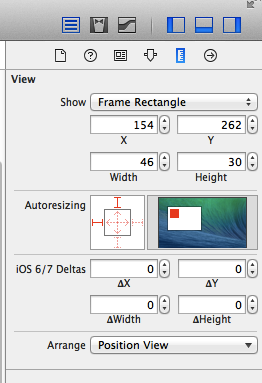
Autolayout:不仅仅能够针对父控件约束,而且可以针对同级进行约束,但对不同设备的横竖屏还是有依赖
Size classes:将所有尺寸分为Regular(标准的)compact(紧凑的) any(任意的)三种情况 进行组合,不再依赖于死的尺寸,这就有效解决了Autolayout的弊端
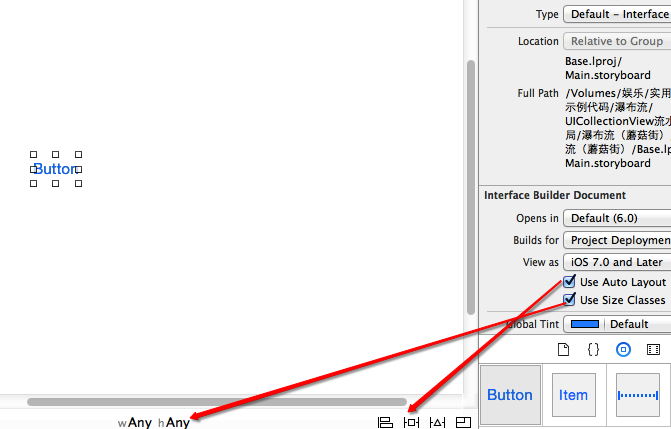
Size classes:
但是我们看到图中的宽度和高度都是Any,Any是什么意思呢?如果weight设为Any,height设置为Regular,那么在该状态下的界面元素在只要height为Regular,无论weight是Regular还是Compact的状态中都会存在。这种关系应该叫做继承关系,具体的四种界面描述与可继承的界面描述如下:
- w:Compact h:Compact 继承 (w:Any h:Compact , w:Compact h:Any , w:Any h:Any)
- w:Regular h:Compact 继承 (w:Any h:Compact , w:Regular h:Any , w:Any h:Any)
- w:Compact h:Regular 继承 (w:Any h:Regular , w:Compact h:Any , w:Any h:Any)
- w:Regular h:Regular 继承 (w:Any h:Regular , w:Regular h:Any , w:Any h:Any)
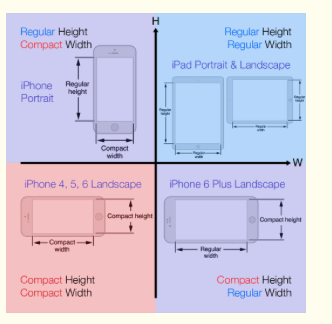
我们知道了iOS 8下面设备界面可以描述为4种,但是这么多设备(iPhone4S,iPhone5/5s,iPhone6,iPhone6 Plus,iPad,Apple Watch)具体对应什么描述呢?经过查看官方文档和具体实践得知具体对应关系如下:
- iPhone4S,iPhone5/5s,iPhone6
- 竖屏:(w:Compact h:Regular)
- 横屏:(w:Compact h:Compact)
- iPhone6 Plus
- 竖屏:(w:Compact h:Regular)
- 横屏:(w:Regular h:Compact)
- iPad
- 竖屏:(w:Regular h:Regular)
- 横屏:(w:Regular h:Regular)
- Apple Watch(猜测)
- 竖屏:(w:Compact h:Compact)
- 横屏:(w:Compact h:Compact)
代码对应:UITraitCollection
UIViewController.h
- (void)willTransitionToTraitCollection:(UITraitCollection *)newCollection withTransitionCoordinator:(id <UIViewControllerTransitionCoordinator>)coordinator NS_AVAILABLE_IOS(8_0);
UITraitCollection.h(普通View)
/*! Trait environments expose a trait collection that describes their environment. */
@protocol UITraitEnvironment <NSObject>
@property (nonatomic, readonly) UITraitCollection *traitCollection;
/*! To be overridden as needed to provide custom behavior when the environment's traits change. */
- (void)traitCollectionDidChange:(UITraitCollection *)previousTraitCollection;
@end
Autolayout:
代码对应:
NSLayoutConstraint
注意:手码自动布局先关闭UIView的以下属性
1.- (BOOL)translatesAutoresizingMaskIntoConstraints NS_AVAILABLE_IOS(6_0); // Default YES
2.1VFL语言
+ (NSArray *)constraintsWithVisualFormat:(NSString *)format options:(NSLayoutFormatOptions)opts metrics:(NSDictionary *)metrics views:(NSDictionary *)views;
2.2纯粹代码
+(instancetype)constraintWithItem:(id)view1 attribute:(NSLayoutAttribute)attr1 relatedBy:(NSLayoutRelation)relation toItem:(id)view2 attribute:(NSLayoutAttribute)attr2 multiplier:(CGFloat)multiplier constant:(CGFloat)c;
详情:http://www.cnblogs.com/zhw511006/p/3998534.html
iOS Autoresizing Autolayout Size classes的更多相关文章
- Xcode 6 AutoLayout Size Classes
1.基本概念 在iPad和iPhone 5出现之前,iOS设备就唯独一种尺寸. 我们在做屏幕适配时须要考虑的唯独设备方向而已. 而非常多应用并不支持转向,这种话就全然没有屏幕适配的工作了. 随着iPa ...
- iOS 8 AutoLayout与Size Class
转自:http://www.cocoachina.com/ios/20141217/10669.html 前言 iOS8 和iPhone6发布已经过去蛮久了,广大的果粉终于迎来了大屏iPhone,再也 ...
- iOS 8 AutoLayout与Size Class自悟(转载)
iOS 8 AutoLayout与Size Class自悟 Size classiOS 8 AutoLayout 前言 iOS8 和iPhone6发布已经过去蛮久了,广大的果粉终于迎来了大屏iPhon ...
- iOS 8 AutoLayout与Size Class自悟
前言 iOS8和iPhone6发布已经过去蛮久了,广大的果粉终于迎来了大屏iPhone,再也不用纠结为大屏买三星舍苹果了…但是对于iOS开发人员来说,迎来了和Android开发开发一样的问题—> ...
- [IOS]译Size Classes with Xcode 6: One Storyboard for all Sizes
Size Classes with Xcode 6: One Storyboard for all Sizes 为所有的尺寸准备一个Storyboard 我最喜欢的Xcode6的特性是新的size c ...
- iOS:Size Classes的使用
iOS 8在应用界面的可视化设计上添加了一个新的特性-Size Classes,对于任何设备来说,界面的宽度和高度都只分为两种描述:正常和紧凑.这样开发者便可以无视设备具体的尺寸,而是对这两类和它们的 ...
- iOS开发——屏幕适配篇&autoResizing autoLayout和sizeClass
autoResizing autoLayout和sizeClass,VFL,Masonry详解 1. autoResizing autoresizing是苹果早期的ui布局适配的解决办法,iOS6之前 ...
- 关于IOS的屏幕适配(iPhone)——Auto Layout和Size Classes
Auto Layout和Size Classes搭配使用极大的方便了开发者,具体如何使用Auto Layout和Size Classes大家可以参考其他文章或者书籍,这里只提一点,在我们设置Size ...
- Xcode iOS布局autolayout和sizeclass的使用
一.关于自动布局(Autolayout) 在Xcode中,自动布局看似是一个很复杂的系统,在真正使用它之前,我也是这么认为的,不过事实并非如此. 我们知道,一款iOS应用,其主要UI组件是由一个个相对 ...
随机推荐
- jQuery 小测试
1.在div元素中,包含了一个<span>元素,通过has选择器获取<div>元素中的<span>元素的语法是? 提示使用has() 答案: $(div:has(s ...
- IO流3
public class Test1 { public static void main(String[] args) throws Exception { //第二个参数,表示是否向末尾追加,tru ...
- sort+结构体+简单数学+暴力-例题
A-前m大的数 还记得Gardon给小希布置的那个作业么?(上次比赛的1005)其实小希已经找回了原来的那张数表,现在她想确认一下她的答案是否正确,但是整个的答案是很庞大的表,小希只想让你把答案中最大 ...
- 曹工杂谈:Linux服务器上,Spring Boot 原地修改 jar 包配置文件/替换class文件,免去重复上传的麻烦
一.前言 相信很多同学有这样的需求,现在很多公司都有多地的研发中心,经常需要跨地区部署,比如,博主人在成都,但是服务器是北京的.一般城市间网络都不怎么好,上传一个几十兆的jar包那是真的慢,别说现在微 ...
- 当面对会反制遭破解装置的App该如何顺利提取数据
在检测App的过程之中,总会遇到比较棘手的,以”侦测是否遭破解的装置”为例,便会是个不好处理的状况.当App具备侦测装置是否已遭Root时,一旦发现装置已遭破解,便会停止运行,等于是只准安装及运行在未 ...
- Usaco Training [1.3] wormhole
传送门 解题要素:代码能力 解题步骤:理解题意 - >搜索枚举所有可能的配对情况 - >判断冲突并求解 - >调试 一. 理解题意 这里讲几个不容易理解的点: 1. +x方向 即向右 ...
- ThreadLocal线程隔离
package com.cookie.test; import java.util.concurrent.atomic.AtomicInteger; /** * author : cxq * Date ...
- 两个 github 账号混用,一个帐号提交错误
问题是这样,之前有一个github帐号,因为注册邮箱的原因,不打算继续使用了,换了一个新的邮箱注册了一个新的邮箱帐号.新账号提交 就会出现下图的问题,但是原来帐号的库还是能正常提交. 方法1:添加 ...
- Vue系列:滚动页面到指定位置实现
方法1:scrollTop 滚动到某位置 方法2:scrollTo,scrollBy,scroll滚动到某位置 方法3:scrollIntoView() 实现滚动到具体某元素 需注意,上述3种方法都不 ...
- CSS等分布局方法
原文链接:http://caibaojian.com/css-equal-layout.html CSS等比例划分,在CSS布局中是比较重要的,下面分享几种常用方法和探讨一下兼容性. 一:浮动布局+百 ...