
ListView 字母导航排序
一.概述
ListView字母导航排序,网上已经有很多代码和博客了, 这篇博文也是照搬网上的. 之所以写到这里,不是为了说明什么,只是为了以后自己查阅方便.本来公司要求实现expandablelistview + 字母导航的, 这里先抄袭一下 ListView的 字母导航, 此处没有实现挤压效果.
二.代码
package com.example.sortlistview;

import android.content.Context;

import android.graphics.Canvas;

import android.graphics.Color;

import android.graphics.Paint;

import android.graphics.Typeface;

import android.graphics.drawable.ColorDrawable;

import android.util.AttributeSet;

import android.view.MotionEvent;

import android.view.View;

import android.widget.TextView;

public class SideBar extends View {

    // 触摸事件

    private OnTouchingLetterChangedListener onTouchingLetterChangedListener;

    // 26个字母

    public static String[] b = { "A", "B", "C", "D", "E", "F", "G", "H", "I",

            "J", "K", "L", "M", "N", "O", "P", "Q", "R", "S", "T", "U", "V",

            "W", "X", "Y", "Z", "#" };

    private int choose = -1;// 选中

    private Paint paint = new Paint();

    private TextView mTextDialog;

    public void setTextView(TextView mTextDialog) {

        this.mTextDialog = mTextDialog;

    }

    public SideBar(Context context, AttributeSet attrs, int defStyle) {

        super(context, attrs, defStyle);

    }

    public SideBar(Context context, AttributeSet attrs) {

        super(context, attrs);

    }

    public SideBar(Context context) {

        super(context);

    }

    /**

     * 重写这个方法

     */

    protected void onDraw(Canvas canvas) {

        super.onDraw(canvas);

        // 获取焦点改变背景颜色.

        int height = getHeight();// 获取对应高度

        int width = getWidth(); // 获取对应宽度

        int singleHeight = height / b.length;// 获取每一个字母的高度

        for (int i = 0; i < b.length; i++) {

            paint.setColor(Color.rgb(33, 65, 98));

            // paint.setColor(Color.WHITE);

            paint.setTypeface(Typeface.DEFAULT_BOLD);

            paint.setAntiAlias(true);

            paint.setTextSize(20);

            // 选中的状态

            if (i == choose) {

                paint.setColor(Color.parseColor("#3399ff"));

                paint.setFakeBoldText(true);

            }

            // x坐标等于中间-字符串宽度的一半.

            float xPos = width / 2 - paint.measureText(b[i]) / 2;

            float yPos = singleHeight * i + singleHeight;

            canvas.drawText(b[i], xPos, yPos, paint);

            paint.reset();// 重置画笔

        }

    }

    @Override

    public boolean dispatchTouchEvent(MotionEvent event) {

        final int action = event.getAction();

        final float y = event.getY();// 点击y坐标

        final int oldChoose = choose;

        final OnTouchingLetterChangedListener listener = onTouchingLetterChangedListener;

        final int c = (int) (y / getHeight() * b.length);// 点击y坐标所占总高度的比例*b数组的长度就等于点击b中的个数.

        switch (action) {

        case MotionEvent.ACTION_UP:

            setBackgroundDrawable(new ColorDrawable(0x00000000));

            choose = -1;//

            invalidate();

            if (mTextDialog != null) {

                mTextDialog.setVisibility(View.INVISIBLE);

            }

            break;

        default:

            setBackgroundResource(R.drawable.sidebar_background);

            if (oldChoose != c) {

                if (c >= 0 && c < b.length) {

                    if (listener != null) {

                        listener.onTouchingLetterChanged(b[c]);

                    }

                    if (mTextDialog != null) {

                        mTextDialog.setText(b[c]);

                        mTextDialog.setVisibility(View.VISIBLE);

                    }

                    choose = c;

                    invalidate();

                }

            }

            break;

        }

        return true;

    }

    /**

     * 向外公开的方法

     *

     * @param onTouchingLetterChangedListener

     */

    public void setOnTouchingLetterChangedListener(

            OnTouchingLetterChangedListener onTouchingLetterChangedListener) {

        this.onTouchingLetterChangedListener = onTouchingLetterChangedListener;

    }

    /**

     * 接口

     *

     * @author coder

     *

     */

    public interface OnTouchingLetterChangedListener {

        public void onTouchingLetterChanged(String s);

    }

}
该类目的就是实现 ListView 右侧字母导航条
对于列表的数据我是这么做的, 首先我定义一个 Bean类,存放json解析后的结果, 然后再排序的时候,把用到的 json字段又定义到了SortModel中作为属性,根据需要往这个类添加必要属性即可, 实际开发我也是这么做的, 不知道有没有更好的方法.
多说无益,由于服务器还是测试阶段,所以我把json 存到了assets目录中,直接看图
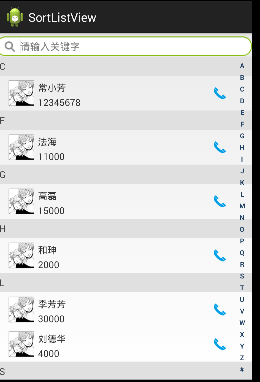
代码存放到了360网盘, 地址:
https://yunpan.cn/cqY2h3xHeVbDn (提取码:3b21)
ExpandableListview的 字母导航,将在后面博文中给出.
ListView 字母导航排序的更多相关文章
- Android自定义View——实现字母导航栏
1.自定义View实现字母导航栏 2.ListView实现联系人列表 3.字母导航栏滑动事件处理 4.字母导航栏与中间字母的联动 5.字母导航栏与ListView的联动 1.先看主布局,方便后面代码的 ...
- js中实现中文按字母拼音排序
js中实现中文按字母拼音排序 var Pinyin = (function (){ var Pinyin = function (ops){ this.initialize(ops); }, opti ...
- sql server 利用首字母拼音排序和笔画排序的语句
--按笔画排序 select * from Student order by Sname COLLATE Chinese_PRC_Stroke_CS_AS_KS_WS --按字母拼音排序 select ...
- 本地化下按首字母分组排序的神器——UILocalizedIndexedCollation
最近在整一个很简单的通讯录相关的项目,通讯录当然就少不了按首字母或者汉字拼音首字母分组排序索引.因为按照我一贯的的做法,都是想要做成更通用的.支持本地化的,所以这就纠结了,世界各地的语言啊我去,我顶多 ...
- 在ListView中实现排序
此处介绍的情境是: (1)使用table布局ListView. (2)ListView的数据源是List<T>. (3)排序字段2个(帖子的回复次数和浏览次数),都是int类型. 基本思路 ...
- 在PHP中,将一个汉字数组按照拼音首字母进行排序
(之前发的这篇博文因为含有敏感关键字,只好重发一遍了) <?php $str = "我们可以在浏览器中看到,当鼠标移到元素上时,元素开始向右移动,开始比较慢,之后则比较快,移开时按原曲 ...
- 字母导航跳转react核心代码
componentDidMount() { this.move(); } skipToDep(e) { let dom = document.getElementById(e); // 获取要跳至的字 ...
- php里获取第一个中文首字母并排序
需求里结算首页需要按门店的首字母A-Z排序.我的数据结构原本是这样的: Array ( [0] => Array ( [sid] => 2885842 [recetcstoredpay] ...
- IOS数组按中文关键字以字母序排序
本文转载至 http://blog.csdn.net/xunyn/article/details/7882087 iosobjective cuser框架通讯 IOS项目中会用到对通讯录的联系人或是会 ...
随机推荐
- 一文了解java异常机制
1.异常的概述 1.1什么是异常? 异常:程序在运行过程中发生由于外部问题导致的程序异常事件,发生的异常会中断程序的运行.(在Java等面向对象的编程语言中)异常本身是一个对象,产生异常就是产生了一个 ...
- 如何永久破解IDEA 2019.2
声明: 支持知识产权,支持正版产权,以下仅限个人学习使用IDEA工具时随笔记录,禁止商业使用. 以下个人提供的激活补丁和激活码来源,均由网上下载,各位也可以自行查找. IDEA官网下载地址:https ...
- Winform 自定义文本框
using System; using System.Collections.Generic; using System.ComponentModel; using System.Data; usin ...
- QFramework 使用指南 2020(二):下载与版本介绍
目前 QFramework 有两个可供安装的版本 PackageKit:QFramework 的插件平台,可以下载只感兴趣的插件,除了 Framework 模块还有一些 Shader 案例.项目模板. ...
- K8S学习笔记之filebeat采集K8S微服务java堆栈多行日志
0x00 背景 K8S内运行Spring Cloud微服务,根据定制容器架构要求log文件不落地,log全部输出到std管道,由基于docker的filebeat去管道采集,然后发往Kafka或者ES ...
- MinorGC 和 FullGC的理解
1.GC回收机制熟悉么,分代算法知道么?2.了解 Java 虚拟机的垃圾回收算法? 从年轻代空间(包括 Eden 和 Survivor 区域)回收内存被称为 Minor GC. Major GC 是清 ...
- springboot中的springSession的存储和获取
利用redis进行springSession的存储: 存储: // 在session中保存用户信息 HttpSession session = httpRequest.getSession(true) ...
- 900E关于导航站
--------------------------以下更新于20190826------------------------- 作用: 导航站为方便网址收藏之用,收录一些常用的网站,目前主要以本科常 ...
- (四十九)c#Winform自定义控件-下拉框(表格)
前提 入行已经7,8年了,一直想做一套漂亮点的自定义控件,于是就有了本系列文章. GitHub:https://github.com/kwwwvagaa/NetWinformControl 码云:ht ...
- CSS3 表单
<form action="http://baidu.com"> <input type="text" placeholder="请 ...