
『Python』 爬取 WooYun 论坛所有漏洞条目的相关信息
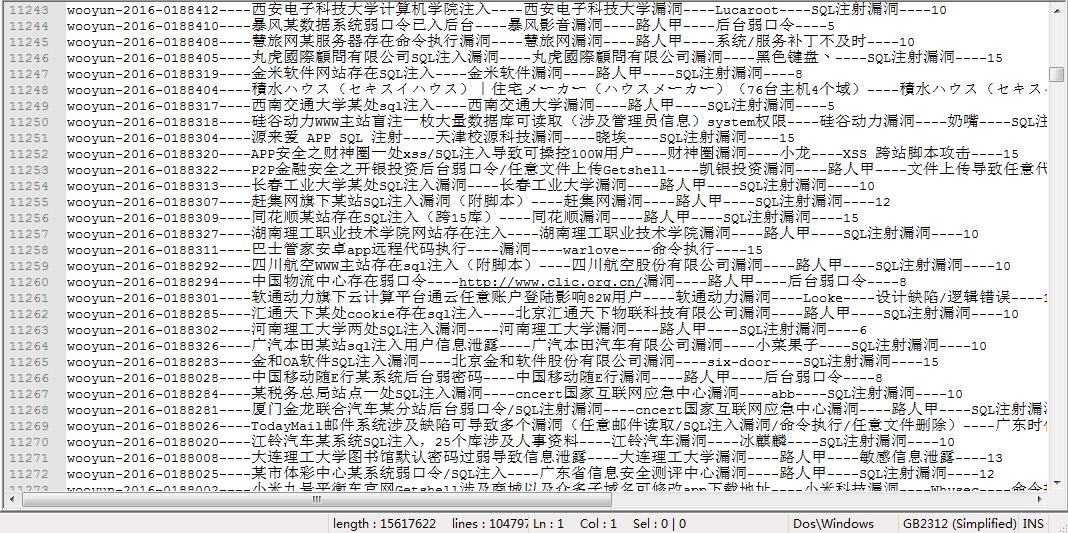
每个漏洞条目包含:
乌云ID,漏洞标题,漏洞所属厂商,白帽子,漏洞类型,厂商或平台给的Rank值
主要是做数据分析使用:
可以分析某厂商的各类型漏洞的统计;
或者对白帽子的能力进行分析.....
数据更新时间:2016/5/27
漏洞条目:104796条
数据截图如下:
数据网盘链接:
链接:http://pan.baidu.com/s/1bpDNKOv 密码:6y57
爬虫脚本:
# coding:utf-8

# author: anka9080

# version: 1.0  py3

import sys,re,time,socket

from requests import get

from queue import Queue, Empty

from threading import Thread

# 全局变量

COUNT = 1

START_URL = 'http://wooyun.org/bugs'

ID_DETAILS = []

ALL_ID = []

Failed_ID = []

PROXIES = []

HEADERS = {

	"Accept": "text/html,application/xhtml+xml,application/xml,application/json;q=0.9,image/webp,*/*;q=0.8",

	"Accept-Encoding": "gzip, deflate, sdch",

	"Accept-Language": "zh-CN,zh;q=0.8",

	"Cache-Control": "max-age=0",

	"Connection": "keep-alive",

	"DNT": "1",

	"Host": "wooyun.org",

	"Upgrade-Insecure-Requests": "1",

	"User-Agent": "Mozilla/5.0 (Windows NT 10.0; Win64; x64) AppleWebKit/537.36 (KHTML, like Gecko) Chrome/52.0.2716.0 Safari/537.36"

}

class WooYunSpider(Thread):

	"""docstring for WooYunSpider"""

	def __init__(self,queue):

		Thread.__init__(self)

		self.pattern1 = re.compile(r'title>(.*?)\| WooYun.*?keywords" content="(.*?),(.*?),(.*?),wooyun',re.S)  # 匹配模式在 compile 的时候指定

		self.pattern2 = re.compile(r"漏洞Rank:(\d{1,3})")

		self.queue = queue

		self.start() # 执行 run()

	def run(self):

		"每次读取 queue 的一条"

		global COUNT,RES_LOG,ERR_LOG

		while(1):

			try:

				id = self.queue.get(block = False)

				r = get('http://wooyun.org/bugs/' + id,headers = HEADERS)

				html = r.text

			except Empty:

				break

			except Exception as e:

				msg = '[ - Socket_Excpt ] 链接被拒绝,再次添加到队列:' + id

				print(msg)

				ERR_LOG.write(msg+'\n')

				self.queue.put(id)  # 访问失败则把这个 URL从新加入队列

			else:

				title,comp,author,bug_type,rank = self.get_detail(html,id)

				detail = id+'----'+title+'----'+comp+'----'+author+'----'+bug_type+'----'+rank

				try: # 写入文件可能会诱发 gbk 编码异常,这里保存 id 到 failed

					RES_LOG.write(detail + '\n')

				except Exception as e:

					Failed_ID.append(id)

					msg = '[ - Encode_Excpt ] 字符编码异常:' + id

					print(msg)

					ERR_LOG.write(msg+'\n')

				ID_DETAILS.append(detail)

			# time.sleep(1)

			print('[ - info ] id: {}  count: {}  time: {:.2f}s'.format(id,COUNT,time.time() - start))

			COUNT += 1

	# 由 缺陷编号 获得对应的 厂商 和 漏洞类型信息

	def get_detail(self,html,id):

		global ERR_LOG

		try:

			# print(html)

			res = self.pattern1.search(html)

			title = res.group(1).strip()

			comp = res.group(2).strip()

			author = res.group(3).strip()

			bug_type = res.group(4).strip()

		except Exception as e:

			msg = '[ - Detail_Excpt ] 未解析出 标题等相关信息:' + id

			print(msg)

			ERR_LOG.write(msg+'\n')

			Failed_ID.append(id)

			title,comp,author,bug_type,rank = 'Null','Null','Null','Null','Null'

		else:

			try:

				res2 = self.pattern2.search(html)  # 若厂商暂无回应则 rank 为 Null

				rank = res2.group(1).strip()

			except Exception as e:

				msg = '[ - Rank_Excpt ] 未解析出 Rank:' + id

				print(msg)

				ERR_LOG.write(msg+'\n')

				rank = 'Null'

		finally:

			try:

				print (title,comp,author,bug_type,rank)

			except Exception as e:

				msg = '[ - Print_Excpt ] 字符编码异常:' + id +'::'+ str(e)

				print(msg)

				ERR_LOG.write(msg+'\n')

			return title,comp,author,bug_type,rank

class ThreadPool(object):

	def __init__(self,thread_num,id_file):

		self.queue = Queue() # 需要执行的队列

		self.threads = [] # 多线程列表

		self.add_task(id_file)

		self.init_threads(thread_num)

	def add_task(self,id_file):

		with open(id_file) as input:

			for id in input.readlines():

				self.queue.put(id.strip())

	def init_threads(self,thread_num):

		for i in range(thread_num):

			print ('[ - info :] loading threading ---> ',i)

			# time.sleep(1)

			self.threads.append(WooYunSpider(self.queue)) # threads 列表装的是 爬虫线程

	def wait(self):

		for t in self.threads:

			if t.isAlive():

				t.join()

def test():

	url = 'http://wooyun.org/bugs/wooyun-2016-0177647'

	r = get(url,headers = HEADERS)

	html = r.text

	# print type(html)

	# keywords" content="(.*?),(.*?),(.*?),wooyun  ====> 厂商,白帽子,类型

	pattern1 = re.compile(r'title>(.*?)\| WooYun')

	pattern2 = re.compile(r'keywords" content="(.*?),(.*?),(.*?),wooyun')

	pattern3 = re.compile(r'漏洞Rank:(\d{1,3})')

	for x in range(500):

		res = pattern1.search(html)

		# print (res.group(1))

		res = pattern2.search(html)

		# print (res.group(1),res.group(2),res.group(3))

		res = pattern3.search(html)

		# print (res.group(1))

		x += 1

		print(x)

	# rank = res.group(4).strip()

	# print html

def test2():

	url = 'http://wooyun.org/bugs/wooyun-2016-0177647'

	r = get(url,headers = HEADERS)

	html = r.text

	pattern = re.compile(r'title>(.*?)\| WooYun.*?keywords" content="(.*?),(.*?),(.*?),wooyun.*?漏洞Rank:(\d{1,3})',re.S)

	for x in range(500):

		res = pattern.search(html)

		# print (res.group(1),res.group(2),res.group(3),res.group(4),res.group(5))

		x += 1

		print(x)

# 保存结果

def save2file(filename,filename_failed_id):

	with open(filename,'w') as output:

		for item in ID_DETAILS:

			try: # 写入文件可能会诱发 gbk 编码异常,这里忽略

				output.write(item + '\n')

			except Exception as e:

				pass

	with open(filename_failed_id,'w') as output:

		output.write('\n'.join(Failed_ID))

if __name__ == '__main__':

	socket.setdefaulttimeout(1)

	start = time.time()

	# test()

	# 日志记录

	ERR_LOG = open('err_log.txt','w')

	RES_LOG = open('res_log.txt','w')

	id_file = 'id_0526.txt'

	# id_file = 'id_test.txt'

	tp = ThreadPool(20,id_file)

	tp.wait()

	save2file('id_details.txt','failed_id.txt')

	end = time.time()

	print ('[ - info ] cost time :{:.2f}s'.format(end - start))
『Python』 爬取 WooYun 论坛所有漏洞条目的相关信息的更多相关文章
- 【Python】爬取理想论坛单帖爬虫
代码: # 单帖爬虫,用于爬取理想论坛帖子得到发帖人,发帖时间和回帖时间,url例子见main函数 from bs4 import BeautifulSoup import requests impo ...
- 『Scrapy』爬取斗鱼主播头像
分析目标 爬取的是斗鱼主播头像,示范使用的URL似乎是个移动接口(下文有提到),理由是网页主页属于动态页面,爬取难度陡升,当然爬取斗鱼主播头像这么恶趣味的事也不是我的兴趣...... 目标URL如下, ...
- 『Scrapy』爬取腾讯招聘网站
分析爬取对象 初始网址, http://hr.tencent.com/position.php?@start=0&start=0#a (可选)由于含有多页数据,我们可以查看一下这些网址有什么相 ...
- python scrapy爬取HBS 汉堡南美航运公司柜号信息
下面分享个scrapy的例子 利用scrapy爬取HBS 船公司柜号信息 1.前期准备 查询提单号下的柜号有哪些,主要是在下面的网站上,输入提单号,然后点击查询 https://www.hamburg ...
- 大神:python怎么爬取js的页面
大神:python怎么爬取js的页面 可以试试抓包看看它请求了哪些东西, 很多时候可以绕过网页直接请求后面的API 实在不行就上 selenium (selenium大法好) selenium和pha ...
- python连续爬取多个网页的图片分别保存到不同的文件夹
python连续爬取多个网页的图片分别保存到不同的文件夹 作者:vpoet mail:vpoet_sir@163.com #coding:utf-8 import urllib import ur ...
- python定时器爬取豆瓣音乐Top榜歌名
python定时器爬取豆瓣音乐Top榜歌名 作者:vpoet mail:vpoet_sir@163.com 注:这些小demo都是前段时间为了学python写的,现在贴出来纯粹是为了和大家分享一下 # ...
- python大规模爬取京东
python大规模爬取京东 主要工具 scrapy BeautifulSoup requests 分析步骤 打开京东首页,输入裤子将会看到页面跳转到了这里,这就是我们要分析的起点 我们可以看到这个页面 ...
- Python爬虫 - 爬取百度html代码前200行
Python爬虫 - 爬取百度html代码前200行 - 改进版, 增加了对字符串的.strip()处理 源代码如下: # 改进版, 增加了 .strip()方法的使用 # coding=utf-8 ...
随机推荐
- 多台计算机之间的ssh无密钥登录
在很多分布式系统中,我们最常遇到的一个问题是,需要在服务器集群上保证多台机器之间的SSH无密钥登录.以Hadoop为例,为了方便,我们需要在master和slaves之间配置密钥登录,这样我们启动Ha ...
- 利用MyEclipse配置S2SH三大框架篇-Spring配置
1.配置完Struts2后,然后配置Spring 2.单击“MyEclipse->Project Capabilities->Add Spring Capabilities” 3.选择Sp ...
- Java里的IO流里的FileReader里的BufferedReader读取并在前打印行数!
哈哈!!我又来了!!这个里面没有运用readLine 的方法!!纯手打!! import java.io.BufferedReader; import java.io.FileNotFoundExce ...
- Hibernate Criterion
在查询方法设计上能够灵活的依据Criteria的特点来方便地进行查询条件的组装.Hibernate设计了CriteriaSpecification作为Criteria的父接口,以下提供了Criteri ...
- android 怎样内置/预置/预编译文件(运行程序,应用程序,apk, jar, lib 等随意文件)到系统中
方法一: 如果要内置的软件名称为iperf.exe 1. 将iperf.exe放到Codebase的随意一个文件夹下(该文件夹必须可以在搜索Android.mk时被搜索到),比方system/ipe ...
- rsyslog安装
http://www.rsyslog.com/downloads/download-other/ http://www.rsyslog.com/download/stable-download/pag ...
- <<java 并发编程>>第七章:取消和关闭
Java没有提供任何机制来安全地终止线程,虽然Thread.stop和suspend等方法提供了这样的机制,但是存在严重的缺陷,应该避免使用这些方法.但是Java提供了中断Interruption机制 ...
- JQ滑动导航菜单的实现
前言:不多说直接看效果!!! 这样的菜单我们在一般的网站上见到的也比较多,有比较好的用户体验! 原理:这个很重要,任何的特效只要原理搞明白了,实现起来都是很容易的!这个特效的原理很简单,菜单的样式 ...
- [转] Java中的容器
在书写程序的时候,我们常常需要对大量的对象引用进行管理.为了实现有效的归类管理,我们常常将同类的引用放置在同一数据容器中. 由于数据容器中存放了我们随时可能需要使用到的对象引用,所以一般的数据容器要都 ...
- iOS 开发-单元测试
前言 维基百科对单元测试的定义如下: 在计算机编程中,单元测试(英语:Unit Testing)又称为模块测试, 是针对程序模块(软件设计的最小单位)来进行正确性检验的测试工作.程序单元是应用的最小可 ...