
Cloudera Certified Associate Administrator案例之Troubleshoot篇
Cloudera Certified Associate Administrator案例之Troubleshoot篇
作者:尹正杰
版权声明:原创作品,谢绝转载!否则将追究法律责任。
一.调整日志的进程级别
问题描述:

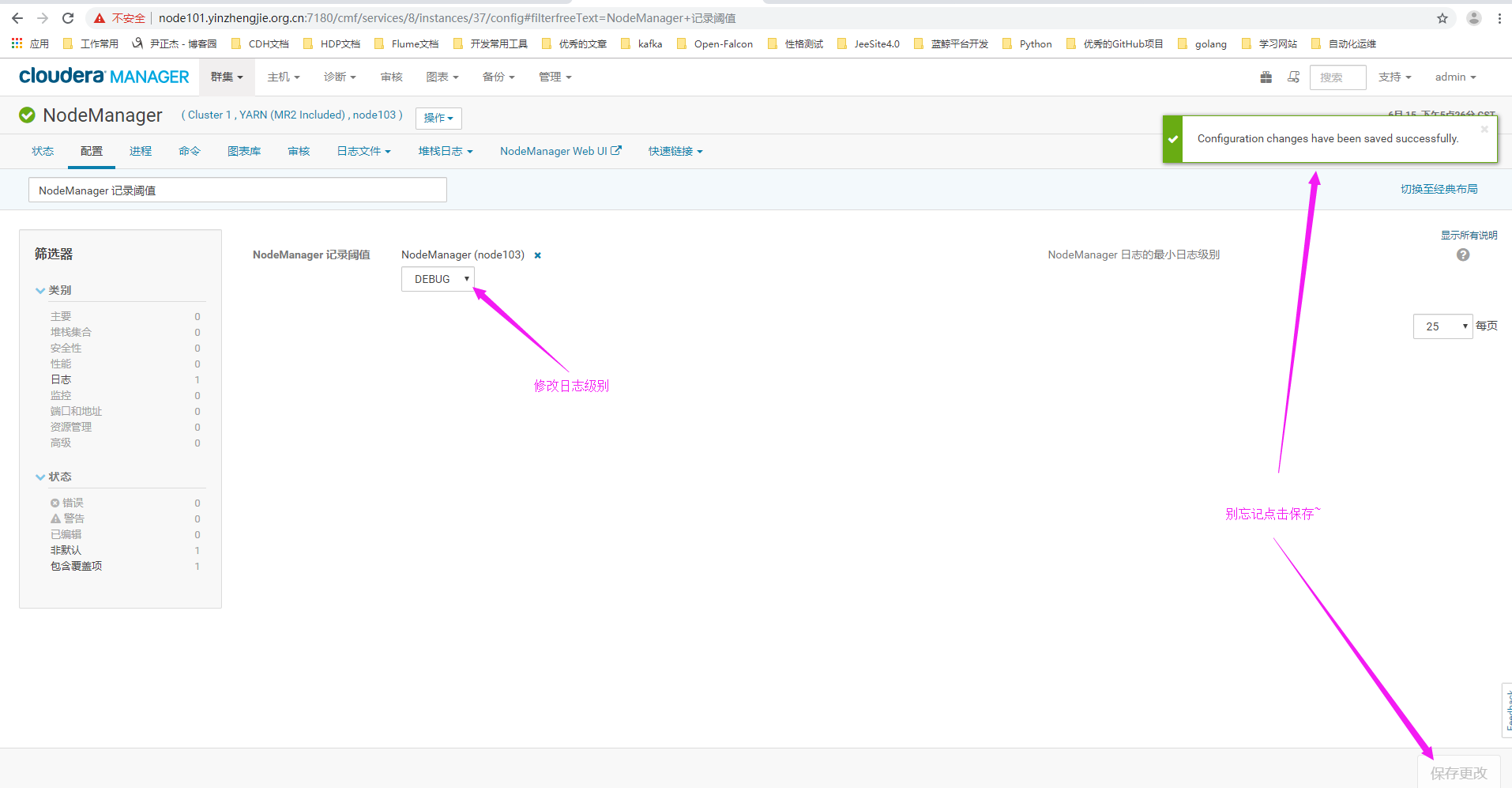
  今天node103.yinzhengjie.org.cn节点的DataNode和NodeManager进程频繁死掉,你决定临时将该节点两个进程的日志级别调整为DEBUG,以便于进行维护排查。

解决方案:
  操作时需注意要求将HDFS和YARN的所有节点日志界别都调整,还是只需要调整还是只需要调整个别节点,两者的调整方式是不一样的,对于个别节点日志级别的临时调整,可以使用yarn daemonlog -setlevel命令来进行,当然通过CM进行更为方便。
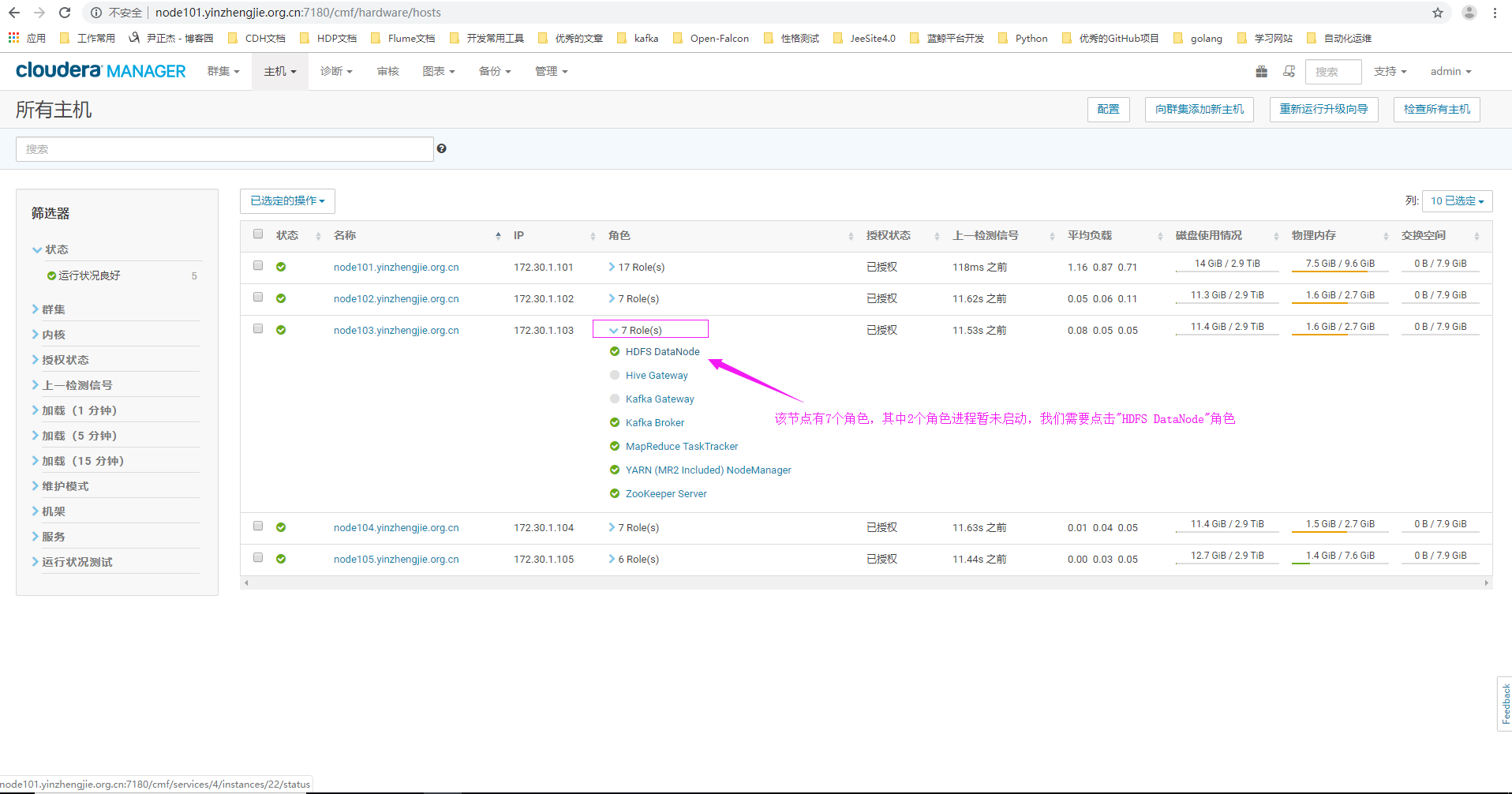
1>.点击主机,选择"所有主机"

2>.点击"HDFS DataNode"角色
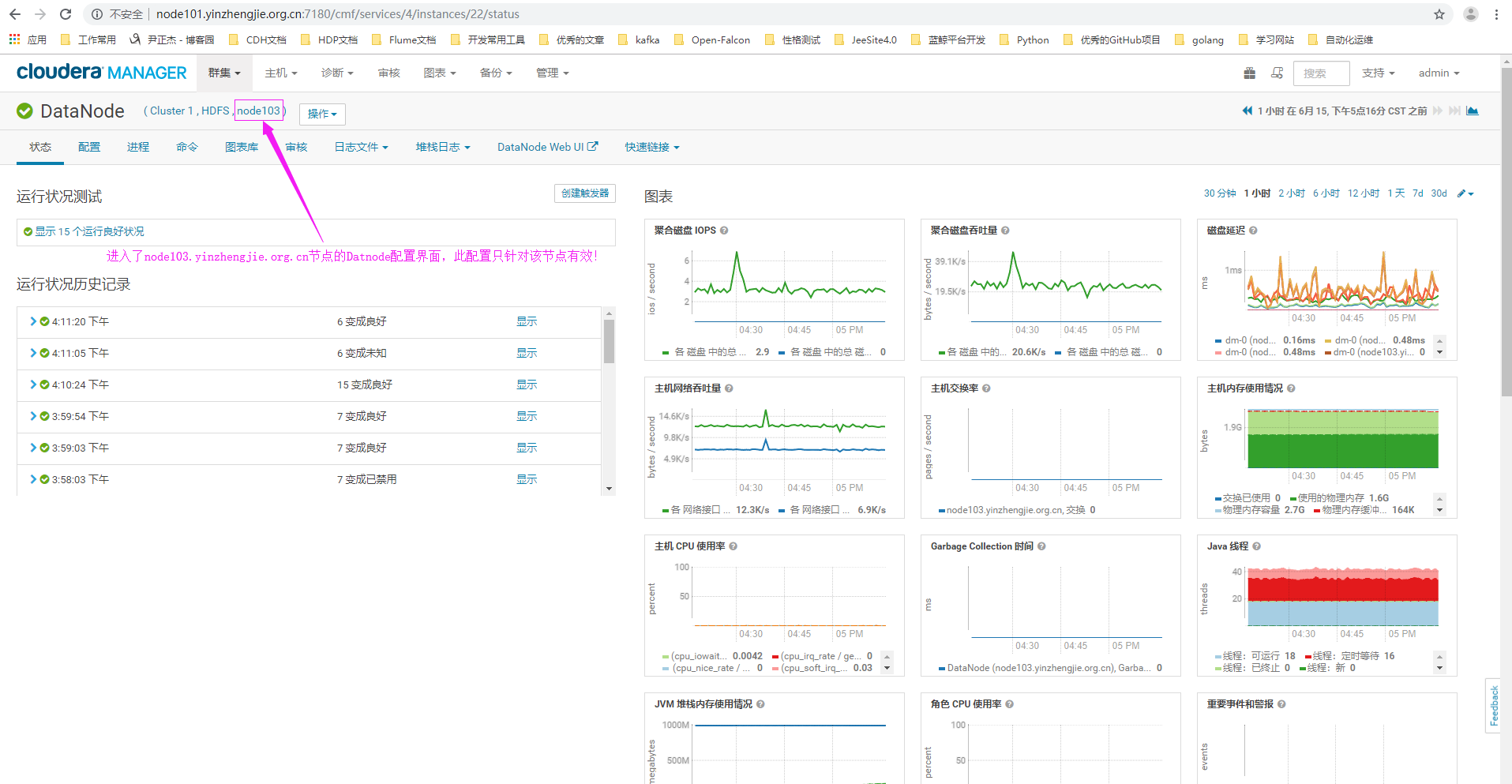
3>.进入"node103.yinzhengjie.org.cn"节点的DataNode角色的配置界面(需要注意的是,此配置只针对该节点生效哟~)
4>.点击配置搜索关键字"DataNode 记录阈值"(英文页面为:"DataNode Logging Threshold")
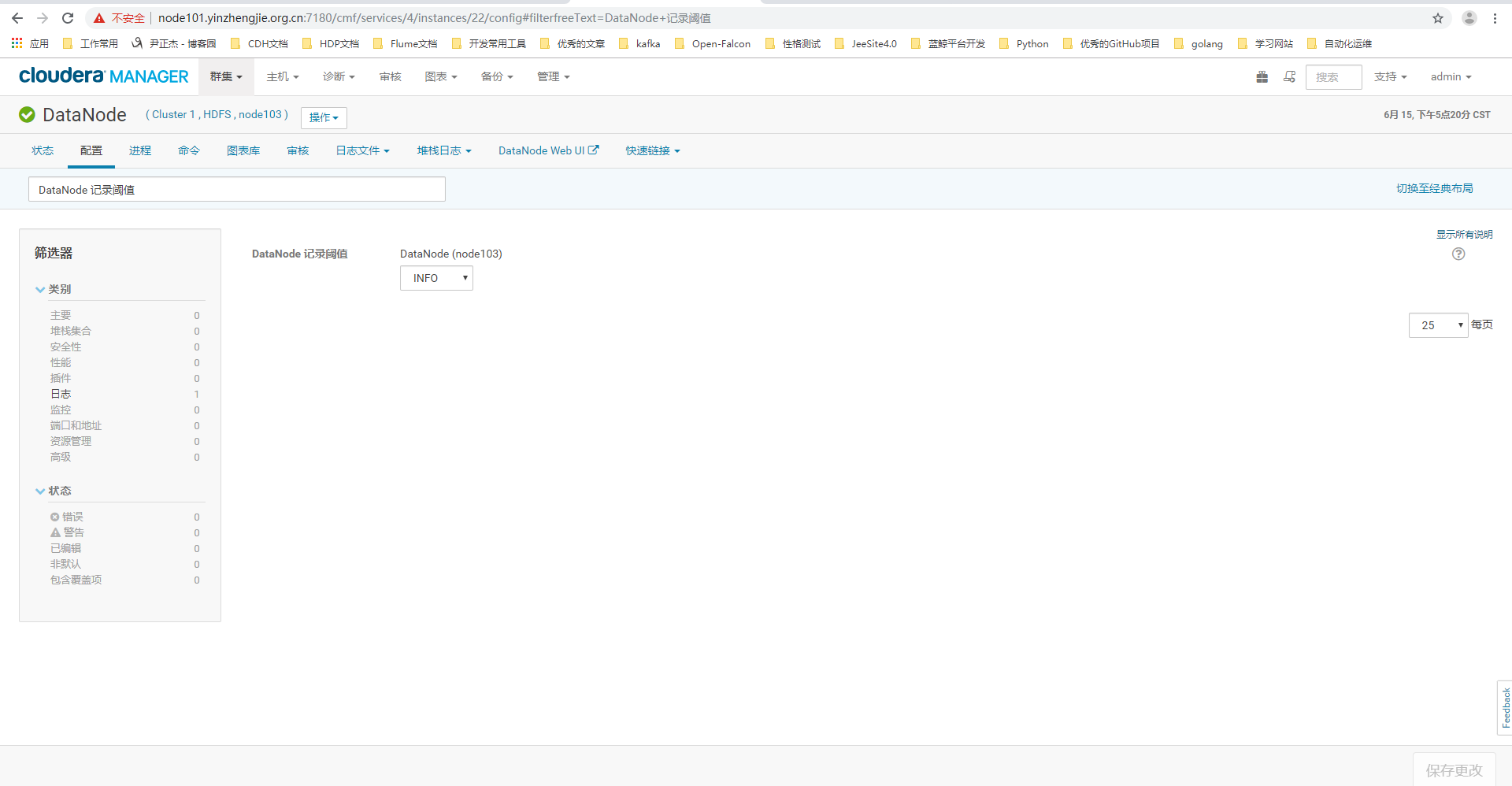
5>.修改"node103.yinzhengjie.org.cn"节点的页面配置为"DEBUG"

6>.进入NodeManger的WebUI配置界面
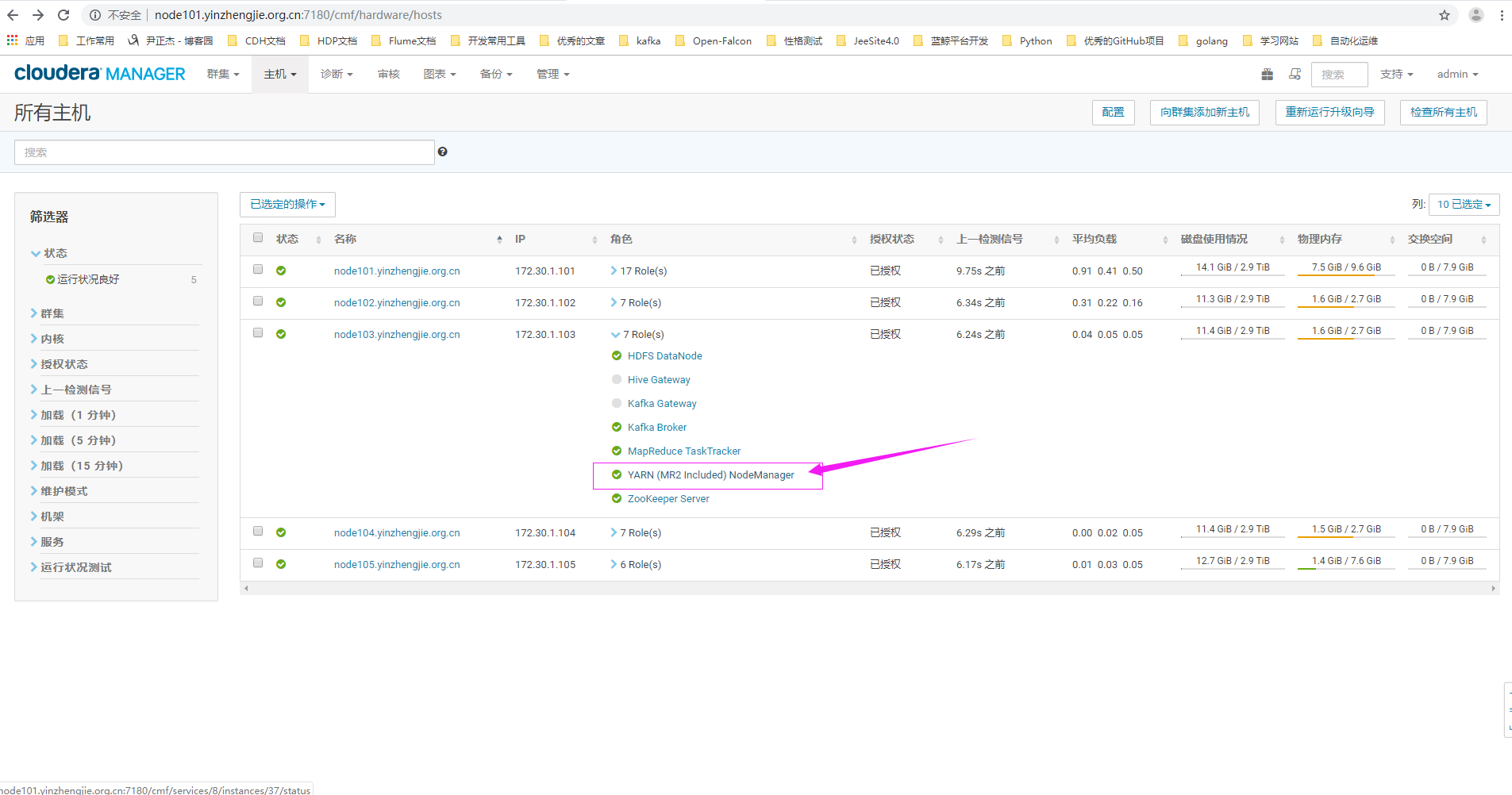
7>.点击配置搜索关键字"NodeManager 记录阈值"(英文页面为:"NodeManager Logging Threshold")
二.运行wordcount
问题描述:

  公司的某个开发人员尝试在集群上运行wordcount程序,但作业执行发生错误,请你帮助解决。

  请将gateway机器的input.txxt文件上传到HDFS上的“/yinzhengjie/debug/mapreduce/data/input”目录中,并执行"wordcount /yinzhengjie/debug/mapreduce/data/input /yinzhengjie/debug/mapreduce/data/output"来测试是否可以运行。

解决方案:

  通常作业失败类型只有目录存在,内存不足,权限部队等简单的几种,难度较低,一般不需要Java语言的知识,只要能看懂英文就可以解决。
1>.上传文件
[root@node101.yinzhengjie.org.cn ~]# ll

total

-rw-r--r--  root root  Jun  : input.txt

[root@node101.yinzhengjie.org.cn ~]#

[root@node101.yinzhengjie.org.cn ~]# cat input.txt

The Apache Hadoop software library is a framework that allows for the distributed processing of large data sets across clusters of computers using simple programming models. It is designed to scale up from single servers to thousands of machines, each offering local computation and storage. Rather than rely on hardware to deliver high-availability, the library itself is designed to detect and handle failures at the application layer, so delivering a highly-available service on top of a cluster of computers, each of which may be prone to failures.

[root@node101.yinzhengjie.org.cn ~]#

[root@node101.yinzhengjie.org.cn ~]# hdfs dfs -mkdir -p /yinzhengjie/debug/mapreduce/data/input

[root@node101.yinzhengjie.org.cn ~]#

[root@node101.yinzhengjie.org.cn ~]# hdfs dfs -copyFromLocal input.txt /yinzhengjie/debug/mapreduce/data/input

[root@node101.yinzhengjie.org.cn ~]#

[root@node101.yinzhengjie.org.cn ~]# hdfs dfs -ls /yinzhengjie/debug/mapreduce/data/input

Found  items

-rw-r--r--    root supergroup         -- : /yinzhengjie/debug/mapreduce/data/input/input.txt

[root@node101.yinzhengjie.org.cn ~]#

[root@node101.yinzhengjie.org.cn ~]#
2>.执行wordcount
[root@node101.yinzhengjie.org.cn ~]#

[root@node101.yinzhengjie.org.cn ~]# su hdfs

[hdfs@node101.yinzhengjie.org.cn /root]$

[hdfs@node101.yinzhengjie.org.cn /root]$ cd /opt/cloudera/parcels/CDH/lib/hadoop-mapreduce/

[hdfs@node101.yinzhengjie.org.cn /opt/cloudera/parcels/CDH/lib/hadoop-mapreduce]$

[hdfs@node101.yinzhengjie.org.cn /opt/cloudera/parcels/CDH/lib/hadoop-mapreduce]$ hadoop jar hadoop-mapreduce-examples.jar wordcount /yinzhengjie/debug/mapreduce/data/input  /yinzhengjie/debug/mapreduce/data/output

// :: INFO client.RMProxy: Connecting to ResourceManager at node101.yinzhengjie.org.cn/172.30.1.101:

// :: INFO input.FileInputFormat: Total input paths to process :

// :: INFO mapreduce.JobSubmitter: number of splits:

// :: INFO mapreduce.JobSubmitter: Submitting tokens for job: job_1560591816714_0001

// :: INFO impl.YarnClientImpl: Submitted application application_1560591816714_0001

// :: INFO mapreduce.Job: The url to track the job: http://node101.yinzhengjie.org.cn:8088/proxy/application_1560591816714_0001/

// :: INFO mapreduce.Job: Running job: job_1560591816714_0001

// :: INFO mapreduce.Job: Job job_1560591816714_0001 running in uber mode : false

// :: INFO mapreduce.Job:  map % reduce %

// :: INFO mapreduce.Job:  map % reduce %

// :: INFO mapreduce.Job:  map % reduce %

// :: INFO mapreduce.Job:  map % reduce %

// :: INFO mapreduce.Job:  map % reduce %

// :: INFO mapreduce.Job:  map % reduce %

// :: INFO mapreduce.Job:  map % reduce %

// :: INFO mapreduce.Job:  map % reduce %

// :: INFO mapreduce.Job: Job job_1560591816714_0001 completed successfully

// :: INFO mapreduce.Job: Counters:

    File System Counters

        FILE: Number of bytes read=

        FILE: Number of bytes written=

        FILE: Number of read operations=

        FILE: Number of large read operations=

        FILE: Number of write operations=

        HDFS: Number of bytes read=

        HDFS: Number of bytes written=

        HDFS: Number of read operations=

        HDFS: Number of large read operations=

        HDFS: Number of write operations=

    Job Counters

        Launched map tasks=

        Launched reduce tasks=

        Data-local map tasks=

        Total time spent by all maps in occupied slots (ms)=

        Total time spent by all reduces in occupied slots (ms)=

        Total time spent by all map tasks (ms)=

        Total time spent by all reduce tasks (ms)=

        Total vcore-milliseconds taken by all map tasks=

        Total vcore-milliseconds taken by all reduce tasks=

        Total megabyte-milliseconds taken by all map tasks=

        Total megabyte-milliseconds taken by all reduce tasks=

    Map-Reduce Framework

        Map input records=

        Map output records=

        Map output bytes=

        Map output materialized bytes=

        Input split bytes=

        Combine input records=

        Combine output records=

        Reduce input groups=

        Reduce shuffle bytes=

        Reduce input records=

        Reduce output records=

        Spilled Records=

        Shuffled Maps =

        Failed Shuffles=

        Merged Map outputs=

        GC time elapsed (ms)=

        CPU time spent (ms)=

        Physical memory (bytes) snapshot=

        Virtual memory (bytes) snapshot=

        Total committed heap usage (bytes)=

    Shuffle Errors

        BAD_ID=

        CONNECTION=

        IO_ERROR=

        WRONG_LENGTH=

        WRONG_MAP=

        WRONG_REDUCE=

    File Input Format Counters

        Bytes Read=

    File Output Format Counters

        Bytes Written=

[hdfs@node101.yinzhengjie.org.cn /opt/cloudera/parcels/CDH/lib/hadoop-mapreduce]$
[hdfs@node101.yinzhengjie.org.cn /opt/cloudera/parcels/CDH/lib/hadoop-mapreduce]$ hadoop jar hadoop-mapreduce-examples.jar wordcount /yinzhengjie/debug/mapreduce/data/input /yinzhengjie/debug/mapreduce/data/output
三.
Cloudera Certified Associate Administrator案例之Troubleshoot篇的更多相关文章
- Cloudera Certified Associate Administrator案例之Test篇
Cloudera Certified Associate Administrator案例之Test篇 作者:尹正杰 版权声明:原创作品,谢绝转载!否则将追究法律责任. 一.准备工作(将CM升级到&qu ...
- Cloudera Certified Associate Administrator案例之Manage篇
Cloudera Certified Associate Administrator案例之Manage篇 作者:尹正杰 版权声明:原创作品,谢绝转载!否则将追究法律责任. 一.下载Namenode镜像 ...
- Cloudera Certified Associate Administrator案例之Install篇
Cloudera Certified Associate Administrator案例之Install篇 作者:尹正杰 版权声明:原创作品,谢绝转载!否则将追究法律责任. 一.创建主机模板(为了给主 ...
- Cloudera Certified Associate Administrator案例之Configure篇
Cloudera Certified Associate Administrator案例之Configure篇 作者:尹正杰 版权声明:原创作品,谢绝转载!否则将追究法律责任. 一.下载CDH集群中最 ...
- Flume实战案例运维篇
Flume实战案例运维篇 作者:尹正杰 版权声明:原创作品,谢绝转载!否则将追究法律责任. 一.Flume概述 1>.什么是Flume Flume是一个分布式.可靠.高可用的海量日志聚合系统,支 ...
- CNCF基金会的Certified Kubernetes Administrator认证考试计划
关于CKA考试 CKA(Certified Kubernetes Administrator)是CNCF基金会(Cloud Native Computing Foundation)官方推出的Kuber ...
- 分享数百个 HT 工业互联网 2D 3D 可视化应用案例之 2019 篇
继<分享数百个 HT 工业互联网 2D 3D 可视化应用案例>2018 篇,图扑软件定义 2018 为国内工业互联网可视化的元年后,2019 年里我们与各行业客户进行了更深度合作,拓展了H ...
- 数百个 HT 工业互联网 2D 3D 可视化应用案例分享 - 2019 篇
继<分享数百个 HT 工业互联网 2D 3D 可视化应用案例>2018 篇,图扑软件定义 2018 为国内工业互联网可视化的元年后,2019 年里我们与各行业客户进行了更深度合作,拓展了H ...
- robotframework+selenium搭配chrome浏览器,web测试案例(搭建篇)
这两天发布版本 做的事情有点多,都没有时间努力学习了,先给自己个差评,今天折腾了一天, 把robotframework 和 selenium 还有appnium 都研究了一下 ,大概有个谱,先说说we ...
随机推荐
- Docker使用 - 容器
查看容器 命令:docker ps [options] options有: -a:查看所有容器,包含不在运行中的(不带-a参数,是只显示运行中的容器) -q:只显示容器ID -s:多加一列来显示总 ...
- OpenStack(二)——使用Kolla部署OpenStack-allinone云平台
(1).Kolla概述 Kolla是OpenStack下用于自动化部署的一个项目,它基于docker和ansible来实现,其中docker主要负责镜像制作和容器管理,ansible主要负责环境的部署 ...
- DataTable 数字排序问题
问题:DataTable 的默认排序功能是按字符来排的.在js里,把数字当字符串来排序会很大的问题,例如:"2" > "11" 返回的是 true 解决办 ...
- 服务器端debug操作
写好的代码打个包放在服务器上,发现与理想的情况下不一致.查看log日志又觉得很烦,毕竟debug调试才是王道. 下面来说说怎么debug调试服务器上的.最好服务器上的代码和本地的保存一致,这样误差会小 ...
- 编程语言与python介绍
目录 一.编程语言的发展史 1.1 机器语言 1.2 汇编语言 1.3 高级语言 1.3.1 编译型 1.3.2 解释型 1.4 总结 2.python介绍 2.1 python解释器版 2.2 运行 ...
- [EXP]CVE-2019-9621 Zimbra<8.8.11 GetShell Exploit(配合Cscan可批量)
发现时间 2019年03月18日 威胁目标 采用Zimbra邮件系统的企业 主要风险 远程代码执行 攻击入口 localconfig.xml 配置文件 使用漏洞 CVE-2019-9621 受影响应 ...
- 前端与算法 leetcode 189. 旋转数组
目录 # 前端与算法 leetcode 189. 旋转数组 题目描述 概要 提示 解析 算法 # 前端与算法 leetcode 189. 旋转数组 题目描述 189. 旋转数组 概要 把他当做一到简单 ...
- 【LOJ502】[LibreOJ β Round] ZQC 的截图 (随机化)
真的是神仙题目啊-- 题目 LOJ502 官方题解 我认为官方题解比我讲得好. 分析 这是一道蒙特卡洛算法的好题 上面那个奇奇怪怪的词是从官方题解里看到的,意思大概就是随机化算法 -- ? 一句话题意 ...
- [转帖]Java升级那么快,多个版本如何灵活切换和管理?
Java升级那么快,多个版本如何灵活切换和管理? https://segmentfault.com/a/1190000021037771 前言 近两年,Java 版本升级频繁,感觉刚刚掌握 Java8 ...
- Java基础---Java环境配置
java 下载:https://www.java.com/zh_CN/ 1.Java安装:jdk9 2. JAVA_HOME 环境变量的配置 在DOS命令行下使用这些工具,就要先进入到JDK的bin目 ...