
spring-cloud(一)
1.SpringCloud概述和搭建Eureka服务注册中心
Spring Cloud是一系列框架的有序集合。它利用Spring Boot的开发便利性巧妙地简化了分布式系统基础设施的开发,如服务发现注册、配置中心、消息总线、负载均衡、断路器、数据监控等,都可以用Spring Boot的开发风格做到一键启动和部署。Spring并没有重复制造轮子,它只是将目前各家公司开发的比较成熟、经得起实际考验的服务框架组合起来,通过Spring Boot风格进行再封装屏蔽掉了复杂的配置和实现原理,最终给开发者留出了一套简单易懂、易部署和易维护的分布式系统开发工具包
spring cloud的组成
Spring Cloud的子项目,大致可分成两类,一类是对现有成熟框架”Spring Boot化”的封装和抽象,也是数量最多的项目;第二类是开发了一部分分布式系统的基础设施的实现,如Spring Cloud Stream扮演的就是kafka, ActiveMQ这样的角色。对于我们想快速实践 微服务的开发者来说,第一类子项目就已经足够使用,如:
Spring Cloud Netflix
是对Netflix开发的一套分布式服务框架的封装,包括服务的发现和注册,负载均衡、断路器、REST客户端、请求路由等。
Spring Cloud Config
将配置信息中央化保存, 配置Spring Cloud Bus可以实现动态修改配置文件
Spring Cloud Bus
分布式消息队列,是对Kafka, MQ的封装
Spring Cloud Security
对Spring Security的封装,并能配合Netflix使用
Spring Cloud Zookeeper
对Zookeeper的封装,使之能配置其它Spring Cloud的子项目使用
spring cloud前景
Spring Cloud对于中小型互联网公司来说是一种福音,因为这类公司往往没有实力或者没有足够的资金投入去开发自己的分布式系统基础设施,使用Spring Cloud一站式解决方案能在从容应对业务发展的同时大大减少开发成本。同时,随着近几年微服务架构和 Docker容器概念的火爆,也会让Spring Cloud在未来越来越“云”化的软件开发风格中立有一席之地,尤其是在目前五花八门的分布式解决方案中提供了标准化的、全站式的技术方案,意义可能会堪比当前Servlet规范的诞生,有效推进服务端软件系统技术水平的进
1.创建一个quickstrat项目名称为:springcloud_eureke_server
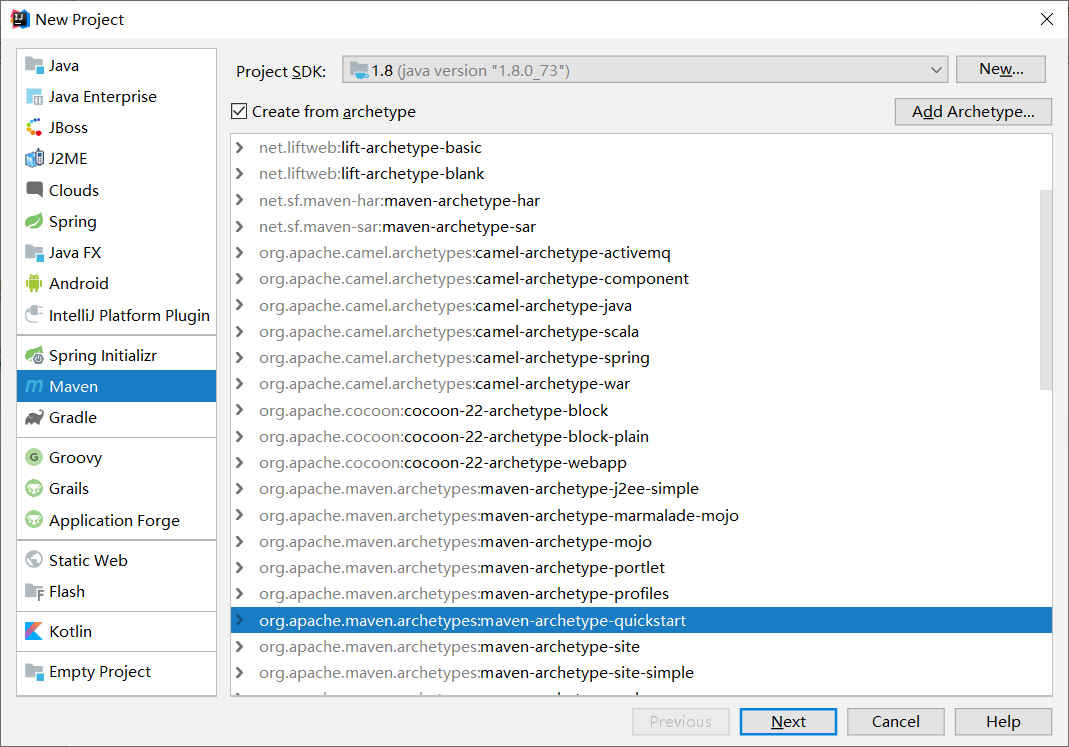
2.导入依赖
<?xml version="1.0" encoding="UTF-8"?>

<project xmlns="http://maven.apache.org/POM/4.0.0" xmlns:xsi="http://www.w3.org/2001/XMLSchema-instance"

  xsi:schemaLocation="http://maven.apache.org/POM/4.0.0 http://maven.apache.org/xsd/maven-4.0.0.xsd">

  <modelVersion>4.0.0</modelVersion>

  <groupId>com.cloud</groupId>

  <artifactId>springcloud_eureke_server</artifactId>

  <version>1.0-SNAPSHOT</version>

  <parent>

    <groupId>org.springframework.boot</groupId>

    <artifactId>spring-boot-starter-parent</artifactId>

    <version>2.1.4.RELEASE</version>

  </parent>

  <name>springcloud_eureke_server</name>

  <!-- FIXME change it to the project's website -->

  <url>http://www.example.com</url>

  <properties>

    <project.build.sourceEncoding>UTF-8</project.build.sourceEncoding>

    <maven.compiler.source>1.7</maven.compiler.source>

    <maven.compiler.target>1.7</maven.compiler.target>

  </properties>

  <dependencies>

    <dependency>

      <groupId>junit</groupId>

      <artifactId>junit</artifactId>

      <version>4.11</version>

      <scope>test</scope>

    </dependency>

    <!--eureka依赖-->

    <dependency>

      <groupId>org.springframework.cloud</groupId>

      <artifactId>spring-cloud-starter-netflix-eureka-server</artifactId>

    </dependency>

  </dependencies>

  <dependencyManagement>

    <dependencies>

      <!--springCloud依赖-->

      <dependency>

        <groupId>org.springframework.cloud</groupId>

        <artifactId>spring-cloud-dependencies</artifactId>

        <version>Greenwich.RELEASE</version>

        <type>pom</type>

        <scope>import</scope>

      </dependency>

    </dependencies>

  </dependencyManagement>

  <build>

    <pluginManagement><!-- lock down plugins versions to avoid using Maven defaults (may be moved to parent pom) -->

      <plugins>

        <!-- clean lifecycle, see https://maven.apache.org/ref/current/maven-core/lifecycles.html#clean_Lifecycle -->

        <plugin>

          <artifactId>maven-clean-plugin</artifactId>

          <version>3.1.0</version>

        </plugin>

        <!-- default lifecycle, jar packaging: see https://maven.apache.org/ref/current/maven-core/default-bindings.html#Plugin_bindings_for_jar_packaging -->

        <plugin>

          <artifactId>maven-resources-plugin</artifactId>

          <version>3.0.2</version>

        </plugin>

        <plugin>

          <artifactId>maven-compiler-plugin</artifactId>

          <version>3.8.0</version>

        </plugin>

        <plugin>

          <artifactId>maven-surefire-plugin</artifactId>

          <version>2.22.1</version>

        </plugin>

        <plugin>

          <artifactId>maven-jar-plugin</artifactId>

          <version>3.0.2</version>

        </plugin>

        <plugin>

          <artifactId>maven-install-plugin</artifactId>

          <version>2.5.2</version>

        </plugin>

        <plugin>

          <artifactId>maven-deploy-plugin</artifactId>

          <version>2.8.2</version>

        </plugin>

        <!-- site lifecycle, see https://maven.apache.org/ref/current/maven-core/lifecycles.html#site_Lifecycle -->

        <plugin>

          <artifactId>maven-site-plugin</artifactId>

          <version>3.7.1</version>

        </plugin>

        <plugin>

          <artifactId>maven-project-info-reports-plugin</artifactId>

          <version>3.0.0</version>

        </plugin>

      </plugins>

    </pluginManagement>

  </build>

</project>
3.创建resources文件夹编写application.yml文件
##应用名称

spring:

  application:

    name: eureke_server

##声明当前eurekeserver的端口号

server:

  port: 8001

##配置eureka

eureka:

  client:

    ##代表是否将自己注册到注册中心当中去

    register-with-eureka: false

    ##表明自己是注册中心

    fetch-registry: false

    ##配置地址

    service-url:

      defaultZone: http://localhost:8001/eureka
4.编写开始StarEurekaServer类
@SpringBootApplication

@EnableEurekaServer    //eureka服务注册中心

public class StarEurekaServer {

    public static void main(String[] args) {

        SpringApplication.run(StarEurekaServer.class,args);

    }

}
5.启动

2.Eureka生产者
1.创建quickstrat项目spring_eureka_server_Provider

2.引入依赖
<?xml version="1.0" encoding="UTF-8"?>

<project xmlns="http://maven.apache.org/POM/4.0.0" xmlns:xsi="http://www.w3.org/2001/XMLSchema-instance"

  xsi:schemaLocation="http://maven.apache.org/POM/4.0.0 http://maven.apache.org/xsd/maven-4.0.0.xsd">

  <modelVersion>4.0.0</modelVersion>

  <groupId>com.cloud</groupId>

  <artifactId>spring_eureka_server_Provider</artifactId>

  <version>1.0-SNAPSHOT</version>

  <parent>

    <groupId>org.springframework.boot</groupId>

    <artifactId>spring-boot-starter-parent</artifactId>

    <version>2.1.4.RELEASE</version>

  </parent>

  <name>spring_eureka_server_Provider</name>

  <!-- FIXME change it to the project's website -->

  <url>http://www.example.com</url>

  <properties>

    <project.build.sourceEncoding>UTF-8</project.build.sourceEncoding>

    <maven.compiler.source>1.7</maven.compiler.source>

    <maven.compiler.target>1.7</maven.compiler.target>

  </properties>

  <dependencies>

    <dependency>

      <groupId>junit</groupId>

      <artifactId>junit</artifactId>

      <version>4.11</version>

      <scope>test</scope>

    </dependency>

    <!--eureka依赖-->

    <dependency>

      <groupId>org.springframework.cloud</groupId>

      <artifactId>spring-cloud-starter-netflix-eureka-server</artifactId>

    </dependency>

  </dependencies>

  <dependencyManagement>

    <dependencies>

      <!--springCloud依赖-->

      <dependency>

        <groupId>org.springframework.cloud</groupId>

        <artifactId>spring-cloud-dependencies</artifactId>

        <version>Greenwich.RELEASE</version>

        <type>pom</type>

        <scope>import</scope>

      </dependency>

    </dependencies>

  </dependencyManagement>

  <build>

    <pluginManagement><!-- lock down plugins versions to avoid using Maven defaults (may be moved to parent pom) -->

      <plugins>

        <!-- clean lifecycle, see https://maven.apache.org/ref/current/maven-core/lifecycles.html#clean_Lifecycle -->

        <plugin>

          <artifactId>maven-clean-plugin</artifactId>

          <version>3.1.0</version>

        </plugin>

        <!-- default lifecycle, jar packaging: see https://maven.apache.org/ref/current/maven-core/default-bindings.html#Plugin_bindings_for_jar_packaging -->

        <plugin>

          <artifactId>maven-resources-plugin</artifactId>

          <version>3.0.2</version>

        </plugin>

        <plugin>

          <artifactId>maven-compiler-plugin</artifactId>

          <version>3.8.0</version>

        </plugin>

        <plugin>

          <artifactId>maven-surefire-plugin</artifactId>

          <version>2.22.1</version>

        </plugin>

        <plugin>

          <artifactId>maven-jar-plugin</artifactId>

          <version>3.0.2</version>

        </plugin>

        <plugin>

          <artifactId>maven-install-plugin</artifactId>

          <version>2.5.2</version>

        </plugin>

        <plugin>

          <artifactId>maven-deploy-plugin</artifactId>

          <version>2.8.2</version>

        </plugin>

        <!-- site lifecycle, see https://maven.apache.org/ref/current/maven-core/lifecycles.html#site_Lifecycle -->

        <plugin>

          <artifactId>maven-site-plugin</artifactId>

          <version>3.7.1</version>

        </plugin>

        <plugin>

          <artifactId>maven-project-info-reports-plugin</artifactId>

          <version>3.0.0</version>

        </plugin>

      </plugins>

    </pluginManagement>

  </build>

</project>
3.创建resources文件夹编写application.yml
##配置应用名称

spring:

  application:

    name: eureka-provider

##配置当前服务的端口号

server :

  port: 9002

##找到注册中心地址

eureka:

  client :

    service-url:

      defaultZone: http://localhost:8001/eureka
4.创建serviec层编写IDoSomeService
IDoSomeService
public interface IDoSomeService {

    String doSome();

}
IDoSomeServiceImpl
@RestController

public class IDoSomeServiceImpl implements IDoSomeService {

    @RequestMapping(value = "/doSome")

    @Override

    public String doSome() {

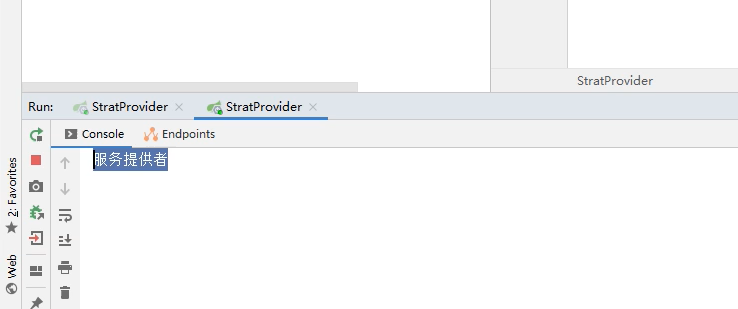
        System.out.println("服务提供者");

        return "eureka";

    }

}
5.启动

3.Eureka消费者
1.创建qustark项目spring_eureka_server_Consumers
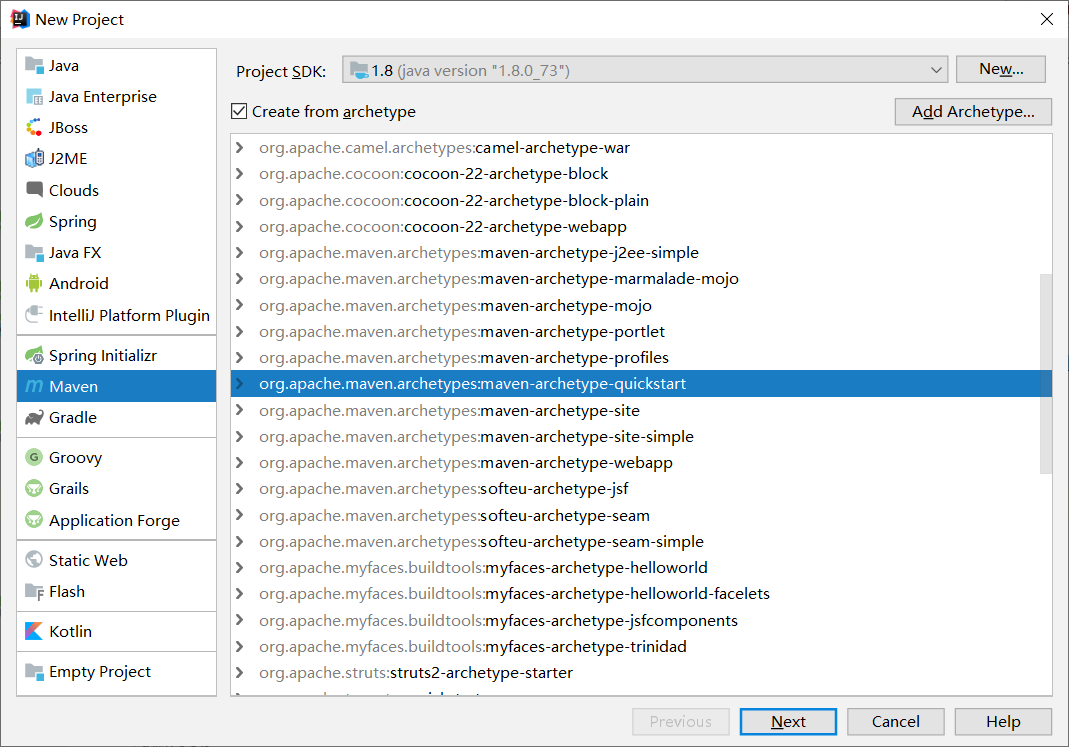
2.引入依赖
<?xml version="1.0" encoding="UTF-8"?>

<project xmlns="http://maven.apache.org/POM/4.0.0" xmlns:xsi="http://www.w3.org/2001/XMLSchema-instance"

  xsi:schemaLocation="http://maven.apache.org/POM/4.0.0 http://maven.apache.org/xsd/maven-4.0.0.xsd">

  <modelVersion>4.0.0</modelVersion>

  <groupId>com.cloud</groupId>

  <artifactId>spring_eureka_server_Consumers</artifactId>

  <version>1.0-SNAPSHOT</version>

  <parent>

    <groupId>org.springframework.boot</groupId>

    <artifactId>spring-boot-starter-parent</artifactId>

    <version>2.1.4.RELEASE</version>

  </parent>

  <name>spring_eureka_server_Consumers</name>

  <!-- FIXME change it to the project's website -->

  <url>http://www.example.com</url>

  <properties>

    <project.build.sourceEncoding>UTF-8</project.build.sourceEncoding>

    <maven.compiler.source>1.7</maven.compiler.source>

    <maven.compiler.target>1.7</maven.compiler.target>

  </properties>

  <dependencies>

    <dependency>

      <groupId>junit</groupId>

      <artifactId>junit</artifactId>

      <version>4.11</version>

      <scope>test</scope>

    </dependency>

    <!--eureka依赖-->

    <dependency>

      <groupId>org.springframework.cloud</groupId>

      <artifactId>spring-cloud-starter-netflix-eureka-server</artifactId>

    </dependency>

    <dependency>

      <groupId>org.springframework.boot</groupId>

      <artifactId>spring-boot-starter-web</artifactId>

    </dependency>

    <dependency>

      <groupId>org.springframework.cloud</groupId>

      <artifactId>spring-cloud-starter-openfeign</artifactId>

    </dependency>

  </dependencies>

  <dependencyManagement>

    <dependencies>

      <!--springCloud依赖-->

      <dependency>

        <groupId>org.springframework.cloud</groupId>

        <artifactId>spring-cloud-dependencies</artifactId>

        <version>Greenwich.RELEASE</version>

        <type>pom</type>

        <scope>import</scope>

      </dependency>

    </dependencies>

  </dependencyManagement>

  <build>

    <pluginManagement><!-- lock down plugins versions to avoid using Maven defaults (may be moved to parent pom) -->

      <plugins>

        <!-- clean lifecycle, see https://maven.apache.org/ref/current/maven-core/lifecycles.html#clean_Lifecycle -->

        <plugin>

          <artifactId>maven-clean-plugin</artifactId>

          <version>3.1.0</version>

        </plugin>

        <!-- default lifecycle, jar packaging: see https://maven.apache.org/ref/current/maven-core/default-bindings.html#Plugin_bindings_for_jar_packaging -->

        <plugin>

          <artifactId>maven-resources-plugin</artifactId>

          <version>3.0.2</version>

        </plugin>

        <plugin>

          <artifactId>maven-compiler-plugin</artifactId>

          <version>3.8.0</version>

        </plugin>

        <plugin>

          <artifactId>maven-surefire-plugin</artifactId>

          <version>2.22.1</version>

        </plugin>

        <plugin>

          <artifactId>maven-jar-plugin</artifactId>

          <version>3.0.2</version>

        </plugin>

        <plugin>

          <artifactId>maven-install-plugin</artifactId>

          <version>2.5.2</version>

        </plugin>

        <plugin>

          <artifactId>maven-deploy-plugin</artifactId>

          <version>2.8.2</version>

        </plugin>

        <!-- site lifecycle, see https://maven.apache.org/ref/current/maven-core/lifecycles.html#site_Lifecycle -->

        <plugin>

          <artifactId>maven-site-plugin</artifactId>

          <version>3.7.1</version>

        </plugin>

        <plugin>

          <artifactId>maven-project-info-reports-plugin</artifactId>

          <version>3.0.0</version>

        </plugin>

      </plugins>

    </pluginManagement>

  </build>

</project>
3.创建resources文件编写application.yml
##配置应用名称

spring:

  application:

    name: eureka_Consumers

##配置当前服务的端口号

server :

  port: 8899

##找到注册中心地址

eureka:

  client :

    service-url:

      defaultZone: http://localhost:8001/eureka
4.创建controller
@RestController

public class Consumerscontroller {

    @Resource

    private RestTemplate restTemplate;

    @Resource

    private IDoSomeService iDoSomeService;

    @RequestMapping(value = "/doSome")

    public String doSome(){

        System.out.println("Consumerscontroller");

        return restTemplate.getForObject("http://eureka-provider/doSome",String.class);

    }

}
5.编写stratProvider
@SpringBootApplication

@EnableEurekaClient

@EnableFeignClients

public class StratProvider {

    public static void main(String[] args) {

        SpringApplication.run(StratProvider.class,args);

    }

    }

    @Bean

    RestTemplate restTemplate(){

        return new RestTemplate();

    }

}
6.运行
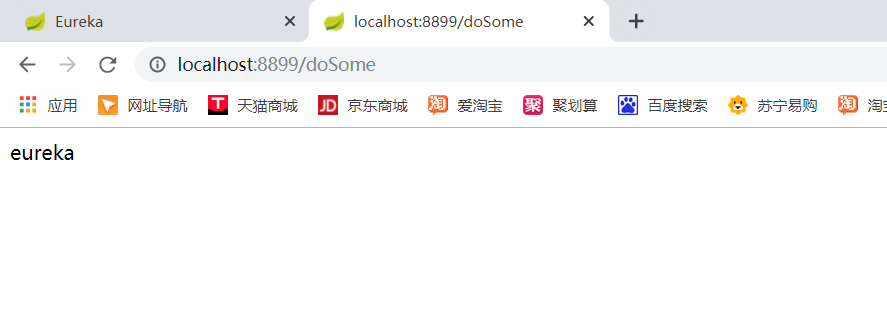
4.Ribbon负载均衡
1.修改消费者的代码controller
package com.cloud.controller;

import com.cloud.service.IDoSomeService;

import org.springframework.stereotype.Controller;

import org.springframework.web.bind.annotation.RequestMapping;

import org.springframework.web.bind.annotation.RestController;

import org.springframework.web.client.RestTemplate;

import javax.annotation.Resource;

@RestController

public class Consumerscontroller {

    @Resource

    private RestTemplate restTemplate;

    @Resource

    private IDoSomeService iDoSomeService;

    @RequestMapping(value = "/doSome")

    public String doSome(){

        return iDoSomeService.doSome();

        /*System.out.println("Consumerscontroller");

        return restTemplate.getForObject("http://eureka-provider/doSome",String.class);*/

    }

}
注:http协议后面不能再写http://localhost:8899/doSome得写"http://eureka-provider/doSome"
2.运行看效果
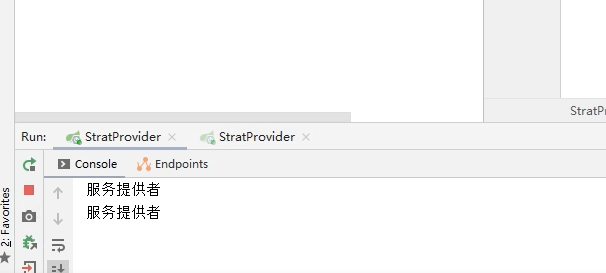
5.Feign的使用以及负载均衡策略
1.引入依赖
<dependency>

      <groupId>org.springframework.cloud</groupId>

      <artifactId>spring-cloud-starter-openfeign</artifactId>

    </dependency>
2.创建service层
@FeignClient("eureka-provider")

public interface IDoSomeService {

    @RequestMapping(value = "/doSome")

    public String doSome();

}
3.编写controller
@RestController

public class Consumerscontroller {

    @Resource

    private RestTemplate restTemplate;

    @Resource

    private IDoSomeService iDoSomeService;

    @RequestMapping(value = "/doSome")

    public String doSome(){

        return iDoSomeService.doSome();

        /*System.out.println("Consumerscontroller");

        return restTemplate.getForObject("http://eureka-provider/doSome",String.class);*/

    }

}
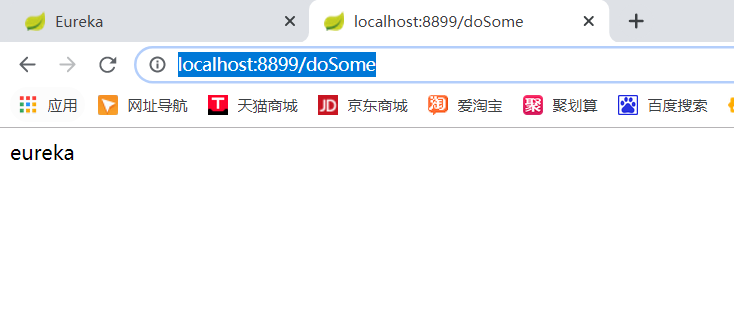
可以看到依旧可以访问
spring-cloud(一)的更多相关文章
- spring/spring boot/spring cloud开发总结
背景 针对RPC远程调用,都在使用dubbo.dubbox等,我们也是如此.由于社区暂停维护.应对未来发展,我们准备尝试新技术(或许这时候也不算什么新技术了吧),选择使用了spring ...
- 转 Netflix OSS、Spring Cloud还是Kubernetes? 都要吧!
Netflix OSS.Spring Cloud还是Kubernetes? 都要吧! http://www.infoq.com/cn/articles/netflix-oss-spring-cloud ...
- spring cloud 学习研究- spring-cloud-microservice-example
spring cloud + docker 微服务架构 http://www.open-open.com/lib/view/open1437363835818.html 实例项目 https://gi ...
- Spring Cloud集成相关优质项目推荐
Spring Cloud Config 配置管理工具包,让你可以把配置放到远程服务器,集中化管理集群配置,目前支持本地存储.Git以及Subversion. Spring Cloud Bus 事件.消 ...
- spring boot分布式技术,spring cloud,负载均衡,配置管理器
spring boot分布式的实现,使用spring cloud技术. 下边是我理解的spring cloud的核心技术: 1.配置服务器 2.注册发现服务器eureka(spring boot默认使 ...
- Spring Cloud 配置服务
Spring Cloud 配置服务 1. 配置服务简介 产生背景: 传统开发中,我们通常是将系统的业务无关配置(数据库,缓存服务器)在properties中配置,在这个文件中不会经常改变,但随着系统规 ...
- Microservices Reference Architecture - with Spring Boot, Spring Cloud and Netflix OSS--转
原文地址:https://www.linkedin.com/pulse/microservices-reference-architecture-spring-boot-cloud-anil-alle ...
- 综合使用spring cloud技术实现微服务应用
在之前的章节,我们已经实现了配置服务器.注册服务器.微服务服务端,实现了服务注册与发现.这一章将实现微服务的客户端,以及联调.实现整个spring cloud框架核心应用. 本文属于<7天学会s ...
- Spring cloud实现服务注册及发现
服务注册与发现对于微服务系统来说非常重要.有了服务发现与注册,你就不需要整天改服务调用的配置文件了,你只需要使用服务的标识符,就可以访问到服务. 本文属于<7天学会spring cloud系列& ...
- 使用spring cloud实现分布式配置管理
<7天学会spring cloud系列>之创建配置管理服务器及实现分布式配置管理应用. 本文涉及到的项目: 开源项目:http://git.oschina.net/zhou666/spri ...
随机推荐
- Python基础(七)——文件和异常
1.1 读取整个文件 我们可以创建一个 test.txt 并写入一些内容,使用 Python 读文件操作,读出文本内容. with open(r'E:\test.txt') as file_objec ...
- EasyExcel读取文件-同步处理数据
读取代码 // 前端传过来的文件 MultipartFile file; InputStream inputStream = file.getInputStream(); // 读取excel数据,边 ...
- PB 修改datawindow 的背景色
1.修改标题行的背景色 rgb(235, 235, 235) 2.修改选择行的背景色(即选择行高亮) if(currentrow() = getrow(), rgb(235,235,235), rgb ...
- [Atcoder AGC037E]Reversing and Concatenating
题目大意:有一个长度为$n$的字符串$S$,有$k$次操作,每次操作为把$S$变为$SS^R$(即翻转后再接在一起),然后从中选取一段长度为$n$的字串.问$k$次操作后,字典序最小的一种是什么.$n ...
- [loj 6253] Yazid的新生舞会
(很久之前刷的题现在看起来十分陌生a) 题意: 给你一个长度为n的序列A,定义一个区间$[l,r]$是“新生舞会的”当且仅当该区间的众数次数严格大于$\frac{r-l+1}{2}$,求有多少子区间是 ...
- EF6 + MySql 建立项目引用失败
EF6 + MySql 建立项目 步骤 在项目中使用” NuGet” 包添加 EntityFramework 和 MySql.Data ,如下图 (1) 在NuGet界面中的“浏览”选项卡 ...
- C ProcessAsUser
class Interop { public static void CreateProcess(string app, string path) { bool result; IntPtr hTok ...
- vue-cli + webpack 环境搭建
1.下载nodeJS,官网 https://nodejs.org/en/ . 2.安装nodeJS.安装完成后可以检测node -v 如果版本号的话则正常. 3.安装淘宝镜像.npm install ...
- 记录axios在IOS上不能发送的问题
最近 遇到 了axios在IOS上无法发送的问题,测试 了两个 苹果 机,IOS10上不能发送,IOS12可以,百度了下,找到了解决方法.记录下吧 首先引入qs,这个安装axios也已经有了吧:然后在 ...
- 彻底解决unable to find valid certification path to requested target
安装证书. 下载证书 第一步是要下载证书 去你程序要访问的网站,点击那个锁按钮,并点击查看详情(chrome浏览器) 点击View certificate 点击详细信息 复制到文件 下一步 选择格式 ...