
windows安装elasticsearch和elasticsearch-head插件
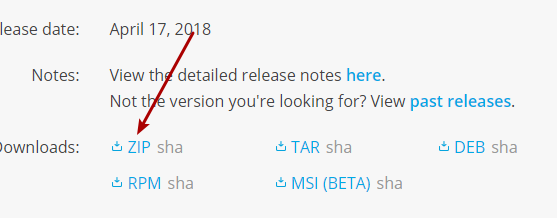
1、去官网下载最新软件
选择zip包,https://www.elastic.co/downloads/elasticsearch
2、下载node
必须 > 6.0已上
3、解压elasticsearch压缩包
4、修改config下的elasticsearch.yml
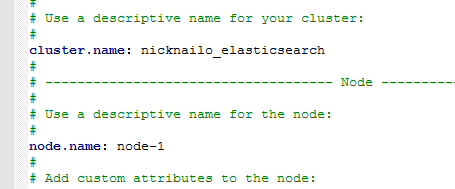
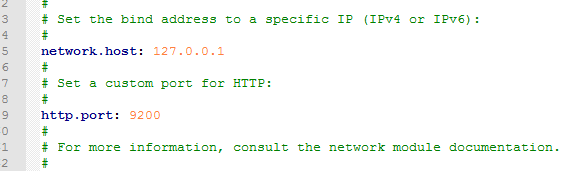

注意:每个“:”后都必须有个空格
5、去 https://github.com/mobz/elasticsearch-head 下载head插件
插件放到plugins目录文件下
6、进入 head文件内 修改配置
修改_site/app.js
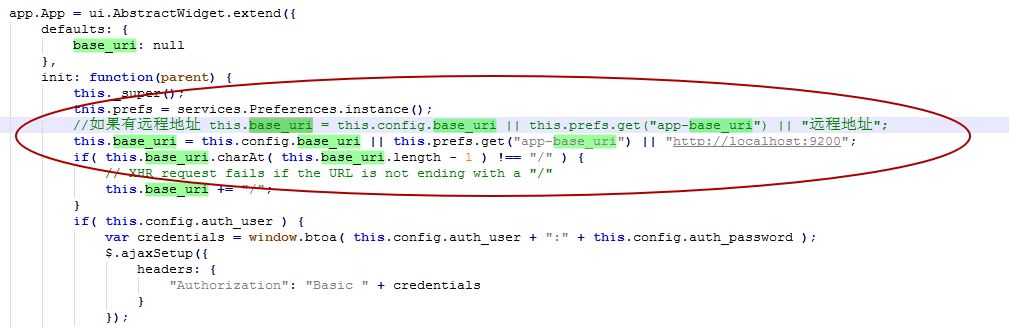
修改 Gruntfile.js

7、使用npm 安装head需要的包
cd elasticsearch-headnpm installnpm run start
8、启动elasticsearch

有点尴尬,报错了。
9、解决报错
[o.e.b.ElasticsearchUncaughtExceptionHandler] [node-1] uncaught exception in thread [main]
org.elasticsearch.bootstrap.StartupException: java.lang.IllegalArgumentException: property [elasticsearch.version] is missing for plugin [head]
at org.elasticsearch.bootstrap.Elasticsearch.init(Elasticsearch.java:125) ~[elasticsearch-6.2.4.jar:6.2.4]
at org.elasticsearch.bootstrap.Elasticsearch.execute(Elasticsearch.java:112) ~[elasticsearch-6.2.4.jar:6.2.4]
at org.elasticsearch.cli.EnvironmentAwareCommand.execute(EnvironmentAwareCommand.java:86) ~[elasticsearch-6.2.4.jar:6.2.4]
at org.elasticsearch.cli.Command.mainWithoutErrorHandling(Command.java:124) ~[elasticsearch-cli-6.2.4.jar:6.2.4]
at org.elasticsearch.cli.Command.main(Command.java:90) ~[elasticsearch-cli-6.2.4.jar:6.2.4]
at org.elasticsearch.bootstrap.Elasticsearch.main(Elasticsearch.java:92) ~[elasticsearch-6.2.4.jar:6.2.4]
at org.elasticsearch.bootstrap.Elasticsearch.main(Elasticsearch.java:85) ~[elasticsearch-6.2.4.jar:6.2.4]
Caused by: java.lang.IllegalArgumentException: property [elasticsearch.version] is missing for plugin [head]
at org.elasticsearch.plugins.PluginInfo.readFromProperties(PluginInfo.java:226) ~[elasticsearch-6.2.4.jar:6.2.4]
at org.elasticsearch.plugins.PluginInfo.readFromProperties(PluginInfo.java:184) ~[elasticsearch-6.2.4.jar:6.2.4]
at org.elasticsearch.bootstrap.Spawner.spawnNativePluginControllers(Spawner.java:75) ~[elasticsearch-6.2.4.jar:6.2.4]
at org.elasticsearch.bootstrap.Bootstrap.setup(Bootstrap.java:167) ~[elasticsearch-6.2.4.jar:6.2.4]
at org.elasticsearch.bootstrap.Bootstrap.init(Bootstrap.java:323) ~[elasticsearch-6.2.4.jar:6.2.4]
at org.elasticsearch.bootstrap.Elasticsearch.init(Elasticsearch.java:121) ~[elasticsearch-6.2.4.jar:6.2.4]
因为 missing for plugin [head],意思是找不到head插件。
从官方文档中,6.2版本需要将head插件放到elasticsearch目录中,所以,将head目录文件剪切拿到上一层目录中
10、启动软件
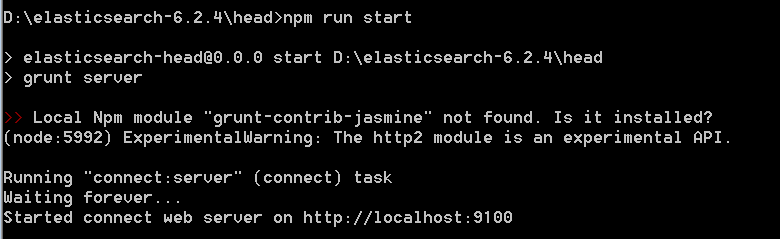
,再点击elasticsearch.bat


这样就完成下载和配置head插件了。
分享不易,请点个赞。
windows安装elasticsearch和elasticsearch-head插件的更多相关文章
- windows安装elasticsearch
1. 去官网 https://www.elastic.co/cn/ 下载 注意: ES对JDK版本有较高的要求,5.x及以上版本需要JDK8支持,本人此次使用2.4.6版本2. 下载后,JDK先安装, ...
- elasticsearch 中文分词、插件的安装和使用(一)
1. 安装elasticsearch.kibana.x-pack #安装elasticsearch wget https://artifacts.elastic.co/downloads/elasti ...
- mac以及centos下安装Elasticsearch 以及权限管理插件
Elasticsearch安装(提前系统需要安装java环境)mac安装 brew install elasticsearch centos安装 下载ElasticSearch安装包,https:// ...
- 安装和使用 Elasticsearch(1.1.1)+marvel插件、Kibana插件
Elasticsearch是开源搜索平台的新成员,实时数据分析的神器,发展迅猛,基于 Lucene.RESTful.分布式.面向云计算设计.实时搜索.全文搜索.稳定.高可靠.可扩展.安装+使用方便,介 ...
- ELK日志监控平台安装部署简介--Elasticsearch安装部署
最近由于工作需要,需要搭建一个ELK日志监控平台,本次采用Filebeat(采集数据)+Elasticsearch(建立索引)+Kibana(展示)架构,实现日志搜索展示功能. 一.安装环境描述: 1 ...
- ES之一:Elasticsearch6.4 windows安装 head插件ik分词插件安装
准备安装目标:1.Elasticsearch6.42.head插件3.ik分词插件 第一步:安装Elasticsearch6.4 下载方式:1.官网下载 https://www.elastic.co/ ...
- ubuntu 安装 JVM 与 ElasticSearch
测试环境: Ubuntu x86_64 3.13.0-35-generic 安装jre: $ sudo apt-get install software-properties-common $ sud ...
- Windows 10环境安装VIM代码补全插件YouCompleteMe
Windows 10环境安装VIM代码补全插件YouCompleteMe 折腾一周也没搞定Windows下安装VIM代码补全插件YouCompleteMe,今天在家折腾一天总算搞定了.关键问题是在于P ...
- Ubuntu16.04安装和使用ElasticSearch
1.下载es wget https://download.elastic.co/elasticsearch/release/org/elasticsearch/distribution/tar/ela ...
随机推荐
- Educational Codeforces Round 48 (Rated for Div. 2) CD题解
Educational Codeforces Round 48 (Rated for Div. 2) C. Vasya And The Mushrooms 题目链接:https://codeforce ...
- ContentProvider学习
1.创建类继承ContentProvider类,并实现增.删.改.查功能. public static final String AUTHORITY = "com.diysoul.lists ...
- ubuntu10.04 安装gcc4.1.2
After a bunch of searching to get gcc-4.1 & g++-4.1 in Ubuntu 10.10 (maverick), I found easy wor ...
- 自己做的jquery的autocomplete的一个例子
转载自:http://dada-fangfang.iteye.com/blog/695464 首先下载jquery.js和jquery.autocomplete.js 注意:jquery.js 要放在 ...
- MongoDB入门(1)- MongoDB简介
什么是MongoDB NoSQL NoSQL systems are also sometimes called "Not only SQL" to emphasize that ...
- 【C++ STL】容器概要
1.容器的共通能力 1. 所有的容器都是“value”语意,而不是“reference”语意.容器进行元素的安插操作时,内部实施的都是拷贝操作,置于容器内.因此STL容器的每个元素都必须能被拷贝.如 ...
- os.fork()
ret = os.fork() if ret == 0: child_suite # 子进程代码 else: parent_suite # 父进程代码 Python中的fork() 函数可以获得系统中 ...
- canvas_基于canvan绘制的双半圆环进度条
效果图 实现原理: 1.使用canvas绘制两个半圆弧,底图灰色半圆弧和颜色进度圆弧. 2.利用setInterval计时器,逐步改变颜色进度条,达到进度条的效果. 效果代码: <!DOCTYP ...
- MapperScannerConfigurer不 property-placeholder
关于org.mybatis.spring.mapper.MapperScannerConfigurer不支持 property-placeholder 参考了http://www.oschina.ne ...
- perl登录ssh
use warnings; use strict; use Net::SSH::Perl; my $host = '192.168.255.128'; my $username = 'root'; m ...