
jenkins-gitlab-harbor-ceph基于Kubernetes的CI/CD运用(二)
一张网图

因为我们使用了Docker in Docker技术,就是把jenkins部署在k8s里。jenkins master会动态创建slave pod,使用slave pod运行代码克隆,项目构建,镜像构建等指令操作。构成完成以后删除这个slave pod。减轻jenkins-master的负载,可以极大地提高资源利用率。
配置连接kubernetes
我们已经安装了Kubernetes插件,我们直接在jenkins中点击
manage jenkins -- > configure system -- > 拉到最底下有一个cloud。
新增一个cloud --> kubernetes
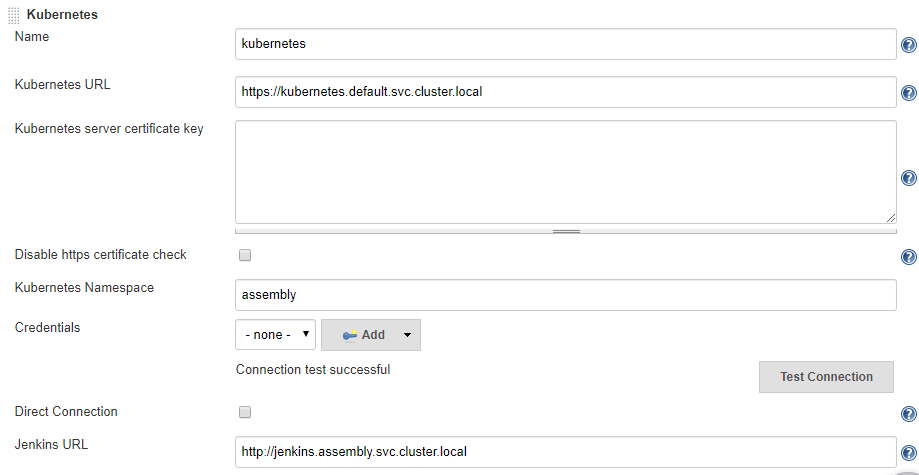
测试
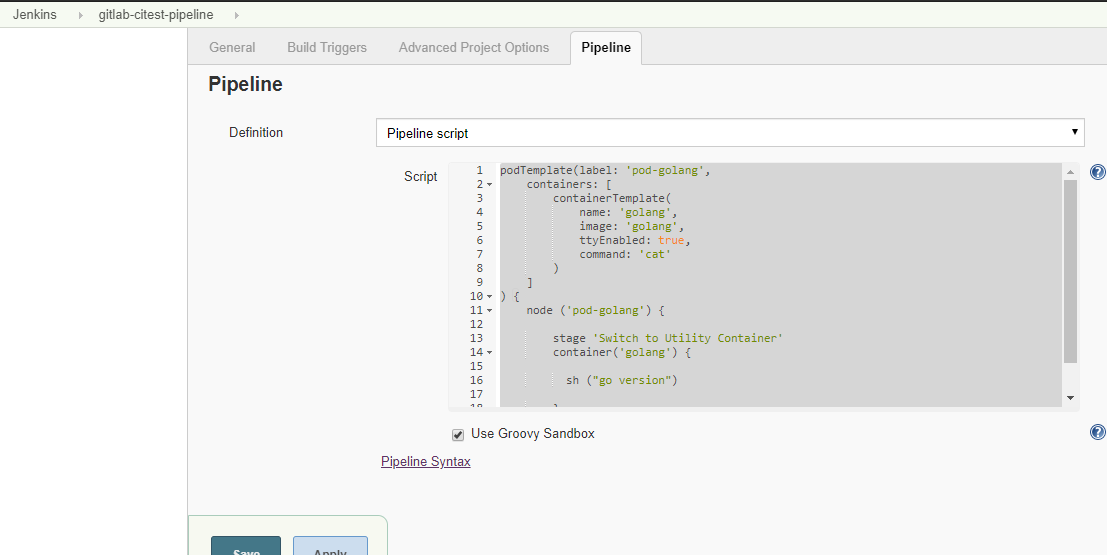
podTemplate(label: 'pod-golang',

    containers: [

        containerTemplate(

            name: 'golang',

            image: 'golang',

            ttyEnabled: true,

            command: 'cat'

        )

    ]

) {

    node ('pod-golang') {

        stage 'Switch to Utility Container'

        container('golang') {

          sh ("go version")

        }

    }

}
输出
# kubectl get pods -A -w

assembly      pod-golang-qbcxr-fbc73                       2/2     Running             0          28s

assembly      pod-golang-qbcxr-fbc73                       2/2     Terminating         0          69s

Started by user zisefeizhu

Running in Durability level: MAX_SURVIVABILITY

[Pipeline] Start of Pipeline

[Pipeline] podTemplate

[Pipeline] {

[Pipeline] node

Created Pod: pod-golang-qbcxr-gkbx2 in namespace assembly

Still waiting to schedule task

‘pod-golang-qbcxr-gkbx2’ is offline

Created Pod: pod-golang-qbcxr-4tn61 in namespace assembly

Created Pod: pod-golang-qbcxr-sqfqk in namespace assembly

Created Pod: pod-golang-qbcxr-lncp9 in namespace assembly

Created Pod: pod-golang-qbcxr-czccr in namespace assembly

Created Pod: pod-golang-qbcxr-3d6wq in namespace assembly

Created Pod: pod-golang-qbcxr-x9q5m in namespace assembly

Created Pod: pod-golang-qbcxr-fbc73 in namespace assembly

Agent pod-golang-qbcxr-fbc73 is provisioned from template pod-golang-qbcxr

---

apiVersion: "v1"

kind: "Pod"

metadata:

  annotations:

    buildUrl: "http://jenkins.assembly.svc.cluster.local/job/gitlab-citest-pipeline/4/"

    runUrl: "job/gitlab-citest-pipeline/4/"

  labels:

    jenkins: "slave"

    jenkins/label: "pod-golang"

  name: "pod-golang-qbcxr-fbc73"

spec:

  containers:

  - command:

    - "cat"

    image: "golang"

    imagePullPolicy: "IfNotPresent"

    name: "golang"

    resources:

      limits: {}

      requests: {}

    securityContext:

      privileged: false

    tty: true

    volumeMounts:

    - mountPath: "/home/jenkins/agent"

      name: "workspace-volume"

      readOnly: false

  - env:

    - name: "JENKINS_SECRET"

      value: "********"

    - name: "JENKINS_AGENT_NAME"

      value: "pod-golang-qbcxr-fbc73"

    - name: "JENKINS_NAME"

      value: "pod-golang-qbcxr-fbc73"

    - name: "JENKINS_AGENT_WORKDIR"

      value: "/home/jenkins/agent"

    - name: "JENKINS_URL"

      value: "http://jenkins.assembly.svc.cluster.local/"

    image: "jenkins/jnlp-slave:3.35-5-alpine"

    name: "jnlp"

    volumeMounts:

    - mountPath: "/home/jenkins/agent"

      name: "workspace-volume"

      readOnly: false

  nodeSelector:

    beta.kubernetes.io/os: "linux"

  restartPolicy: "Never"

  securityContext: {}

  volumes:

  - emptyDir:

      medium: ""

    name: "workspace-volume"

Running on pod-golang-qbcxr-fbc73 in /home/jenkins/agent/workspace/gitlab-citest-pipeline

[Pipeline] {

[Pipeline] stage (Switch to Utility Container)

Using the ‘stage’ step without a block argument is deprecated

Entering stage Switch to Utility Container

Proceeding

[Pipeline] container

[Pipeline] {

[Pipeline] sh

+ go version

go version go1.14.1 linux/amd64

[Pipeline] }

[Pipeline] // container

[Pipeline] }

[Pipeline] // node

[Pipeline] }

[Pipeline] // podTemplate

[Pipeline] End of Pipeline

Finished: SUCCESS
以上podTemplate是在Pipeline里面定义的
*注意name必须jnlp,如果不为jnlp pod会启两个容器
name必须jnlp Kubernetes 才能用自定义 images 指定的镜像替换默认的 jenkinsci/jnlp-slave 镜像
构建jenkins-slave镜像
github官方构建slave文档
https://github.com/jenkinsci/docker-jnlp-slave
# ll

总用量 80900

-rw-r--r-- 1 root root      596 3月  23 09:14 Dockerfile

-rwxr-xr-x 1 root root 38457344 3月  22 20:55 helm

-rw-r--r-- 1 root root     2229 3月  21 20:04 jenkins-slave

-rwxr-xr-x 1 root root 43491328 3月  23 09:13 kubectl

-rw-r--r-- 1 root root      619 3月  21 20:05 settings.xml

-rw-r--r-- 1 root root   877037 3月  23 08:40 slave.jar

# cat Dockerfile

FROM centos:7

LABEL maintainer lizhenliang

# 使镜像具有拖git仓库,编译java代码的能力

RUN yum install -y java-1.8.0-openjdk maven curl git libtool-ltdl-devel && \

    yum clean all && \

    rm -rf /var/cache/yum/* && \

    mkdir -p /usr/share/jenkins

# 将获取到slave.jar放入镜像

COPY slave.jar /usr/share/jenkins/slave.jar

# jenkins-slave执行脚本

COPY jenkins-slave /usr/bin/jenkins-slave

# settings.xml中设置了aliyun的镜像

COPY settings.xml /etc/maven/settings.xml

RUN chmod +x /usr/bin/jenkins-slave

COPY helm kubectl /usr/bin/

ENTRYPOINT ["jenkins-slave"]

# cat jenkins-slave

#!/usr/bin/env sh

if [ $# -eq 1 ]; then

    # if `docker run` only has one arguments, we assume user is running alternate command like `bash` to inspect the image

    exec "$@"

else

    # if -tunnel is not provided try env vars

    case "$@" in

        *"-tunnel "*) ;;

        *)

        if [ ! -z "$JENKINS_TUNNEL" ]; then

            TUNNEL="-tunnel $JENKINS_TUNNEL"

        fi ;;

    esac

    # if -workDir is not provided try env vars

    if [ ! -z "$JENKINS_AGENT_WORKDIR" ]; then

        case "$@" in

            *"-workDir"*) echo "Warning: Work directory is defined twice in command-line arguments and the environment variable" ;;

            *)

            WORKDIR="-workDir $JENKINS_AGENT_WORKDIR" ;;

        esac

    fi

    if [ -n "$JENKINS_URL" ]; then

        URL="-url $JENKINS_URL"

    fi

    if [ -n "$JENKINS_NAME" ]; then

        JENKINS_AGENT_NAME="$JENKINS_NAME"

    fi

    if [ -z "$JNLP_PROTOCOL_OPTS" ]; then

        echo "Warning: JnlpProtocol3 is disabled by default, use JNLP_PROTOCOL_OPTS to alter the behavior"

        JNLP_PROTOCOL_OPTS="-Dorg.jenkinsci.remoting.engine.JnlpProtocol3.disabled=true"

    fi

    # If both required options are defined, do not pass the parameters

    OPT_JENKINS_SECRET=""

    if [ -n "$JENKINS_SECRET" ]; then

        case "$@" in

            *"${JENKINS_SECRET}"*) echo "Warning: SECRET is defined twice in command-line arguments and the environment variable" ;;

            *)

            OPT_JENKINS_SECRET="${JENKINS_SECRET}" ;;

        esac

    fi

    OPT_JENKINS_AGENT_NAME=""

    if [ -n "$JENKINS_AGENT_NAME" ]; then

        case "$@" in

            *"${JENKINS_AGENT_NAME}"*) echo "Warning: AGENT_NAME is defined twice in command-line arguments and the environment variable" ;;

            *)

            OPT_JENKINS_AGENT_NAME="${JENKINS_AGENT_NAME}" ;;

        esac

    fi

    #TODO: Handle the case when the command-line and Environment variable contain different values.

    #It is fine it blows up for now since it should lead to an error anyway.

    exec java $JAVA_OPTS $JNLP_PROTOCOL_OPTS -cp /usr/share/jenkins/slave.jar hudson.remoting.jnlp.Main -headless $TUNNEL $URL $WORKDIR $OPT_JENKINS_SECRET $OPT_JENKINS_AGENT_NAME "$@"

fi

# cat settings.xml

<?xml version="1.0" encoding="UTF-8"?>

<settings xmlns="http://maven.apache.org/SETTINGS/1.0.0"

          xmlns:xsi="http://www.w3.org/2001/XMLSchema-instance"

          xsi:schemaLocation="http://maven.apache.org/SETTINGS/1.0.0 http://maven.apache.org/xsd/settings-1.0.0.xsd">

  <pluginGroups>

  </pluginGroups>

  <proxies>

  </proxies>

  <servers>

  </servers>

  <mirrors>

    <mirror>

      <id>central</id>

      <mirrorOf>central</mirrorOf>

      <name>aliyun maven</name>

      <url>https://maven.aliyun.com/repository/public</url>

    </mirror>

  </mirrors>

  <profiles>

  </profiles>

</settings>

构建镜像并打上标签

# docker build . -t harbor.linux.com/jenkinsci/jenkins-slave-jdk:1.8

推送镜像到harbor

#docker push harbor.linux.com/jenkinsci/jenkins-slave-jdk:1.8
创建应用Pipeline动态构建测试

// 镜像仓库地址

def registry = "harbor.linux.com"

podTemplate(label: 'jenkins-agent', cloud: 'kubernetes',

    containers: [

    containerTemplate(

        name: 'jnlp',

        image: "${registry}/jenkinsci/jenkins-slave-jdk:1.8"

    )],

    volumes: [

        hostPathVolume(mountPath: '/var/run/docker.sock', hostPath: '/var/run/docker.sock'),

        hostPathVolume(mountPath: '/usr/bin/docker', hostPath: '/usr/bin/docker')

    ])

{

  node("jenkins-agent"){

        stage('拉取代码') { // for display purposes

            echo 'ok'

        }

        stage('代码编译') {

            echo 'ok'

        }

        stage('部署') {

            echo 'ok'

        }

    }

}
输出
Started by user zisefeizhu

Running in Durability level: MAX_SURVIVABILITY

[Pipeline] Start of Pipeline

[Pipeline] podTemplate

[Pipeline] {

[Pipeline] node

Still waiting to schedule task

‘Jenkins’ doesn’t have label ‘jenkins-agent’

Created Pod: jenkins-agent-xnj85-cq1vx in namespace assembly

Agent jenkins-agent-xnj85-cq1vx is provisioned from template jenkins-agent-xnj85

---

apiVersion: "v1"

kind: "Pod"

metadata:

  annotations:

    buildUrl: "http://jenkins.assembly.svc.cluster.local/job/gitlab-citest-pipeline/18/"

    runUrl: "job/gitlab-citest-pipeline/18/"

  labels:

    jenkins: "slave"

    jenkins/label: "jenkins-agent"

  name: "jenkins-agent-xnj85-cq1vx"

spec:

  containers:

  - env:

    - name: "JENKINS_SECRET"

      value: "********"

    - name: "JENKINS_AGENT_NAME"

      value: "jenkins-agent-xnj85-cq1vx"

    - name: "JENKINS_NAME"

      value: "jenkins-agent-xnj85-cq1vx"

    - name: "JENKINS_AGENT_WORKDIR"

      value: "/home/jenkins/agent"

    - name: "JENKINS_URL"

      value: "http://jenkins.assembly.svc.cluster.local/"

    image: "harbor.linux.com/jenkinsci/jenkins-slave-jdk:1.8"

    imagePullPolicy: "IfNotPresent"

    name: "jnlp"

    resources:

      limits: {}

      requests: {}

    securityContext:

      privileged: false

    tty: false

    volumeMounts:

    - mountPath: "/var/run/docker.sock"

      name: "volume-0"

      readOnly: false

    - mountPath: "/usr/bin/docker"

      name: "volume-1"

      readOnly: false

    - mountPath: "/home/jenkins/agent"

      name: "workspace-volume"

      readOnly: false

  nodeSelector:

    beta.kubernetes.io/os: "linux"

  restartPolicy: "Never"

  securityContext: {}

  volumes:

  - hostPath:

      path: "/var/run/docker.sock"

    name: "volume-0"

  - hostPath:

      path: "/usr/bin/docker"

    name: "volume-1"

  - emptyDir:

      medium: ""

    name: "workspace-volume"

Running on jenkins-agent-xnj85-cq1vx in /home/jenkins/agent/workspace/gitlab-citest-pipeline

[Pipeline] {

[Pipeline] stage

[Pipeline] { (拉取代码)

[Pipeline] echo

ok

[Pipeline] }

[Pipeline] // stage

[Pipeline] stage

[Pipeline] { (代码编译)

[Pipeline] echo

ok

[Pipeline] }

[Pipeline] // stage

[Pipeline] stage

[Pipeline] { (部署)

[Pipeline] echo

ok

[Pipeline] }

[Pipeline] // stage

[Pipeline] }

[Pipeline] // node

[Pipeline] }

[Pipeline] // podTemplate

[Pipeline] End of Pipeline

Finished: SUCCESS

# kubectl get pods  --all-namespaces -w -o wide

NAMESPACE     NAME                                         READY   STATUS    RESTARTS   AGE     IP               NODE         NOMINATED NODE   READINESS GATES

assembly      jenkins-agent-7hbn2-5kwwv                    0/1     Pending   0          0s

assembly      jenkins-agent-7hbn2-5kwwv                    0/1     Pending   0          0s

assembly      jenkins-agent-7hbn2-5kwwv                    0/1     ContainerCreating   0          0s

assembly      jenkins-agent-7hbn2-5kwwv                    1/1     Running             0          3s

assembly      jenkins-agent-7hbn2-5kwwv                    1/1     Terminating         0          68s

assembly      jenkins-agent-7hbn2-5kwwv                    0/1     Terminating         0          72s

assembly      jenkins-agent-7hbn2-5kwwv                    0/1     Terminating         0          72s

assembly      jenkins-agent-7hbn2-5kwwv                    0/1     Terminating         0          77s

assembly      jenkins-agent-7hbn2-5kwwv                    0/1     Terminating         0          77s

会发现 jenkins-agent-xnj85-cq1vx  构建完成后自动删除
jenkins-gitlab-harbor-ceph基于Kubernetes的CI/CD运用(二)的更多相关文章
- jenkins-gitlab-harbor-ceph基于Kubernetes的CI/CD运用(一)
注:这部分的学习还是要靠自己多点点 多尝试尝试 这部分19年3月份我是玩的很溜的,一年没用,基本忘光光了. 学习要温故而知新! 流程拓扑图 前提准备 部署应用服务 部署kubernetes 集群:ht ...
- jenkins-gitlab-harbor-ceph基于Kubernetes的CI/CD运用(四)
前景提要 jenkins与gitlab结合,实现代码自动拉取:https://www.cnblogs.com/zisefeizhu/p/12548662.html jenkins与kubernetes ...
- jenkins-gitlab-harbor-ceph基于Kubernetes的CI/CD运用(三)
从最基础镜像到业务容器 构建 [为gitlab项目部署做铺垫] 业务镜像设计规划 目录结构 # pwd /data/k8s/app/myapp # tree . . ├── dockerfile │ ...
- 基于docker搭建Jenkins+Gitlab+Harbor+Rancher架构实现CI/CD操作
一.各个组件的功能描述: Docker 是一个开源的应用容器引擎. Jenkis 是一个开源自动化服务器. (1).负责监控gitlab代码.gitlab中配置文件的变动: (2).负责执行镜像文件的 ...
- 容器云平台No.10~通过gogs+drone+kubernetes实现CI/CD
什么是CI/CD 持续集成(Continous Intergration,CI)是一种软件开发实践,即团队开发成员经常集成它们的工作,通常每个成员每天至少集成一次,也就意味着每天可能会发生多次集成.每 ...
- 基于docker搭建Jenkins+Gitlab+Harbor+Rancher架构实现CI/CD操作(续)---Harbor的安装
前期安装文档:https://www.cnblogs.com/lq-93/p/11828626.html Harbor的作用: 开发提交代码至gitlab容器中,Jenkins拉取代码构建镜像 ...
- 基于docker搭建Jenkins+Gitlab+Harbor+Rancher架构实现CI/CD操作(续)
说明:前期的安装,请转向https://www.cnblogs.com/lq-93/p/11824039.html (4).查看gitlab镜像是否启动成功 docker inspect 容器id ...
- kubernetes的CI/CD
部署流程:把编码上传到gitlab上,使用webhook链接jenkins自动去编译docker镜像,然后上传到harbor本地docker镜像库中,再自动下载docker镜像,使用k8s控制dock ...
- Dockerfile+Jenkinsfile+GitLab轻松实现.NetCore程序的CI&CD
一.相关介绍 Dockerfile:关于Dockerfile的使用说明,我在文章<让.NetCore程序跑在任何有docker的地方>中有说到,这里不在赘述,需要的可以先看下,本文主要介绍 ...
随机推荐
- Dockfile自动创建discuz论坛和可道云
将discuz论坛的zip包解压之后用tar包压缩,这样ADD可以直接解压tar包. [root@localhost centos6.9_ssh_discuz]# pwd /opt/dockerfil ...
- 在腾讯云服务器上安装JDK+Tomcat并启动tomcat
由于Java web项目需要使用到tomcat所以决定在腾讯云服务器(centos7.X)上安装JDK和tomcat,来部署我们的项目. 准备工具: 云服务器:centos7.x+ 本地连接服务器:X ...
- 「CometOJ」Contest #11
Link Aeon 显然字典序最大就是把最小的字母放在最后 Business [动态规划] 简单dp dp[i][j]dp[i][j]dp[i][j]表示到第iii天,当前有jjj块钱,最后返还的钱最 ...
- JXL包大解析;Java程序生成excel文件和解析excel文件内容
最近需求变化,需要把excel导入 我以前没有做过,所以我查了一些资料 和参考别人的代码 以下是多种方式: import java.io.File; import java.io.FileInputS ...
- mysql in与exists区别
1.exists是对外表做loop循环,每次loop循环再对内表(子查询)进行查询,那么因为对内表的查询使用的索引(内表效率高,故可用大表),而外表有多大都需要遍历,不可避免(尽量用小表),故内表大的 ...
- 从头解决PKIX path building failed
从头解决PKIX path building failed的问题 本篇涉及到PKIX path building failed的原因和解决办法(包括暂时解决和长效解决的方法),也包括HTTP和HTTP ...
- jdbc对 数据库的数据进行增删改(两个类)
1.方法类 package com.com; import java.sql.Connection;import java.sql.DriverManager;import java.sql.Resu ...
- web页面上展示图片时,图片不显示,报错:ERR_CONTENT_LENGTH_MISMATCH
问题描述 前端页面加载css,和js文件的时候,经常出现ERR_CONTENT_LENGTH_MISMATCH的报错情况. 查找问题 在单独打开hearder中css,js的网络地址是能打开的 ...
- [Tensorflow-CPU完整安装过程-Win10]新手各种踩过的坑
流程介绍:先安装Anaconda(不同Python版本对于Anaconda不同!!见图),然后就是在Anaconda Prompt里面安装Tensorflow即可. 环境介绍:Anaconda3-4. ...
- 关于使用map存放数据乱序”问题“
今天做项目中遇到了一个比较低级的错误,如果没注意将会变的更麻烦... 其实吧,也不难,要求就是将list中的值转为map后,再顺序输出map中的值,list的顺序怎样,加入到map的顺序也应怎样,不能 ...