
Error building Player because scripts had compiler errors
报错信息如下:
Error building Player because scripts had compiler errors

 Build completed with a result of 'Failed'

 UnityEngine.GUIUtility:ProcessEvent(Int32, IntPtr)

 UnityEditor.BuildPlayerWindow+BuildMethodException: Error building Player because scripts had compiler errors

   at UnityEditor.BuildPlayerWindow+DefaultBuildMethods.BuildPlayer (BuildPlayerOptions options) [0x0020e] in C:\buildslave\unity\build\Editor\Mono\BuildPlayerWindowBuildMethods.cs:181

   at UnityEditor.BuildPlayerWindow.CallBuildMethods (Boolean askForBuildLocation, BuildOptions defaultBuildOptions) [0x00065] in C:\buildslave\unity\build\Editor\Mono\BuildPlayerWindowBuildMethods.cs:88

 UnityEngine.GUIUtility:ProcessEvent(Int32, IntPtr)
没有其他的,也没有定位到,报错的文件。
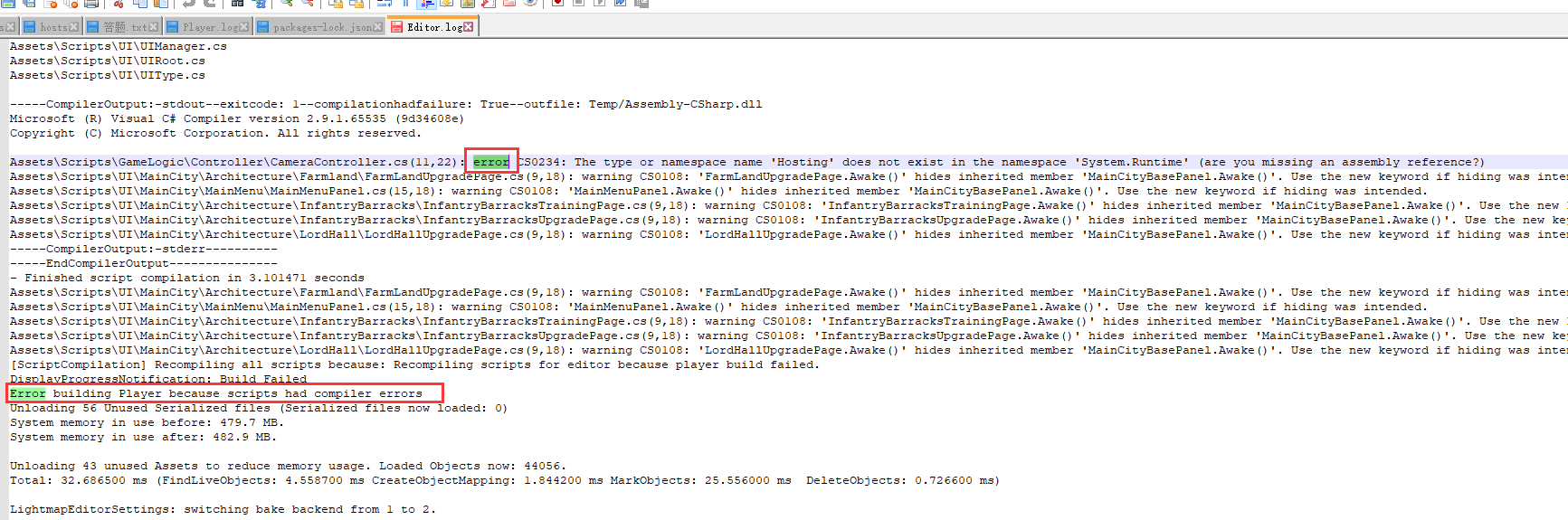
需要查看C:\Users\XXXX\AppData\Local\Unity\Editor文件下的Editor.log文件。
有详细的报错信息。
我这里的原因是无用的头文件。如下图,删除掉,就可以打出android包来了。
Error building Player because scripts had compiler errors的更多相关文章
- 打包Android:Error building Player: CommandInvokationFailure
错误log Error building Player: CommandInvokationFailure: Unable to determine the tools version of the ...
- Error building Player: Win32Exception: ApplicationName=‘xxxxxxxxxxxxxxxxxx//sdk\tools\zipalign.exe' , CommandLine='4 的解决办法
更新了安卓SDK后,有时候Unity编译失失败,报错类似 Error building Player: Win32Exception: ApplicationName='D:/Program File ...
- 【Unity3D】生成工程报错解决—UnityEditor.HostView:OnGUI() Error building Player: Couldn't build player because of unsupported data on target platform.
错误 错误1:An asset is marked as dont save, but is included in the build: unityEditor.HostView:OnGUI() 错 ...
- Unity出现 error building player exception android (invocation failed)
今天在编译Android的时候出现这个错误 error building player exception android (invocation failed) 百度谷歌之后,看到xuanyuson ...
- Error building Player: CommandInvokationFailure: Failed to re-package resources. See the Console for details. ShareSDK 也有这种错误
Error building Player: CommandInvokationFailure: Failed to re-package resources. See the Console for ...
- Error building Player: UnityException: Bundle Identifier has not been set up correctly
错误提示: Error building Player: UnityException: Bundle Identifier has not been set up correctlyPlease s ...
- 【已解决】unity4.2.0f4 导出Android工程报错:Error building Player: ArgumentException: Illegal characters in path. [unity导出android工程 报错,路径含有非法字符]
使用unity3D开发的一个客户端,需要导出为Android工程,然后接入一些第三方android SDK. unity版本 操作系统为: OS 名称: Microsoft Windows 7 旗舰版 ...
- Error building Player: Exception: Could not start java
4.6.1发布Flash版本出错.解决方法:把C:\Windows\System32\java.exe复制到C:\Windows\SysWOW64下即可
- Error building Player: Win32Exception: ApplicationName='E:/adt-20140702/sdk\tools\zipalign.exe', Com
1.原因 更新sdk后报错..由于版本号不同,zipalign.exe所处路径不同 2.解决的方法 在sdk路径下搜索zipalign.exe .然后拷贝到报错内容中制定的路径即可了.
- Error:java:Compilation failed: internal java compiler error
在IDEA中编译时出现这个错误:Error:java:Compilation failed: internal java compiler error! Information:Using javac ...
随机推荐
- Android 数据回显
public class EchoDataUtils { /** * 保存文件到手机内存 * @param context * @param number * @param psw * @return ...
- kali日常快捷命令(用到就更新)
什么BASH命令? 在Linux上采用bash作为标准,基本上它描述了对带有".sh"扩展名的vi编辑器等文本的处理并执行. 与编程一样,它有许多函数,如变量,函数和算术处理,所以 ...
- 项目day1 -- vscode远程连接云服务器
刚学完go的语法,本来想着找个小项目试试手,发现大佬们都是vscode ssh到云服务器上做开发的.正好看到阿里云的学生认证后可以白嫖,就先嫖了个试试手 跟着各大教程简单配置了一下阿里云,安装vsco ...
- lg8365题解
容易发现我们一定会先加后乘,使用调整法可以证明这个结论. 并且可以发现除了\(a_i\)值为\(1\)的数外(假设他们的\(a\)值和为\(s\)),其他的数最多只会选\(1\)个做加法操作(设如果其 ...
- 安卓调试打包错误Error executing aapt: Return code -1073741819 Error while running zipalign
之前开发完的安卓app项目,再次打开,突然抽风报错. 1.调试运行报错:Error executing aapt: Return code -1073741819 2.打包失败报错: Error wh ...
- JavaSE 日期时间类整理
一.创建日期对象 1.创建日期对象 //1.直接创建日期 Date date1 = new Date(); //2.创建指定日期 使用Date类 目标 2000-5-10 Date date2 = n ...
- java HashMap 原理
jdk1.7 和 1.8 大致相同但还是有区别,主要是数据结构的区别,1.7 为数组+链表:1.8 为数组+链表+红黑树 关键知识点 加载因子:装填因子,目的是何时对 map 进行扩容,默认是 0.7 ...
- 在sublime text 3中编译javascript
1.整理步骤: 1).安装node.js: 2).配置js编译系统: 2.过程 1).先是按照网上的方法,在配置的时候输入如下内容: {"cmd": ["node&quo ...
- PYTHON中的CONCURRENT.FUTURES模块
一 : 概述 concurrent.futures模块提供了高度封装的异步调用接口 ThreadPoolExecutor:线程池,提供异步调用 ProcessPoolExecutor: 进程池,提供异 ...
- Foxmail配置Exchange报错:RPC 服务器不可用 的解决方法
如果确定了你电脑的RPC服务正常开启了,还是报这个错,那可能是你的Foxmail版本太低了, 低版本用Exchange时就会报这个错,升级为最新版就好了,我升级到7.2.23就正常了