
RabbitMQ-01-使用Java进行简单消息发送与接收
前言
这里使用手动管理jar与使用Maven管理jar两种方式,分别演示消息的发送和接收。
手动管理jar实现消息发送与接收
- 添加jar
amqp-client-5.7.1.jar
slf4j-api-1.7.26.jar
slf4j-simple-1.7.26.jar - 编写发布者Publisher
import com.rabbitmq.client.Channel;

import com.rabbitmq.client.Connection;

import com.rabbitmq.client.ConnectionFactory;

import java.nio.charset.StandardCharsets;

public class Publisher {

    private final static String QUEUE_NAME = "queue_hello";

    public static void main(String[] argv) throws Exception {

        ConnectionFactory factory = new ConnectionFactory();

        factory.setHost("localhost");

        factory.setPort(5672);

        factory.setUsername("guest");

        factory.setPassword("guest");

        try (Connection connection = factory.newConnection();

             Channel channel = connection.createChannel()) {

            channel.queueDeclare(QUEUE_NAME, false, false, false, null);

            String message = "Hello World!";

            // 使用默认交换机

            channel.basicPublish("", QUEUE_NAME, null, message.getBytes(StandardCharsets.UTF_8));

            System.out.println(" [x] Sent '" + message + "'");

        }

    }

}
- 编写接收者
import com.rabbitmq.client.Channel;

import com.rabbitmq.client.Connection;

import com.rabbitmq.client.ConnectionFactory;

import com.rabbitmq.client.DeliverCallback;

public class Receiver {

    private final static String QUEUE_NAME = "queue_hello";

    public static void main(String[] args) throws Exception {

        ConnectionFactory connectionFactory = new ConnectionFactory();

        connectionFactory.setHost("localhost");

        connectionFactory.setPort(5672);

        connectionFactory.setUsername("guest");

        connectionFactory.setPassword("guest");

        Connection connection = connectionFactory.newConnection();

        Channel channel = connection.createChannel();

        channel.queueDeclare(QUEUE_NAME, false, false, false, null);

        System.out.println(" [*] Waiting for messages. To exit press CTRL+C");

        DeliverCallback deliverCallback = (consumerTag, delivery) -> {

            String message = new String(delivery.getBody(), "UTF-8");

            System.out.println(" [x] Received '" + message + "'");

        };

        channel.basicConsume(QUEUE_NAME, true, deliverCallback, consumerTag -> { });

    }

}
使用Maven管理jar实现发送与接收
- 添加常用Maven依赖
<properties>

        <project.build.sourceEncoding>UTF-8</project.build.sourceEncoding>

        <project.reporting.outputEncoding>UTF-8</project.reporting.outputEncoding>

        <java.version>1.8</java.version>

</properties>

    <build>

        <plugins>

            <plugin>

                <groupId>org.apache.maven.plugins</groupId>

                <artifactId>maven-compiler-plugin</artifactId>

                <version>2.3.2</version>

                <configuration>

                    <source>1.8</source>

                    <target>1.8</target>

                </configuration>

            </plugin>

        </plugins>

    </build>
- 添加MQ相关依赖
<dependencies>

        <dependency>

            <groupId>com.rabbitmq</groupId>

            <artifactId>amqp-client</artifactId>

            <version>5.1.2</version>

        </dependency>

</dependencies>
- 消息发送代码
import com.rabbitmq.client.Channel;

import com.rabbitmq.client.Connection;

import com.rabbitmq.client.ConnectionFactory;

import java.io.IOException;

import java.nio.charset.StandardCharsets;

import java.util.concurrent.TimeoutException;

public class Publisher {

    private final static String QUEUE_NAME = "queue_hello";

    public static void main(String[] args) throws IOException, TimeoutException {

        ConnectionFactory factory = new ConnectionFactory();

        factory.setHost("localhost");

        factory.setPort(5672);

        factory.setUsername("guest");

        factory.setPassword("guest");

        try (Connection connection = factory.newConnection();

             Channel channel = connection.createChannel()) {

            channel.queueDeclare(QUEUE_NAME, false, false, false, null);

            String message = "Hello World";

            channel.basicPublish("", QUEUE_NAME, null, message.getBytes(StandardCharsets.UTF_8));

            System.out.println(" [x] Sent '" + message + "'");

        }

    }

}
- 消息接收代码
import com.rabbitmq.client.Channel;

import com.rabbitmq.client.Connection;

import com.rabbitmq.client.ConnectionFactory;

import com.rabbitmq.client.DeliverCallback;

import java.io.IOException;

import java.nio.charset.StandardCharsets;

import java.util.Queue;

import java.util.concurrent.TimeoutException;

public class Receiver {

    private final static String QUEUE_NAME = "queue_hello";

    public static void main(String[] args) throws IOException, TimeoutException {

        ConnectionFactory factory = new ConnectionFactory();

        factory.setHost("localhost");

        factory.setPort(5672);

        factory.setUsername("guest");

        factory.setPassword("guest");

        Connection connection = factory.newConnection();

        Channel channel = connection.createChannel();

        channel.queueDeclare(QUEUE_NAME, false, false, false, null);

        System.out.println("正在等待消息...");

        DeliverCallback deliverCallback = (consumerTag, delivery) -> {

            String message = new String(delivery.getBody(), StandardCharsets.UTF_8);

            System.out.println("接收到消息:" + message);

        };

        channel.basicConsume(QUEUE_NAME, true, deliverCallback, consumerTag -> {});

    }

}
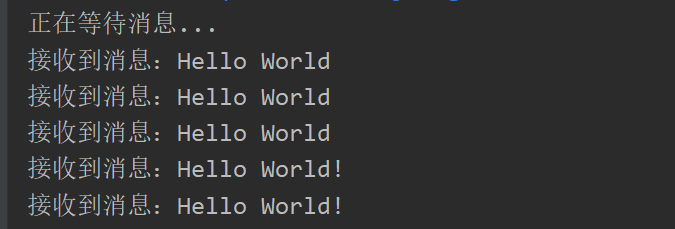
演示结果
参考文档
官方文档: https://www.rabbitmq.com/tutorials/tutorial-one-java.html
RabbitMQ-01-使用Java进行简单消息发送与接收的更多相关文章
- RabbitMQ 简单的消息发送与接收
RabbitMQ是建立在AMQP(Advanced Message Queuing Protocol,高级消息队列协议)基础上的,而AMQP是建立在TCP协议之上的. 因此,RabbitMQ是需要建立 ...
- 整合Spring Cloud Stream Binder与GCP Pubsub进行消息发送与接收
我最新最全的文章都在南瓜慢说 www.pkslow.com,欢迎大家来喝茶! 1 前言 之前的文章<整合Spring Cloud Stream Binder与RabbitMQ进行消息发送与接收& ...
- Android Java使用JavaMail API发送和接收邮件的代码示例
JavaMail是Oracle甲骨文开发的Java邮件类API,支持多种邮件协议,这里我们就来看一下Java使用JavaMail API发送和接收邮件的代码示例 使用Javamail发送邮件,必需的j ...
- rabbitMQ学习笔记(二) 简单的发送与接收消息 HelloWorld
首先要下载rabbitmq的javaClient库,然后加入到项目中,下载地址为:http://www.rabbitmq.com/releases/rabbitmq-java-client/v3.1. ...
- Kafka、RabbitMQ、RocketMQ消息中间件的对比 —— 消息发送性能
引言 分布式系统中,我们广泛运用消息中间件进行系统间的数据交换,便于异步解耦.现在开源的消息中间件有很多,前段时间我们自家的产品 RocketMQ (MetaQ的内核) 也顺利开源,得到大家的关注. ...
- Kafka、RabbitMQ、RocketMQ消息中间件的对比 —— 消息发送性能-转自阿里中间件
引言 分布式系统中,我们广泛运用消息中间件进行系统间的数据交换,便于异步解耦.现在开源的消息中间件有很多,前段时间我们自家的产品 RocketMQ (MetaQ的内核) 也顺利开源,得到大家的关注. ...
- activemq安装与简单消息发送接收实例
安装环境:Activemq5.11.1, jdk1.7(activemq5.11.1版本需要jdk升级到1.7),虚拟机: 192.168.147.131 [root@localhost softwa ...
- DICOM医学图像处理:DIMSE消息发送与接收“大同小异”之DCMTK fo-dicom mDCM
背景: 从DICOM网络传输一文开始,相继介绍了C-ECHO.C-FIND.C-STORE.C-MOVE等DIMSE-C服务的简单实现,博文中的代码给出的实例都是基于fo-dicom库来实现的,原因只 ...
- TeamTalk Android代码分析(业务流程篇)---消息发送和接收的整体逻辑说明
第一次纪录东西,也没有特别的顺序,想到哪里就随手画了一下,后续会继续整理- 6.2消息页面动作流程 6.2.1 消息页面初始化的总体思路 1.页面数据的填充更新直接由页面主线程从本地数据库请求 2.数 ...
- 转:Kafka、RabbitMQ、RocketMQ消息中间件的对比 —— 消息发送性能 (阿里中间件团队博客)
from: http://jm.taobao.org/2016/04/01/kafka-vs-rabbitmq-vs-rocketmq-message-send-performance/ 引言 分布式 ...
随机推荐
- Postman实现UI自动化测试
转载请注明出处️ 作者:测试蔡坨坨 原文链接:caituotuo.top/1db4fa44.html 你好,我是测试蔡坨坨. 看到这篇文章的标题,是不是有小伙伴会感到惊讶呢? Postman不是做接口 ...
- CentOS7下配置使用JumpServer 堡垒机 (图文教程)
前面介绍了如何在<CentOS7下搭建JumpServer 堡垒机>,基于这篇文章的环境搭建过程,接着介绍安装后的的功能配置使用. 首次wbe登录,https://ip:80,默认账号密码 ...
- AJAX容易出错地方,错误处理
myajax.js //创建路由器对象 const express=require('express'); //引入连接池模块 const pool=require('../pool.js'); ...
- Quartz帮助类
#region 帮助类 public class QuarztHelper { #region 字段 /// <summary> /// 调度器 /// </summary> ...
- CAS 悲观锁 乐观锁
前面的偏向锁,轻量级锁,重量级锁都是悲观锁, 都会认为必须要对操作对象进行互斥访问,不然就会产生异常, 所以线程只供一个线程使用,阻塞其他线程,是悲观的 在某些情况下,同步的耗时远大于线程切换的时间, ...
- spring cloud alibaba Nacos集群部署 Linux
参考:https://www.cnblogs.com/dw3306/p/12961353.html 1.官网: https://nacos.io/zh-cn/docs/cluster-mode- ...
- vue-cli环境搭建 (超详细保姆级教程)
一.使用之前,我们先来掌握3个东西是用来干什么的. npm: Nodejs下的包管理器. webpack: 它主要的用途是通过CommonJS的语法把所有浏览器端需要发布的静态资源做相应的准备,比如资 ...
- 学习Java Day12
今天学习了多维数组
- qt元对象系统之 Q_PROPERTY宏
这个宏需要和Q_OBJECT宏结合使用, moc工具为Q_OBJECT宏所声明的变量和函数生成定义 同时为Q_PROPERTY宏添加函数的映射,以便qt_static_metacall 能够寻找到对应 ...
- IP地址后面/24/26/27/28/29/30网关数量分别是多少?如何计算?
转载csdn: https://blog.csdn.net/jinfengyunIDC/article/details/112575286