
JavaWeb 07_创建web项目连接MySQL实现注册登录功能
一、创建一个web项目,参照JW/01_创建web项目及部署
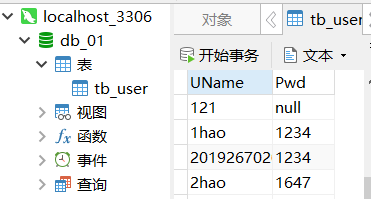
二、在NAVICat 里建数据库 db_01,建表tb_user ,字段UName 、Pwd
三、在web下创建一个Directory, 设名字为JSPWorks
1. 创建jsp文件如图
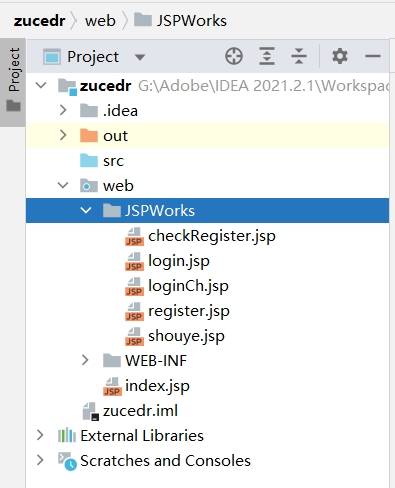
代码如下:
1)shouye.jsp
<%@ page language="java" import="java.util.*" pageEncoding="utf-8"%>

<%

    String path = request.getContextPath();

    String basePath = request.getScheme()+"://"+request.getServerName()+":"+request.getServerPort()+path+"/";

%>

<!DOCTYPE HTML PUBLIC "-//W3C//DTD HTML 4.01 Transitional//EN">

<html>

<head>

    <base href="<%=basePath%>">

    <title>My JSP</title>

    <meta http-equiv="pragma" content="no-cache">

    <meta http-equiv="cache-control" content="no-cache">

    <meta http-equiv="expires" content="0">

    <meta http-equiv="keywords" content="keyword1,keyword2,keyword3">

    <meta http-equiv="description" content="This is my page">

    <!--

    <link rel="stylesheet" type="text/css" href="styles.css">

    -->

</head>

<body>

<div style="text-align: center;">

    <span style="font-family: 宋体; font-size: x-large; color: #000; ">欢迎JSP</span><hr>

    <%--<div>

        <img alt="" width = "600" height = "400" src="">

    </div>--%>

    <table width = "200" border ="1" bordercolor = "#00F">

        <td colspan = "2" align = "center">

            <td><input type = "button" value = "登      陆" onclick = "window.open('JSPWorks/login.jsp')"></td>

            <td><input type = "button" value = "注      册" onclick = "window.open('JSPWorks/register.jsp')"></td>

        </tr>

    </table>

</div>

</body>

</html>
2)login.jsp
<%@ page language="java" import="java.util.*" pageEncoding="utf-8"%>

<%!

    private Object Finally;

%><%

    String path = request.getContextPath();

    String basePath = request.getScheme()+"://"+request.getServerName()+":"+request.getServerPort()+path+"/";

%>

<!DOCTYPE HTML PUBLIC "-//W3C//DTD HTML 4.01 Transitional//EN">

<html>

<head>

    <base href="<%=basePath%>">

    <title>My JSP</title>

    <meta http-equiv="pragma" content="no-cache">

    <meta http-equiv="cache-control" content="no-cache">

    <meta http-equiv="expires" content="0">

    <meta http-equiv="keywords" content="keyword1,keyword2,keyword3">

    <meta http-equiv="description" content="This is my page">

    <!--

    <link rel="stylesheet" type="text/css" href="styles.css">

    -->

<body>

<div style="text-align: center;">

    <span style="font-family: 楷体; font-size: x-large; color: #000; ">登录界面</span>

    <%

        String flag = request.getParameter("errNo");

        try{

            if(flag!=null)

                out.println("用户名为空或不存在或密码错误");

        }catch(Exception e){

            e.printStackTrace();

        }

    %>

    <form action = "JSPWorks/loginCh.jsp">

        <table width="300" height = "180" border="5" bordercolor="#A0A0A0">

            <td colspan = "2" align = "center">

                <th>账  户:</th>

                <td><input type="text" name="user"  value = "请输入用户名" maxlength = "16" onfocus = "if(this.value == '请输入用户名') this.value =''"></td>

            </tr>

            <td colspan = "2" align = "center">

                <th>密  码:</th>

                <td><input type="password" name="pwd" maxlength = "20"></td>

            </tr>

            <tr>

                <td colspan = "2" align = "center">

                     <td><input type="submit" name="submit" value="登       录"></td>

                      <td><input type="button" value="返       回" onclick = "window.open('JSPWorks/shouye.jsp')"></td>

                </td>

            </tr>

        </table>

    </form>

</div>

</body>

</html>
3) loginCh.jsp
<%@ page language="java" import="java.util.*,java.sql.*" pageEncoding="utf-8"%>

<%

    String path = request.getContextPath();

    String basePath = request.getScheme()+"://"+request.getServerName()+":"+request.getServerPort()+path+"/";

%>

<!DOCTYPE HTML PUBLIC "-//W3C//DTD HTML 4.01 Transitional//EN">

<html>

<head>

    <base href="<%=basePath%>">

    <title>My JSP</title>

    <meta http-equiv="pragma" content="no-cache">

    <meta http-equiv="cache-control" content="no-cache">

    <meta http-equiv="expires" content="0">

    <meta http-equiv="keywords" content="keyword1,keyword2,keyword3">

    <meta http-equiv="description" content="This is my page">

    <!--

    <link rel="stylesheet" type="text/css" href="styles.css">

    -->

</head>

<body>

<%

    String user = new String(request.getParameter("user").getBytes("ISO-8859-1"),"UTF-8");

    String pwd = request.getParameter("pwd");

    String driverClass = "com.mysql.cj.jdbc.Driver";

    String url = "jdbc:mysql://localhost:3306/db_01";

    String username = "root";

    String password = "root";

    try {

        java.lang.Class.forName(driverClass);//加载驱动

        Connection conn = DriverManager.getConnection(url, username, password);//得到连接

       /* if(!conn.isClosed()) {

            out.println("数据库连接成功!!");

        }*/

        PreparedStatement pStmt = conn.prepareStatement("select * from tb_user where  UName = '" + user + "' and Pwd= '" + pwd + "'");

        ResultSet rs = pStmt.executeQuery();

        if(rs.next()) {

            out.println("<br>用户:"+rs.getString(1)+"密码:"+rs.getString(2));

            out.println("<script language='javascript'>alert('用户登录成功!将返回首页!');window.location.href='JSPWorks/shouye.jsp';</script>");

        }else{

            out.println("<script language='javascript'>alert('用户登录失败!将返回首页!');window.location.href='JSPWorks/shouye.jsp';</script>");

        }

            rs.close();

            conn.close();

            pStmt.close();

    }

    catch(ClassNotFoundException e){

        System.out.println("数据库加载失败!");

        e.printStackTrace();

    }

    catch(SQLException e1){

    e1.printStackTrace();

    }

    catch(Exception e2){

    e2.printStackTrace();

    }

    finally{

        System.out.println("数据库获取成功!");

    }

%>

</body>

</html>
4) register.jsp
<%@ page language="java" import="java.util.*" pageEncoding="utf-8"%>

<%

    String path = request.getContextPath();

    String basePath = request.getScheme()+"://"+request.getServerName()+":"+request.getServerPort()+path+"/";

%>

<!DOCTYPE HTML PUBLIC "-//W3C//DTD HTML 4.01 Transitional//EN">

<html>

<head>

    <base href="<%=basePath%>">

    <title>My JSP</title>

    <meta http-equiv="pragma" content="no-cache">

    <meta http-equiv="cache-control" content="no-cache">

    <meta http-equiv="expires" content="0">

    <meta http-equiv="keywords" content="keyword1,keyword2,keyword3">

    <meta http-equiv="description" content="This is my page">

    <!--

    <link rel="stylesheet" type="text/css" href="styles.css">

    -->

    <script>

        function addCheck(){

            var username = document.getElementById("username").value;

            var password = document.getElementById("password").value;

            var newword = document.getElementById("newword").value;

            if(username==""){

                alert("用户名不能为空!");

                document.getElementById("username").focus();

                return false;

            }

            if(password==""){

                alert("密码不能为空!");

                document.getElementById("password").focus();

                return false;

            }

            if(password != newword){

                alert("两次输入密码不相同!");

                document.getElementById("newword").focus();

                return false;

            }

        }

        function validate(){

            var flag = addCheck();

            if(flag == false)

                return false;

            return true;

        }

    </script>

<body>

<div style="text-align: center;">

    <span style="font-family: 楷体; font-size: x-large; color: #000; ">注册界面</span>

    <form action = "JSPWorks/checkRegister.jsp">

        <table width="300" height = "180" border="5" bordercolor="#A0A0A0">

            <tr>

                <th>用户名:</th>

                <td><input type="text" name="username" value="输入16个字符以内" maxlength = "16" onfocus = "if(this.value == '输入16个字符以内') this.value =''"></td>

            </tr>

            <tr>

                <th>输入密码:</th>

                <td><input type="text" name="password" value="输入20个字符以内" maxlength = "20" onfocus = "if(this.value == '输入20个字符以内') this.value =''"></td>

            </tr>

            <tr>

                <th>确认密码:</th>

                <td><input type="text" name="newword" value="重新输入密码" maxlength = "20" onfocus = "if(this.value == '重新输入密码') this.value =''"></td>

            </tr>

            <tr>

                <td colspan = "2" align = "center">

                    <input type="submit" value="注  册">

                    <input type="reset" value="重  置">

                </td>

            </tr>

        </table>

    </form>

</div>

</body>

</html>
5) checkRegister.jsp
<%@ page language="java" import="java.util.*,java.sql.*" pageEncoding="utf-8"%>

<%

    String path = request.getContextPath();

    String basePath = request.getScheme()+"://"+request.getServerName()+":"+request.getServerPort()+path+"/";

%>

<!DOCTYPE HTML PUBLIC "-//W3C//DTD HTML 4.01 Transitional//EN">

<html>

<head>

    <base href="<%=basePath%>">

    <title>检查注册</title>

    <meta http-equiv="pragma" content="no-cache">

    <meta http-equiv="cache-control" content="no-cache">

    <meta http-equiv="expires" content="0">

    <meta http-equiv="keywords" content="keyword1,keyword2,keyword3">

    <meta http-equiv="description" content="This is my page">

    <!--

    <link rel="stylesheet" type="text/css" href="styles.css">

    -->

</head>

<body>

<%

    String user = new String(request.getParameter("username").getBytes("ISO-8859-1"),"UTF-8");

    String pwd = request.getParameter("password");

    String driverClass = "com.mysql.cj.jdbc.Driver";

    String url = "jdbc:mysql://localhost:3306/db_01";

    String username = "root";

    String password = "root";

    Class.forName(driverClass);//加载驱动

    Connection conn = DriverManager.getConnection(url,username,password);//得到连接

    PreparedStatement pStmt = conn.prepareStatement("select * from tb_user where UName = '" + user + "'");

    ResultSet rs = pStmt.executeQuery();

    if(rs.next()){

        out.println("<script language='javascript'>alert('该用户已存在,请重新注册!');window.location.href='JSPWorks/register.jsp';</script>");

    }else{

        PreparedStatement tmt = conn.prepareStatement("Insert into tb_user values('" + user + "','" + pwd + "')");

        int rst = tmt.executeUpdate();

        if (rst != 0){

            out.println("<script language='javascript'>alert('用户注册成功!');window.location.href='JSPWorks/shouye.jsp';</script>");

        }else{

            out.println("<script language='javascript'>alert('用户注册失败!');window.location.href='JSPWorks/register.jsp';</script>");

        }

    }

%>

</body>

</html>
2. 配置Tomcat
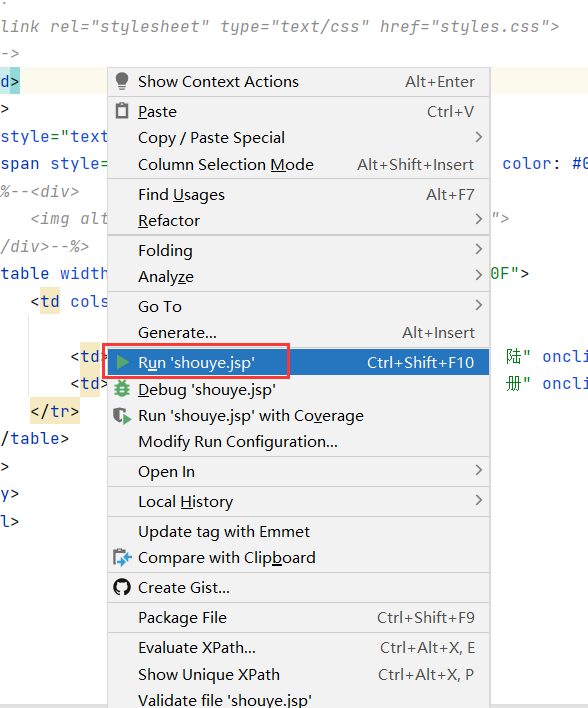
1)先run
2)
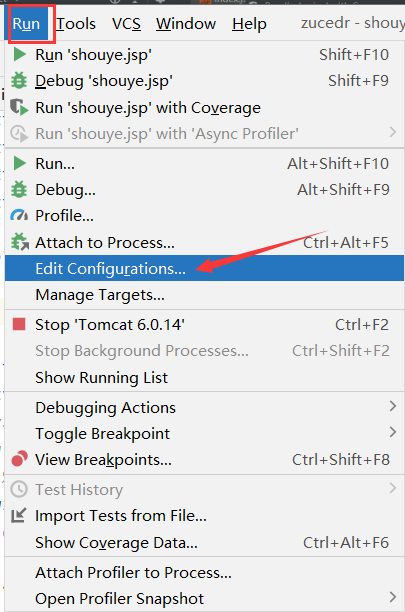
3)
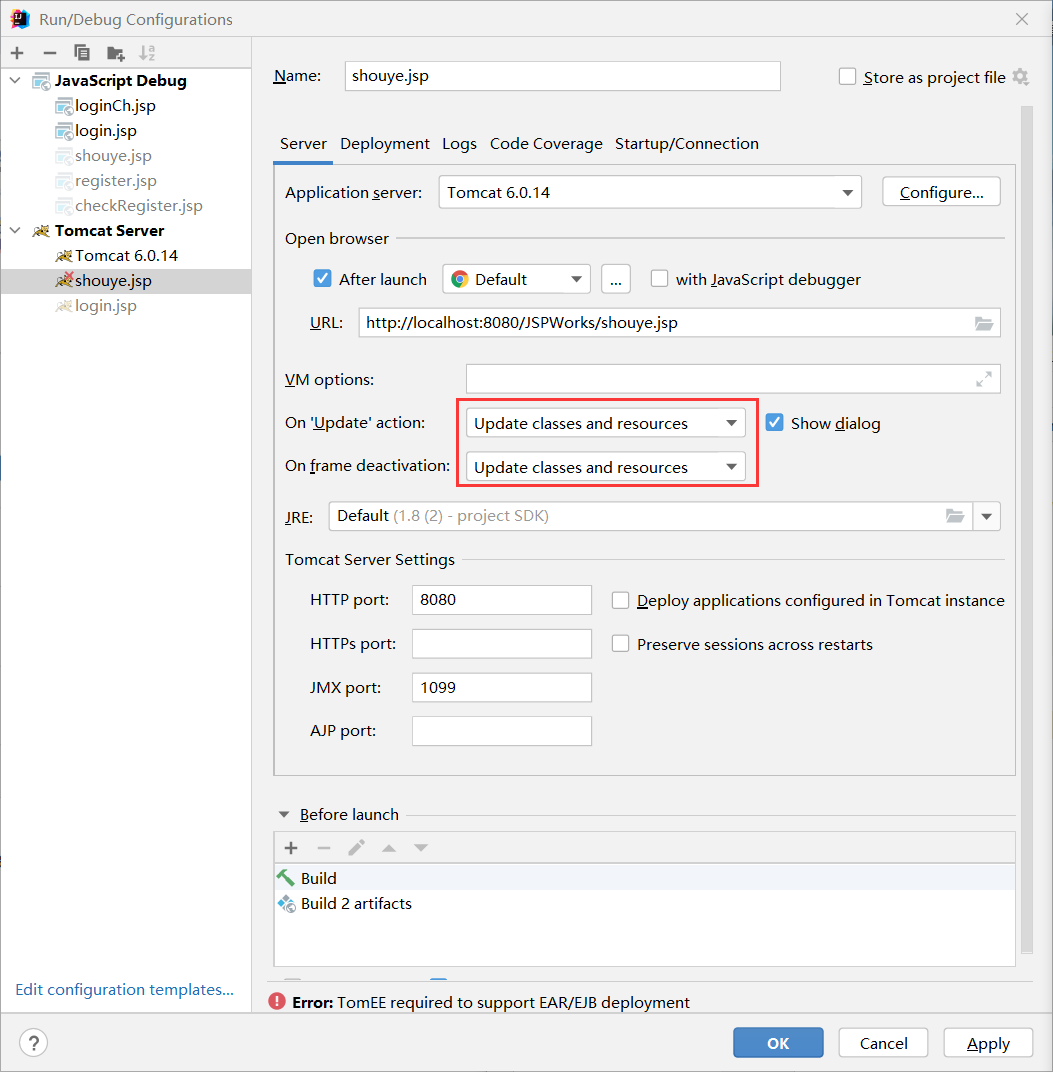
4)
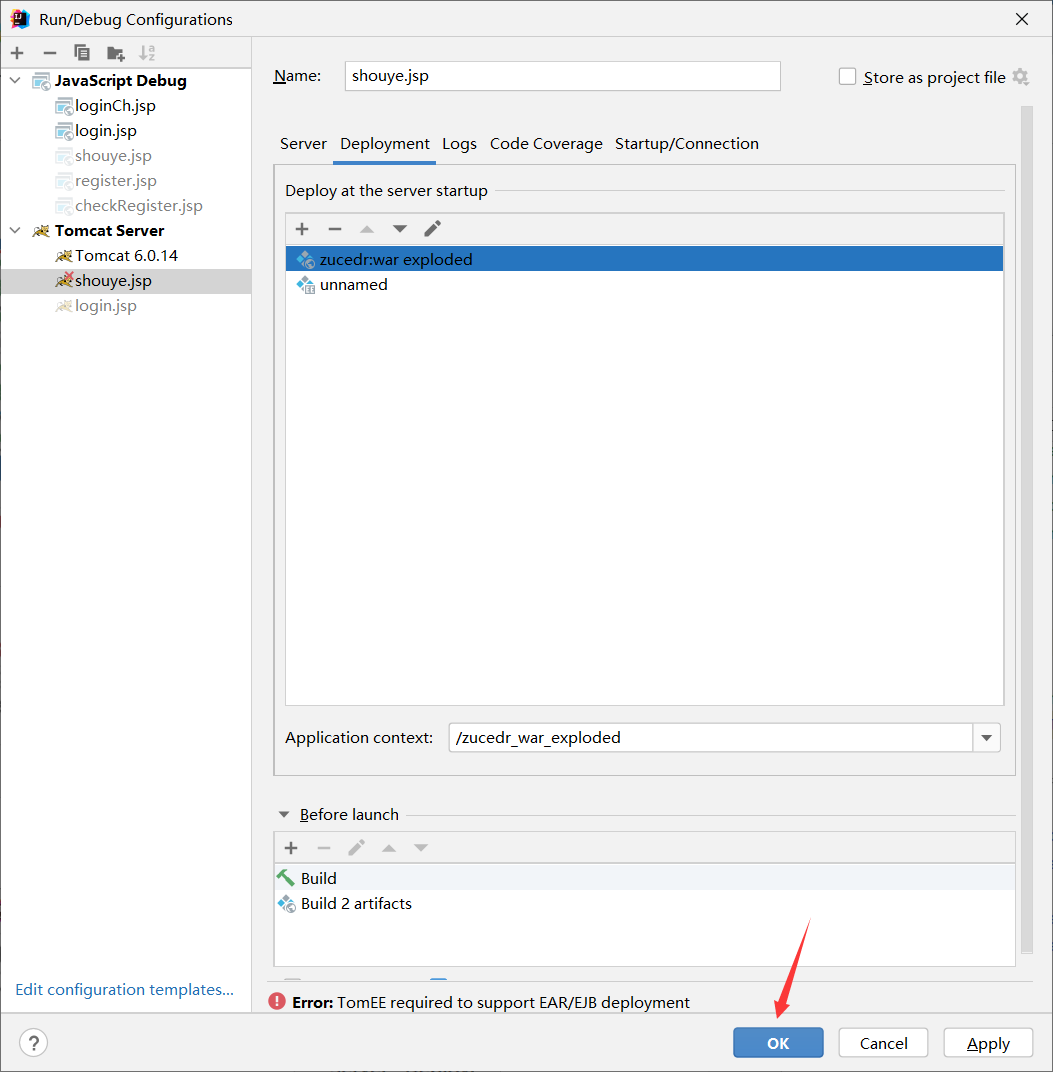
JavaWeb 07_创建web项目连接MySQL实现注册登录功能的更多相关文章
- Eclipse开发Web项目连接MySQL时找不到驱动的解决办法
当我们使用Eclipse开发Web项目连接MySQL时后台报找不到驱动的错误,如下:解决办法: 1.这时我们首先要检查我们是否导入了连接MySQL数据库的jar包,如图,是否已经将jar包复制到项目下 ...
- idea中创建web项目搭建Hibernate框架连接oracle数据库
hibernate框架 hibernate是数据化持久工具,也是一个开源代码的ORM解决方案.hibernate内部封装了通过jdbc访问数据库的操作,向商场应用提供面向对象的数据访问api. hib ...
- IntelliJ IDEA创建web项目及异常问题解决
IDEA配置Tomcat: 1.下载Tomcat,本次使用的是apache-tomcat-6.0.43 2.IDEA配置Tomcat 在idea中的Settings(Ctrl+Alt+s)(或者点击图 ...
- maven 创建web项目的标准目录结构
maven 创建web项目的标准目录结构 CreateTime--2018年4月18日21:05:37 Author:Marydon 1.标准目录介绍(开发目录) 2.在eclipse下,目录展示 ...
- SSM 框架-04-使用maven创建web项目
SSM 框架-04-使用maven创建web项目 本篇介绍使用MAVEN来管理jar包,就不用一个一个去添加和下载jar包了,直接在maven配置文件中配置就可以了,maven可以帮助我们自动下载.本 ...
- Java Web工程连接MySQL数据库及Tomcat服务器页面中文乱码
Java Web工程连接MySQL数据库 一. 准备工作 1.下载连接MySQL数据库的JDBC (可以去官网下,也可以去百度云找) 2.将下载的jar文件复制到Tomcat的lib目录下 3.新建一 ...
- eclipse maven创建web项目
记录地址 jdk设置及文件包miss 实例下载地址 创建SSM整合项目 一.使用Eclipse中的maven插件创建web项目 1: 2: 3: 4: 5:maven web项目创建成功.(去掉ind ...
- 3.在eclipse中创建Web项目,并部署到Tomcat上
1.找到创建web项目的菜单 2.创建web项目并选择web环境 3.查看创建好的web项目结构 4.在web项目的webContent文件夹下创建jsp页面 5.查看是否创建jsp页面成功,并编辑j ...
- 搭建django项目连接mysql数据库环境
开通博客园这么久,即将写下第一篇博客,十分兴奋.首先了,庆祝自己写下了码农生涯博客园第一篇博客,其次了,庆祝自己经过了10个小时奋战,终于成功搭建django项目连接mysql数据库的环境.在此过程中 ...
随机推荐
- Java多态、向上转型、向下转型知识分享(讲解全面)
多态(方法的多态.对象的多态) 方法的多态 重写的多态(重要):子类继承父类,因此子类拥有父类属性和方法,如果子类重写父类方法,那么父类调用该方法的时候就会检查子类是否重写该方法,子类重写了就调用子类 ...
- CPU、进程、线程原理
巨人的肩膀 看完这篇还不懂高并发中的线程与线程池你来打我 (qq.com)
- Acme-https证书申请
Linux下使用acme.sh 配置https 免费证书 简单来说acme.sh 实现了 acme 协议, 可以从 let's encrypt 生成免费的证书. acme.sh 有以下特点: 一个纯粹 ...
- 云原生 PostgreSQL - CrunchyData PGO 教程:创建、连接、删除 Postgres 集群
入门 作为安装的一部分,请确保您已完成以下操作: 分叉 Postgres Operator 示例存储库并将其克隆到您的主机. https://github.com/CrunchyData/postgr ...
- GAN实战笔记——第五章训练与普遍挑战:为成功而GAN
训练与普遍挑战:为成功而GAN 一.评估 回顾一下第1章中伪造达・芬奇画作的类比.假设一个伪造者(生成器)正在试图模仿达・芬奇,想使这幅伪造的画被展览接收.伪造者要与艺术评论家(判别器)竞争,后者试图 ...
- Linux Shell 变量自加
转至:https://blog.csdn.net/dj0379/article/details/50946398/ declare -i iv=$svnvlet iv+=1shell中变量自增的实现方 ...
- Shell脚本实现网络连通性检查Ping+Telnet
转至:https://blog.csdn.net/AngelLBS/article/details/89382136 #!/bin/sh ############################### ...
- JavaWeb后端
JavaWeb后端 我们学习JavaWeb的最终目的是为了搭建一个网站,并且让用户能访问我们的网站并在我们的网站上做一些事情. 计算机网络基础 在计算机网络(谢希仁 第七版 第264页)中,是这样描述 ...
- linux 提权防护
linux 用户提权 利用系统漏洞或者程序等方面的缺陷使一个低权限用户,获得他们原本不具有的权限或者得到root权限 下面介绍几种可能得到root访问权限的方式 1, 内核开发 防护:及时更新补丁 臭 ...
- Excel:如何为某一列写相同的数而不是累加的数
按住CTRL,双击单元格右下角的加号,则该行以下的行都是这个单元格的值 不按CTRL,双击单元格右下角的加号,该行以下的行都是每次加一的数