
pytest文档82 - 用例收集钩子 pytest_collect_file 的使用
前言
pytest 提供了一个收集用例的钩子,在用例收集阶段,默认会查找test_*.py 文件或者 *_test.py文件。
如果我们想运行一个非python的文件,比如用yaml 文件写用例,那么就需要改变用例的收集规则。
以最新版pytest 7.2.0版本为例
YAML 测试示例
在 Yaml 文件中指定测试的基本示例, 以下是官方文档上给的一个执行yaml格式的内容作为自定义测试的例子。
相关文档地址https://docs.pytest.org/en/latest/example/nonpython.html
写到conftest.py
# content of conftest.py

import pytest

def pytest_collect_file(parent, file_path):

    if file_path.suffix == ".yaml" and file_path.name.startswith("test"):

        return YamlFile.from_parent(parent, path=file_path)

class YamlFile(pytest.File):

    def collect(self):

        # We need a yaml parser, e.g. PyYAML.

        import yaml

        raw = yaml.safe_load(self.path.open())

        for name, spec in sorted(raw.items()):

            yield YamlItem.from_parent(self, name=name, spec=spec)

class YamlItem(pytest.Item):

    def __init__(self, *, spec, **kwargs):

        super().__init__(**kwargs)

        self.spec = spec

    def runtest(self):

        for name, value in sorted(self.spec.items()):

            # Some custom test execution (dumb example follows).

            if name != value:

                raise YamlException(self, name, value)

    def repr_failure(self, excinfo):

        """Called when self.runtest() raises an exception."""

        if isinstance(excinfo.value, YamlException):

            return "\n".join(

                [

                    "usecase execution failed",

                    "   spec failed: {1!r}: {2!r}".format(*excinfo.value.args),

                    "   no further details known at this point.",

                ]

            )

    def reportinfo(self):

        return self.path, 0, f"usecase: {self.name}"

class YamlException(Exception):

    """Custom exception for error reporting."""
创建一个简单的yaml文件
# test_simple.yaml

ok:

    sub1: sub1

hello:

    world: world

    some: other
如果你已经安装了 PyYAML 或 YAML-parser解析器,那么就可以执行yaml用例
nonpython $ pytest test_simple.yaml

=========================== test session starts ============================

platform linux -- Python 3.x.y, pytest-7.x.y, pluggy-1.x.y

rootdir: /home/sweet/project/nonpython

collected 2 items

test_simple.yaml F.                                                  [100%]

================================= FAILURES =================================

______________________________ usecase: hello ______________________________

usecase execution failed

   spec failed: 'some': 'other'

   no further details known at this point.

========================= short test summary info ==========================

FAILED test_simple.yaml::hello

======================= 1 failed, 1 passed in 0.12s ========================
网上关于 pytest 插件开发的资料非常少,大部分都是停留在使用 pytest 写用例的阶段。
也有一些 pytest+yaml 的封装,最终还是会写的 py 文件去读取 yaml 文件执行用例,并没有达到真正意义上的把 yaml 文件当一个用例去执行。
pytest_collect_file 钩子
先看下pytest_collect_file 钩子的定义
def pytest_collect_file(

    file_path: Path, path: "LEGACY_PATH", parent: "Collector"

) -> "Optional[Collector]":

    """Create a :class:`~pytest.Collector` for the given path, or None if not relevant.

    The new node needs to have the specified ``parent`` as a parent.

    :param file_path: The path to analyze.

    :param path: The path to collect (deprecated).

    .. versionchanged:: 7.0.0

        The ``file_path`` parameter was added as a :class:`pathlib.Path`

        equivalent of the ``path`` parameter. The ``path`` parameter

        has been deprecated.

    """
这里用到了3个参数
- file_path 它是一个 pathlib.Path 对象, 收集到的文件路径
- path LEGACY_PATH(合法路径), 收集到的文件路径
- parent Collector 收集器,用例文件.py 或者 .yml 文件的父目录,也就是 python 的包 Package
v 7.0.0 版本的变更:
在 v 7.0.0 版本后,新增了一个 file_path 参数,它与原来的 path 功能是一样的,原来的 path 参数会被弃用。
我们看下这2个参数变更前和变更后到底用什么区别呢?
def pytest_collect_file(file_path: Path, path, parent):

    # 获取文件.yml 文件,匹配规则

    if file_path.suffix == ".yml" and file_path.name.startswith("test"):

        print(file_path, type(file_path))

        print(path, type(path))

        print(parent, type(parent))

        return YamlFile.from_parent(parent, path=file_path)
运行 pytest -s
看到打印日志
collecting ... D:\demo\demo_x2\case\test_login.yml <class 'pathlib.WindowsPath'>

D:\demo\demo_x2\case\test_login.yml <class '_pytest._py.path.LocalPath'>

<Package case> <class '_pytest.python.Package'>
原来的path参数(path.LocalPath),是通过os模块的path 获取的文件路径
最新的file_path 参数(pathlib.WindowsPath), 是通过pathlib 模块获取的文件路径。
pathlib 是 os模块的升级版,所以这里做了一个细节的优化。
通过pytest_collect_file收集钩子就可以找到.yml后缀,并且以test开头的文件,会被当做用例返回。
pytest_ignore_collect 忽略收集
与pytest_collect_file 勾选相反的一个忽略收集钩子pytest_ignore_collect
[docs]@hookspec(firstresult=True)

def pytest_ignore_collect(

    collection_path: Path, path: "LEGACY_PATH", config: "Config"

) -> Optional[bool]:

    """Return True to prevent considering this path for collection.

    This hook is consulted for all files and directories prior to calling

    more specific hooks.

    Stops at first non-None result, see :ref:`firstresult`.

    :param collection_path: The path to analyze.

    :param path: The path to analyze (deprecated).

    :param config: The pytest config object.

    .. versionchanged:: 7.0.0

        The ``collection_path`` parameter was added as a :class:`pathlib.Path`

        equivalent of the ``path`` parameter. The ``path`` parameter

        has been deprecated.

    """
也是传3个参数
- collection_path 收集到的用例文件路径,pathlib.Path类
- path 跟 collection_path作用一样,被弃用了
- config Config的实例
通过返回布尔值判断是否收集该文件
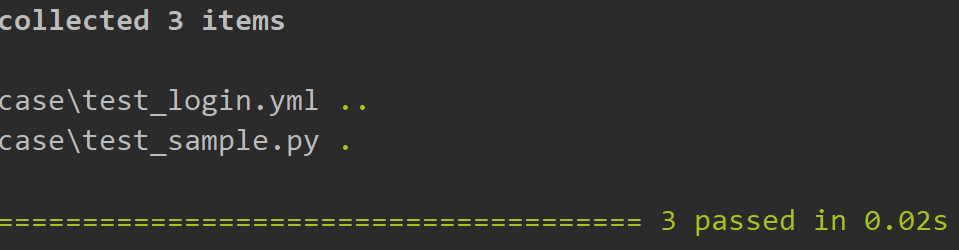
举个例子,当判断用例文件名称是test_login.yml 就不收集
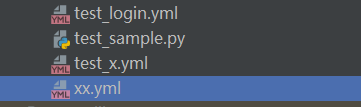
def pytest_ignore_collect(collection_path: Path, path, config):

    # 返回布尔值(会根据返回值为 True 还是 False 来决定是否收集改路径下的用例)

    if collection_path.name == 'test_x.yml':

        return True
运行后不会收集'test_x.yml'文件
pytest文档82 - 用例收集钩子 pytest_collect_file 的使用的更多相关文章
- pytest文档4-测试用例setup和teardown
前言 学过unittest的都知道里面用前置和后置setup和teardown非常好用,在每次用例开始前和结束后都去执行一次. 当然还有更高级一点的setupClass和teardownClass,需 ...
- pytest文档3-测试用例setup和teardown
用例运行级别 模块级(setup_module/teardown_module)开始于模块始末,全局的 函数级(setup_function/teardown_function)只对函数用例生效(不在 ...
- pytest文档7-pytest-html生成html报告
前言 pytest-HTML是一个插件,pytest用于生成测试结果的HTML报告.兼容Python 2.7,3.6 pytest-html 1.github上源码地址[https://github. ...
- pytest文档3-pycharm运行pytest
前言 上一篇pytest文档2-用例运行规则已经介绍了如何在cmd执行pytest用例,平常我们写代码在pycharm比较多 写完用例之后,需要调试看看,是不是能正常运行,如果每次跑去cmd执行,太麻 ...
- pytest文档2-用例运行规则
用例设计原则 文件名以test_*.py文件和*_test.py 以test_开头的函数 以Test开头的类 以test_开头的方法 所有的包pakege必须要有__init__.py文件 help帮 ...
- pytest文档44-allure.dynamic动态生成用例标题
前言 pytest 结合 allure 描述用例的时候我们一般使用 @allure.title 和 @allure.description 描述测试用例的标题和详情. 在用例里面也可以动态更新标题和详 ...
- pytest文档51-内置fixture之cache使用
前言 pytest 运行完用例之后会生成一个 .pytest_cache 的缓存文件夹,用于记录用例的ids和上一次失败的用例. 方便我们在运行用例的时候加上--lf 和 --ff 参数,快速运行上一 ...
- pytest文档19-doctest测试框架
前言 doctest从字面意思上看,那就是文档测试.doctest是python里面自带的一个模块,它实际上是单元测试的一种. 官方解释:doctest 模块会搜索那些看起来像交互式会话的 Pytho ...
- pytest文档1-环境准备与入门
前言 首先说下为什么要学pytest,在此之前相信大家已经掌握了python里面的unittest单元测试框架,那再学一个框架肯定是需要学习时间成本的. 刚开始我的内心是拒绝的,我想我用unittes ...
- pytest文档55-plugins插件开发
前言 前面一篇已经学会了使用hook函数改变pytest运行的结果,代码写在conftest.py文件,实际上就是本地的插件了. 当有一天你公司的小伙伴觉得你写的还不错,或者更多的小伙伴想要你这个功能 ...
随机推荐
- CCC3.0 NFC OWNER PAIRING
OWNER PAIRING 本篇只介绍所有操作都成功执行的场景,中间如果出现异常,需要翻看规范决定接下来的操作 一些密钥 公私密钥对(Vehicle.PK&Vehicle.SK) Endpoi ...
- Python 爬取网站数据
一.使用request库实现批量下载HTML 二.使用BeautifulSoup库实现html解析 官网:https://beautifulsoup.readthedocs.io/zh_CN/v4.4 ...
- day31-线程基础01
线程基础01 1.程序 进程 线程 程序(program):是为完成的特定任务,用某种语言编写的一组指令的集合.简单来说,就是我们写的代码. 进程: 进程是指运行中的程序,比如我们使用QQ,就启动了一 ...
- nginx中 location正则的理解
文章转载自:https://blog.csdn.net/wzj_110/article/details/110142902 正则表达式在线测试工具:https://tool.lu/regex loca ...
- Elasticsearch:Index生命周期管理入门
如果您要处理时间序列数据,则不想将所有内容连续转储到单个索引中. 取而代之的是,您可以定期将数据滚动到新索引,以防止数据过大而又缓慢又昂贵. 随着索引的老化和查询频率的降低,您可能会将其转移到价格较低 ...
- 使用prometheus + granafa 监控mysql主从
若主从同步数据库未同步默认的mysql表,则也需要在从库上创建mysql用户mysqld_exporter用来收集监控数据 mysqld_exporter安装部署 这里采取的是mysqld_expor ...
- 关于MongoDB副本集和分片集群有关用户和权限的说明分析
1.MongoDB副本集 可以先创建超管用户,然后再关闭服务,创建密钥文件,修改配置文件,启动服务,使用超管用户登录验证,然后创建普通用户 2.MongoDB分片集群 先关闭服务,创建密钥文件,修改配 ...
- 初试Jenkins2.0 Pipeline持续集成
转载自:https://cloud.tencent.com/developer/article/1010628 1.Jenkins 2.0介绍 先介绍下什么是Jenkins 2.0,Jenkins 2 ...
- 10_SpringBoot更加详细
一. 原理初探 1.1 自动装配 1.1.1 pom.xml spring-boot-dependencies: 核心依赖在父工程中 我们在写入或者引入一些SpringBoot依赖的时候, 不需要指定 ...
- RabbitMQ原理和架构图解(附6大工作模式)
为什么要使用RabbitMQ? 1.解耦 系统A在代码中直接调用系统B和系统C的代码,如果将来D系统接入,系统A还需要修改代码,过于麻烦. 2.异步 将消息写入消息队列,非必要的业务逻辑以异步的方式运 ...