
Java+selenium自动爬取网站内容并写入本地
目的:本文主要描述如何使用Java+selenium爬取58同城招聘页,并记录指定职位的招聘公司名保存到本地
一、首先创建一个maven工程,配置依赖包
 1 <dependencies>

 2

 3         <!-- selenium-java -->

 4         <dependency>

 5             <groupId>org.seleniumhq.selenium</groupId>

 6             <artifactId>selenium-java</artifactId>

 7             <version>3.4.0</version>

 8         </dependency>

 9

10         <!-- https://mvnrepository.com/artifact/org.apache.poi/poi -->

11         <dependency>

12             <groupId>org.apache.poi</groupId>

13             <artifactId>poi</artifactId>

14             <version>3.9</version>

15         </dependency>

16

17         <!-- https://mvnrepository.com/artifact/org.apache.poi/poi-ooxml -->

18         <dependency>

19             <groupId>org.apache.poi</groupId>

20             <artifactId>poi-ooxml</artifactId>

21             <version>3.9</version>

22         </dependency>

23     </dependencies>
二、开始写入自动化测试代码
 1 import org.apache.poi.xssf.usermodel.XSSFSheet;

 2 import org.apache.poi.xssf.usermodel.XSSFWorkbook;

 3 import org.openqa.selenium.By;

 4 import org.openqa.selenium.WebDriver;

 5 import org.openqa.selenium.WebElement;

 6 import org.openqa.selenium.chrome.ChromeDriver;

 7 import java.io.FileInputStream;

 8 import java.io.FileOutputStream;

 9 import java.io.IOException;

10 import java.util.concurrent.TimeUnit;

11

12

13 public class Zhaopin {

14     public static void main(String[] args) throws InterruptedException, IOException {

15         System.setProperty("webdriver.chrome.driver", "C:\\Program Files (x86)\\Google\\Chrome\\Application\\chromedriver.exe");

16         WebDriver driver = new ChromeDriver();

17         driver.manage().window().maximize();  //窗口最大化

18         driver.manage().timeouts().implicitlyWait(10, TimeUnit.SECONDS);

19         driver.get("http://www.58.com/");  //输入网址

20

21         driver.findElement(By.xpath("//*[@id=\"commonTopbar_ipconfig\"]/a[1]")).click();

22         WebElement input = driver.findElement(By.xpath("//*[@id=\"selector-search-input\"]"));

23         input.sendKeys("深圳"); //切换城市,打开默认是本地

24

25         driver.findElement(By.xpath("//*[@id=\"selector-search-btn\"]")).click();

26         driver.findElement(By.xpath("/html/body/div[3]/div[1]/div[1]/div/div[3]/div[1]/h2/a")).click();//打开招聘

27         Thread.sleep(1000);

28         String SecondtHandle = driver.getWindowHandle();     //首先得到最先的窗口 权柄

29         for (String winHandle1 : driver.getWindowHandles()) {    //得到浏览器所有窗口的权柄为Set集合,遍历

30             if (!winHandle1.equals(SecondtHandle)) {                //如果为 最先的窗口 权柄跳出

31                 driver.close();

32                 driver.switchTo().window(winHandle1);             //如果不为 最先的窗口 权柄,将 新窗口的操作权柄  给 driver

33                 System.out.println(driver.getCurrentUrl());     //打印是否为新窗口

34             }

35         }

36

37

38         FileInputStream fis = new FileInputStream("D:\\Desktop\\test.xlsx");//创建输入流,获取本地文件

39         XSSFWorkbook workbook=new XSSFWorkbook(fis);  //创建工作簿,将数据读入到workbook中

40         XSSFSheet sheet1 = workbook.getSheet("Sheet1");

41         String index= sheet1.getRow(0).getCell(0).getStringCellValue(); //读取文件内容,为下文做索引

42

43         WebElement input1 = driver.findElement(By.xpath("//*[@id=\"keyword1\"]"));

44         input1.sendKeys(index);

45         driver.findElement(By.xpath("//*[@id=\"searJob\"]/strong")).click();   //搜索关键词

46

47         for (int i=1;i<100;i++){

48             String name=driver.findElement(By.xpath("//*[@id=\"list_con\"]/li["+i+"]/div[2]/div/a")).getAttribute("title");

49             //查找每一条记录的title值

50             sheet1.createRow(i).createCell(0).setCellValue(name);

51         }   //遍历该页面所有公司名并写入excel

52

53         sheet1.createRow(0).createCell(0).setCellValue(index);

54         FileOutputStream os = new FileOutputStream("D:\\Desktop\\2.xlsx");//创建一个向指定位置写入文件的输出流

55         workbook.write(os);//向指定的文件写入excel

56         os.close();//关闭流

57         driver.close();//关闭浏览器

58     }

59 }
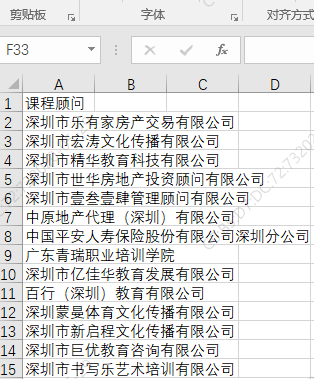
三、运行结果,读取本地的test.xlsx文件内容,将结果作为搜索条件

Java+selenium自动爬取网站内容并写入本地的更多相关文章
- selenium自动爬取网易易盾的验证码
我们在爬虫过程中难免会遇到一些拦路虎,比如各种各样的验证码,时不时蹦出来,这时候我们需要去识别它来继续我们的工作,接下来我将爬取网一些滑动验证码,然后通过百度的EasyDL平台进行数据标注,创建模型, ...
- 利用Jsoup包爬取网站内容
一 Jsoup包 下载链接:http://download.csdn.net/detail/u014000832/7994245 二 爬取搜狐新闻网站标题等内容 package com.test1; ...
- 用selenium 自动爬取某一本小说章节及其内容,并存入数据库中
from selenium import webdriver import pymysql from selenium.webdriver.support.ui import WebDriverWai ...
- python爬取网站视频保存到本地
前言 文的文字及图片来源于网络,仅供学习.交流使用,不具有任何商业用途,版权归原作者所有,如有问题请及时联系我们以作处理. 作者: Woo_home PS:如有需要Python学习资料的小伙伴可以加点 ...
- Java爬虫实践--爬取CSDN网站图片为例
实现的效果,自动在工程下创建Pictures文件夹,根据网站URL爬取图片,层层获取.在Pictures下以网站的层级URL命名文件夹,用来装该层URL下的图片.同时将文件名,路径,URL插入数据库, ...
- 使用Selenium爬取网站表格类数据
本文转载自一下网站:Python爬虫(5):Selenium 爬取东方财富网股票财务报表 https://www.makcyun.top/web_scraping_withpython5.html 需 ...
- Python3.x:Selenium+PhantomJS爬取带Ajax、Js的网页
Python3.x:Selenium+PhantomJS爬取带Ajax.Js的网页 前言 现在很多网站的都大量使用JavaScript,或者使用了Ajax技术.这样在网页加载完成后,url虽然不改变但 ...
- 利用linux curl爬取网站数据
看到一个看球网站的以下截图红色框数据,想爬取下来,通常爬取网站数据一般都会从java或者python爬取,但本人这两个都不会,只会shell脚本,于是硬着头皮试一下用shell爬取,方法很笨重,但旨在 ...
- selenium+phantomjs爬取bilibili
selenium+phantomjs爬取bilibili 首先我们要下载phantomjs 你可以到 http://phantomjs.org/download.html 这里去下载 下载完之后解压到 ...
- scrapy框架之CrawlSpider全站自动爬取
全站数据爬取的方式 1.通过递归的方式进行深度和广度爬取全站数据,可参考相关博文(全站图片爬取),手动借助scrapy.Request模块发起请求. 2.对于一定规则网站的全站数据爬取,可以使用Cra ...
随机推荐
- vue2 less的下载配置
1. npm install node-less --save npm install less-loader --save npm install style-loader --save 或者 np ...
- spark structured streaming (结构化流) join 操作( 官方文档翻译)
spark 结构化流 join 连接 结构化流支持将流dataset/DataFrame与静态dataset/DataFrame,或者另一个流数据集-DataFrame连接起来.流式连接的结果是增量生 ...
- idea主题插件 ->Atom Material File Icons
Atom Material File Icons 插件名
- Mac 启动转换助理 安装 win10
Mac 启动转换助理 安装 win10 Mac的处理器 是Inter芯 才有该功能 打开启动转换助理/Bootcamp 设置分区大小 win10安装完成后 在左侧的此电脑中找到咱们的Boot Camp ...
- 下载安装i5ting_toc
全部都是以管理员身份运行powershell 1.打开powershell之后输入命令npm i i5ting_toc -g 这样就全局安装了 2.set-ExecutionPolicy Remote ...
- Cgroup学习笔记3—代码实现—相关结构和全局变量
基于 LInux-5.10 一.相关结构 1. 通过多次的 #define 和 #undef SUBSYS 宏来展开 cgroup_subsys.h 中通过 deconfig 使能的 cgroup 子 ...
- Redis实战(二)Redis 的 RDB 配置和数据恢复
RDB 配置解释 在 redis.conf 文件中,默认有 RDB 持久化配置: save 900 1 save 300 10 save 60 10000复制复制失败复制成功 解释: 这些配置称为检查 ...
- Android build系统中常用“LOCAL_” 变量
编写模块的编译文件,实际就是定义一系列以"LOCAL_"开头的编译变量,因此我们有必要弄明白这些变量的具体含义.下面是一些经常使用的LOCAL_编译变量的说明: 变量名 说明 LO ...
- 本地开发环境使用redis
1.使用cmd 连接后,查询结果出现乱码时, 尝试连接时加--raw 参数 2.如果还是乱码,设置cmd 窗口编码 chcp 65001 就是换成UTF-8代码页chcp 936 可以换回默认的GBK ...
- 关于新手在使用git过程中的基本问题--前端开发篇
1.首先git是什么? git学名叫做分布式版本控制系统. 它能做啥呢?想一想,你在写项目的时候,尤其是大型的协作项目,往往一个项目会经过很多次修改才上线,在这个过程中,你会写项目1.0版.2.0版诸 ...