
【Azure Developer】使用 adal4j(Azure Active Directory authentication library for Java)如何来获取Token呢
问题描述
使用中国区的Azure,在获取Token时候,参考了 adal4j的代码,在官方文档中,发现了如下的片段代码:
ExecutorService service = Executors.newFixedThreadPool(1);

AuthenticationContext context = new AuthenticationContext(AUTHORITY, false, service);

Future<AuthenticationResult> future = context.acquireToken(

    "https://graph.windows.net", YOUR_TENANT_ID, username, password,

    null);

AuthenticationResult result = future.get();

System.out.println("Access Token - " + result.getAccessToken());

System.out.println("Refresh Token - " + result.getRefreshToken());

System.out.println("ID Token - " + result.getIdToken());
以上代码中,有一些参数很不明确:
1)AUTHORITY, 是什么意思呢?
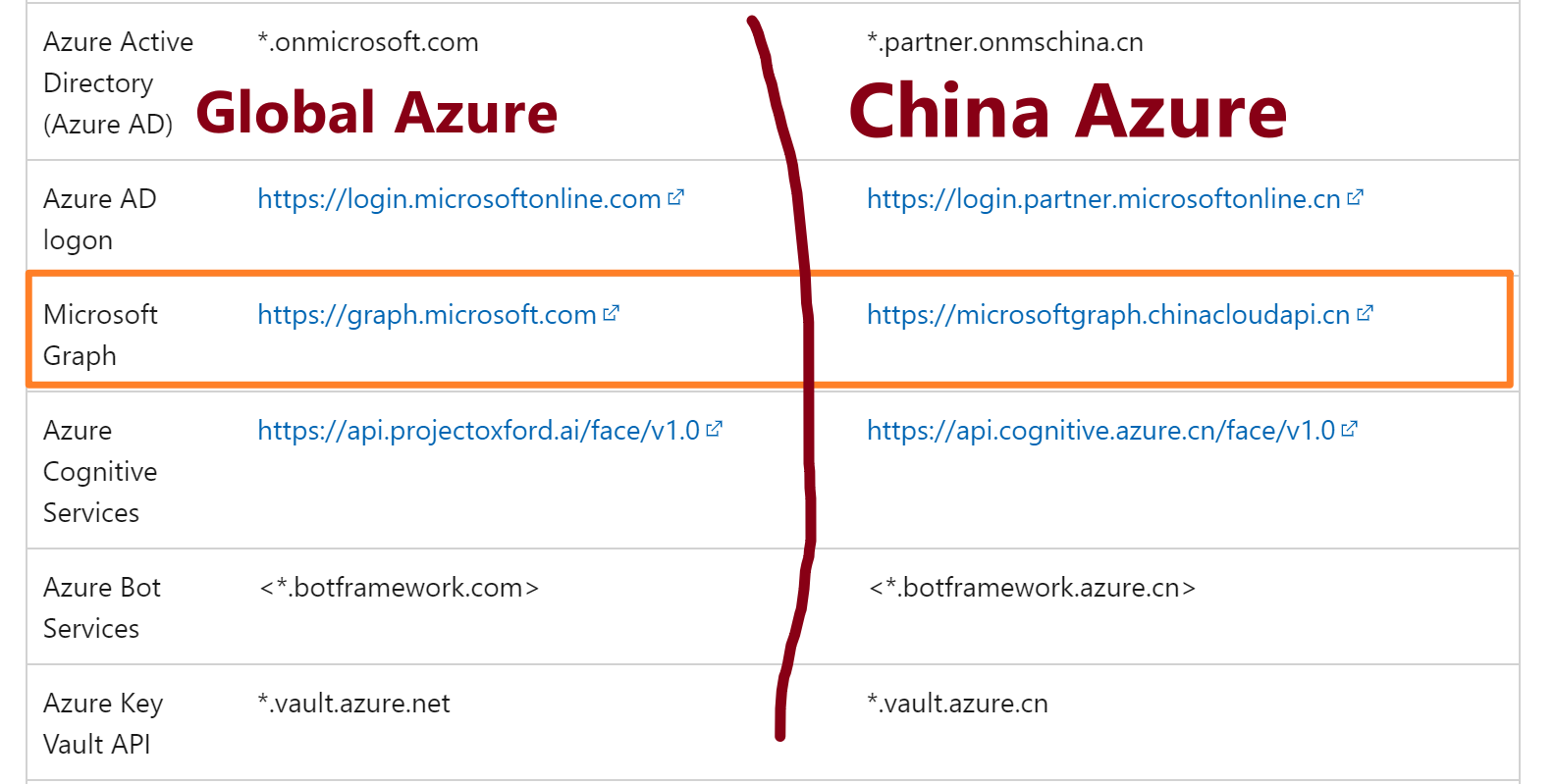
2)acquireTokne方法中的 https://graph.windows.net 是指向global azure的资源,如果是中国区azure的资源,那么resource url是多少呢?
3)YOUR_TENANT_ID,它的值是什么呢?
问题解答
第一个问题:AUTHORITY, 是什么意思,它的值是什么呢?
AUTHORITY,表示认证的主体,它是一个URL,表示可以从该主体中获取到认证Token。 它的格式为:https://<authority host>/<tenant id> ,所以在使用Azure的过程中,根据Azure环境的不同,Host 有以下四个值。
- AzureChina :The host of the Azure Active Directory authority for tenants in the Azure China Cloud. AZURE_CHINA = "login.chinacloudapi.cn"
- AzureGermany: The host of the Azure Active Directory authority for tenants in the Azure German Cloud. AZURE_GERMANY = "login.microsoftonline.de"
- AzureGovernment: The host of the Azure Active Directory authority for tenants in the Azure US Government Cloud. AZURE_GOVERNMENT = "login.microsoftonline.us"
- AzurePublicCloud: The host of the Azure Active Directory authority for tenants in the Azure Public Cloud. AZURE_PUBLIC_CLOUD = "login.microsoftonline.com"
所以,这里我们需要使用的值为:String AUTHORITY = "https://login.chinacloudapi.cn/<tenant id >";
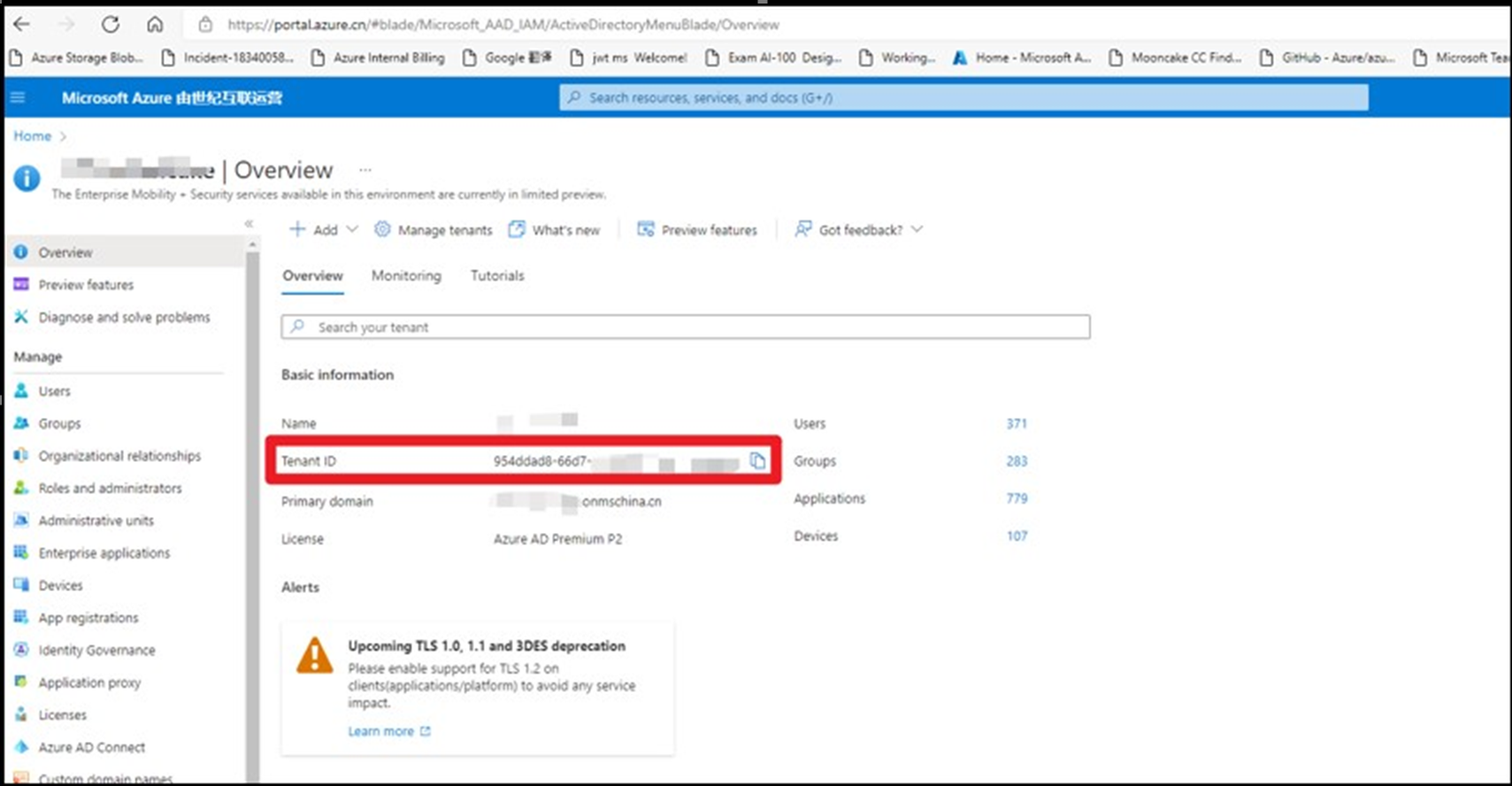
那么如何来获取Tenant ID呢?
登录到Azure门户 --> 进入AAD中,在Overview页面查看Tenant ID (https://portal.azure.cn/#blade/Microsoft_AAD_IAM/ActiveDirectoryMenuBlade/Overview)
第二个问题:acquireTokne方法中的 https://graph.windows.net 是指向global azure的资源,如果是中国区azure的资源,那么resource url是多少呢?
根据中国区Azure的开发文档,并没有查找到对应于 graph.windows.net的中国区Graph 终结点。但是,中国区Graph 的终结点为:microsoftgraph.chinacloudapi.cn,所以,以上示例中应该使用的值应是:
第三个问题:YOUR_TENANT_ID,它的值是什么呢?
在对比了adal4j的源代码后,在acquireToken方法定义中,发现YOUR_TENANT_ID所对应的值应该是 clientId ()。所以,官网参考文档中的YOUR_TENANT_ID存在误导情景。需要修改为YOUR_CLIENT_ID。
ADAL4J中acquireToken源码(acquireToken有多个重载,但此处只列举出代码中使用的这个重载)
    /**

     * Acquires a security token from the authority using a Refresh Token

     * previously received.

     *

     * @param clientId

     *            Name or ID of the client requesting the token.

     * @param resource

     *            Identifier of the target resource that is the recipient of the

     *            requested token. If null, token is requested for the same

     *            resource refresh token was originally issued for. If passed,

     *            resource should match the original resource used to acquire

     *            refresh token unless token service supports refresh token for

     *            multiple resources.

     * @param username

     *            Username of the managed or federated user.

     * @param password

     *            Password of the managed or federated user.

     * @param callback

     *            optional callback object for non-blocking execution.

     * @return A {@link Future} object representing the

     *         {@link AuthenticationResult} of the call. It contains Access

     *         Token, Refresh Token and the Access Token's expiration time.

     */

    public Future<AuthenticationResult> acquireToken(final String resource,

            final String clientId, final String username,

            final String password, final AuthenticationCallback callback) {

        if (StringHelper.isBlank(resource)) {

            throw new IllegalArgumentException("resource is null or empty");

        }

        if (StringHelper.isBlank(clientId)) {

            throw new IllegalArgumentException("clientId is null or empty");

        }

        if (StringHelper.isBlank(username)) {

            throw new IllegalArgumentException("username is null or empty");

        }

        if (StringHelper.isBlank(password)) {

            throw new IllegalArgumentException("password is null or empty");

        }

        return this.acquireToken(new AdalAuthorizatonGrant(

                new ResourceOwnerPasswordCredentialsGrant(username, new Secret(

                        password)), resource), new ClientAuthenticationPost(

                ClientAuthenticationMethod.NONE, new ClientID(clientId)),

                callback);

    }
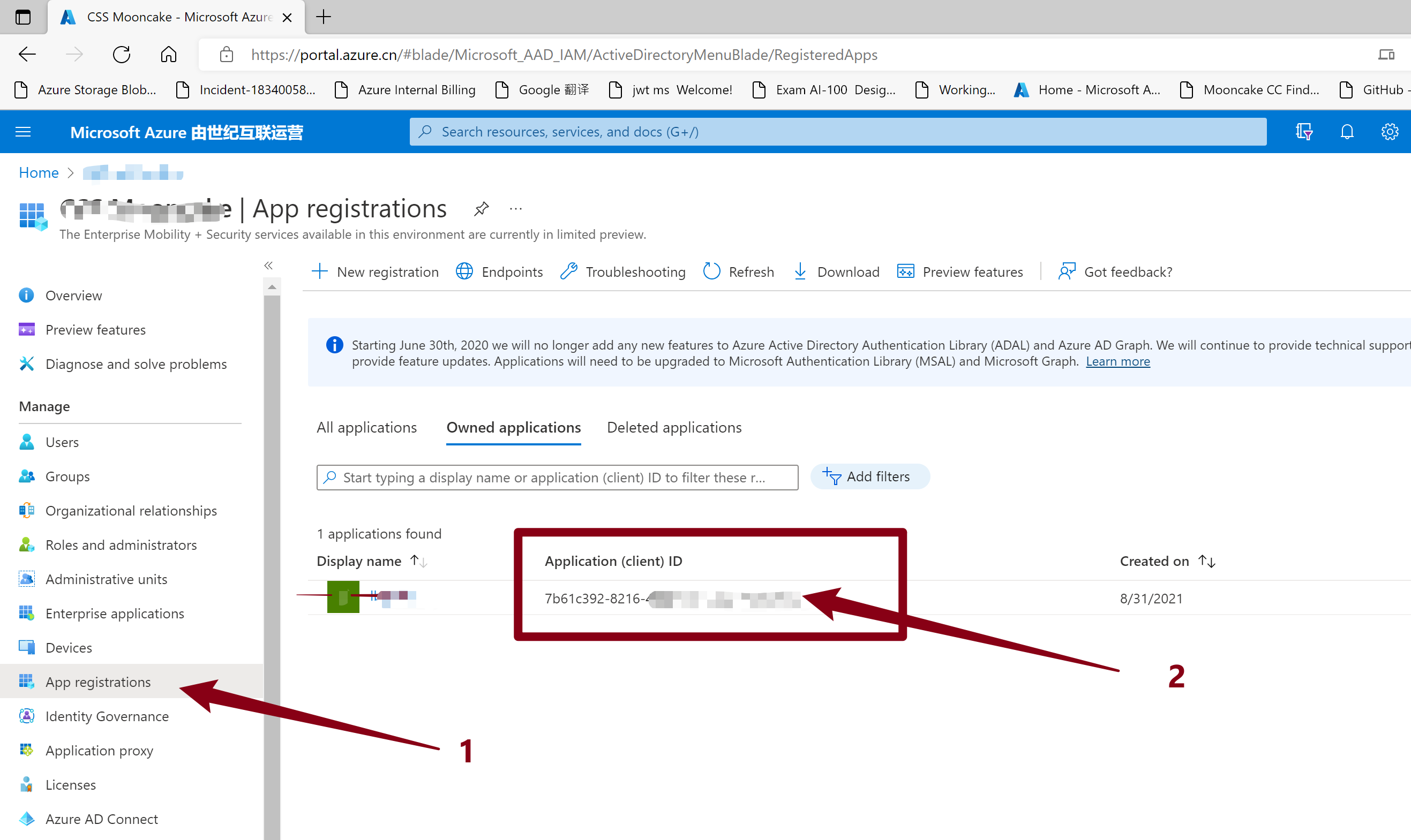
所以,这里指定的Client ID 其实是,AAD中所注册的一个应用(服务主体),而这个主体可以根据需求授予不同的权限,acquireToken就是根据用户验证成功后,生成这个主题所拥有的权限JWT令牌(Token),获取到Token后,就拥有了访问Azure中资源API的授权.
如何来获取这个Client ID呢?
- 进入AAD, 选择注册应用( App Registrations:https://portal.azure.cn/#blade/Microsoft_AAD_IAM/ActiveDirectoryMenuBlade/RegisteredApps)
- 并在Onwed Applications 中选择,进入详细页面或就是当前页面,获取Application(Client) ID
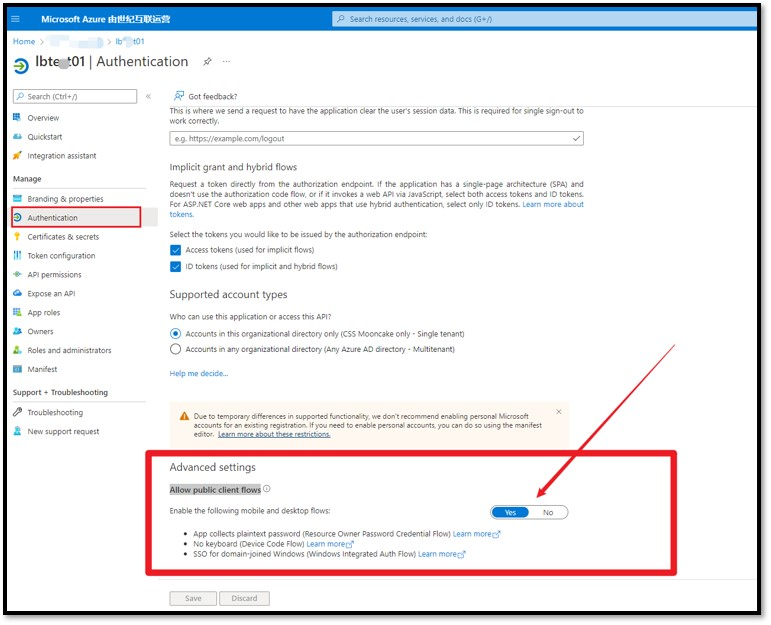
特别注意:这个App必须开启 “Allow public client flows“ 才能成功获取到 Token。 默认情况下,这里选择的是No。 如果不开启这一步,将会收到错误消息:"error_description":"AADSTS7000218: The request body must contain the following parameter: 'client_assertion' or 'client_secret'.
开启方式为:点击这个App的名称,进入详细页面,选择Authentication,滑动到最底部,选择“Allow public client flows”。
完成参考实例代码
1:在POM.XML文件中添加adal4j依赖
    <dependency>

      <groupId>com.microsoft.azure</groupId>

      <artifactId>adal4j</artifactId>

      <version>1.2.0</version>

  </dependency>
2:示例代码
package com.example;

import java.net.MalformedURLException;

import java.util.concurrent.ExecutionException;

import java.util.concurrent.ExecutorService;

import java.util.concurrent.Executors;

import java.util.concurrent.Future;

import com.microsoft.aad.adal4j.AuthenticationContext;

import com.microsoft.aad.adal4j.AuthenticationResult;

/**

 * Hello world!

 *

 */

public class App {

    public static void main(String[] args) throws InterruptedException, ExecutionException, MalformedURLException {

        System.out.println("Hello World!");

        ExecutorService service = Executors.newFixedThreadPool(1);

        String AUTHORITY = "https://login.chinacloudapi.cn/<tenant id >"; // AzureAuthority

        String YOUR_Client_ID="7b61c392-xxxx-xxxx-xxxx-xxxxxxxxxxx";

        String username = "xxxx@xxxx.xxx.onmschina.cn";

        String password = "xxxxxxxxxxx";

        AuthenticationContext context = new AuthenticationContext(AUTHORITY, false, service);

        Future<AuthenticationResult> future = context.acquireToken("https://microsoftgraph.chinacloudapi.cn/", YOUR_Client_ID,

                username, password, null);

        AuthenticationResult result = future.get();

        System.out.println("Access Token - " + result.getAccessToken());

        System.out.println("Refresh Token - " + result.getRefreshToken());

        System.out.println("ID Token - " + result.getIdToken());

    }

}
(PS: 使用的 username, password就是登录Azure的用户名和密码)
测试结果:
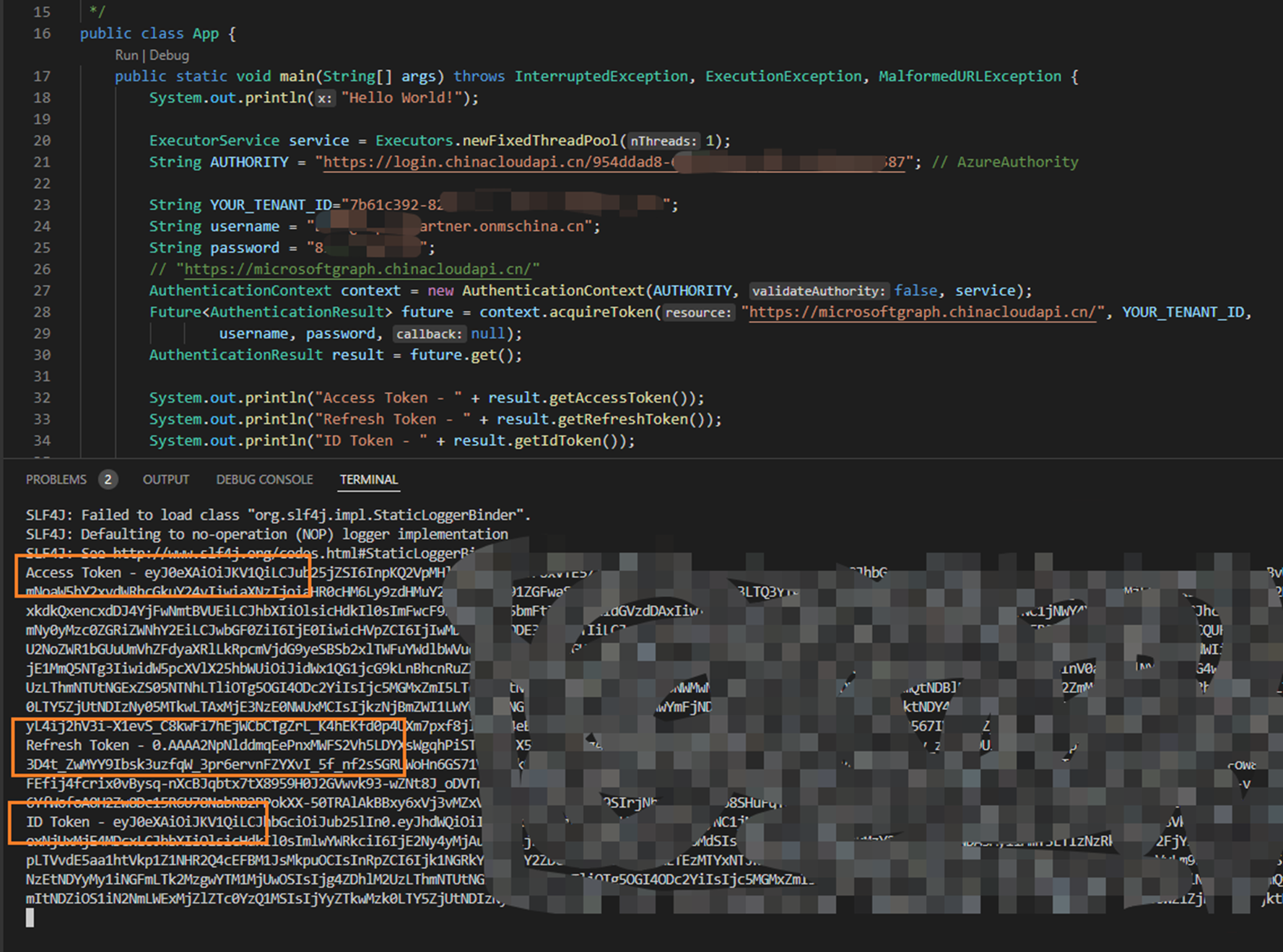
获取Token成功。
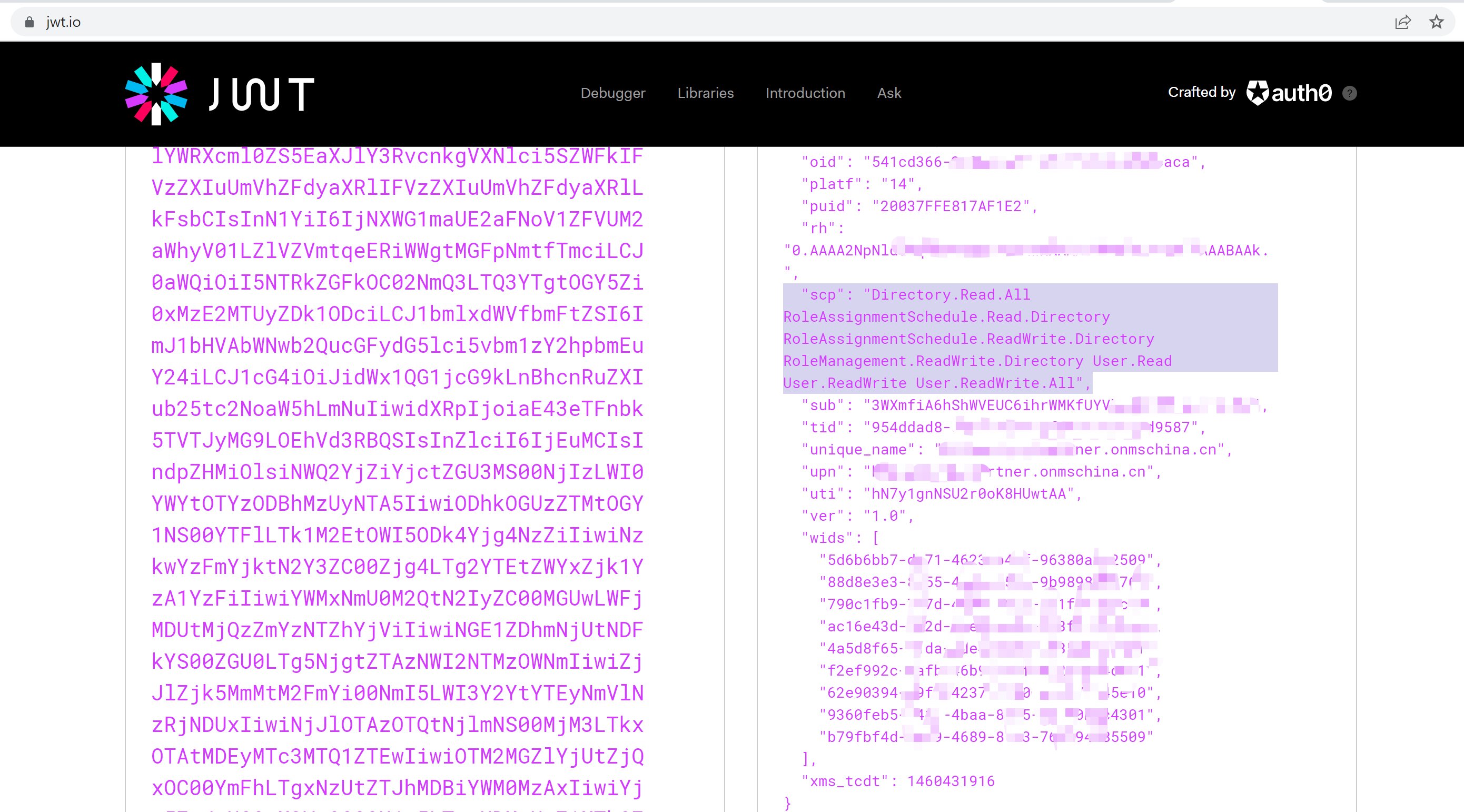
可以通过一个公用网站 jwt.io 来解析Token: https://jwt.io/, 它可以解析出Token内容,让我们可读。
参考资料
Azure China developer guide:https://docs.microsoft.com/en-us/azure/china/resources-developer-guide#check-endpoints-in-azure
Azure Active Directory libraries for Java: https://docs.microsoft.com/en-us/java/api/overview/azure/activedirectory?view=azure-java-stable#client-library
【Azure Developer】使用 adal4j(Azure Active Directory authentication library for Java)如何来获取Token呢的更多相关文章
- Enabling Active Directory Authentication for VMWare Server running on Linux《转载》
Enabling Active Directory Authentication for VMWare Server running on Linux Version 0.2 - Adam Breid ...
- Weblogic中配置Active Directory Authentication Provider
其要点或者容易出错的关键点是:(<>及其中说明代表需要替换的内容) Host: ads.yourdomain.com Host填AD服务器的域名或IP ...
- 【Azure Developer】通过Azure提供的Azue Java JDK 查询虚拟机的CPU使用率和内存使用率
问题描述 在Azure上创建虚拟机(VM)后,在门户上可以查看监控指标(Metrics),如CPU Usage,Memory,Disk I/O等.那如何通过Java 代码获取到这些指标呢? 关于VM ...
- 【Azure Developer】解决Azure Key Vault管理Storage的示例代码在中国区Azure遇见的各种认证/授权问题 - C# Example Code
问题描述 使用Azure密钥保管库(Key Vault)来托管存储账号(Storage Account)密钥的示例中,从Github中下载的示例代码在中国区Azure运行时候会遇见各种认证和授权问题, ...
- Active Directory Authentication in ASP.NET MVC 5 with Forms Authentication and Group-Based Authorization
I know that blog post title is sure a mouth-full, but it describes the whole problem I was trying to ...
- SQL Server ->> 使用Azure Active Directory Authentication连接到Azure SQL Database
SQL Server 2016以后支持Azure AD集成验证,这当中有些数据驱动必须在高版本才可以使用,支持的包括sqlcmd,SSDT,JDBC,ODBC,SSMS等. 对于SSIS来讲,我们需要 ...
- 【Azure Developer】使用 Azure Python SDK时,遇见 The resource principal named https://management.azure.com was not found in the tenant China Azure问题的解决办法
问题描述 在使用Python SDK时候,登录到China Azure (Mooncake)并访问AlertsManagement资源时候,时常遇见 EnvironmentCredential: A ...
- 【Azure Developer】在Azure Resource Graph Explorer中查看当前订阅下的所有资源信息列表并导出(如VM的名称,IP地址内网/公网,OS,区域等)
问题描述 通过Azure的Resource Graph Explorer(https://portal.azure.cn/#blade/HubsExtension/ArgQueryBlade),可以查 ...
- 【Azure Developer】使用Azure PubSub服务示例代码时候遇见了.NET 6.0的代码转换问题
问题描述 当本地环境中安装.NET 6.0后,用指令 dotnet new web 或 dotnet new console 生成的项目,使用的都是新模板生成的Program.cs文件.里面去掉了n ...
随机推荐
- Hibernate实体的三种状态是什么?各有什么特点?
瞬时态(Transient). 持久态(Persistent).脱管态(Detached).处于持久态的对象也称为PO(Persistence Object),瞬时对象和脱管对象也称为VO(Value ...
- Dubbo 支持分布式事务吗?
目前暂时不支持,可与通过 tcc-transaction 框架实现 介绍:tcc-transaction 是开源的 TCC 补偿性分布式事务框架 Git 地址:https://github.com/c ...
- docker打包镜像,测试部署
docker基本入门以后,(docker基本入门https://www.cnblogs.com/yangyangming/p/11470926.html)可以试试打包docker镜像与dockerfi ...
- Elasticsearch 是如何实现 Master 选举的?
1.Elasticsearch 的选主是 ZenDiscovery 模块负责的,主要包含 Ping(节点之 间通过这个 RPC 来发现彼此)和 Unicast(单播模块包含一个主机列表以控制哪 些节点 ...
- 阿里低代码引擎 | LowCodeEngine - 如何配置并调用请求
首发于 语雀文档@blueju 前言 发送请求是前端中很重要也很常见的一部分,阿里低代码引擎自然也不会缺少这一块.在阿里低代码引擎中,请求是在数据源中配置,数据源位置如下图: 配置 配置界面如下图:其 ...
- Effective Java —— 用静态工厂方法代替构造器
本文参考 本篇文章参考自<Effective Java>第三版第一条"Consider static factory methods instead of constructor ...
- weevely使用小结
Weevely 写在前面 由于比赛不确定会不会提供菜刀或者蚁剑,这里我稍微对weevely进行简单介绍一下,具体还是请看官方文档,官方文档讲的很详细(前提你英语嘚不错) 官方文档:https://gi ...
- AD学习总结
一.常用快捷键总结 快捷键tab:显示放置的线.元器件.管脚等详细信息(可以修改) 快捷键p:打开放置内容:在元器件原理图中放置能容主要是线等(组合键p+w 启动 "线" 操作 ...
- DOS、DOS攻击、DDOS攻击、DRDOS攻击
https://baike.baidu.com/item/dos%E6%94%BB%E5%87%BB/3792374?fr=aladdin DOS:中文名称是拒绝服务,一切能引起DOS行为的攻击都被称 ...
- 单页应用SPA开发最佳实践
最近用vue+vue-router做了个单页应用的项目,页面大概有15个左右.积累了一些开发经验在此做一些记录.本文主要从可维护性方面来考虑SPA的开发实践 全站的颜色定义放在一个less或者scss ...