
【Azure Developer】通过Azure提供的Azue Java JDK 查询虚拟机的CPU使用率和内存使用率
问题描述
在Azure上创建虚拟机(VM)后,在门户上可以查看监控指标(Metrics),如CPU Usage,Memory,Disk I/O等。那如何通过Java 代码获取到这些指标呢?
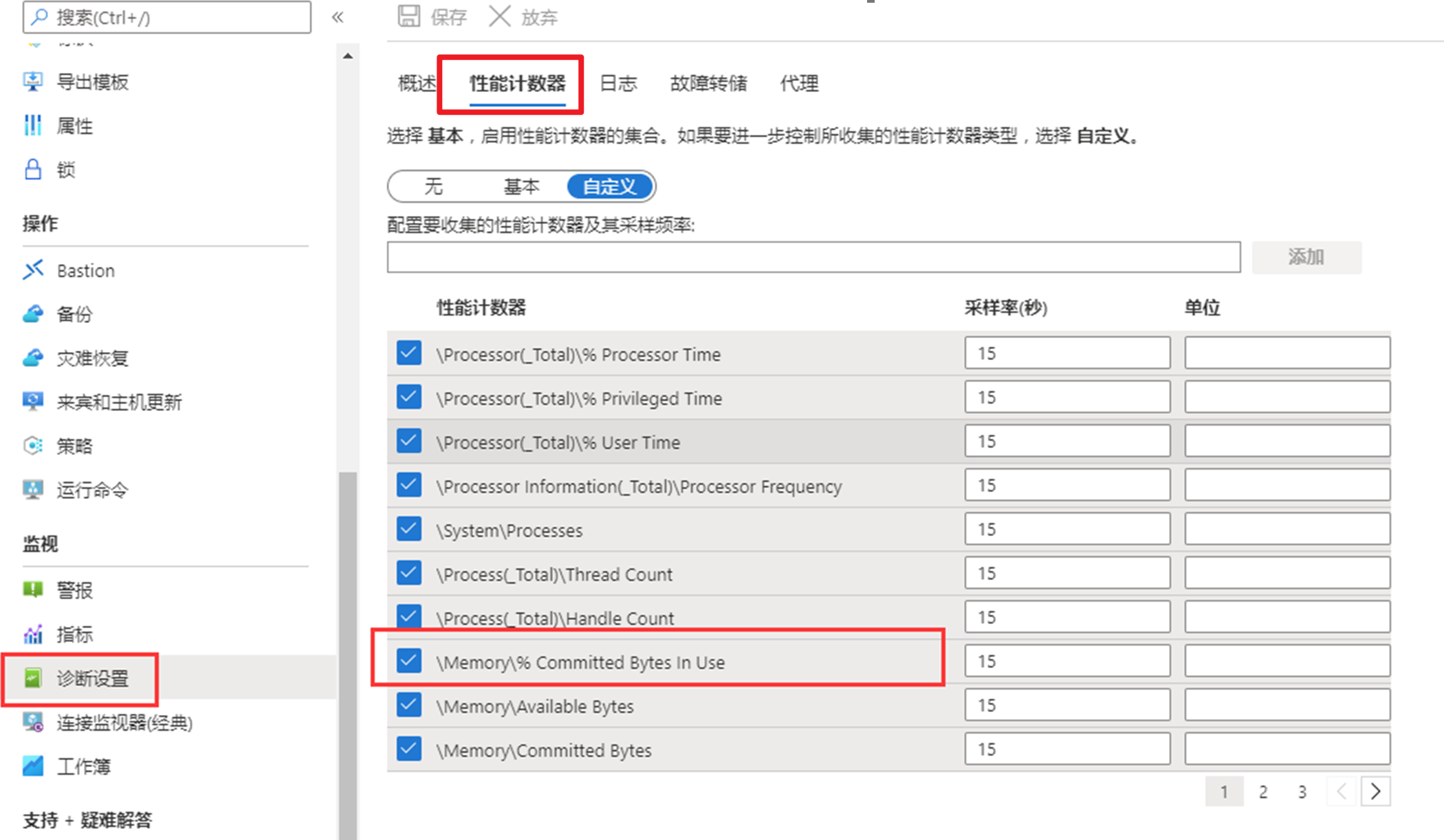
关于VM 的内存使用率,虚拟机本身并没有提供这个指标,需要开启诊断后去Azure Storage表中获取,字段为\Memory\% Committed Bytes In Use,是开启了诊断日志存储到WADMetrics 表中
解决办法
方式一:使用REST API
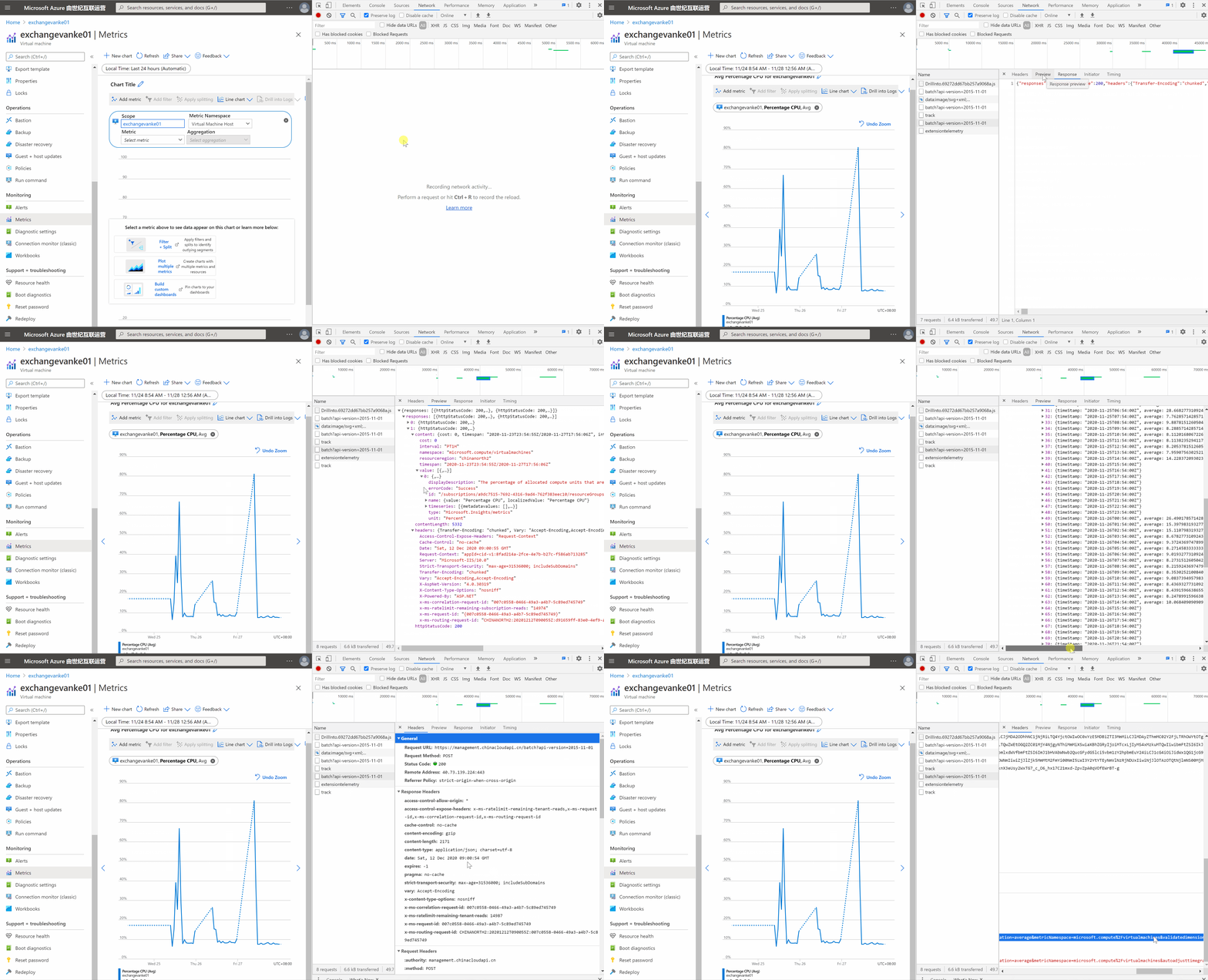
Azure中门户上看见的内容都是通过REST API来获取值,基于此原理,可以通过在门户中Metrics页面中,点看CPU的指标数据后,通过F12(开发者工具),查看具体使用的是什么API, 并参考同样的方式在Java 代码中调用该类接口来完成。
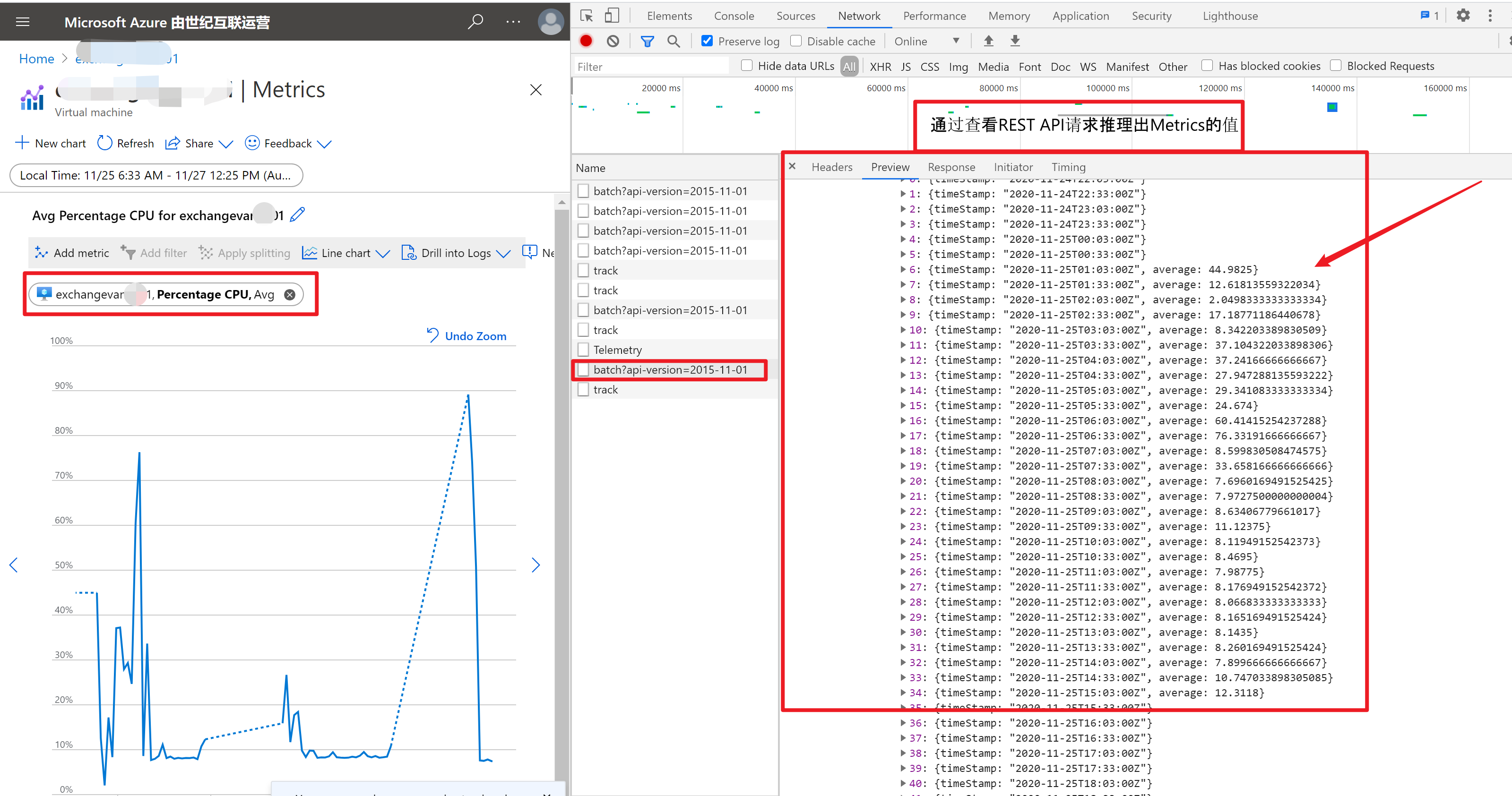
通常情况,是可以在Azure Monitor官网中(https://docs.microsoft.com/zh-cn/rest/api/monitor/)找到需要的REST API接口。如:
Metrics - List
列出资源的指标值。
GET https://management.azure.com/{resourceUri}/providers/microsoft.insights/metrics?api-version=2018-01-01在携带相应的参数后的请求URL:GET https://management.azure.com/{resourceUri}/providers/microsoft.insights/metrics?timespan={timespan}&interval={interval}&metricnames={metricnames}&aggregation={aggregation}&top={top}&orderby={orderby}&$filter={$filter}&resultType={resultType}&api-version=2018-01-01&metricnamespace={metricnamespace}
上文截图中调用通过API获取到的Metrics的URL参数值为:"/subscriptions/<subscriptionid>/resourceGroups/<resource group>/providers/Microsoft.Compute/virtualMachines/<vm name>/providers/microsoft.Insights/metrics?
timespan=2020-11-24T22:03:01.141Z/2020-11-27T04:55:40.325Z
&interval=PT30M
&metricnames=Percentage CPU
&aggregation=average
&metricNamespace=microsoft.compute%2Fvirtualmachines
&autoadjusttimegrain=true
&validatedimensions=false
&api-version=2019-07-01"参数的详细说明:
Name In Required Type Description path True
- string
资源的标识符。
query True
- string
客户端 Api 版本。
query
- string
$filter用于减少返回的指标数据集。
示例:
指标包含元数据 A、B 和 C。
- 返回所有时间序列 C,其中 A = a1 和 B = b1 或 b2
$filter_eq 'a1' 和 B eq 'b1' 或 B eq 'b2' 和 C eq '#'
- 无效变体:
$filter=eq 'a1'和 B eq 'b1' 和 C eq '*' 或 B = 'b2'
这是无效的,因为逻辑或运算符不能分隔两个不同的元数据名称。
- 返回所有时间序列,其中 A = a1,B = b1 和 C = c1:
$filter=eq 'a1'和 B eq 'b1' 和 C eq 'c1'
- 返回所有时间序列,其中 A = a1
$filter_aq 'a1' 和 B eq '和 C eq''.query
- string
要检索的聚合类型(逗号分隔)的列表。
query
- string
duration
查询的间隔(即时粒)。
query
- string
要检索的指标(逗号分隔)的名称。
query
- string
用于查询指标定义的指标命名空间。
query
- string
用于对结果进行排序的聚合和排序方向。 只能指定一个订单。 示例:总和 asc。
query 减少收集的数据集。 允许的语法取决于操作。 有关详细信息,请参阅操作说明。
query
- string
查询的时间跨度。 它是具有以下格式"startDateTime_ISO/endDateTime_ISO"的字符串。
query
- integer
int32
要检索的最大记录数。 仅在指定$filter时有效。 默认值为 10。
全文内容:https://docs.microsoft.com/zh-cn/rest/api/monitor/metrics/list
方式二:使用Azure VM诊断日志 ——> Storage Table——> Java Code (Storage SDK)
开启虚拟机的诊断日志,让Azure VM把监控数据发送到Storage Table中,通过Storage SDK直接获取Table中的数据。
开启诊断日志
获取Storage Table中数据的Java代码
若要对表查询分区中的实体,可以使用
TableQuery。 调用TableQuery.from可创建针对特定表的查询,该查询将返回指定的结果类型。 以下代码指定了一个筛选器,用于筛选其中的分区键是“Smith”的实体。TableQuery.generateFilterCondition是用于创建查询筛选器的帮助程序方法。 对TableQuery.from方法返回的引用调用where,以对查询应用筛选器。 当通过调用CloudTable对象上的execute来执行查询时,该查询将返回指定了CustomerEntity结果类型的Iterator。 然后,可以利用在“ForEach”循环中返回的Iterator来使用结果。 此代码会将查询结果中每个实体的字段打印到控制台。try
{
// Define constants for filters.
final String PARTITION_KEY = "PartitionKey";
final String ROW_KEY = "RowKey";
final String TIMESTAMP = "Timestamp"; // Retrieve storage account from connection-string.
CloudStorageAccount storageAccount =
CloudStorageAccount.parse(storageConnectionString); // Create the table client.
CloudTableClient tableClient = storageAccount.createCloudTableClient(); // Create a cloud table object for the table.
CloudTable cloudTable = tableClient.getTableReference("people"); // Create a filter condition where the partition key is "Smith".
String partitionFilter = TableQuery.generateFilterCondition(
PARTITION_KEY,
QueryComparisons.EQUAL,
"Smith"); // Specify a partition query, using "Smith" as the partition key filter.
TableQuery<CustomerEntity> partitionQuery =
TableQuery.from(CustomerEntity.class)
.where(partitionFilter); // Loop through the results, displaying information about the entity.
for (CustomerEntity entity : cloudTable.execute(partitionQuery)) {
System.out.println(entity.getPartitionKey() +
" " + entity.getRowKey() +
"\t" + entity.getEmail() +
"\t" + entity.getPhoneNumber());
}
}
catch (Exception e)
{
// Output the stack trace.
e.printStackTrace();
}
参考资料
REST API 引用 Azure Monitor: https://docs.microsoft.com/zh-cn/rest/api/monitor/
如何通过 Java 使用 Azure 表存储或 Azure Cosmos DB 表 API: https://docs.azure.cn/zh-cn/cosmos-db/table-storage-how-to-use-java?toc=https%3A%2F%2Fdocs.azure.cn%2Fzh-cn%2Fstorage%2Ftables%2Ftoc.json&bc=https%3A%2F%2Fdocs.azure.cn%2Fzh-cn%2Fbread%2Ftoc.json
附录一:查看Azure REST API的方法:
附录二:使用Java SDK直接获取VM对象和VM对象中Mertics的代码:https://github.com/Azure/azure-libraries-for-java/blob/master/azure-mgmt-monitor/src/test/java/com/microsoft/azure/management/monitor/MonitorActivityAndMetricsTests.java
/**

 * Copyright (c) Microsoft Corporation. All rights reserved.

 * Licensed under the MIT License. See License.txt in the project root for

 * license information.

 */

package com.microsoft.azure.management.monitor;

import com.microsoft.azure.PagedList;

import com.microsoft.azure.management.compute.VirtualMachine;

import com.microsoft.azure.management.resources.fluentcore.utils.SdkContext;

import org.joda.time.DateTime;

import org.junit.Assert;

import org.junit.Test;

import java.util.List;

public class MonitorActivityAndMetricsTests extends MonitorManagementTest {

    @Test

    public void canListEventsAndMetrics() throws Exception {

        DateTime recordDateTime = SdkContext.dateTimeNow().minusDays(40);

        VirtualMachine vm = computeManager.virtualMachines().list().get(0);

        // Metric Definition

        List<MetricDefinition> mt = monitorManager.metricDefinitions().listByResource(vm.id());

        Assert.assertNotNull(mt);

        MetricDefinition mDef = mt.get(0);

        Assert.assertNotNull(mDef.metricAvailabilities());

        Assert.assertNotNull(mDef.namespace());

        Assert.assertNotNull(mDef.supportedAggregationTypes());

        // Metric

        MetricCollection metrics = mDef.defineQuery()

                .startingFrom(recordDateTime.minusDays(30))

                .endsBefore(recordDateTime)

                .withResultType(ResultType.DATA)

                .execute();

        Assert.assertNotNull(metrics);

        Assert.assertNotNull(metrics.namespace());

        Assert.assertNotNull(metrics.resourceRegion());

        Assert.assertEquals("Microsoft.Compute/virtualMachines", metrics.namespace());
【Azure Developer】通过Azure提供的Azue Java JDK 查询虚拟机的CPU使用率和内存使用率的更多相关文章
- 【Azure Developer】Azure Graph SDK获取用户列表的问题: SDK中GraphServiceClient如何指向中国区的Endpoint:https://microsoftgraph.chinacloudapi.cn/v1.0
问题描述 想通过Java SDK的方式来获取Azure 门户中所列举的用户.一直报错无法正常调用接口,错误信息与AAD登录认证相关,提示tenant not found. 想要实现的目的,通过代码方式 ...
- 【Azure Developer】记录一次使用Java Azure Key Vault Secret示例代码生成的Jar包,单独运行出现 no main manifest attribute, in target/demo-1.0-SNAPSHOT.jar 错误消息
问题描述 创建一个Java Console程序,用于使用Azure Key Vault Secret.在VS Code中能正常Debug,但是通过mvn clean package打包为jar文件后, ...
- 【Azure Developer】Azure Automation 自动化账号生成的时候怎么生成连接 与证书 (Connection & Certificate)
Azure Automation :The Azure Automation service provides a highly reliable and scalable workflow exec ...
- 【Azure Developer】Azure Logic App 示例: 解析 Request Body 的 JSON 的表达式? triggerBody()?
问题描述 通过Azure Logic App(逻辑应用)实现无代码的处理JSON数据.但是如何获取Request Body中的一个属性值呢? 例如:如何来获取以下JSON结构中的 ObjectName ...
- Java对象在虚拟机中的创建、内存分布、访问定位以及死亡判定
转载请注明原文地址:http://www.cnblogs.com/ygj0930/p/6535156.html 一:虚拟机中对象的创建 1:虚拟机遇到new指令时,在常量池检索是否有对应的符号引用, ...
- Windows Azure HandBook (2) Azure China提供的服务
<Windows Azure Platform 系列文章目录> 对于传统的自建数据中心,从底层的Network,Storage,Servers,Virtualization,中间层的OS, ...
- 获取指定订阅下所有Azure ARM虚拟机配置(CPU核数,内存大小,磁盘信息)的使用情况
脚本内容: <# .SYNOPSIS This script grab all ARM VM VHD file in the subscription and caculate VHD size ...
- Linux下使用java获取cpu、内存使用率
原文地址:http://www.voidcn.com/article/p-yehrvmep-uo.html 思路如下:Linux系统中可以用top命令查看进程使用CPU和内存情况,通过Runtime类 ...
- 【Azure Developer】使用Java代码启动Azure VM(虚拟机)
问题描述 在使用Java的启动Azure VM的过程中,遇见了com.azure.core.management.exception.ManagementException: Status code ...
随机推荐
- 「NOIP2009」最优贸易 题解
「NOIP2009」最优贸易 题解 题目TP门 题目描述 \(C\)国有\(n\)个大城市和\(m\)条道路,每条道路连接这\(n\)个城市中的某两个城市.任意两个城市之间最多只有一条道路直接相连.这 ...
- Folx使用教程:怎么通过设置标签分类下载内容
很多Mac OS下载软件从网上下载各种各样的文件,一般默认都会存放在"下载"文件夹中.如果不是经常整理"下载"文件夹,久而久之,该文件夹会变得庞大而杂乱. 如果 ...
- 检查字符串结尾 判断一个字符串(str)是否以指定的字符串(target)结尾。
function confirmEnding(str, target) { var arr = str.replace(/\s+/g, ""); var bb = arr.subs ...
- 蓝桥杯 调手表(bfs解法)
小明买了块高端大气上档次的电子手表,他正准备调时间呢. 在 M78 星云,时间的计量单位和地球上不同,M78 星云的一个小时有 n 分钟. 大家都知道,手表只有一个按钮可以把当前的数加一.在调分钟的时 ...
- VUE:data数据中,能被网页渲染出来的数据类型有哪些
我们都知道vue中,data里面的数据类型可以使任意类型. 但是能在网页上可以渲染出来的类型有哪些呢? 我们来看一下在VUE中data里的什么数据类型可以渲染出来. 我在下面列举了这些数据类型 显示结 ...
- Springboot结合Jpa的外键使用
当我们写项目的时候,总有些奇奇怪怪的理由,非让你连表查询,其实最好的就是什么都不连,数据库完全解耦 但我们还是要学习下Jpa怎么根据外键查询 (这里说下Jpa+springboot的感觉,刚开始就感觉 ...
- 数论之prufer序列
定义 \(Prufer\) 数列是无根树的一种数列. 在组合数学中,\(Prufer\) 数列由有一个对于顶点标过号的树转化来的数列,点数为 \(n\) 的树转化来的 \(Prufer\) 数列长度为 ...
- 010 editor的使用
原文链接:http://www.cnblogs.com/vendanner/p/4939444.html 注意事项:之前一直在虚拟机winxp中添加template一直失败,原因可能是因为虚拟机的版本 ...
- Java 安全之Java Agent
Java 安全之Java Agent 0x00 前言 在前面发现很多技术都会去采用Java Agent该技术去做实现,比分说RASP和内存马(其中一种方式).包括IDEA的这些破解都是基于Java A ...
- 后端程序员必备的 Linux 基础知识
1. 从认识操作系统开始 正式开始 Linux 之前,简单花一点点篇幅科普一下操作系统相关的内容. 1.1. 操作系统简介 我通过以下四点介绍什么是操作系统: 操作系统(Operating Syste ...