
不规则形状的Mask动画
不规则形状的Mask动画
效果

源码
https://github.com/YouXianMing/Animations
//

//  MaskShapeViewController.m

//  Animations

//

//  Created by YouXianMing on 16/7/10.

//  Copyright © 2016年 YouXianMing. All rights reserved.

//

#import "MaskShapeViewController.h"

#import "AppleSystemService.h"

#import "JSAnimatedImagesView.h"

#import "CutOutClearView.h"

#import "UIView+SetRect.h"

#import "UIFont+Fonts.h"

#import "FBShimmeringView.h"

typedef enum : NSUInteger {

    kUpJsView = ,

    kDownJsView,

} EMaskShapeViewControllerValue;

@interface MaskShapeViewController () <JSAnimatedImagesViewDataSource>

@property (nonatomic, strong) JSAnimatedImagesView  *upJsView;

@property (nonatomic, strong) NSArray               *upDataSource;

@property (nonatomic, strong) JSAnimatedImagesView  *downJsView;

@property (nonatomic, strong) NSArray               *downDataSource;

@end

@implementation MaskShapeViewController

- (void)setup {

    [super setup];

    self.backgroundView.backgroundColor = [UIColor blackColor];

    CGFloat gap    = .f;

    CGFloat offset = .f;

    {

        CutOutClearView *areaView = [[CutOutClearView alloc] initWithFrame:CGRectMake(, , Width, self.contentView.height / .f + offset - gap)];

        areaView.fillColor        = [UIColor clearColor];

        areaView.areaColor        = [UIColor blackColor];

        UIBezierPath *path = [UIBezierPath bezierPath];

        [path moveToPoint:CGPointMake(gap, gap)];

        [path addLineToPoint:CGPointMake(Width - gap, gap)];

        [path addLineToPoint:CGPointMake(Width - gap, areaView.height)];

        [path addLineToPoint:CGPointMake(gap, areaView.height - (offset - gap) *  - gap)];

        [path closePath];

        areaView.paths = @[path];

        self.upDataSource = @[[UIImage imageNamed:@""],

                              [UIImage imageNamed:@""],

                              [UIImage imageNamed:@""],

                              [UIImage imageNamed:@""],

                              [UIImage imageNamed:@""]];

        self.upJsView                     = [[JSAnimatedImagesView alloc] initWithFrame:CGRectMake(, , Width, self.contentView.height / .f + offset - gap)];

        self.upJsView.transitionDuration  = .f;

        self.upJsView.tag                 = kUpJsView;

        self.upJsView.dataSource          = self;

        self.upJsView.layer.masksToBounds = YES;

        self.upJsView.maskView            = areaView;

        [self.contentView addSubview:self.upJsView];

    }

    {

        CutOutClearView *areaView = [[CutOutClearView alloc] initWithFrame:CGRectMake(, , Width, self.contentView.height / .f + (offset - gap))];

        areaView.fillColor        = [UIColor clearColor];

        areaView.areaColor        = [UIColor blackColor];

        UIBezierPath *path = [UIBezierPath bezierPath];

        [path moveToPoint:CGPointMake(gap, )];

        [path addLineToPoint:CGPointMake(gap, areaView.height - gap)];

        [path addLineToPoint:CGPointMake(Width - gap, areaView.height - gap)];

        [path addLineToPoint:CGPointMake(Width - gap, (offset - gap) *  + gap)];

        [path closePath];

        areaView.paths = @[path];

        self.downDataSource = @[[UIImage imageNamed:@"pic_1"],

                                [UIImage imageNamed:@"pic_2"],

                                [UIImage imageNamed:@"pic_3"],

                                [UIImage imageNamed:@"pic_4"]];

        self.downJsView                     = [[JSAnimatedImagesView alloc] initWithFrame:CGRectMake(, , Width, self.contentView.height / .f + offset - gap)];

        self.downJsView.transitionDuration  = .f;

        self.downJsView.tag                 = kDownJsView;

        self.downJsView.dataSource          = self;

        self.downJsView.layer.masksToBounds = YES;

        self.downJsView.maskView            = areaView;

        self.downJsView.bottom = self.contentView.height;

        [self.contentView addSubview:self.downJsView];

    }

}

#pragma mark - JSAnimatedImagesViewDataSource

- (NSUInteger)animatedImagesNumberOfImages:(JSAnimatedImagesView *)animatedImagesView {

    NSUInteger count = ;

    animatedImagesView.tag == kUpJsView ? (count = self.upDataSource.count) : (count = self.downDataSource.count);

    return count;

}

- (UIImage *)animatedImagesView:(JSAnimatedImagesView *)animatedImagesView imageAtIndex:(NSUInteger)index {

    UIImage *image = nil;

    animatedImagesView.tag == kUpJsView ? (image = self.upDataSource[index]) : (image = self.downDataSource[index]);

    return image;

}

#pragma mark - Overwrite methods.

- (void)buildTitleView {

    [super buildTitleView];

    // Title label.

    UILabel *headlinelabel      = [UILabel new];

    headlinelabel.font          = [UIFont HeitiSCWithFontSize:.f];

    headlinelabel.textAlignment = NSTextAlignmentCenter;

    headlinelabel.textColor     = [UIColor cyanColor];

    headlinelabel.text          = self.title;

    [headlinelabel sizeToFit];

    headlinelabel.center = self.titleView.middlePoint;

    FBShimmeringView *shimmeringView           = [[FBShimmeringView alloc] initWithFrame:self.titleView.bounds];

    shimmeringView.shimmering                  = YES;

    shimmeringView.shimmeringBeginFadeDuration = 0.3;

    shimmeringView.shimmeringOpacity           = 0.1f;

    shimmeringView.shimmeringAnimationOpacity  = .f;

    [self.titleView addSubview:shimmeringView];

    shimmeringView.contentView = headlinelabel;

    // Line.

    UIView *line         = [[UIView alloc] initWithFrame:CGRectMake(, 63.5, self.view.width, 0.5f)];

    line.backgroundColor = [[UIColor grayColor] colorWithAlphaComponent:0.25f];

    [self.titleView addSubview:line];

    [self.titleView addSubview:headlinelabel];

    // Back button.

    UIImage  *image      = [UIImage imageNamed:@"backIconVer2"];

    UIButton *backButton = [[UIButton alloc] initWithFrame:CGRectMake(, , , )];

    backButton.center    = CGPointMake(, self.titleView.middleY);

    [backButton setImage:image forState:UIControlStateNormal];

    [backButton addTarget:self action:@selector(popSelf) forControlEvents:UIControlEventTouchUpInside];

    [backButton.imageView setContentMode:UIViewContentModeCenter];

    [self.titleView addSubview:backButton];

}

- (void)popSelf {

    [self popViewControllerAnimated:YES];

}

@end
细节
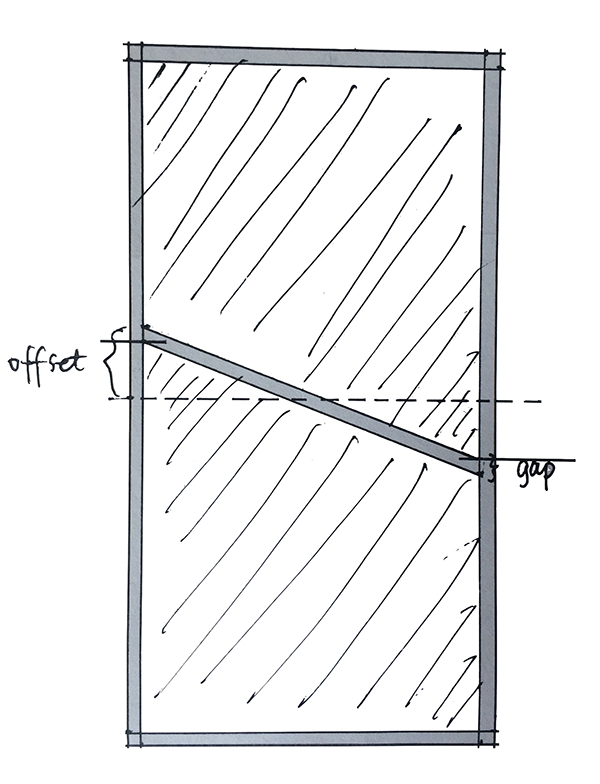
//

//  CutOutClearView.h

//  Animations

//

//  Created by YouXianMing on 16/7/10.

//  Copyright © 2016年 YouXianMing. All rights reserved.

//

#import <UIKit/UIKit.h>

@interface CutOutClearView : UIView

/**

 *  The total fill color, you can used it as the view's background color.

 */

@property (nonatomic, strong) UIColor  *fillColor;

/**

 *  The paths area color.

 */

@property (nonatomic, strong) UIColor  *areaColor;

/**

 *  Path array.

 */

@property (nonatomic, strong) NSArray  <UIBezierPath *>  *paths;

@end
//

//  CutOutClearView.m

//  Animations

//

//  Created by YouXianMing on 16/7/10.

//  Copyright © 2016年 YouXianMing. All rights reserved.

//

#import "CutOutClearView.h"

@implementation CutOutClearView

- (instancetype)initWithFrame:(CGRect)frame {

    if (self = [super initWithFrame:frame]) {

        self.fillColor       = [UIColor whiteColor];

        self.backgroundColor = [UIColor clearColor];

        self.opaque          = NO;

    }

    return self;

}

- (void)drawRect:(CGRect)rect {

    [super drawRect:rect];

    [self.fillColor setFill];

    UIRectFill(rect);

    CGContextRef context = UIGraphicsGetCurrentContext();

    if (self.areaColor && self.paths.count) {

        UIBezierPath *path = nil;

        for (int i = ; i < self.paths.count; i++) {

            i ==  ? path = self.paths[i] : [path appendPath:self.paths[i]];

        }

        CGFloat red   = ;

        CGFloat green = ;

        CGFloat blue  = ;

        CGFloat alpha = ;

        [self.areaColor getRed:&red green:&green blue:&blue alpha:&alpha];

        CGContextAddPath(context, path.CGPath);

        CGContextSetRGBFillColor(context, red, green, blue, alpha);

        CGContextFillPath(context);

    } else {

        for (UIBezierPath *path in self.paths) {

            CGContextAddPath(context, path.CGPath);

            CGContextSetBlendMode(context, kCGBlendModeClear);

            CGContextFillPath(context);

        }

    }

}

@end
不规则形状的Mask动画的更多相关文章
- 使用Win32 API创建不规则形状&带透明色的窗口
前一阵突然想起了9月份电面某公司实习时的二面题,大概就是说怎么用Win32 API实现一个透明的窗口,估计当时我的脑残答案肯定让面试官哭笑不得吧.所以本人决定好好研究下这个问题.经过一下午的摸索,基本 ...
- cocos2d-x 不规则形状按钮的点击判定
cocos2d-x 不规则形状按钮的点击判定 原理: 1.OpeGL ES提供了glReadPixels[^footnote]函数,来获取当前framebuffer上的像素数据 2.cocos2d-x ...
- 图片碎片化mask动画
图片碎片化mask动画 效果 源码 https://github.com/YouXianMing/Animations // // TransformFadeViewController.m // A ...
- Unity---动画系统学习(6)---Avatar Mask动画融合、Layers动画分层、IK反向动力学
1. 介绍 Avatar Mask(动画融合) 前面我们一直介绍的都是动画混合,一般用于解决边跑边转弯的问题.而动画融合一般用于解决例如边跑边挥手的问题. 简单说就是让跑步去控制腿的骨骼,挥手控制手的 ...
- html5 svg实现不规则形状图片触发事件
html5 svg实现不规则形状图片触发事件<pre><!DOCTYPE html><html lang="en"> <head> ...
- 不规则形状的Ifc构件顶点坐标获取
不规则形状的Ifc构件顶点坐标获取 今天有人问我,ifc构件的顶点坐标怎么获取,自己前年的时候写过类似的程序,但有点记不清了,最近一直用C++解析ifc,慎重起见,还是重新再写一次,java版本的获取 ...
- Unity 制作不规则形状button
在游戏开发中,我们有时需要制作不规则形状的按键. Unity3d中使用UGUI的Button控件只能实现规则的长方形按钮.而通过给Button的Image组件添加对应的贴图(sprite)我们可以实现 ...
- 动效解析工厂:Mask 动画
转载自:http://www.cocoachina.com/ios/20160214/15250.html 前言:很多动效都是多种动画的组合,有时候你可能只是需要其中某个动画,但面对庞杂的代码库或是教 ...
- pyqt 不规则形状窗口显示
#coding=utf- import sys from PyQt5.QtCore import Qt from PyQt5.QtWidgets import QWidget, QApplicatio ...
随机推荐
- Selenium2+python自动化62-jenkins持续集成环境搭建【转载】
前言 selenium脚本写完之后,一般是集成到jenkins环境了,方便一键执行. 一.环境准备 小编环境: 1.win10 64位 2.JDK 1.8.0_66 3.tomcat 9.0.0.M4 ...
- watch案例解析(element-ui el-select 无法选中问题剖析)
fire 读在最前面: 1.此文章衔接Vue 虚拟Dom 及 部分生命周期初探,相关整体知识点请先阅读后再继续本文阅读 问:子组件中明明有watch value,为什么this.$emit('inpu ...
- ExpressMapper- The New .NET Mapper!
推荐,据测试比手工映射的效率还高. https://www.codeproject.com/Tips/1009198/Expressmapper-The-New-NET-Mapper
- JAVA 传递
其实java里面都是传值,只不过基本数据类型传的是数值,而引用类型传的是对象的地址. 作者:Intopass链接:https://www.zhihu.com/question/31203609/ans ...
- 使用Plant Simulation连接SQL Server
1. 在管理类库中添加ODBC. 2. 在控制面板->管理工具中设置ODBC,添加SQL Server服务. 3. 在plant simulation中将信息流中的ODBC添加到Frame中. ...
- Django 性能测试
唐纳德·克努特(Donald Knuth)曾经说过:“不成熟的优化方案是万恶之源.”然而,任何一个承受高负载的成熟项目都不可避免地需要进行优化.在本文中,我想谈谈优化Web项目代码的五种常用方法.虽然 ...
- BZOJ3772精神污染
参见http://blog.csdn.net/popoqqq/article/details/43122821 #include<bits/stdc++.h> using namespac ...
- 【bfs】BZOJ1102- [POI2007]山峰和山谷Grz
最后刷个水,睡觉去.Bless All! [题目大意] 给定一个地图,为FGD想要旅行的区域,地图被分为n*n的网格,每个格子(i,j) 的高度w(i,j)是给定的.若两个格子有公共顶点,那么他们就是 ...
- 我的Python之旅第五天---迭代器和生成器
h3,#nv_portal .vw .d .h3 {display: block; font-weight: 500; background-image: linear-gradient(to rig ...
- 2016-2017 CT S03E06: Codeforces Trainings Season 3 Episode 6(8/13)
2016-2017 CT S03E06: Codeforces Trainings Season 3 Episode 6 比赛连接: http://codeforces.com/gym/101124/ ...