
编译安装php5 解决编译安装的php加载不了gd
1、 编译安装php需要的模块:
yum install libxml2-devel libxml2 curl curl-devel libpng-devel libpng openssl openssl-devel -y
yum install php-mcrypt libmcrypt libmcrypt-devel freetype* libjpeg-devel
2、编译
./configure --prefix=/usr/local/php --with-config-file-path=/usr/local/php/etc --enable-libxml --enable-xml --enable-bcmath --enable-shmop --enable-sysvsem --enable-inline-optimization --enable-opcache --enable-mbregex --enable-fpm --enable-mbstring=all --enable-gd-native-ttf --with-openssl --enable-pcntl --enable-sockets --with-xmlrpc --enable-zip --enable-soap --without-pear --with-gettext --enable-session --with-curl --enable-ctype --enable-shared --with-gd --with-jpeg-dir=/usr/local/jpeg --with-freetype-dir=/usr/include/freetype2/freety --with-mysql=mysqlnd --with-mysqli=mysqlnd --with-pdo-mysql=mysqlnd --with-mcrypt
3、安装make && make install
4、配置文件cp php.ini-production /usr/local/php/etc/php.ini
cd /usr/local/php/etc && cp php-fpm.conf.default php-fpm.conf
5、配置php-fpm启动脚本
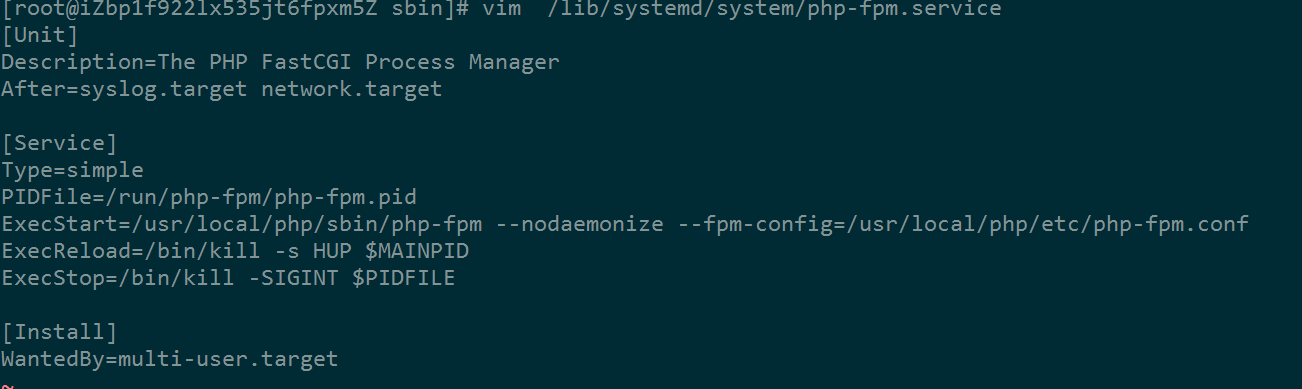
[root@iZbp1f922lx535jt6fpxm5Z sbin]# vim /lib/systemd/system/php-fpm.service
[Unit]
Description=The PHP FastCGI Process Manager
After=syslog.target network.target
[Service]
Type=simple
PIDFile=/run/php-fpm/php-fpm.pid
ExecStart=/usr/local/php/sbin/php-fpm --nodaemonize --fpm-config=/usr/local/php/etc/php-fpm.conf
ExecReload=/bin/kill -s HUP $MAINPID
ExecStop=/bin/kill -SIGINT $PIDFILE
[Install]
WantedBy=multi-user.target
配置环境变量 /etc/profile最后加上如下这句
export PATH=$PATH:/usr/local/php/bin
至此已编译ok
下面是利用phpize安装php扩展gd模块
1、进入gd目录执行phpize命令后,当前目录会生成一个新的configure文件,如果没有可能是没有autoconf,yum -y install autoconf安装一下
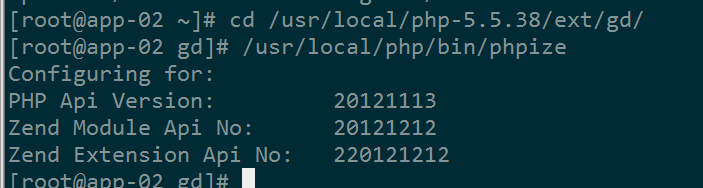
然后执行./configure --with-php-config=/usr/local/php/bin/php-config
然后make && make install
执行结束后,会出现下面画面,表示安装成功

2、配置php.ini
去掉extension=php_gd2.dll 前面的分号取消注释
修改php.ini中 extension_dir = “ext” 为绝对路径 extension_dir = “”/usr/local/src/php-5.5.38/ext/“”
在php.ini最后加上下面这句
extension = /usr/local/php/lib/php/extensions/no-debug-zts-20121212/gd.so
3、重启nginx php-fpm
systemctl restart php-fpm
systemctl restart nginx
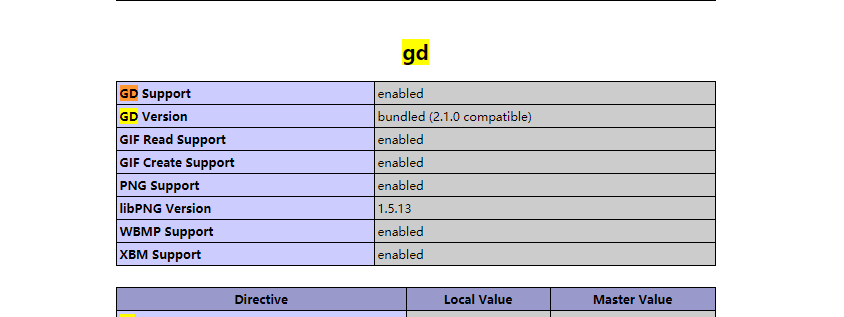
4、验证安装是否成功
其他gd库
JPEG https://blog.csdn.net/zzzxxbird/article/details/53609783
freetype
先yum install freetype*
再找到freetype位置,find / -name freetype
最后重新编译php
./configure --prefix=/usr/local/php --with-config-file-path=/usr/local/php/etc --enable-libxml --enable-xml --enable-bcmath --enable-shmop --enable-sysvsem --enable-inline-optimization --enable-opcache --enable-mbregex --enable-fpm --enable-mbstring=all --enable-gd-native-ttf --with-openssl --enable-pcntl --enable-sockets --with-xmlrpc --enable-zip --enable-soap --without-pear --with-gettext --enable-session --with-curl --enable-ctype --enable-shared --with-gd --with-jpeg-dir=/usr/local/jpeg --with-freetype-dir=/usr/include/freetype2/freety --with-mysql=mysqlnd --with-mysqli=mysqlnd --with-pdo-mysql=mysqlnd --with-mcrypt
zlib https://blog.csdn.net/azh89125/article/details/78464784
redis https://www.cnblogs.com/doseoer/p/6161110.html
解决yum 安装没有libphp5.so
1、安装
yum install httpd
yum install httpd-devel
2、找到apsx 所在路径

3、加上apsx后重新编译php
./configure --prefix=/usr/local/php --with-config-file-path=/usr/local/php/etc --enable-libxml --enable-xml --enable-bcmath --enable-shmop --enable-sysvsem --enable-inline-optimization --enable-opcache --enable-mbregex --enable-fpm --enable-mbstring=all --enable-gd-native-ttf --with-openssl --enable-pcntl --enable-sockets --with-xmlrpc --enable-zip --enable-soap --without-pear --with-gettext --enable-session --with-curl --enable-ctype --enable-shared --with-gd --with-jpeg-dir=/usr/local/jpeg --with-freetype-dir=/usr/include/freetype2/freety --with-mysql=mysqlnd --with-mysqli=mysqlnd --with-pdo-mysql=mysqlnd --with-mcrypt --with-apxs2=/usr/bin/apxs
make && make install
4. 修改apache配置文件,Centos7.4 下的apache2.4的配置文件路径为
vim /etc/httpd/conf/httpd.conf
//在LoadModule后面添加:LoadModule php5_module modules/libphp5.so //不添加则访问.php文件将会变成下载
//在DirectoryIndex后面添加:index.php
//在AddType application/x-gzip .gz .tgz后面添加:AddType application/x-httpd-php .php //.php前面有一个空格
5、重启httpd
编译安装php5 解决编译安装的php加载不了gd的更多相关文章
- Laravel4快速安装方法,解决Laravel4安装速度慢
Laravel4原始安装方法 Laravel4 是构建在 Composer 之上的, 之前的安装方法是如下: composer create-project laravel/laravel you ...
- 解决win7 下 curl无法加载的问题
最近分别在WIN7和Windows8 上分别安装php 高版本!都遇到了这个问题! 一.win7系统64位, apache2.2, php 5.35 vc6 版本 这个比较容易: 1. phpinfo ...
- 解决MWPhotoBrowser中的SDWebImage加载大图导致的内存警告问题
下面两种现象,用同一种方法解决 1.解决MWPhotoBrowser中的SDWebImage加载大图导致的内存警告问题 2.突然有一天首页访问图片很慢,至少隔20多秒所有图片才会出来.(解析:app使 ...
- 解决hibernate中的懒加载(延迟加载)问题
解决hibernate中的懒加载(延迟加载)问题 我们在开发的时候经常会遇到延迟加载问题,在实体映射时,多对一和多对多中,多的一样的属性默认是lazy="true"(即,默认是 ...
- 解决ArcGIS API for Silverlight 加载地图的内外网访问问题
原文:解决ArcGIS API for Silverlight 加载地图的内外网访问问题 先上一个类,如下: public class BaseClass { public static string ...
- 解决tableView中cell动态加载控件的重用问题
解决tableView中cell动态加载控件的重用问题 tableView的cell,有时候需要在运行时取得对应的数据后才能够动态的创建该cell中的控件并加载到该cell中,此时,你一定会遇到重用问 ...
- Kali之——解决物理机U盘安装Kali Linux2018.1,光驱无法加载问题
Kali系统和烧录软件 链接:https://pan.baidu.com/s/1v78d62hdF95NM2minct9sw 提取码:b08k 1.无效的方法: (1)执行 df -m,然后查看U盘设 ...
- homebrew安装和解决brew安装速度慢的问题
homebrew安装 ruby -e "$(curl -fsSL https://raw.githubusercontent.com/Homebrew/install/master/inst ...
- 解决物理机U盘安装Kali Linux2018.1,光驱无法加载问题
1.无效的方法: (1)执行 df -m,然后查看U盘设备是否挂载到了/media,导致cd-rom不能被挂载,执行 umount /media. (2)在光驱加载安装界面,把U盘拔下换到电脑的另外 ...
随机推荐
- sqlserver 模糊查询,连表,聚合函数,分组
use StudentManageDB go select StudentName,StudentAddress from Students where StudentAddress like '天津 ...
- Centos7下安装Python3.7.2
在我的Centos7中,Python默认是安装的,输入python 直接可以查看版本号,入下图 注意:如果本机安装了python2,尽量不要管它,使用python3运行python脚本就好,因为可能有 ...
- [深度分析] Python Web 开发框架 Bottle
[深度分析] Python Web 开发框架 Bottle(这个真的他妈的经典!!!) 作者:lhf2009913 Bottle 是一个非常精致的WSGI框架,它提供了 Python Web开发中需要 ...
- 深入理解Apache Flink
Apache Flink(下简称Flink)项目是大数据处理领域最近冉冉升起的一颗新星,其不同于其他大数据项目的诸多特性吸引了越来越多人的关注.本文将深入分析Flink的一些关键技术与特性,希望能够帮 ...
- live2d添加网页看板娘
最近逛博客,发现好多博主都加了网页看板娘,简直可爱到血槽空了,赶紧学习模仿改造了一下~ 给博客园的博客也添加了看板娘!!就在右边~喜欢的请打赏我~ 不过因为移植过来比较复杂,就不出教程啦~记得多来调教 ...
- WPF 自定义分页控件一
一:右键添加新建项,选择新建自定义控件,命名为:KDataPager public class KDataPager : Control { static KDataPager() { Default ...
- jdbc(MySQL)
1.连接数据库 2.使用配置文件 3.启用连接池 4.事务 JDBC WHAT? 用于执行 SQL 语句的 Java API WHY? 不需要了解每一种数据库连接操作方式 HOW? 加载驱动.获取连接 ...
- 使用python操作excel表格
首先 pip install xlrd 安装相关模块 其次:使用方法: 1 导入模块 import xlrd 2 打开excel文件读取数据 worksheet=xlrd.open_workbook ...
- android 开发 使用自定义布局实现标题栏复用(标题栏内容自定义:使用代码实现和xml布局自定义属性2种办法实现)
在个人学习的情况下可能很少使用自定义布局去实现大量复用的情况下,但是在一个开发工作的环境下就会使用到大量复用的自定义控件. 实现思维: 1.写一个xml的布局,用于标题栏的样式,并且添加在标题栏中你想 ...
- gentoo wireshark 安装
安装软件 emerge --ask net-analyzer/wireshark 把用户加入 wireshark 组. gpasswd -a $USER wireshark 如果不像重新登录就可以使用 ...