
用 python 来操作 docx, xlsx 格式文件(二)(使用 docx 库操作 docx 格式文件
docx 库
文章结构:
一、docx 基本用,创建 docx 文件并添加数据
二、深入理解文本格式(format),并设置所格式属性(attribute)
三、深入理解样式(styles),以及如何运用样式
四、常用样式(style)示例
一、docx基本用法,创建docx 文件并添加数据
官方文档:https://python-docx.readthedocs.org/en/latest/
docx 可以操作 doxc 格式文件
linux 安装 sudo pip install python_docx (不要安装错了,python_docx 是新版本,如果只是安装 docx 有些 API 会不匹配)
windows 安装 pip install python_docx
基本用法:
 #!/usr/bin/env python

 #coding: utf-8

 from docx import Document

 from docx.shared import Inches

 #创建 Document 对象,相当于打开一个 word 文档

 document = Document()

 #向文档中添加一个标题,标题级别设置为0级

 document.add_heading('This is title', level=0)

 #向文档中添加一个段落,并将段落引用赋给变量 p

 #使用 add_run 方法追加字段,并设置格式

 p = document.add_paragraph('This is paragraph')

 p.add_run('bold').bold = True

 p.add_run(' and some ')

 p.add_run('italic.').italic = True

 #添加标题和段落,采用不同的形式

 document.add_heading('This is Heading, level 1', level=1)

 document.add_paragraph('Intese quote',style="Intense Quote")

 document.add_paragraph('first item in unordered list', style='List Bullet')

 document.add_paragraph('first item in ordered list', style='List Number')

 #添加图片,设置图片大小

 document.add_picture(r"D:\picture\a.jpg", width=Inches(2.25))

 #添加表格,填入表格内容

 table = document.add_table(rows=2, cols=2)

 table.cell(0,0).text = "cell_00"

 table.cell(0,1).text = "cell_01"

 table.cell(1,0).text = "cell_10"

 table.cell(1,1).text = "cell_11"

 #保存文本

 document.save('demo.docx')
效果展示:
<-------------------- start -------------------->
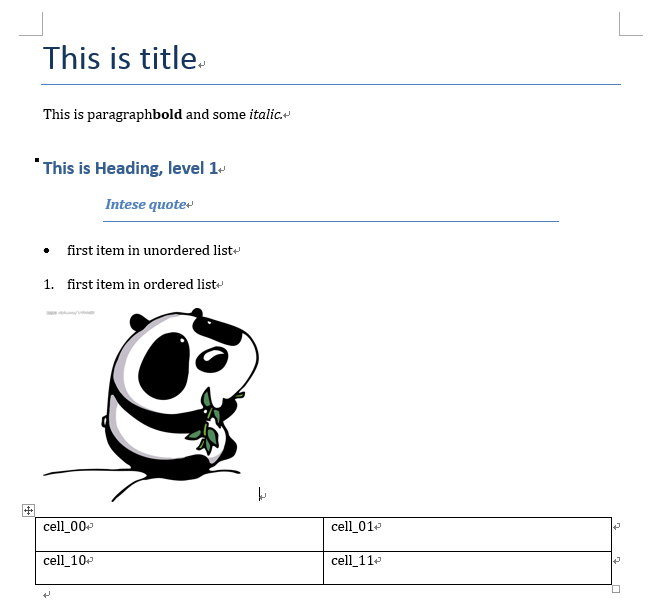
<-------------------- end -------------------->
二、深入理解文本格式(format),并设置所格式属性(attribute)
根据官方文档所述,word 中主要有两种用文本格式等级:块等级(block-level)和内联等级(inline-level)
word 中大部分内容都是由这两种等级的对象组成的
(其他的诸如眉页、引脚等,docx 库的作者还在开发中)
块等级(block-level):
段落是 word 文件中的主要块对象(block-level object)
块等级项(block-level item)主要任务是将文本格式从左边界向右边界展示(flows);\
对于段落而言,边界就是分段标识,或者是文本的列边界
列表(table)也是块对象(block-level object)
内联等级(inline-level):
内联对象(inline-level object)是块对象(block-level object)的组成部分
块对象的所有内容都包含在内联对象中,一个块对象由一个或多个内联对象组成
run 是常用的内联对象,例如:
         p = document.add_paragraph('This is paragraph')

         p.add_run('bold').bold = True

         p.add_run(' and some ')

         p.add_run('italic.').italic = True
这个例子中一个段落(块对象)包含三个 run(内联对象),每一个 run 都设置有不同属性
块等级,及其属性
块对象一般包括:段落(paragraph)、图片(inline picture)、表(table)、标题(heading)、\
有序列表(numbered lists)、无序列表(bullets lists)
块对象的属性指定了块对象所在的位置,例如缩进、段间距离
常用属性:
alignment,水平对齐
from docx.enum.text import WD_ALIGN_PARAGRAPH

paragraph = document.add_paragraph("hello")

paragraph_format = paragraph.paragraph_format

#设置段落水平右对齐

paragraph_format.alignment = WD_ALIGN_PARAGRAPH.CENTER

#WD_ALIGN_PARAGRAPH 存储了多种对齐格式,例如:

#WD_ALIGN_PARAGRAPH.LEFT,左对齐;WD_ALIGN_PARAGRAPH.RIGHT,右对齐

#更多参见https://python-docx.readthedocs.org/en/latest/api/enum/WdAlignParagraph.html#wdparagraphalignment
indent,缩进
from docx.shared import Inches

from docx.shared import Pt

#设置段落从左开始缩进,使用Inches来衡量

paragraph_format.left_indent = Inches(0.5)

#设置段落从右开始缩进,使用Pt来衡量

paragraph_format.right_indent = Pt(20)

#设置段落第一行缩进,可以与上两个缩进叠加

paragraph_format.first_line_indent = Inches(0.5)
space,行间距
from docx.shared import Pt

#设置与上一段间隔 Pt(5)

paragraph.space_after = Pt(5)

#设置与下一段间隔 Pt(10)

paragraph.space_before = Pt(10)
其他熟悉如字间距、页码等属性,参见文档:https://python-docx.readthedocs.org/en/latest/user/text.html
内联等级,及其属性
内联对象一般包括:文字、句子、段落
内联对象的属性指定了字体,例如粗体(bold)、斜体(italic)、大小(size)等等
常用属性:
name and size
document = Document()

paragraph = document.add_paragraph()

run = paragraph.add_run("hellohellohello")

font = run.font

#设置字体样式

font.name = 'Calibri'

#设置字体大小

font.size = Pt(55)
bold 、underline and underline
#设置为斜体

font.italic = True

#不设置下划线

font.underline = False

#设置粗体为继承上一个字体的格式

font.bold = None

#这一类属性,每个有三种状态

#True 为使用属性;False 为不使用属性;None 默认属性继承自上一个字体

#此外,underline 属性还可以设置值,例如

font.underline = WD_UNDERLINE.DOT_DASH

#更多选项参见http://python-docx.readthedocs.org/en/latest/api/enum/WdUnderline.html#wdunderline
color
#以RGB方式设置颜色

from docx.shared import RGBColor

font.color.rgb = RGBColor(0x42, 0x24, 0xE9)

#使用内建主题设置颜色

#详细说明参见https://python-docx.readthedocs.org/en/latest/api/enum/MsoThemeColorIndex.html#msothemecolorindex

from docx.enum.dml import MSO_THEME_COLOR

font.color.theme_color = MSO_THEME_COLOR.ACCENT_1
三、深入理解样式(styles),以及如何运用样式
在 word 中,样式包括:段落样式(paragraph styles)、字符样式(character styles)、表样式(table styles)、列表样式(numbering styles)
样式类似于前端开发的 CSS,一处定义,处处使用
docx 库内的 styles 样式不包含 word 中全部的样式,有一些还在开发中,但是基本够用
Document 的属性 styles,包含了所有 docx 提供的可用样式
选取段落可用样式
#显示所有段落样式

from docx.enum.style import WD_STYLE_TYPE

styles = document.styles

paragraph_styles = [

     s for s in styles if s.type == WD_STYLE_TYPE.PARAGRAPH

 ]

for style in paragraph_styles:

    print(style.name)

#styles 为 Document 的属性,style 为段落的属性

#除了段落(paragraph),还有 run,表(table)有 style 属性
段落设置样式
document = Document()

#从styles中选取样式

paragraph = document.add_paragraph()

paragraph.style = document.styles['Heading 1']

#用样式名称直接赋值

paragraph2 = document.add_paragraph()

paragraph2.style = 'List Bullet'

#在创建段落时赋值

paragraph = document.add_paragraph(style='Body Text')
定义样式(style)中的字符格式(character format)
定义样式中的字符格式后,所有运用此样式的段落都有相应的字符格式
document = Document()

#从样式库中选取 'Normal' 样式,并提取 'Normal' 样式的字符属性

style = document.styles['Normal']

font = style.font

#设置样式中的字符属性 ,操作方法和上面改变内联对象属性方法一致

font.name = "Microsoft YaHei UI"

font.size = Pt(50)

#将设置好字符属性的样式运用到段落中

p = document.add_paragraph("change font attribution", style = 'Normal')
定义样式(style)中的段落格式(paragraph format)
定义样式中的段落格式后,所有运用此样式的段落都有相应的段落格式
document = Document()

styles = document.styles

#选取 style,并设置 style 中的段落格式

style = styles['Heading 2']

para_format = style.paragraph_format

para_format.left_indent = Pt(20)

para_format.widow_control = True

#将设置好段落格式的 style 运用到段落中

p = document.add_paragraph('This is Heading, level 1', style = style)
简单总结
文章第二部分直接设置段落的格式(paragraph.format),字符的格式(run.font)
在这一部分,运用了 style 对象,统一设置了段落格式、字符格式
一旦 style 对象设置好了以后,可以多次反复利用
style 对象是从文件对象中提取(document.styles)的,docx 提供的 Style 类对象
四、常用样式(style)示例
段落样式
from docx.enum.style import WD_STYLE_TYPE

from docx import *

document = Document()

styles = document.styles

#生成所有段落样式

for s in styles:

    if s.type == WD_STYLE_TYPE.PARAGRAPH:

        document.add_paragraph('Paragraph style is : '+ s.name, style = s)

document.save('para_style.docx')
字符样式
from docx.enum.style import WD_STYLE_TYPE

from docx import *

document = Document()

styles = document.styles

para = document.add_paragraph()

#生成所有字符样式

for s in styles:

    if s.type == WD_STYLE_TYPE.CHARACTER:

        run = para.add_run("Character style is:  "+s.name+"\n")

        run.style = s

document.save('character_style.docx')
表格样式
from docx.enum.style import WD_STYLE_TYPE

from docx import *

document = Document()

styles = document.styles

#生成所有表样式

for s in styles:

    if s.type == WD_STYLE_TYPE.TABLE:

        document.add_paragraph("Table style is :  "+ s.name)

        document.add_table(3,3, style = s)

        document.add_paragraph("\n")

document.save('demo2.docx')
用 python 来操作 docx, xlsx 格式文件(二)(使用 docx 库操作 docx 格式文件的更多相关文章
- python框架之Flask基础篇(二)-------- 数据库的操作
1.flask连接数据库的四步: 倒入第三方数据库扩展包:from flask_sqlalchemy import SQLAlchemy 配置config属性,连接数据库: app.config[&q ...
- ios学习:AVAudioPlayer播放音乐文件及读取ipod库中的音乐文件
首先要导入AVFoundation框架及 #import <AVFoundation/AVFoundation.h>头文件 注意:要在真机上调试 下面是ipad上的调试效果 下面是代码,代 ...
- Git常用命令(二)------ 远程库操作
本文总结自廖雪峰网站. Git支持多种协议,git://使用ssh协议,速度最快,也可使用https等协议. 对远程库操作: 推送: 1.先远程建立一个Repo库,f 2.远程和本地关联: git r ...
- ogr ogr2ogr 矢量数据格式转换 ogrinfo 矢量数据图层信息操作 ogr gdal的一部分 gdal 命令行 库操作
- mysqli扩展库操作mysql数据库
配置环境 配置php.ini文件让php支持mysqli扩展库 extension=php_mysqli.dll 建库建表 详见博客 “mysql扩展库操作mysql数据库” 查询数据库 <?p ...
- 制作与使用静态链接库(.lib)文件
(一)制作.lib文件 (1)打开vs,选择“新建项目”,选择“Visual C++“,选择”Win32 控制台应用程序“. (2)点击”确定“,点击”下一步“,设置如下 (3)点击”完成“,然后就可 ...
- Python常用的数据文件存储的4种格式(txt/json/csv/excel)及操作Excel相关的第三方库(xlrd/xlwt/pandas/openpyxl)(2021最新版)
序言:保存数据的方式各种各样,最简单的方式是直接保存为文本文件,如TXT.JSON.CSV等,除此之外Excel也是现在比较流行的存储格式,通过这篇文章你也将掌握通过一些第三方库(xlrd/xlwt/ ...
- 【Python全栈笔记】05 [模块二] 19 Oct 文件的操作
文件操作 一般步骤1. 文件打开 2. 文件操作 3. 文件关闭 1. 打开文件 使用open(文件名(绝对路径), 打开模式, 编码) 文件打开的模式有: r: 只读模式(默认) w: 只写模式 ...
- Python基础笔记系列十一:标准输入输出、文件读写和指针等操作
本系列教程供个人学习笔记使用,如果您要浏览可能需要其它编程语言基础(如C语言),why?因为我写得烂啊,只有我自己看得懂!! 标准输入输出一.输入 在sublime中这个时候需要安装SublimeRE ...
随机推荐
- HDU.2149 Public Sale (博弈论 巴什博弈)
HDU.2149 Public Sale (博弈论 巴什博弈) 题意分析 巴什博奕裸题 博弈论快速入门 代码总览 #include <bits/stdc++.h> using namesp ...
- SQLite中的自增关键字:AUTO_INCREMENT、INTEGER PRIMARY KEY与AUTOINCREMENT
1.SQLite不支持关键字AUTO_INCREMENT 1)AUTO_INCREMENT不生效的问题 SQL语句: CREATE TABLE todo ( id INTEGER AUTO_I ...
- 51nod 1952 栈(单调队列)
用deque实时维护栈的情况. 数加入栈顶部,删掉栈顶部的数,相当于加入一个数,删掉最早出现的数,每次求最大值,这个直接记录一下就好了. 数加入栈底部,删掉栈顶部的数,相当于加入一个数,删掉最晚出现的 ...
- bzoj2006: [NOI2010]超级钢琴(堆+RMQ)
和上一道题同类型...都是用堆求第k大 考虑对于每一个r,怎么求出一个最优的l.显然只需要求出前缀和,用RMQ查询前面最小的l的前缀和就好了.但是对于一个r,每个l只能选一次,选了一次之后,考虑怎么把 ...
- Linux之Json20160705
JSON(JavaScript Object Notation) 是一种轻量级的数据交换格式.JSON采用完全独立于语言的文本格式,这些特性使JSON成为理想的数据交换语言.易于人阅读和编写,同时也易 ...
- 图像处理之均值滤波介绍及C算法实现
1 均值滤波介绍 滤波是滤波是将信号中特定波段频率滤除的操作,是从含有干扰的接收信号中提取有用信号的一种技术. 均值滤波是典型的线性滤波算法,它是指在图像上对目标像素给一个模板,该模板包括了其周围的临 ...
- Java设计模式の责任链模式
在阎宏博士的<JAVA与模式>一书中开头是这样描述责任链(Chain of Responsibility)模式的: 责任链模式是一种对象的行为模式.在责任链模式里,很多对象由每一个对象对其 ...
- GridControl GridView 修改表格中的标题居中
Grid Designer>Views>Appearance>HeaderPanel>TextOptions>HAIignment{Center} 依次打开并找到HAIL ...
- 【Atcoder】AGC022 C - Remainder Game 搜索
[题目]C - Remainder Game [题意]给定n个数字的序列A,每次可以选择一个数字k并选择一些数字对k取模,花费2^k的代价.要求最终变成序列B,求最小代价或无解.n<=50,0& ...
- java规范之checkstyle
1. 概述 随着中心的代码规范的建立和实施,项目组对代码规范要求,以及软件工程师们对自身代码的编写规范重要性的认知,“代码规范”已经成为了中心的一个“热词”.然后怎么才能写出有规范的代码,怎么才能养成 ...