
[iOS基础控件 - 6.5] UITableView的数据刷新
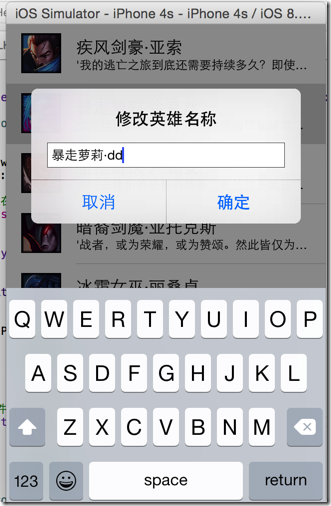
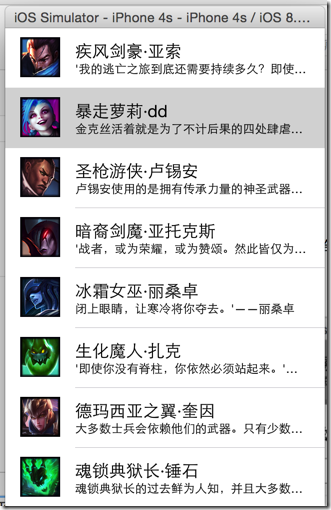
// 1.全局刷新
NSIndexPath *indexPath = [NSIndexPath indexPathForRow:alertView.tag inSection:0];
 //

 //  Hero.h

 //  LOLHero

 //

 //  Created by hellovoidworld on 14/12/1.

 //  Copyright (c) 2014年 hellovoidworld. All rights reserved.

 //

 #import <Foundation/Foundation.h>

 @interface Hero : NSObject

 @property(nonatomic, copy) NSString *icon;

 @property(nonatomic, copy) NSString *intro;

 @property(nonatomic, copy) NSString *name;

 - (instancetype) initWithDictionary:(NSDictionary *) dictionary;

 + (instancetype) heroWithDictionary:(NSDictionary *) dictionary;

 + (instancetype) hero;

 @end
 //

 //  Hero.m

 //  LOLHero

 //

 //  Created by hellovoidworld on 14/12/1.

 //  Copyright (c) 2014年 hellovoidworld. All rights reserved.

 //

 #import "Hero.h"

 @implementation Hero

 - (instancetype) initWithDictionary:(NSDictionary *) dictionary {

     if (self = [super init]) {

 //        self.icon = dictionary[@"icon"];

 //        self.intro = dictionary[@"intro"];

 //        self.name = dictionary[@"name"];

         // 代替上方代码, 使用KVC

         [self setValuesForKeysWithDictionary:dictionary];

     }

     return self;

 }

 + (instancetype) heroWithDictionary:(NSDictionary *) dictionary {

     return [[self alloc] initWithDictionary:dictionary];

 }

 + (instancetype) hero {

     return [self heroWithDictionary:nil];

 }

 @end
 //

 //  ViewController.m

 //  LOLHero

 //

 //  Created by hellovoidworld on 14/12/1.

 //  Copyright (c) 2014年 hellovoidworld. All rights reserved.

 //

 #import "ViewController.h"

 #import "Hero.h"

 // 遵守了UITableViewDelegate才能响应行点击事件, 遵守UIAlertViewDelegate处理弹窗的事件

 @interface ViewController () <UITableViewDataSource, UITableViewDelegate, UIAlertViewDelegate>

 // UITableView

 @property (weak, nonatomic) IBOutlet UITableView *tableView;

 // 所有hero资料

 @property(nonatomic, strong) NSArray *heros;

 @end

 @implementation ViewController

 - (void)viewDidLoad {

     [super viewDidLoad];

     // Do any additional setup after loading the view, typically from a nib.

     // 设置dataSource

     self.tableView.dataSource = self;

     // 设置行高

     self.tableView.rowHeight = ;

     // 设置delegate

     self.tableView.delegate = self;

 }

 - (void)didReceiveMemoryWarning {

     [super didReceiveMemoryWarning];

     // Dispose of any resources that can be recreated.

 }

 /** 隐藏状态栏 */

 - (BOOL)prefersStatusBarHidden {

     return YES;

 }

 /** 延迟加载hero数据 */

 - (NSArray *) heros {

     if (nil == _heros) {

         NSArray *dictArray = [NSArray arrayWithContentsOfFile:[[NSBundle mainBundle] pathForResource:@"heros.plist" ofType:nil]];

         NSMutableArray *herosArray = [NSMutableArray array];

         for (NSDictionary *dict in dictArray) {

             Hero *hero = [Hero heroWithDictionary:dict];

             [herosArray addObject:hero];

         }

         _heros = herosArray;

     }

     return _heros;

 }

 #pragma mark - 列表方法

 // section数, 默认是1

 - (NSInteger)numberOfSectionsInTableView:(UITableView *)tableView {

     return ;

 }

 // 特定section的行数

 - (NSInteger)tableView:(UITableView *)tableView numberOfRowsInSection:(NSInteger)section {

     return self.heros.count;

 }

 // 特定行的内容

 - (UITableViewCell *)tableView:(UITableView *)tableView cellForRowAtIndexPath:(NSIndexPath *)indexPath {

     Hero *hero = self.heros[indexPath.row];

     // 使用static修饰局部变量,能保证只分配一次存储空间

     static NSString *hereCellId = @"hero";

     // 使用特定标识符, 从缓存池查看时候有适合的cell存在

     UITableViewCell *cell = [tableView dequeueReusableCellWithIdentifier:hereCellId];

     if (nil == cell) {

         // 创建的时候指定标识符

         cell = [[UITableViewCell alloc] initWithStyle:UITableViewCellStyleSubtitle reuseIdentifier:hereCellId];

     }

     // 标题

     cell.textLabel.text = hero.name;

     // 副标题

     cell.detailTextLabel.text = hero.intro;

     // 图标

     cell.imageView.image = [UIImage imageNamed:hero.icon];

     return cell;

 }

 #pragma mark - 响应事件

 /** 点击选中某行 */

 - (void)tableView:(UITableView *)tableView didSelectRowAtIndexPath:(NSIndexPath *)indexPath {

     // 取得model

     Hero *hero = self.heros[indexPath.row];

     // 弹窗

     UIAlertView *alertView = [[UIAlertView alloc] initWithTitle:@"修改英雄名称" message:nil delegate:nil cancelButtonTitle:@"取消" otherButtonTitles:@"确定", nil];

     // 设置delegate,也可以在init方法中指定

     alertView.delegate = self;

     // 设置弹窗样式

     alertView.alertViewStyle = UIAlertViewStylePlainTextInput;

     // 设置弹窗输入框内容

     [alertView textFieldAtIndex:].text = hero.name;

     // 保存index

     alertView.tag = indexPath.row;

     // 显示弹窗

     [alertView show];

 }

 /** 处理弹窗点击“确定”按钮事件 */

 - (void)alertView:(UIAlertView *)alertView clickedButtonAtIndex:(NSInteger)buttonIndex {

     // 取消

     if ( == buttonIndex) return;

     // 确定

     // 保存新的名字到model

     Hero *hero = self.heros[alertView.tag];

     hero.name = [alertView textFieldAtIndex:].text;

     // 刷新数据

     // 1.全局刷新

 //    [self.tableView reloadData];

     // 2.局部刷新

     NSIndexPath *indexPath = [NSIndexPath indexPathForRow:alertView.tag inSection:];

     [self.tableView reloadRowsAtIndexPaths:[NSArray arrayWithObject:indexPath] withRowAnimation:UITableViewRowAnimationRight];

 }

 @end
[iOS基础控件 - 6.5] UITableView的数据刷新的更多相关文章
- [iOS基础控件 - 6.0] UITableView
A.需要掌握的 1.基本属性和方法 设置UITableView的dataSource.delegate UITableView多组数据和单组数据的展示 UITableViewCell的常见属性 UIT ...
- [iOS基础控件 - 5.5] 代理设计模式 (基于”APP列表"练习)
A.概述 在"[iOS基础控件 - 4.4] APP列表 进一步封装,初见MVC模式”上进一步改进,给“下载”按钮加上效果.功能 1.按钮点击后,显示为“已下载”,并且不 ...
- [iOS基础控件 - 6.7.1] 微博展示 代码
Controller: // // ViewController.m // Weibo // // Created by hellovoidworld on 14/12/4. // Copyrig ...
- [iOS基础控件 - 6.1] 汽车品牌列表 UITableView多项显示
A.实现思路 1.拖入UITableView 2.拖曳.连线UITableView控件 3.Controller遵守UITalbeViewDataSource协议 4.设置UITableView的da ...
- iOS 基础控件(下)
上篇介绍了UIButton.UILabel.UIImageView和UITextField,这篇就简短一点介绍UIScrollView和UIAlertView. UIScrollView 顾名思义也知 ...
- [iOS基础控件 - 6.11.3] 私人通讯录Demo 控制器的数据传递、存储
A.需求 1.搭建一个"私人通讯录"Demo 2.模拟登陆界面 账号 密码 记住密码开关 自动登陆开关 登陆按钮 3.退出注销 4.增删改查 5.恢复数据(取消修改) 这个代码 ...
- [iOS基础控件 - 6.9] 聊天界面Demo
A.需求 做出一个类似于QQ.微信的聊天界面 1.每个cell包含发送时间.发送人(头像).发送信息 2.使用对方头像放在左边,我方头像在右边 3.对方信息使用白色背景对话框,我方信息使用蓝色背景对话 ...
- [iOS基础控件 - 7.0] UIWebView
A.基本使用 1.概念 iOS内置的浏览器控件 Safari浏览器就是通过UIWebView实现的 2.用途:制作简易浏览器 (1)基本请求 创建请求 加载请求 (2)代理监听webView加载, ...
- [iOS基础控件 - 6.10.2] PickerView 自定义row内容 国家选择Demo
A.需求 1.自定义一个UIView和xib,包含国家名和国旗显示 2.学习row的重用 B.实现步骤 1.准备plist文件和国旗图片 2.创建模型 // // Flag.h // Co ...
随机推荐
- Android ExpandableListView 带有Checkbox的简单应用
expandablelistview2_groups.xml <?xml version="1.0" encoding="utf-8"?> < ...
- 李洪强iOS开发之自定义cell的使用
第一步: 创建自定义cell类,继承自UItableVIewcell 第二步: 在sb中布局自己需要的视图控件并且将此cell与我刚刚创建的cell类进行关联.并且连线 第三步: 创建modle类, ...
- IIS8报错 403 404
当IIS报403错误,而打开目录浏览权限后,又出404错误,这种错误很可能是.net的版本安装问题 注意勾选上asp.net4.5
- POJ1035——Spell checker(字符串处理)
Spell checker DescriptionYou, as a member of a development team for a new spell checking program, ar ...
- POJ1068——Parencodings
Parencodings Description Let S = s1 s2...s2n be a well-formed string of parentheses. S can be encode ...
- Java基于Servlet过虑器
- 排查Java线上服务故障的方法和实例分析
前言 作为在线系统负责人或者是一个技术专家,你可能刚刚接手一个项目就需要处理紧急故障,或者被要求帮忙处理一些紧急的故障,这个时候的情景是: (1)你可能对这个业务仅仅是听说过,而不怎么真正了解: (2 ...
- awesome awesomeness
Awesome Awesomeness A curated list of amazingly awesome awesomeness.Also available on: Awesome-Aweso ...
- 转: Linux 技巧:让进程在后台可靠运行的几种方法
我们经常会碰到这样的问题,用 telnet/ssh 登录了远程的 Linux 服务器,运行了一些耗时较长的任务, 结果却由于网络的不稳定导致任务中途失败.如何让命令提交后不受本地关闭终端窗口/网络断开 ...
- UVa 11572 (滑动窗口) Unique Snowflakes
滑动窗口挺有意思的,如果符合条件右端点一直向前走,不符合的话,左端点向前走. #include <bits/stdc++.h> using namespace std; set<in ...