
[iOS基础控件 - 6.10.2] PickerView 自定义row内容 国家选择Demo
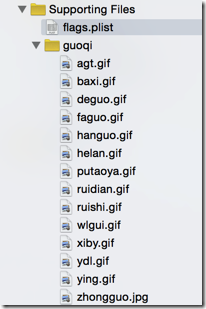
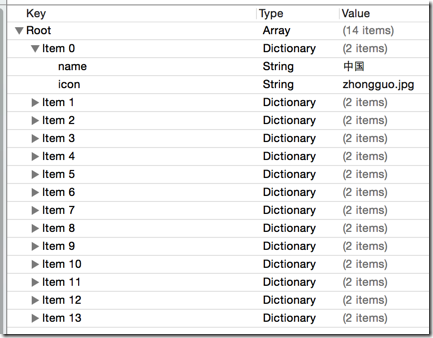
 //

 //  Flag.h

 //  CountriesSelection

 //

 //  Created by hellovoidworld on 14/12/16.

 //  Copyright (c) 2014年 hellovoidworld. All rights reserved.

 //

 #import <Foundation/Foundation.h>

 @interface Flag : NSObject

 /** 国家名 */

 @property(nonatomic, copy) NSString *name;

 /** 国旗 */

 @property(nonatomic, copy) NSString *icon;

 - (instancetype) initWithDictionary:(NSDictionary *) dictionary;

 + (instancetype) flagWithDictionary:(NSDictionary *) dictionary;

 @end
 //

 //  Flag.m

 //  CountriesSelection

 //

 //  Created by hellovoidworld on 14/12/16.

 //  Copyright (c) 2014年 hellovoidworld. All rights reserved.

 //

 #import "Flag.h"

 @implementation Flag

 - (instancetype) initWithDictionary:(NSDictionary *) dictionary {

     if (self = [super init]) {

         [self setValuesForKeysWithDictionary:dictionary];

     }

     return self;

 }

 + (instancetype) flagWithDictionary:(NSDictionary *) dictionary {

     return [[self alloc] initWithDictionary:dictionary];

 }

 @end

 #pragma mark - dataSource function

 - (NSInteger)numberOfComponentsInPickerView:(UIPickerView *)pickerView {

     return ;

 }

 - (NSInteger)pickerView:(UIPickerView *)pickerView numberOfRowsInComponent:(NSInteger)component {

     return self.countries.count;

 }

 #pragma mark - delegate function

 // 使用返回UIView的row数据返回方法

 - (UIView *) pickerView:(UIPickerView *)pickerView viewForRow:(NSInteger)row forComponent:(NSInteger)component reusingView:(UIView *)view {

     //todo 创建自定义的view

 }


 //

 //  FlagView.h

 //  CountriesSelection

 //

 //  Created by hellovoidworld on 14/12/16.

 //  Copyright (c) 2014年 hellovoidworld. All rights reserved.

 //

 #import <UIKit/UIKit.h>

 @class Flag;

 @interface FlagView : UIView

 /** 国旗数据成员 */

 @property(nonatomic, strong) Flag *flag;

 /** 自定义构造方法 */

 + (instancetype) flagViewWithPickerView:(UIPickerView *) pickerView;

 /** 定义自己的高度 */

 + (CGFloat) flagViewHeight;

 @end
 //

 //  FlagView.m

 //  CountriesSelection

 //

 //  Created by hellovoidworld on 14/12/16.

 //  Copyright (c) 2014年 hellovoidworld. All rights reserved.

 //

 #import "FlagView.h"

 #import "Flag.h"

 @interface FlagView()

 /** 国家名控件 */

 @property (weak, nonatomic) IBOutlet UILabel *contryLabel;

 /** 国旗控件 */

 @property (weak, nonatomic) IBOutlet UIImageView *flagImage;

 @end

 @implementation FlagView

 + (instancetype) flagViewWithPickerView:(UIPickerView *) pickerView {

     return [[NSBundle mainBundle] loadNibNamed:@"FlagView" owner:nil options:nil].lastObject;

 }

 /** 加载数据 */

 - (void) setFlag:(Flag *)flag {

     _flag = flag;

     // 1.国家名

     self.contryLabel.text = flag.name;

     // 2.国旗

     self.flagImage.image = [UIImage imageNamed:flag.icon];

 }

 /** 定义自己的高度 */

 + (CGFloat) flagViewHeight {

     return ;

 }

 @end
 //

 //  ViewController.m

 //  CountriesSelection

 //

 //  Created by hellovoidworld on 14/12/16.

 //  Copyright (c) 2014年 hellovoidworld. All rights reserved.

 //

 #import "ViewController.h"

 #import "Flag.h"

 #import "FlagView.h"

 @interface ViewController () <UIPickerViewDataSource, UIPickerViewDelegate>

 /** 国家选择器 */

 @property (weak, nonatomic) IBOutlet UIPickerView *pickerView;

 /** 国家数组 */

 @property(nonatomic, strong) NSArray *countries;

 @end

 @implementation ViewController

 - (void)viewDidLoad {

     [super viewDidLoad];

     // Do any additional setup after loading the view, typically from a nib.

     // 设置dataSource

     self.pickerView.dataSource = self;

     // 设置delegate

     self.pickerView.delegate = self;

 }

 - (void)didReceiveMemoryWarning {

     [super didReceiveMemoryWarning];

     // Dispose of any resources that can be recreated.

 }

 /** 加载数据 */

 - (NSArray *) countries {

     if (nil == _countries) {

         NSArray * dictArray = [NSArray arrayWithContentsOfFile:[[NSBundle mainBundle] pathForResource:@"flags.plist" ofType:nil]];

         NSMutableArray *mCountriesArray = [NSMutableArray array];

         for (NSDictionary *dict in dictArray) {

             Flag *flag = [Flag flagWithDictionary:dict];

             [mCountriesArray addObject:flag];

         }

         _countries = mCountriesArray;

     }

     return _countries;

 }

 #pragma mark - dataSource function

 - (NSInteger)numberOfComponentsInPickerView:(UIPickerView *)pickerView {

     return ;

 }

 - (NSInteger)pickerView:(UIPickerView *)pickerView numberOfRowsInComponent:(NSInteger)component {

     return self.countries.count;

 }

 #pragma mark - delegate function

 // 使用返回UIView的row数据返回方法

 - (UIView *) pickerView:(UIPickerView *)pickerView viewForRow:(NSInteger)row forComponent:(NSInteger)component reusingView:(UIView *)view {

     FlagView *flagView = [FlagView flagViewWithPickerView:self.pickerView];

     flagView.flag = self.countries[row];

     return flagView;

 }

 /** 设置row的高度 */

 - (CGFloat)pickerView:(UIPickerView *)pickerView rowHeightForComponent:(NSInteger)component {

     return [FlagView flagViewHeight];

 }

 @end
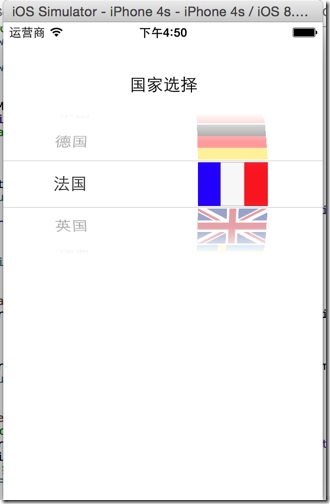
 #pragma mark - delegate function

 // 使用返回UIView的row数据返回方法

 - (UIView *) pickerView:(UIPickerView *)pickerView viewForRow:(NSInteger)row forComponent:(NSInteger)component reusingView:(UIView *)view {

     FlagView *flagView;

     if (nil == view) {

         flagView = [FlagView flagViewWithPickerView:self.pickerView];

     } else {

         NSLog(@"重用");

         flagView = (FlagView *)view;

     }

     flagView.flag = self.countries[row];

     NSLog(@"flagView - %p, view - %p", flagView, view);

     return flagView;

 }
2014-12-16 17:02:58.931 CountriesSelection[19352:1505008] flagView - 0x7b942300, view - 0x0
2014-12-16 17:02:58.936 CountriesSelection[19352:1505008] flagView - 0x79e44b80, view - 0x0
2014-12-16 17:02:58.937 CountriesSelection[19352:1505008] flagView - 0x79f64bc0, view - 0x0
2014-12-16 17:02:58.940 CountriesSelection[19352:1505008] flagView - 0x79f68e00, view - 0x0
2014-12-16 17:02:58.941 CountriesSelection[19352:1505008] flagView - 0x79f6a720, view - 0x0
2014-12-16 17:02:58.942 CountriesSelection[19352:1505008] flagView - 0x79f6bff0, view - 0x0
2014-12-16 17:02:58.943 CountriesSelection[19352:1505008] flagView - 0x79f6ff30, view - 0x0
2014-12-16 17:02:58.944 CountriesSelection[19352:1505008] flagView - 0x79f6e370, view - 0x0
2014-12-16 17:03:00.134 CountriesSelection[19352:1505008] flagView - 0x7b94a6c0, view - 0x0
2014-12-16 17:03:00.168 CountriesSelection[19352:1505008] flagView - 0x7b94b810, view - 0x0
2014-12-16 17:03:00.605 CountriesSelection[19352:1505008] flagView - 0x79f364c0, view - 0x0
2014-12-16 17:03:00.655 CountriesSelection[19352:1505008] flagView - 0x79f439e0, view - 0x0
2014-12-16 17:03:00.657 CountriesSelection[19352:1505008] flagView - 0x79f5a450, view - 0x0
2014-12-16 17:03:00.873 CountriesSelection[19352:1505008] flagView - 0x79f6cc60, view - 0x0
[iOS基础控件 - 6.10.2] PickerView 自定义row内容 国家选择Demo的更多相关文章
- [iOS基础控件 - 6.10.1] PickerView 餐点搭配Demo
A.需求 1.使用PickerView做出有3列餐点(水果.主菜.饮料)的搭配Demo 2.选择的餐点实时显示在“显示区” 3.提供“随机”按钮,随机选择菜品搭配 B.实现步骤 1.拖入一个Pic ...
- [iOS基础控件 - 6.10.7] UIWindow
A.UIWindow概念 1.继承UIView,是一种特殊的UIView 2.通常一个APP只有一个UIWindow 3.iOS程序启动后,创建的第一个视图就是UIWindow 4.没有UIWindo ...
- [iOS基础控件 - 6.10.5] UIApplication
A.概念 1.UIApplication对象是应用程序的象征,每个应用都有 2.单例 3.[UIApplication sharedApplication] 获取 4.iOS启动创建的第一个对象 5. ...
- [iOS基础控件 - 6.10] Notification 通知机制
A.定义 iOS程序都有一个NSNotificationCenter的单例对象,用来负责发布不同对象之间的通知 任何对象都能够在NSNotificationCenter发布通知,发 ...
- [iOS基础控件 - 6.10.6] UIApplicationDelegate & 程序启动过程
A.概念 1.移动app非常容易受到其他的系统.软件事件的干扰,如来电.锁屏 2.app受到干扰的时候,UIApplication会通知delegate,来代理处理干扰事件 3.delegate可以处 ...
- [iOS基础控件 - 6.10.4] 项目启动原理 项目中的文件
A.项目中的常见文件 1.单元测试Test 2.Frameworks(xCode6 创建的SingleView Project没有) 依赖框架 3.Products 打包好的文件 4. p ...
- [iOS基础控件 - 6.10.3] DatePicker & UIToolBar
A.需求 1. 学习DatePicker的基本配置 2.使用TextField召唤指定类型的输入键盘View,这里使用DatePicker 3.给输入键盘上方加上一个UIToolBar,实现如关闭键盘 ...
- [iOS基础控件 - 5.5] 代理设计模式 (基于”APP列表"练习)
A.概述 在"[iOS基础控件 - 4.4] APP列表 进一步封装,初见MVC模式”上进一步改进,给“下载”按钮加上效果.功能 1.按钮点击后,显示为“已下载”,并且不 ...
- iOS 基础控件(下)
上篇介绍了UIButton.UILabel.UIImageView和UITextField,这篇就简短一点介绍UIScrollView和UIAlertView. UIScrollView 顾名思义也知 ...
随机推荐
- Android中使用Parcelable
今天 在两个Activity之间传集合类型数据,看了一下,要用Parcelable 所以就看一下东西: 下面一段话是复制网友的. Android序列化对象主要有两种方法,实现Serializable接 ...
- struct TABLE
struct TABLE { TABLE() {} /* Remove gcc warning */ TABLE_SHARE *s; handler *file; TABLE *next, *prev ...
- Qt之自定义界面(右下角冒泡)
简述 网页右下角上经常会出现一些提示性的信息,桌面软件中也比较常见,类似360新闻.QQ消息提示一样! 这种功能用动画实现起来很简单,这节我们暂时使用定时器来实现,后面章节会对动画框架进行详细讲解. ...
- CodeForces Round #280 (Div.2)
A. Vanya and Cubes 题意: 给你n个小方块,现在要搭一个金字塔,金字塔的第i层需要 个小方块,问这n个方块最多搭几层金字塔. 分析: 根据求和公式,有,按照规律直接加就行,直到超过n ...
- 物联网操作系统HelloX开发者入门指南
HelloX开发者入门指南 HelloX是聚焦于物联网领域的操作系统开发项目,可以通过百度搜索"HelloX",获取详细信息.当前开发团队正在进一步招募中,欢迎您的了解和加入.如果 ...
- python - os.path,路径相关操作
python处理系统路径的相关操作: # -*- coding: utf-8 -*- import os # 属性 print '__file__: %s' % __file__ # 绝对路径(包含文 ...
- CSS HACK区别IE6、IE7、IE8、Firefox兼容性
相信不少人,都特别清楚CSS HACK,而其中也是区别IE6.IE7.IE8.Firefox兼容性问题用的,CSS hack由于不同的浏览器,对CSS的解析认识不一样,因此会导致生成的页面效果不一样. ...
- 怎样在 Ubuntu 中修改默认程序
导读 作为一个新手,你需要知道如何在 Ubuntu 中修改任何默认程序,这也是我今天在这篇指南中所要讲的. 对于我来说,安装 VLC 多媒体播放器是安装完 Ubuntu 16.04 该做的事中最先做的 ...
- JAVA深复制(深克隆)与浅复制(浅克隆)
1.浅复制与深复制概念⑴浅复制(浅克隆)被复制对象的所有变量都含有与原来的对象相同的值,而所有的对其他对象的引用仍然指向原来的对象.换言之,浅复制仅仅复制所考虑的对象,而不 复制它所引用的对象. 1. ...
- IOS 弹出式 POPMenuView
//MenuView.h // // MenuView.h // RockPopMenu // // Created by zhuang chaoxiao on 14-6-26. // C ...