
VTK使用矢量数据弯曲几何体
vtkWarpVector is a filter that modifies point coordinates by moving points along vector times the scale factor. Useful for showing flow profiles or mechanical deformation. The filter passes both its point data and cell data to its output.
沿法向膨胀
#!/usr/bin/env python

import vtk

inputPolyData = vtk.vtkPolyData()

sphereSource = vtk.vtkSphereSource()

sphereSource.SetPhiResolution(15)

sphereSource.SetThetaResolution(15)

sphereSource.Update()

inputPolyData = sphereSource.GetOutput()

# merge duplicate points, and/or remove unused points and/or remove degenerate cells

clean = vtk.vtkCleanPolyData()

clean.SetInputData(inputPolyData)

# Generate normals

normals = vtk.vtkPolyDataNormals()

normals.SetInputConnection(clean.GetOutputPort())

normals.SplittingOff()

# vtkWarpVector is a filter that modifies point coordinates by moving points along vector times the scale factor

# Warp using the normals (deform geometry with vector data)

warp = vtk.vtkWarpVector()

warp.SetInputConnection(normals.GetOutputPort())

# Set the input data arrays that this algorithm will process

# The fieldAssociation refers to which field in the data object the array is stored

warp.SetInputArrayToProcess(0, 0, 0,vtk.vtkDataObject.FIELD_ASSOCIATION_POINTS, vtk.vtkDataSetAttributes.NORMALS)

# Specify value to scale displacement

warp.SetScaleFactor(1.0)

# Visualize the original and warped models

colors = vtk.vtkNamedColors()

mapper = vtk.vtkPolyDataMapper()

mapper.SetInputConnection(warp.GetOutputPort())

warpedActor = vtk.vtkActor()

warpedActor.SetMapper(mapper)

warpedActor.GetProperty().SetColor(colors.GetColor3d("Flesh"))

originalMapper = vtk.vtkPolyDataMapper()

originalMapper.SetInputConnection(normals.GetOutputPort())

originalActor = vtk.vtkActor()

originalActor.SetMapper(originalMapper)

originalActor.GetProperty().SetInterpolationToFlat() # Set the shading interpolation method for an object

originalActor.GetProperty().SetColor(colors.GetColor3d("Flesh"))

renderWindow =vtk.vtkRenderWindow()

renderWindow.SetSize(640, 480)

# Create a camera for all renderers

camera = vtk.vtkCamera()

# Define viewport ranges: (xmin, ymin, xmax, ymax)

leftViewport = [0.0, 0.0, 0.5, 1.0]

rightViewport =[0.5, 0.0, 1.0, 1.0]

# Setup both renderers

leftRenderer = vtk.vtkRenderer()

leftRenderer.SetViewport(leftViewport)

leftRenderer.SetBackground(colors.GetColor3d("Burlywood"))

leftRenderer.SetActiveCamera(camera)

rightRenderer = vtk.vtkRenderer()

rightRenderer.SetViewport(rightViewport)

rightRenderer.SetBackground(colors.GetColor3d("CornFlower"))

rightRenderer.SetActiveCamera(camera)

leftRenderer.AddActor(originalActor)

rightRenderer.AddActor(warpedActor)

rightRenderer.ResetCamera()

renderWindow.AddRenderer(rightRenderer)

renderWindow.AddRenderer(leftRenderer)

style = vtk.vtkInteractorStyleTrackballCamera()

interactor = vtk.vtkRenderWindowInteractor()

interactor.SetRenderWindow(renderWindow)

interactor.SetInteractorStyle(style)

renderWindow.Render()

interactor.Start()
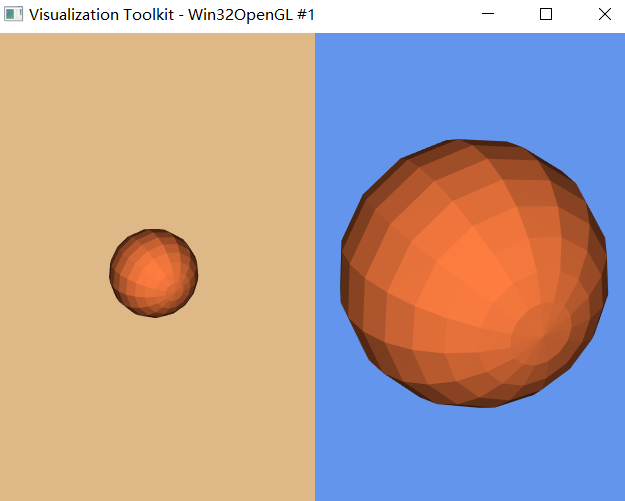
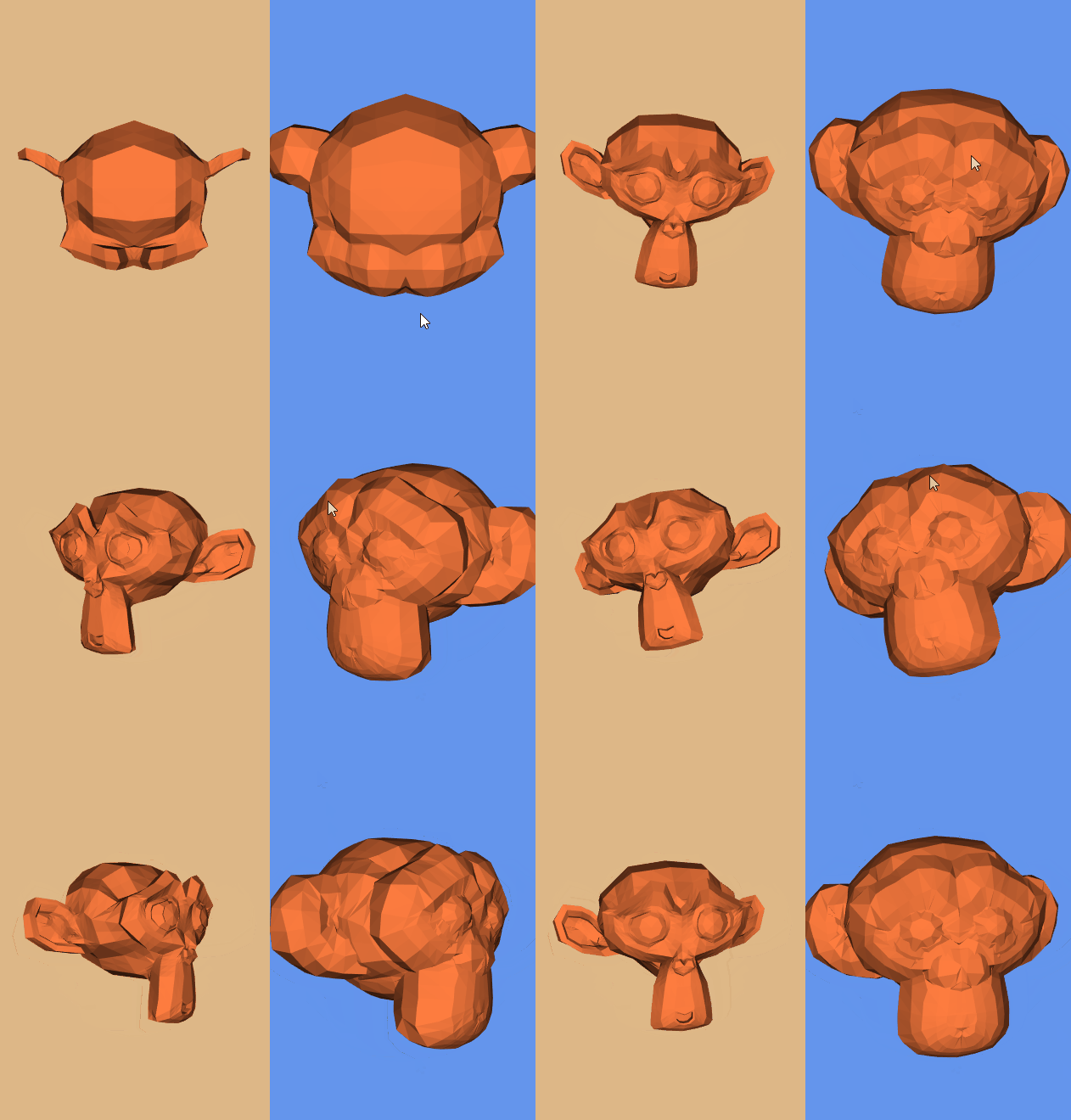
膨胀导入的STL模型
#!/usr/bin/env python

import vtk

inputPolyData = vtk.vtkPolyData()

readerSTL = vtk.vtkSTLReader()

readerSTL.SetFileName("Suzanne.stl")

readerSTL.Update()

inputPolyData = readerSTL.GetOutput()

# merge duplicate points, and/or remove unused points and/or remove degenerate cells

clean = vtk.vtkCleanPolyData()

clean.SetInputData(inputPolyData)

# Generate normals

normals = vtk.vtkPolyDataNormals()

normals.SetInputConnection(clean.GetOutputPort())

normals.SplittingOff() # Turn off the splitting of sharp edges

# vtkWarpVector is a filter that modifies point coordinates by moving points along vector times the scale factor

# Warp using the normals (deform geometry with vector data)

warp = vtk.vtkWarpVector()

warp.SetInputConnection(normals.GetOutputPort())

# Set the input data arrays that this algorithm will process

# The fieldAssociation refers to which field in the data object the array is stored

warp.SetInputArrayToProcess(0, 0, 0,vtk.vtkDataObject.FIELD_ASSOCIATION_POINTS, vtk.vtkDataSetAttributes.NORMALS)

# Specify value to scale displacement

warp.SetScaleFactor(0.3)

# Visualize the original and warped models

colors = vtk.vtkNamedColors()

mapper = vtk.vtkPolyDataMapper()

mapper.SetInputConnection(warp.GetOutputPort())

warpedActor = vtk.vtkActor()

warpedActor.SetMapper(mapper)

warpedActor.GetProperty().SetColor(colors.GetColor3d("Flesh"))

originalMapper = vtk.vtkPolyDataMapper()

originalMapper.SetInputConnection(normals.GetOutputPort())

originalActor = vtk.vtkActor()

originalActor.SetMapper(originalMapper)

originalActor.GetProperty().SetInterpolationToFlat() # Set the shading interpolation method for an object

originalActor.GetProperty().SetColor(colors.GetColor3d("Flesh"))

renderWindow =vtk.vtkRenderWindow()

renderWindow.SetSize(640, 480)

# Create a camera for all renderers

camera = vtk.vtkCamera()

# Define viewport ranges: (xmin, ymin, xmax, ymax)

leftViewport = [0.0, 0.0, 0.5, 1.0]

rightViewport =[0.5, 0.0, 1.0, 1.0]

# Setup both renderers

leftRenderer = vtk.vtkRenderer()

leftRenderer.SetViewport(leftViewport)

leftRenderer.SetBackground(colors.GetColor3d("Burlywood"))

leftRenderer.SetActiveCamera(camera)

rightRenderer = vtk.vtkRenderer()

rightRenderer.SetViewport(rightViewport)

rightRenderer.SetBackground(colors.GetColor3d("CornFlower"))

rightRenderer.SetActiveCamera(camera)

leftRenderer.AddActor(originalActor)

rightRenderer.AddActor(warpedActor)

rightRenderer.ResetCamera()

renderWindow.AddRenderer(rightRenderer)

renderWindow.AddRenderer(leftRenderer)

style = vtk.vtkInteractorStyleTrackballCamera()

interactor = vtk.vtkRenderWindowInteractor()

interactor.SetRenderWindow(renderWindow)

interactor.SetInteractorStyle(style)

renderWindow.Render()

interactor.Start()
参考:
VTK: vtkWarpVector Class Reference
VTK/Examples/Cxx/PolyData/WarpSurface
VTK/Examples/Python/PolyData/WarpVector.py
An algorithm for inflating/deflating (offsetting, buffering) polygons
VTK使用矢量数据弯曲几何体的更多相关文章
- Three.js开发指南---创建,加载高级网格和几何体(第八章)
本章的主要内容: 一, 通过Three.js自带的功能来组合和合并已有的几何体,创建出新的几何体 二, 从外部资源中加载网格和几何体 1 前面的章节中,我们学习到,一个几何体创建的网格,想使用多个材质 ...
- VTK三维点集轮廓凸包提取
碰撞检测问题在虚拟现实.计算机辅助设计与制造.游戏及机器人等领域有着广泛的应用,甚至成为关键技术.而包围盒算法是进行碰撞干涉初步检测的重要方法之一.包围盒算法是一种求解离散点集最优包围空间的方法.基本 ...
- VTK资料收集
使用Qt Creator开发VTK 原文链接:http://blog.csdn.net/numit/article/details/10200507 VTK应用系列:非常强大!非常善良 05-VTK在 ...
- mfc+vtk
MFC中view类主要处理显示视图,doc类处理文档,mainframe主要为整个窗口的和工程的设置管理.由此,VTK与MFC联合编程时,需要主要的是数据操作,以及显示要很好的与MFC中的结构结合,做 ...
- vtk多线程简单测试
vtkMultithreader is a class that provides support for multithreaded execution using sproc() on an SG ...
- Convert PLY to VTK Using PCL 1.6.0 使用PCL库将PLY格式转为VTK格式
PLY格式是比较流行的保存点云Point Cloud的格式,可以用MeshLab等软件打开,而VTK是医学图像处理中比较常用的格式,可以使用VTK库和ITK库进行更加复杂的运算处理.我们可以使用Par ...
- geotrellis使用(八)矢量数据栅格化
目录 前言 栅格化处理 总结 参考链接 一.前言 首先前几天学习了一下Markdown,今天将博客园的编辑器改为Markdown,从编写博客到界面美观明显都清爽多了,也能写出各种样式的东 ...
- vtk工作流
要理解VTK的工作原理,首先应明确几个类型: 1.vtkSource(数据源) 这个就好比一个剧本里面的角色,让演员知道要演的是什么人物. 数据源有:vtkConeSource,vtkSphere ...
- 认识VTK工作原理
VTk通过数据流实现变信息为图形数据的. 数据流一般为:source-filter--mapper--actor--render--renderwindow--interactor. 要理解工作原理, ...
随机推荐
- 006 python操作符
一:数值操作符 1.操作符 2.不同点 上面有了一个说法,这个 / 与其他的编程不同. 这个是精确的除法. 3.连续赋值 这种用法,第一次遇见,就记录下来. 4.注意点 重要的是要注意优先级的问题 二 ...
- mac docker环境搭建mysql主从同步服务器
参考地址:https://www.cnblogs.com/jinjiangongzuoshi/p/9299275.html 1.下载镜像 docker pull mysql:5.7.19 2.建立配用 ...
- GIT结合android studio使用总结
使用GIT前请阅读(有git基础可略过) git指引 :http://www.bootcss.com/p/git-guide/ 一. 下载git http://git-scm.com/downloa ...
- so插件化
--摘自<android插件化开发指南> 1.local.properties添加配置 ndk.dir=/Users/jianqiang/Library/Android/sdk/ndk-b ...
- jupyter notebook不能选择虚拟环境的解决方法
今天使用dlib没有py37版本,因此创建了Version_36虚拟环境.但jupyter notebook默认的内核找不到新建的虚拟环境,解决方法是需要安装两个包: × ipykernel × nb ...
- 在ArchLinux中安装MySQL
最近前端学习用到数据库的知识.鉴于MySQL被甲骨文收购的情况,我从MariaDB开始学习.操作系统Manjaro 17.1, 数据库版本MariaDB 10.1. 1. 安装MariaDb和其客户端 ...
- dhcp搭建
DHCP服务搭建 动态主机配置协议 dhcp曾用名 bootp 应用规模:终端超过五台,建议使用DHCP分配的信息:IP地址,NETMASK掩码,GATEWAY网关,DNS1DNS服务器,DNS2,D ...
- 如何去掉linux配置文件的注释行和空行
1.使用grep -v "^#" 来去掉注释行,其中:-v 就是取相反的 ^# 表示以#开头的行 eg. grep -v "^#" /etc/vsftp ...
- Java 基础 在Java中需要使用内存的组件
Java程序启动后作为一个进程运行在操作系统中,那么这个进程有哪些部分需要分配内存? 1 Java堆 Java堆用于存储Java对象,堆的大小在JVM启动时向操作系统一次性申请完成,通过-Xmx和-X ...
- HTTP中的重定向和请求转发的区别(转)
一.调用方式 我们知道,在servlet中调用转发.重定向的语句如下: request.getRequestDispatcher("new.jsp").forward(reques ...