
python下的selenium和PhantomJS
一般我们使用python的第三方库requests及框架scrapy来爬取网上的资源,但是设计javascript渲染的页面却不能抓取,此时,我们使用web自动化测试化工具Selenium+无界面浏览器PhantomJS来抓取javascript渲染的页面, 但是新版本的Selenium不再支持PhantomJS了,请使用Chrome或Firefox的无头版本来替代。
如下图:

这里有2中解决方案, 我采用第一种, 第二种搞了很久也没有成功
一:降级selenium使用
pip uninstall selenium #先卸载selenium
pip install selenium==3.4.3 #指定版本安装selenium
防止以后官网没得下载,先备份个selenium3.4.3和PhantomJS 下载地址
二:使用Headless Chrome和Headless Firefox
使用Headless Chrome
Headless模式是Chrome 59中的新特征。
要使用Chrome需要安装 chromedriver。
chromedriver驱动大全
from selenium import webdriver

from selenium.webdriver.chrome.options import Options

chrome_options = Options()

chrome_options.add_argument('--headless')

chrome_options.add_argument('--disable-gpu')

br = webdriver.Chrome(chrome_options=chrome_options)

br.get('https://www.baidu.com/')

baidu = br.find_element_by_id('su').get_attribute('value')

print(baidu)
使用Headless Firefox
要使用Firebox需要安装 geckodriver。
geckodriver.exe驱动大全
from selenium import webdriver

from selenium.webdriver.firefox.options import Options

firefox_options = Options()

firefox_options.add_argument('--headless')

br = webdriver.Firefox(firefox_options=firefox_options)

br.get('https://www.baidu.com/')

baidu = br.find_element_by_id('su').get_attribute('value')

print(baidu)
以上代码我在测试的时候没有成功, 遇到如下错误:
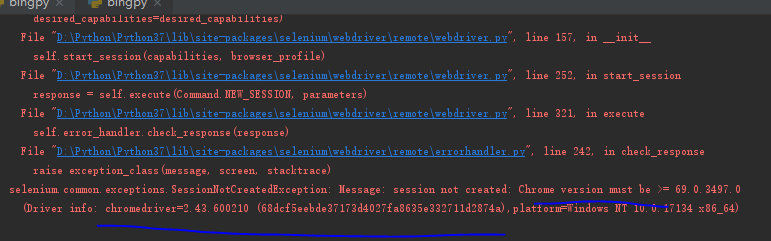
说的是chrome的版本不一致,当然前人也遇到过了, 只是我按照网上说的 没有解决
Python爬虫Selenium安装
使用python selenium時關於chromedriver的小問題
Selenium support for PhantomJS has been deprecated, please use headless
最后我找了一个老版本解决了问题 2.33
Python的模块pywin32中的win32gui.SystemParametersInfo()函数,在使用win32con.SPI_SETDESKWALLPAPER设置Wallpaper时,其第二个参数为图片路径,图片必须是BMP格式。如下:
win32gui.SystemParametersInfo(win32con.SPI_SETDESKWALLPAPER, imagepath, 1+2)
否则将报错如下:pywintypes.error: (0, 'SystemParametersInfo', 'No error message is available') 关于 SystemParametersInfo
在设置壁纸的时候发现img_path = "D://Users//Gavin//PythonDemo//Bing.bmp"失败,但是把路径改为img_path = "D:\\Users\\Gavin\\PythonDemo\\Bing.bmp" 就可以了或者img_path = "D:/Users/Gavin/PythonDemo/Bing.bmp"
Python更换Windows壁纸,问题与解决方案
使用pythonwin设置windows的桌面背景
我的demo是参考 Python爬虫之提取Bing搜索的背景图片并设置为Windows的电脑桌面
具体代码:
# -*- coding: utf- -*-

"""

   此程序用于提取Bing搜索的背景图片并设置为Windows的电脑桌面

"""

from urllib.request import urlretrieve

from selenium import webdriver

from selenium.common.exceptions import TimeoutException

import win32api,win32con,win32gui

from selenium.webdriver.chrome.options import Options

# 利用PhantomJS加载网页

chrome_options = Options()

chrome_options.add_argument('--headless')

chrome_options.add_argument('--disable-gpu')

browser = webdriver.Chrome(chrome_options=chrome_options)

# 设置最大等待时间为30s

browser.set_page_load_timeout()

url = 'https://cn.bing.com/'

try:

    browser.get(url)

except TimeoutException:

    # 当加载时间超过30秒后,自动停止加载该页面

    browser.execute_script('window.stop()')

# 从id为bgDiv的标签中获取背景图片的信息

t = browser.find_element_by_id('bgDiv')

bg = t.get_attribute('style')

# 从字符串中提取背景图片的下载网址

start_index = bg.index('(')

end_index = bg.index(')')

img_url = bg[start_index+: end_index]

img_url = img_url.replace('"', '')

# 下载该图片到本地

img_path = "D:\\Users\\Gavin\\PythonDemo\\Bing.bmp"

urlretrieve(img_url, img_path)

# 将下载后的图片设置为Windows系统的桌面

# 打开指定注册表路径

reg_key = win32api.RegOpenKeyEx(win32con.HKEY_CURRENT_USER, "Control Panel\\Desktop", , win32con.KEY_SET_VALUE)

# 最后的参数:2拉伸,0居中,6适应,10填充,0平铺

win32api.RegSetValueEx(reg_key, "WallpaperStyle", , win32con.REG_SZ, "")

# 最后的参数:1表示平铺,拉伸居中等都是0

win32api.RegSetValueEx(reg_key, "TileWallpaper", , win32con.REG_SZ, "")

# 刷新桌面

try:

    win32gui.SystemParametersInfo(win32con.SPI_SETDESKWALLPAPER, img_path, win32con.SPIF_SENDWININICHANGE)

except Exception as e:

    print(e)
以上代码 确实是可以跑起来的(win10 python3.7), 但是晚上 回家后再win7 就跑不起来,典型的就是 图片问题,需要安装 pip install Pillow 于是 code 变成如下:
# -*- coding: utf- -*-

"""

   此程序用于提取Bing搜索的背景图片并设置为Windows的电脑桌面

"""

from urllib.request import urlretrieve

from selenium import webdriver

from selenium.common.exceptions import TimeoutException

import win32api, win32con, win32gui

from PIL import Image

from selenium.webdriver.chrome.options import Options

# 利用PhantomJS加载网页

chrome_options = Options()

chrome_options.add_argument('--headless')

chrome_options.add_argument('--disable-gpu')

browser = webdriver.Chrome(options=chrome_options)

# 设置最大等待时间为30s

browser.set_page_load_timeout()

url = 'https://cn.bing.com/'

try:

    browser.get(url)

except TimeoutException:

    # 当加载时间超过30秒后,自动停止加载该页面

    browser.execute_script('window.stop()')

# 从id为bgDiv的标签中获取背景图片的信息

t = browser.find_element_by_id('bgDiv')

bg = t.get_attribute('style')

# 从字符串中提取背景图片的下载网址

start_index = bg.index('(')

end_index = bg.index(')')

img_url = bg[start_index + : end_index]

img_url = img_url.replace('"', '')

# 下载该图片到本地

img_path = "D:\\Python\\demoBing.jpg"

urlretrieve(img_url, img_path)

bmpImage = Image.open(img_path)

img_path = img_path.replace('.jpg', '.bmp')

bmpImage.save(img_path, "BMP")

# 将下载后的图片设置为Windows系统的桌面

# 打开指定注册表路径

reg_key = win32api.RegOpenKeyEx(win32con.HKEY_CURRENT_USER, "Control Panel\\Desktop", , win32con.KEY_SET_VALUE)

# 最后的参数:2拉伸,0居中,6适应,10填充,0平铺

win32api.RegSetValueEx(reg_key, "WallpaperStyle", , win32con.REG_SZ, "")

# 最后的参数:1表示平铺,拉伸居中等都是0

win32api.RegSetValueEx(reg_key, "TileWallpaper", , win32con.REG_SZ, "")

# 刷新桌面

try:

    win32gui.SystemParametersInfo(win32con.SPI_SETDESKWALLPAPER, img_path, win32con.SPIF_SENDWININICHANGE)

except Exception as e:

    print(e)
python下的selenium和PhantomJS的更多相关文章
- python下的selenium和chrome driver的安装
selenium是一款支持多种语言.多种浏览器.多个平台的开源web自动化测试软件,测试人员可用python.java等语言编写自动化脚本,使得浏览器可以完全按照你的指令运行,大大节省了测试人员用鼠标 ...
- 吾八哥学Selenium(一):Python下的selenium安装
selenium简介 Selenium也是一个用于Web应用程序测试的工具.Selenium测试直接运行在浏览器中,就像真正的用户在操作一样.支持的浏览器包括IE.Mozilla Firefox.Mo ...
- python爬虫之selenium、phantomJs
图片懒加载技术 什么是图片懒加载技术 图片懒加载是一种网页优化技术.图片作为一种网络资源,在被请求时也与普通静态资源一样,将占用网络资源,而一次性将整个页面的所有图片加载完,将大大增加页面的首屏加载时 ...
- python下的selenium安装
安装python 打开 Python官网,找到“Download”, 在其下拉菜单中选择自己的平台(Windows/Mac),一般的Linux平台已经自带的Python,所以不需要安装,通过打开“终端 ...
- Python爬虫系列-Selenium+Chrome/PhantomJS爬取淘宝美食
1.搜索关键字 利用Selenium驱动浏览器搜索关键字,得到查询后的商品列表 2.分析页码并翻页 得到商品页码数,模拟翻页,得到后续页面的商品列表 3.分析提取商品内容 利用PyQuery分析源码, ...
- Python爬虫开发【第1篇】【动态HTML、Selenium、PhantomJS】
JavaScript JavaScript 是网络上最常用也是支持者最多的客户端脚本语言.它可以收集用户的跟踪数据,不需要重载页面直接提交表单,在页面嵌入多媒体文件,甚至运行网页游戏. 我们可以在网页 ...
- Python爬虫 Selenium与PhantomJS
Selenium Selenium是一个Web的自动化测试工具,最初是为网站自动化测试而开发的,最初是为网站自动化测试而开发的,类型像我们玩游戏用的按键精灵,可以按指定的命令自动化操作,不同是Sele ...
- python下的自动化测试--selenium 验证码输入问题
之前一直在研究scrapy下数据抓取,在研究ajax数据抓取时碰巧研究了一下selenium,确实很实用,不过只做scrapy下的数据抓取,不怎么合适,一是性能的损耗,一直需要开一个浏览器,二是对于爬 ...
- windows环境下安装selenium+python
selenium 是一个web的自动化测试工具,不少学习功能自动化的同学开始首选selenium ,相因为它相比QTP有诸多有点: * 免费,也不用再为破解QTP而大伤脑筋 * 小巧,对于不同的语 ...
随机推荐
- LVM管理之减少LV的大小
LVM管理之减少LV的大小 规定动作 1.umount filesystem 2.e2fsck filesystem 3.resize2fs filesystem 4.lvredure 实例演示——— ...
- 20165319 《JAVA程序设计》第一周学习总结
教材内容学习总结 1.了解了基础的JAVA历史 2.学会了JDK的安装 3.学会了JAVA的基本应用 git的学习以及代码相关 1.学会了git在Windows系统上的安装以及linux系统的安装 2 ...
- day 55 jQuery-part2
这里有一个DOM对象转换成jQuery对象的方法,在jQuery对象后面加上索引值0即可得到效果如图所示: $("#btn")[0] 这里我们这里的索引值为0 只是一种写法而已,只 ...
- sql 的一些总结
如果用到“每” 就要用到group by 例:每个部门有多少人,就要用到分组技术 聚合函数一般作用在多条记录上 having 是分组厚的筛选条件,分组厚的数据组内再筛选,where 则是在分组 ...
- selenium设置chrome和phantomjs的请求头信息
selenium设置chrome和phantomjs的请求头信息 出于反爬虫也好-跳转到手机端页面也好都需要设置请求头,那么如何进行呢? 目录 一:selenium设置phantomjs请求头: ...
- 问题 L: An Invisible Hand - (2018年第二阶段个人训练赛第三场)
题目描述 There are N towns located in a line, conveniently numbered 1 through N. Takahashi the merchant ...
- 浅谈solr
Solr是一个独立的企业级搜索应用服务器,它对外提供类似于Web-service的API接口.用户可以通过http请求,向搜索引擎服务器提交一定格式的XML文件,生成索引:也可以通过Http Get操 ...
- C#如何使用REST接口读写数据
原网站:http://www.codeproject.com/Tips/497123/How-to-make-REST-requests-with-Csharp 一个类,我们拷贝下来直接调用就行: 以 ...
- C# DGVPrinter.cs 打印方法
Code highlighting produced by Actipro CodeHighlighter (freeware)http://www.CodeHighlighter.com/--> ...
- C# Work PPT to PDF
//// <summary> /// 把ppt文件转换成pdf文件2 /// </summary> /// <param name="sourcePath&qu ...