
DamonOehlman/detect-browser
https://github.com/DamonOehlman/detect-browser
detect-browser
This is a package that attempts to detect a browser vendor and version (in a semver compatible format) using a navigator useragent in a browser or process.version in node.
这个包使用浏览器中的navigator useragent或node中的process.version检测浏览器厂商和版本(与semver兼容的格式)
Example Usage
const { detect } = require('detect-browser');

const browser = detect();

// handle the case where we don't detect the browser

if (browser) {

  console.log(browser.name);

  console.log(browser.version);

  console.log(browser.os);

}
Or you can use a switch statement:
const { detect } = require('detect-browser');

const browser = detect();

// handle the case where we don't detect the browser

switch (browser && browser.name) {

  case 'chrome':

  case 'firefox':

    console.log('supported');

    break;

  case 'edge':

    console.log('kinda ok');

    break;

  default:

    console.log('not supported');

}
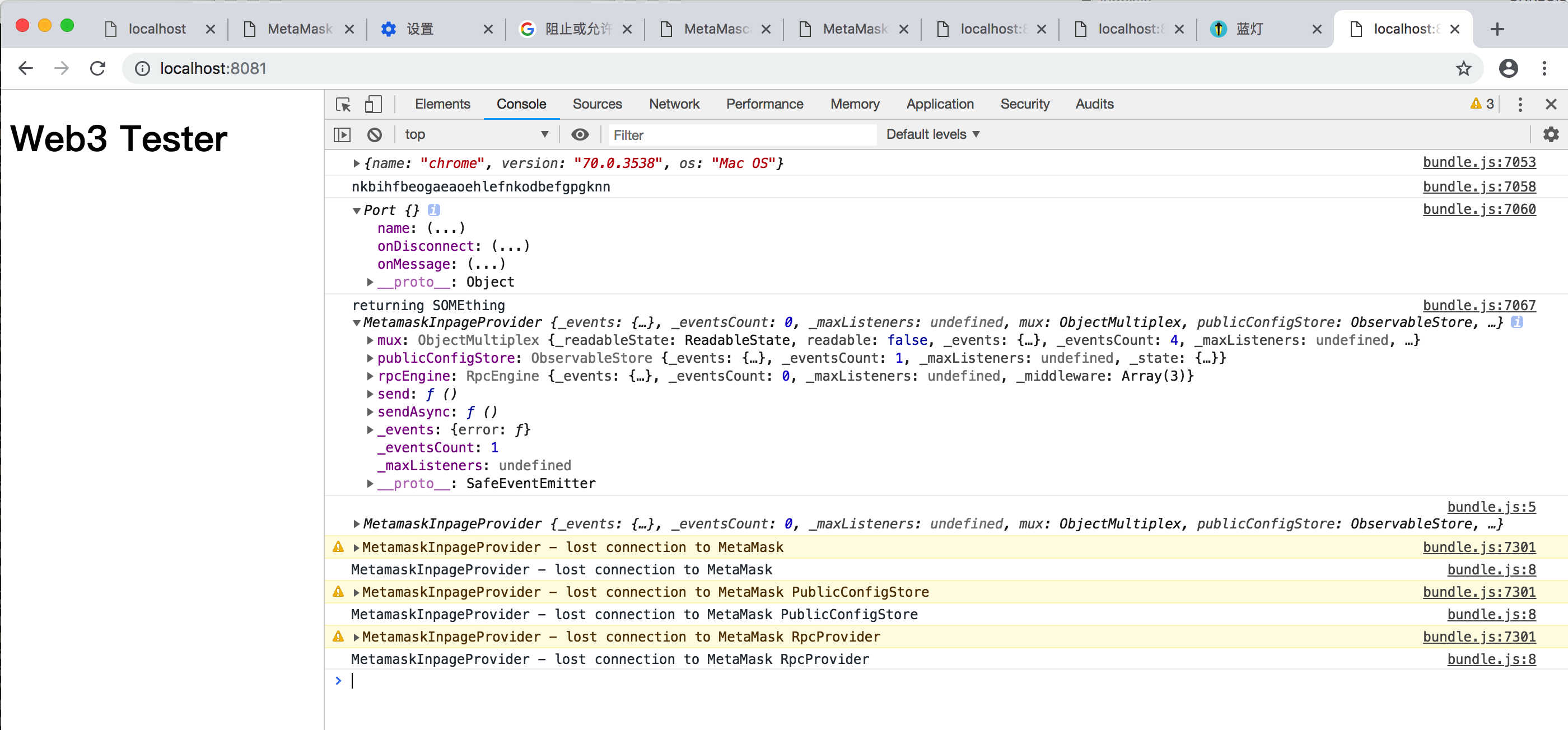
看下图控制器第一行的输出我们就能够看见得到的是{name : "chrome",version : "70.0.3538", os : "Mac OS"}
Adding additional browser support
The current list of browsers that can be detected by detect-browser is not exhaustive. If you have a browser that you would like to add support for then please submit a pull request with the implementation.
但是目前能够被detect-browser这个库检测到的浏览器列表还不够详尽。如果你有想要加入的浏览器,那么就请提交一个实现的请求
Creating an acceptable implementation requires two things需要两样东西:
- A test demonstrating that the regular expression you have defined identifies your new browser correctly. Examples of this can be found in the
test/logic.jsfile.test测试中阐述了你用来正确识别你的浏览器的自定义的正则表达式,例子如test/logic.js,看下面
- Write the actual regex to the
index.jsfile. In most cases adding the regex to the list of existing regexes will be suitable (if usage ofdetect-browerreturnsundefinedfor instance), but in some cases you might have to add it before an existing regex. This would be true for a case where you have a browser that is a specialised variant of an existing browser but is identified as the non-specialised case.在index.js中写下真是的正则表达式。在大多数情况下列表中已存在的正则表达式与添加进的是相配的,但是在一些情况下你就必须要将其添加在已存在的正则表达式之前。如果您的浏览器是现有浏览器的特殊版本,但被识别为非特殊的,那么这种情况就会发生
When writing the regular expression remember that you would write it containing a single capturing group which captures the version number of the browser.
在编写正则表达式时,请记住,您将编写包含捕获浏览器版本号的单个捕获组的表达式
detect-browser/index.js
function detect() {

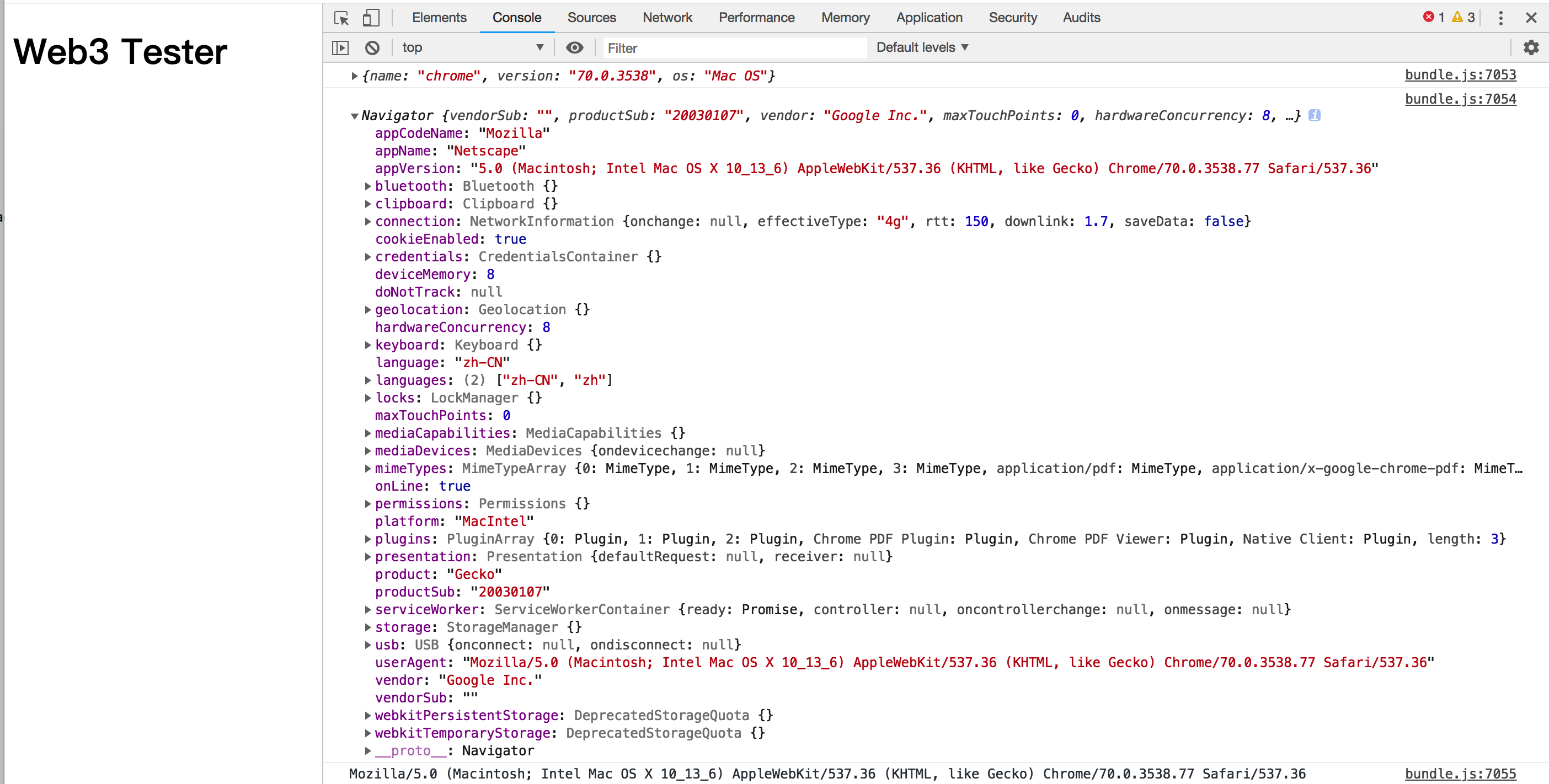
  if (typeof navigator !== 'undefined') {//下面图中有显示navigator

    return parseUserAgent(navigator.userAgent);//navigator.userAgent结果为:Mozilla/5.0 (Macintosh; Intel Mac OS X 10_13_6) AppleWebKit/537.36 (KHTML, like Gecko) Chrome/70.0.3538.77 Safari/537.36

  }

  return getNodeVersion();

}

function detectOS(userAgentString) {

  var rules = getOperatingSystemRules();//匹配操作系统的正则表达式

  var detected = rules.filter(function (os) {

    return os.rule && os.rule.test(userAgentString);

  })[];

  return detected ? detected.name : null;

}

function getNodeVersion() {

  var isNode = typeof process !== 'undefined' && process.version;

  return isNode && {

    name: 'node',

    version: process.version.slice(),

    os: process.platform

  };

}

function parseUserAgent(userAgentString) {

  var browsers = getBrowserRules();//得到浏览器的正则表达式

  if (!userAgentString) {

    return null;

  }

  var detected = browsers.map(function(browser) {

    var match = browser.rule.exec(userAgentString);

    var version = match && match[].split(/[._]/).slice(,);

    if (version && version.length < ) {

      version = version.concat(version.length ==  ? [, ] : []);

    }

    return match && {

      name: browser.name,

      version: version.join('.')

    };

  }).filter(Boolean)[] || null;

  if (detected) {

    detected.os = detectOS(userAgentString);

  }

  if (/alexa|bot|crawl(er|ing)|facebookexternalhit|feedburner|google web preview|nagios|postrank|pingdom|slurp|spider|yahoo!|yandex/i.test(userAgentString)) {

    detected = detected || {};

    detected.bot = true;

  }

  return detected;

}

function getBrowserRules() { //返回相应的浏览器的正则表达式

  return buildRules([

    [ 'aol', /AOLShield\/([-\._]+)/ ],

    [ 'edge', /Edge\/([-\._]+)/ ],

    [ 'yandexbrowser', /YaBrowser\/([-\._]+)/ ],

    [ 'vivaldi', /Vivaldi\/([-\.]+)/ ],

    [ 'kakaotalk', /KAKAOTALK\s([-\.]+)/ ],

    [ 'samsung', /SamsungBrowser\/([-\.]+)/ ],

    [ 'chrome', /(?!Chrom.*OPR)Chrom(?:e|ium)\/([-\.]+)(:?\s|$)/ ],

    [ 'phantomjs', /PhantomJS\/([-\.]+)(:?\s|$)/ ],

    [ 'crios', /CriOS\/([-\.]+)(:?\s|$)/ ],

    [ 'firefox', /Firefox\/([-\.]+)(?:\s|$)/ ],

    [ 'fxios', /FxiOS\/([-\.]+)/ ],

    [ 'opera', /Opera\/([-\.]+)(?:\s|$)/ ],

    [ 'opera', /OPR\/([-\.]+)(:?\s|$)$/ ],

    [ 'ie', /Trident\/\..*rv\:([-\.]+).*\).*Gecko$/ ],

    [ 'ie', /MSIE\s([-\.]+);.*Trident\/[-]./ ],

    [ 'ie', /MSIE\s(\.)/ ],

    [ 'bb10', /BB10;\sTouch.*Version\/([-\.]+)/ ],

    [ 'android', /Android\s([-\.]+)/ ],

    [ 'ios', /Version\/([-\._]+).*Mobile.*Safari.*/ ],

    [ 'safari', /Version\/([-\._]+).*Safari/ ],

    [ 'facebook', /FBAV\/([-\.]+)/],

    [ 'instagram', /Instagram\s([-\.]+)/],

    [ 'ios-webview', /AppleWebKit\/([-\.]+).*Mobile/]

  ]);

}

function getOperatingSystemRules() {//匹配操作系统的正则表达式

  return buildRules([

    [ 'iOS', /iP(hone|od|ad)/ ],

    [ 'Android OS', /Android/ ],

    [ 'BlackBerry OS', /BlackBerry|BB10/ ],

    [ 'Windows Mobile', /IEMobile/ ],

    [ 'Amazon OS', /Kindle/ ],

    [ 'Windows 3.11', /Win16/ ],

    [ 'Windows 95', /(Windows )|(Win95)|(Windows_95)/ ],

    [ 'Windows 98', /(Windows )|(Win98)/ ],

    [ 'Windows 2000', /(Windows NT 5.0)|(Windows )/ ],

    [ 'Windows XP', /(Windows NT 5.1)|(Windows XP)/ ],

    [ 'Windows Server 2003', /(Windows NT 5.2)/ ],

    [ 'Windows Vista', /(Windows NT 6.0)/ ],

    [ 'Windows 7', /(Windows NT 6.1)/ ],

    [ 'Windows 8', /(Windows NT 6.2)/ ],

    [ 'Windows 8.1', /(Windows NT 6.3)/ ],

    [ 'Windows 10', /(Windows NT 10.0)/ ],

    [ 'Windows ME', /Windows ME/ ],

    [ 'Open BSD', /OpenBSD/ ],

    [ 'Sun OS', /SunOS/ ],

    [ 'Linux', /(Linux)|(X11)/ ],

    [ 'Mac OS', /(Mac_PowerPC)|(Macintosh)/ ],

    [ 'QNX', /QNX/ ],

    [ 'BeOS', /BeOS/ ],

    [ 'OS/2', /OS\// ],

    [ 'Search Bot', /(nuhk)|(Googlebot)|(Yammybot)|(Openbot)|(Slurp)|(MSNBot)|(Ask Jeeves\/Teoma)|(ia_archiver)/ ]

  ]);

}

function buildRules(ruleTuples) {

  return ruleTuples.map(function(tuple) {

    return {

      name: tuple[],

      rule: tuple[]

    };

  });

}

module.exports = {

  detect: detect,

  detectOS: detectOS,

  getNodeVersion: getNodeVersion,

  parseUserAgent: parseUserAgent

};
detect-browser/test/logic.js
使用例子来进行说明某类userAgent会检测出什么样的结果:
var test = require('tape');

var { parseUserAgent } = require('../');

function assertAgentString(t, agentString, expectedResult) {

  t.deepEqual(parseUserAgent(agentString), expectedResult);

}

test('detects Chrome', function(t) {

  assertAgentString(t,

    'Mozilla/5.0 (X11; Linux x86_64) AppleWebKit/537.36 (KHTML, like Gecko) Chrome/50.0.2661.102 Safari/537.36',

    { name: 'chrome', version: '50.0.2661', os: 'Linux' }

  );

  assertAgentString(t,

    'Mozilla/5.0 (Windows NT 6.1) AppleWebKit/537.36 (KHTML, like Gecko) Chrome/41.0.2228.0 Safari/537.36',

    { name: 'chrome', version: '41.0.2228', os: 'Windows 7' }

  );

  t.end();

});

test('handles no browser', function(t) {

    assertAgentString(t,

        null,

        null

    );

    t.end();

});
DamonOehlman/detect-browser的更多相关文章
- python flask detect browser language
python flask detect browser language No problem. We won't show you that ad again. Why didn't you l ...
- C#检测浏览器类型 Detect Browser
private void Button1_Click(object sender, System.EventArgs e) { System.Web.HttpBrowserCapabilities b ...
- clear session on close of browser jsp
关闭浏览器销毁session <%@ Page Language="C#" AutoEventWireup="true" CodeBehind=" ...
- 【CSS3 入门教程系列】CSS3 Media Queries 实现响应式设计
在 CSS2 中,你可以为不同的媒介设备(如屏幕.打印机)指定专用的样式表,而现在借助 CSS3 的 Media Queries 特性,可以更为有效的实现这个功能.你可以为媒介类型添加某些条件,检测设 ...
- 26 个 jQuery使用技巧
1. 禁用右键点击(Disable right-click) $(document).ready(function(){ $(document).bind("contextmenu" ...
- 直接拿来用 九个超实用的PHP代码片段(二)
每位程序员和开发者都喜欢讨论他们最爱的代码片段,尤其是当PHP开发者花费数个小时为网页编码或创建应用时,他们更知道这些代码的重要性.为了节约编码时间,笔者收集了一些较为实用的代码片段,帮助开发者提高工 ...
- 开源网站流量统计系统Piwik源码分析——参数统计(一)
Piwik现已改名为Matomo,这是一套国外著名的开源网站统计系统,类似于百度统计.Google Analytics等系统.最大的区别就是可以看到其中的源码,这正合我意.因为我一直对统计的系统很好奇 ...
- 【JavaScript 封装库】BETA 5.0 测试版发布!
JavaScript 前端框架(封装库) BETA 5.0 已于10月10日正式发布,今天开始提供 BETA 5.0 的 API 参考文献.相较于之前 5 个版本的发布都是草草的提供源代码,并没有很多 ...
- 后端程序员看前端想死(二)进入页面之后js分析
在上一篇中分析了一下以网页的组成.header中引入的乱七八糟的东西,现在进入到js中进行分析了 tuhooo啊,你是要搞前端了么? nonono,好玩,学一下 打开页面之后执行js的几种方法 直接写 ...
- Code Project精彩系列(转)
Code Project精彩系列(转) Code Project精彩系列(转) Applications Crafting a C# forms Editor From scratch htt ...
随机推荐
- win10 uwp 如何开始写 uwp 程序
本文告诉大家如何创建一个 UWP 程序. 这是一系列的 uwp 入门博客,所以写的很简单 本文来告诉大家如何创建一个简单的程序 安装 VisualStudio 在开始写 UWP 需要安装 Visual ...
- 【Spring】30、Spring,SpringMVC用法汇总
SpringMVC的工作原理图: springMVC中的几个组件: 前端控制器(DispatcherServlet):接收请求,响应结果,相当于电脑的CPU. 处理器映射器(HandlerMappin ...
- int**a = new int[5][6] 怎么delete
int **a = new int[5][6],这个根本编译不过去吧. 如果你想new一个二维数组出来,应该这样: int** a= new int*[5]; for (int i = 0; i &l ...
- 设计模式之责任链模式(Chain of Responsibility )
责任链的目的是通过特定的设计对请求者和接收者之间进行解耦,请求者调用操作的对象,接收者接收请求并执行相关操作,通过解耦请求者不需要关心接收者的接口,同时也可增强职责的灵活性,通过改变链内的成员或调用次 ...
- MVC中的HtmlHelper详解
熟悉MVC开发的朋友都应该知道在MVC中,每一个Controller都对应一个View,并且CS文件和对应的ASPX文件也被分离了,更重要的是不再有服务器端控件在工具箱中,不再是代码后至了.MVC中的 ...
- CSS3背景色透明(兼容IE8)
标准浏览器通过rgba()实现背景色透明;IE8以下浏览器通过特有滤镜实现背景色透明. 代码如下: 1 /* IE8 */ 2 filter:progid:DXImageTransform.Micro ...
- 深入研究HTML5实现图片压缩上传
上篇文章中提到移动端上传图片,我们知道现在流量还是挺贵的,手机的像素是越来越高,拍个照动不动就是好几M,伤不起.虽然客户端可以轻轻松松实现图片压缩再上传,但是我们的应用还可能在浏览器里面打开,怎么办呢 ...
- IDEA项目搭建七——使用Feign简化消费者端操作
一.简介 我们可以看到上一篇文章的消费者这边调用Service时比较麻烦,所以我们可以使用Feign来简化这部分操作,它底层也是使用Ribbon实现的只是Ribbon支持HTTP和TCP两种通信协议, ...
- MySQL主从及主主环境部署
主从同步 主机环境 mysql的安装可以参考:https://www.cnblogs.com/brianzhu/p/8575243.htmlCentos7版本master:192.168.192.12 ...
- Linux 操作系统主机名变成bogon怎么解决?
主机名变成bogon怎么解决? by:授客 QQ:1033553122 一:使用hostname命令 [laiyu@localhost ~]$ hostname localhost.localdo ...