
flex和box-shadow一些兼容性问题
html代码
<div class="creative-list">

            <a class="creative-list-item">

                <div class="item-img">

                    <img src=""/>

                    <div class="item-sell"></div>

                    <div class="patentImg">

                        <svg class="icon" aria-hidden="true"><use xlink:href="#icon-patent"></use></svg>

                        <span>专利</span>

                    </div>

                </div>

                <div class="item-title">我是标题哈哈哈我是标题哈哈哈我是标题哈哈哈</div>

                <div class="item-middle"><span class="type">西洋陶瓷</span><span class="look-num">1人浏览</span></div>

                <div class="item-bottom">

                    <div class="left">

                       <img src="">

                       <span class="name" title="ccbb">ccbb</span>

                       <span class="integral">750</span>

                    </div>

                    <div class="right">

                        <span class="price">1.00</span>

                        <span class="unit">元</span>

                    </div>

                </div>

            </a>
css代码
.creative-list{

    width: 100%;

    height: auto;

    -webkit-box-sizing: border-box;

            box-sizing: border-box;

    display: -webkit-box;

    display: -ms-flexbox;

    display: flex;

    -ms-flex-wrap: wrap;

        flex-wrap: wrap;

}

.creative-list-item{

    width: 280px;

    -webkit-box-sizing: border-box;

            box-sizing: border-box;

    -webkit-box-shadow: 0 0 12px rgba(0, 0, 0, .2);

            box-shadow: 0 0 12px rgba(0, 0, 0, .2);

    border-radius: 5px;

    background: #fff;

    cursor: pointer;

    margin-right:15px;

    margin-bottom: 15px;

    color: #000;

    overflow: hidden;

}

.creative-list-item:hover{

    color: #000;

}

.creative-list-item .item-img{

    width: 100%;

    height: 200px;

    overflow: hidden;

    position: relative;

}

.creative-list-item .item-img>img{

    width: 100%;

    height: 100%;

    -webkit-transition: -webkit-transform 0.3s;

    transition: -webkit-transform 0.3s;

    transition: transform 0.3s;

    transition: transform 0.3s, -webkit-transform 0.3s;

    -webkit-transform: scale(1);

            transform: scale(1)

}

.creative-list-item .item-img>img:hover{

     -webkit-transform: scale(1.2);

             transform: scale(1.2);

}

.creative-list-item .item-img .item-sell{

    position: absolute;

    top:;

    bottom:;

    left:;

    right:;

    border-radius: 5px 5px 0 0;

    display: block;

    height: 200px;

    background: #000;

    background: url(/static/img/design/yishouchu.png) 50% no-repeat rgba(0, 0, 0, .5);

    filter: alpha(opacity=50);

    opacity: .9;

}

.creative-list-item .item-img .patentImg{

    position: absolute;

    top:;

    left:;

    width: 60px;

    height: 30px;

    z-index: 999px;

    font-size: 12px;

    color: #fff;

    background-color: #fc4147;

    border-radius: 5px 0 12px 0;

}

.item-img .patentImg .icon{

    width: 18px;

    height: 18px;

    fill: currentColor;

    display: inline-block;

    overflow: hidden;

    color: #fff;

    margin: 6px 5px;

}

.item-img .patentImg span {

    position: absolute;

    font-weight: lighter;

    top: 6px;

}

.creative-list-item .item-title{

    padding:0 15px;

    -webkit-box-sizing: border-box;

            box-sizing: border-box;

    font-size: 18px;

    overflow: hidden;

    text-overflow: ellipsis;

    white-space: nowrap;

    margin-top:20px;

    color: #000;

}

.creative-list-item .item-middle {

    margin-top: 15px;

    padding:0 15px;

    font-size: 12px;

    color: #999;

    -webkit-box-sizing: border-box;

            box-sizing: border-box;

}

.item-middle .type{

    background-color: #e5e5e5;

    margin-right: 10px;

    display: inline-block;

    padding: 2px 4px;

    border-radius: 8px;

}

.item-middle .look-num{

    vertical-align: middle;

}

.creative-list-item .item-bottom{

    -webkit-box-sizing: border-box;

            box-sizing: border-box;

    padding:0 15px;

    margin:15px 0;

    display: -webkit-box;

    display: -ms-flexbox;

    display: flex;

    -webkit-box-align: center;

        -ms-flex-align: center;

            align-items: center;

}

.item-bottom img{

    margin-right: 5px;

    height: 30px;

    width: 30px;

    border-radius: 50%;

}

.item-bottom .left{

    -webkit-box-flex:;

        -ms-flex:;

            flex:;

    display: -webkit-box;

    display: -ms-flexbox;

    display: flex;

    -webkit-box-align: center;

        -ms-flex-align: center;

            align-items: center;

}

.item-bottom .name{

    margin-right: 5px;

    font-size: 14px;

    color: #333;

    cursor: pointer;

    max-width: 100px;

    display: inline-block;

    overflow: hidden;

    text-overflow: ellipsis;

    white-space: nowrap;

}

.item-bottom .integral{

    background-color: #fcba07;

    border-radius: 8px;

    font-size: 12px;

    color: #fff;

    display: inline-block;

    padding: 0 4px;

}

.item-bottom .right{

    float: right;

}

.item-bottom .right .price{

    color: #ff6000;

    font-size: 18px;

}

.item-bottom .right .unit{

    color: #ff6000;

    font-size: 12px;

}
ie11以上 显示正常 效果如下
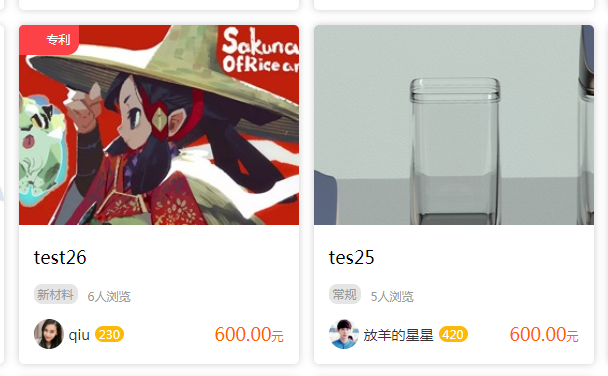
ie11以下 效果如下

原因 :列表遍历 我这边用的是a标签,ie11以下就不兼容了,只需要给a标签加个属性display:block; 将其变成块级元素即可。可以兼容到ie7
flex和box-shadow一些兼容性问题的更多相关文章
- display:flex和display:box布局浏览器兼容性分析
display:flex和display:box都可用于弹性布局,不同的是display:box是2009年的命名,已经过时,用的时候需要加上前缀:display:flex是2012年之后的命名.在实 ...
- flex和box兼容性写法
display: -webkit-box; /* Chrome 4+, Safari 3.1, iOS Safari 3.2+ */ display: -moz-box; /* Firefox 17- ...
- 如何设置box shadow的透明度
(从已经死了一次又一次终于挂掉的百度空间人工抢救出来的,发表日期2014-04-24) 今天发现使用box-shadow属性,可以很好的给div添加阴影效果,但是添加的效果如果是: -moz-box- ...
- 分享div、text、Box Shadow(阴影)演示及代码的页面
附图: 直接上链接:www.css88.com/tool/css3Preview/Box-Shadow.html
- CSS3新特性,兼容性,兼容方法总结
css3手册css3手册 边框 border-radius 用于添加圆角效果 语法: border-radius:[ <length> | <percentage> ]{1,4 ...
- flexbox布局的兼容性
http://ayqy.net/blog/flexbox布局的兼容性/ 写在前面 flex布局早在2009年就有了,而现在是2015年6月8日,使用最新的flex语法会发现支持程度并不好,即使是在“高 ...
- Flex弹性布局在移动设备上的应用
引文 首先,我们有表格布局.当不考虑语义并且利用一些适当的嵌套和其他技巧,我们可以用table建立具有一定功能的布局. 然后是现在大多数人都在使用的浮动布局.我们可以使用任何我们想用的元素,但浮动并不 ...
- CSS3弹性伸缩布局(二)——flex布局
上一篇博客<CSS3弹性伸缩布局(一)——box布局>介绍了旧版本的box布局,而这篇博客将主要介绍最新版本的flex布局的基础知识. 新版本简介 新版本的Flexbox模型是2012年9 ...
- 67.web--手机端兼容性问题
H5页面窗口自动调整到设备宽度,并禁止用户缩放页面 <meta name="viewport" content="width=device-width,initia ...
- CSS魔法堂:Flex布局
前言 Flex是Flexible Box的缩写,就是「弹性布局」.从2012年已经面世,但由于工作环境的原因一直没有详细了解.最近工作忙到头晕脑胀,是要学点新东西刺激一下大脑,打打鸡血. Flex就 ...
随机推荐
- 微软Office Online服务安装部署(二)
现在准备配置Client 1.进入到桌面后,打开powershell 输入: Add-WindowsFeature Web-Server,Web-Mgmt-Tools,Web-Mgmt-Console ...
- Android如何在http头信息里设置参数
在使用http请求server时常常要传递一些参数给server,如IMEI号.平台号.渠道号.客户端的版本号等一些通用信息,像这些参数我们没有必要每次都拼在url后,我们可以统一添加到http头里. ...
- django.core.exceptions.ImproperlyConfigured: Requested setting DEFAULT_INDEX_TABLESPACE, but settings are not configured. You must either define the environment variable DJANGO_SETTINGS_MODULE or call
Error info: django.core.exceptions.ImproperlyConfigured: Requested setting DEFAULT_INDEX_TABLESPACE, ...
- PostFix添加多个端口
/usr/local/*/config/postfix/master.cf 在/etc/services中搜索smtp,复制,添加smtp2<与上面一步对应起来的服务名>,后面为需要添加的 ...
- Minimum Domino Rotations For Equal Row LT1007
In a row of dominoes, A[i] and B[i] represent the top and bottom halves of the i-th domino. (A domi ...
- gitlab 10汉化
记得备份 先检查一下版本,好下载对应的汉化包 cat /opt/gitlab/embedded/service/gitlab-rails/VERSION 1)然后下载10.0.x.diff 文件到服务 ...
- linux 查看信息-进程&用户&服务&程序
进程 1.查看所有进程 2.实时显示进程状态 用户 1.查看活动用户 2.查看登录日志 3.查看系统所有用户 4.查看系统所有组 5.查看当前用户的计划任务 服务 1.列出所有系统服务 2.列出所有启 ...
- 兼容IE8的flash上传框架"uploadify"自定义上传按钮样式的办法
(uploadify版本:3.2.1 ) 因为公司业务的原因,所做的项目需要兼容IE8,因此做的上传插件无奈选择的是基于flash的uploadify. 由于是基于flash的,所以使用过程中,难以给 ...
- 学以致用二十八-----win10安装mysql5.7.24及卸载
1.在windows环境下安装mysql,需要下载相对应的版本. ------------------------> 这里我下载的是mysql-5.7.24-win64.zip 2.下载后解压, ...
- Struts2学习第三天——保存登陆信息及数据校验
在JSP中服务器端保存数据的作用域通常有request.session.application,它们对应的Servlet API分别是HttpServletRquerst.HttpSession.Se ...