
ckeditor5 增加居中alignment
https://ckeditor.com/docs/ckeditor5/latest/builds/guides/integration/installing-plugins.html
克隆下来
git clone -b stable https://github.com/ckeditor/ckeditor5-build-classic.git

cd ckeditor5-build-classic

npm install
安装插件
npm install --save-dev @ckeditor/ckeditor5-alignment
修改src/ckeditor.js文件
增加
/**

 * @license Copyright (c) 2003-2019, CKSource - Frederico Knabben. All rights reserved.

 * For licensing, see LICENSE.md.

 */

// The editor creator to use.

import ClassicEditorBase from '@ckeditor/ckeditor5-editor-classic/src/classiceditor';

import Essentials from '@ckeditor/ckeditor5-essentials/src/essentials';

import UploadAdapter from '@ckeditor/ckeditor5-adapter-ckfinder/src/uploadadapter';

import Autoformat from '@ckeditor/ckeditor5-autoformat/src/autoformat';

import Bold from '@ckeditor/ckeditor5-basic-styles/src/bold';

import Italic from '@ckeditor/ckeditor5-basic-styles/src/italic';

import BlockQuote from '@ckeditor/ckeditor5-block-quote/src/blockquote';

import CKFinder from '@ckeditor/ckeditor5-ckfinder/src/ckfinder';

import EasyImage from '@ckeditor/ckeditor5-easy-image/src/easyimage';

import Heading from '@ckeditor/ckeditor5-heading/src/heading';

import Image from '@ckeditor/ckeditor5-image/src/image';

import ImageCaption from '@ckeditor/ckeditor5-image/src/imagecaption';

import ImageStyle from '@ckeditor/ckeditor5-image/src/imagestyle';

import ImageToolbar from '@ckeditor/ckeditor5-image/src/imagetoolbar';

import ImageUpload from '@ckeditor/ckeditor5-image/src/imageupload';

import Link from '@ckeditor/ckeditor5-link/src/link';

import List from '@ckeditor/ckeditor5-list/src/list';

import MediaEmbed from '@ckeditor/ckeditor5-media-embed/src/mediaembed';

import Paragraph from '@ckeditor/ckeditor5-paragraph/src/paragraph';

import PasteFromOffice from '@ckeditor/ckeditor5-paste-from-office/src/pastefromoffice';

import Table from '@ckeditor/ckeditor5-table/src/table';

import TableToolbar from '@ckeditor/ckeditor5-table/src/tabletoolbar';

import Alignment from '@ckeditor/ckeditor5-alignment/src/alignment';     // <--- ADDED

export default class ClassicEditor extends ClassicEditorBase {}

// Plugins to include in the build.

ClassicEditor.builtinPlugins = [

	Essentials,

	UploadAdapter,

	Autoformat,

	Bold,

	Italic,

	BlockQuote,

	CKFinder,

	EasyImage,

	Heading,

	Image,

	ImageCaption,

	ImageStyle,

	ImageToolbar,

	ImageUpload,

	Link,

	List,

	MediaEmbed,

	Paragraph,

	PasteFromOffice,

	Table,

	TableToolbar,

	 Alignment                                                            // <--- ADDED

];

// Editor configuration.

ClassicEditor.defaultConfig = {

	toolbar: {

		items: [

			'heading',

			'|',

			'alignment',                                                 // <--- ADDED

			'bold',

			'italic',

			'link',

			'bulletedList',

			'numberedList',

			'imageUpload',

			'blockQuote',

			'insertTable',

			'mediaEmbed',

			'undo',

			'redo'

		]

	},

	image: {

		toolbar: [

			'imageStyle:full',

			'imageStyle:side',

			'|',

			'imageTextAlternative'

		]

	},

	table: {

		contentToolbar: [

			'tableColumn',

			'tableRow',

			'mergeTableCells'

		]

	},

	// This value must be kept in sync with the language defined in webpack.config.js.

	language: 'zh-cn'

};
打包
yarn run build
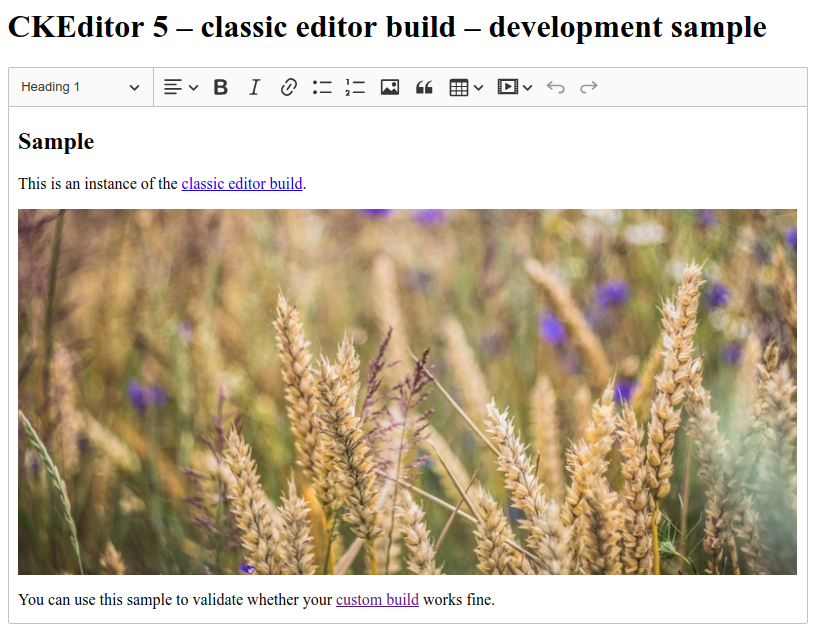

toolbar: ["undo", "redo", "|", "alignment", "bold", "italic", "blockQuote", "imageTextAlternative", "imageUpload", "heading", "link", "numberedList", "bulletedList"],
ckeditor5 增加居中alignment的更多相关文章
- python 读取Excel(二)之xlwt
今天由于在接口测试报告中感觉自己写的接口测试报告特别low,Excel的连个颜色都不加,就想着怎么去想办法给整整,自己根据API一次次调试,感觉很慢,于是乎,百度,可惜没有找到,去官网,官网给的也特别 ...
- python模块介绍- xlwt 创建xls文件(excel)
python模块介绍- xlwt 创建xls文件(excel) 2013-06-24磁针石 #承接软件自动化实施与培训等gtalk:ouyangchongwu#gmail.comqq 37391319 ...
- 干货--Excel的表格数据的一般处理和常用python模块。
写在前面: 本文章的主要目的在于: 介绍了python常用的Excel处理模块:xlwt,xlrd,xllutils,openpyxl,pywin32的使用和应用场景. 本文只针对于Excel表中常用 ...
- python Excel数据导出
import pymysql,os,time,xlwtpymysql.install_as_MySQLdb() try: #创建一个excel工作簿,编码utf-8,表格中支持中文 wb=xlwt.W ...
- Flutter之Container详解
1 基本内容1.1 继续关系Object > Diagnosticable > DiagnosticableTree > Widget > StatelessWidget &g ...
- python3查询数据库并生成excel报表
#!/usr/bin/env python3 #encoding=UTF- import os import time import xlwt hostIp = 'xxx.xxx.xxx.xx' us ...
- python 写入execl记录
记录代码中关于写execl的操作 # 创建execl workbook = xlwt.Workbook(encoding='utf8') # 创建样式实例 style = xlwt.XFStyle() ...
- JQuery 用法总结
1.隐藏与显示,用于div等等 //隐藏id=myTab下的所有li标签 $("#myTab li").hide(); //动画隐藏,1秒内隐藏该对象 $(); //显示class ...
- python 生成文件到- execl
查了一些资料发现是英文版本的 很尴尬,经过看源码,和几个错误 ,现记录下来 一:下载包 pip install xlwt 二:定义样式 def set_style(name, height, bold ...
随机推荐
- 批量数据的Excel导入
public void importIndexHistoryByCsv(String fileName) { logger.info("开始获取Csv文件导入到数据库,csv文件名为:&qu ...
- bootstrap-treeview 中文开发手册
官方文档URL: https://www.npmjs.com/package/bootstrap-treeview 2017年11月21日10:45:10 演示:http://www.htmleaf ...
- consul服务配置维护
1.命令参数 -advertise:通知展现地址用来改变我们给集群中的其他节点展现的地址,默认情况下-bind地址就是展现地址,然而也存在一些路由地址是不能受约束的,这时候会激活一个不同的地址来供应, ...
- 用java代码解决excel打开csv文件乱码问题
Java 读取csv文件后,再保存到磁盘上,然后直接用Excel打开,你会发现里面都是乱码. 贴上代码: public class Test { public static void main(S ...
- sql server实例内存使用统计
转载于: http://blog.csdn.net/shutao917/article/details/51444424 SQL SERVER内存按存放数据的类型,大概可以分为三类: 1.buffer ...
- python-----编写接口,使用postman与soapiu与jemeter访问调用
实例:自己写一个注册接口 输入用户名.密码.验证码,当满足注册将密码进行md5加密. 场景 接口返回参数 提示 用户名存在 2000 exit 用户已存在 密码与验证码不相等 3000 wrong 密 ...
- Chrome扩展程序——TabCopy:一键复制网页标题和网址
Chrome扩展程序——TabCopy:一键复制网页标题和网址 - Erik_ly的博客 - CSDN博客 https://blog.csdn.net/u012318074/article/detai ...
- 深度学习基础(三)NIN_Network In Network
该论文提出了一种新颖的深度网络结构,称为"Network In Network"(NIN),以增强模型对感受野内local patches的辨别能力.与传统的CNNs相比,NIN主 ...
- ES6 Map 与 Set
Map 对象 Map 对象保存键值对.任何值(对象或者原始值) 都可以作为一个键或一个值. Maps 和 Objects 的区别 一个 Object 的键只能是字符串或者 Symbols,但一个 Ma ...
- C工程 交互 ceph 分布式存储系统
网上看到有人问,如何在C项目里调用ceph系统对外提供的API,实现分布式存储. 我在网上搜到了相关信息,但是因为不是会员无法追加答案,故而,贴于此. 赠予有缘人:) ———————————————— ...