
Unity 修改windows窗口的标题
修改windows窗口的标题名称,就是修改下图的东西:
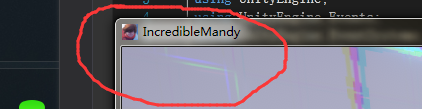
第一种:
using UnityEngine;

using System;

using System.Runtime.InteropServices;

public class SetWindowText : MonoBehaviour

{

    #region WIN32API

    delegate bool EnumWindowsCallBack(IntPtr hwnd, IntPtr lParam);

    [DllImport("user32", CharSet = CharSet.Unicode)]

    static extern bool SetWindowTextW(IntPtr hwnd, string title);

    [DllImport("user32")]

    static extern int EnumWindows(EnumWindowsCallBack lpEnumFunc, IntPtr lParam);

    [DllImport("user32")]

    static extern uint GetWindowThreadProcessId(IntPtr hWnd, ref IntPtr lpdwProcessId);

    #endregion

    IntPtr myWindowHandle;

    public void Start()

    {

        IntPtr handle = (IntPtr)System.Diagnostics.Process.GetCurrentProcess().Id;  //获取进程ID

        EnumWindows(new EnumWindowsCallBack(EnumWindCallback), handle);     //枚举查找本窗口

        SetWindowTextW(myWindowHandle, "测试代码"); //设置窗口标题

    }

    bool EnumWindCallback(IntPtr hwnd, IntPtr lParam)

    {

        IntPtr pid = IntPtr.Zero;

        GetWindowThreadProcessId(hwnd, ref pid);

        if (pid == lParam)  //判断当前窗口是否属于本进程

        {

            myWindowHandle = hwnd;

            return false;

        }

        return true;

    }

}
第二种:
using System;

using System.Collections;

using System.Collections.Generic;

using System.Runtime.InteropServices;

using System.Text;

using UnityEngine;

public class NewBehaviourScript : MonoBehaviour {

    //Import the following.

    [DllImport("user32.dll", EntryPoint = "SetWindowTextW", CharSet = CharSet.Unicode)]

    public static extern bool SetWindowTextW(System.IntPtr hwnd, System.String lpString);

    [DllImport("user32.dll", EntryPoint = "FindWindow")]

    public static extern System.IntPtr FindWindow(System.String className, System.String windowName);

    public void Change()

    {

        //Get the window handle.

        var windowPtr = FindWindow(null, "WindowTitleChange");//打包时的ProductName,找到名字是WindowTitleChange的窗口
     //Set the title text using the window handle.
     SetWindowTextW(windowPtr, "测试代码");
    }
}
Unity 修改windows窗口的标题的更多相关文章
- 对于windows窗口的标题菜单栏的操作——删除/禁用 最小最大话和关闭
HWND hand = FindWindow(NULL, "计算器"); int nStyle = GetWindowLong(hand, GWL_STYLE);nStyle &a ...
- unity 实现调用Windows窗口/对话框交互
Unity调用Window窗口 本文提供全流程,中文翻译. Chinar 坚持将简单的生活方式,带给世人!(拥有更好的阅读体验 -- 高分辨率用户请根据需求调整网页缩放比例) Chinar -- 心分 ...
- Windows 系统上用 .NET/C# 查找所有窗口,并获得窗口的标题、位置、尺寸、最小化、可见性等各种状态
原文:Windows 系统上用 .NET/C# 查找所有窗口,并获得窗口的标题.位置.尺寸.最小化.可见性等各种状态 在 Windows 应用开发中,如果需要操作其他的窗口,那么可以使用 EnumWi ...
- CMD命令之 :修改windows的CMD窗口输出编码格式为UTF-8
修改windows的CMD窗口输出编码格式为UTF-8 转载自 http://xuliduo.iteye.com/blog/639923 dos命令: chcp 65001 就是换成UTF-8代码页 ...
- 按键精灵 句柄 获得句柄 控制windows窗口 后台
新建一个文本文档,打开,Windows就会给这个文本文档的窗口临时分配唯一的一串数字来标识这个窗体,以区别于其他窗口,这串数字就叫句柄. 因为句柄是临时随机分配的,所以每次虽然是打开同一个文件,但 ...
- windows窗口分析,父窗口,子窗口,所有者窗口
(本文尝试通过一些简单的实验,来分析Windows的窗口机制,并对微软的设计理由进行一定的猜测,需要读者具备C++.Windows编程及MFC经验,还得有一定动手能力.文中可能出现一些术语不统一的现象 ...
- Windows窗口消息大全(转)
Windows窗口消息大全,全不全自己看 ////////////////////////////////////////////////////////////////////////// #inc ...
- Windows窗口消息大全
////////////////////////////////////////////////////////////////////////// #include "AFXPRIV.H& ...
- C语言Windows程序开发—Windows窗口样式与常用控件样式【第04天】
(一)Windows窗口(MDICLIENT)样式介绍 /* Windows窗口样式 */ WS_BORDER //带有边框的窗口 WS_CAPTION //带有标题栏的窗口 WS_CHILD //子 ...
随机推荐
- ASP.NET中Service接受前端单个及多个数据的写法
MVC中的Service主要是用来处理数据交互的. 前端页面传递一个或者多个参数到Service的写法: 一个参数写法: public DataTable 方法名 (Pagination pagina ...
- 献上一款漂亮的手写PHP验证码
献上一款漂亮的PHP验证码,可以根据个人需求作调整,代码如下(审美观不同,欢迎吐槽): <?php /** * Author: xiongwei * Email: 695704253@qq.co ...
- HDU - 1251 统计难题(trie树)
Ignatius最近遇到一个难题,老师交给他很多单词(只有小写字母组成,不会有重复的单词出现),现在老师要他统计出以某个字符串为前缀的单词数量(单词本身也是自己的前缀). Input输入数据的第一部 ...
- Reporting Service服务SharePoint集成模式安装配置(1、虚拟机+ 2、AD域环境配置)
研究 Reporting Service SharePoint 集成模式安装有一段时间,最初其实只是想知道Power View 技术是怎么回事,能实现什么效果.(当然也可以通过Excel 配置好 Po ...
- 【转】Android Android属性动画深入分析
转载请注明出处:http://blog.csdn.net/singwhatiwanna/article/details/17841165 开篇 像设计模式一样,我们也提出一个问题来引出我们的内容. 问 ...
- 【EfF】 贪婪加载和延迟加载 (virtual去掉关闭延迟加载)
EntityFramework(EF)贪婪加载和延迟加载的选择和使用 贪婪加载:顾名思议就是把所有要加载的东西一 次性读取 1 using (var context = new MyDbContext ...
- Java 文件上传至leanCloud
首先,在Controller端入参设置为 @RequestParam(value = "file",defaultValue = "") MultipartFi ...
- ubuntu14.04,安装Gnome 15.10 (桌面)
Linux:ubuntu14.04 Gnome:15.10 更新最新版Gnome的一个好处:更新了ubuntu的软件源,我们可以使用ubuntu的软件中心获取更多需要的软件!! ubuntu默认的桌面 ...
- 趣图:后端工程师是怎样调试CSS的
一大波趣图:CSS的力量 趣图:前端 VS 后端
- 【转载】Java资源大全中文版
Java资源大全中文版 我想很多程序员应该记得 GitHub 上有一个 Awesome - XXX 系列的资源整理.awesome-java 就是 akullpp 发起维护的 Java 资源列表,内容 ...