
Selenium2学习(十二)-- alert\confirm\prompt
前言
不是所有的弹出框都叫alert,在使用alert方法前,先要识别出到底是不是alert。先认清楚alert长什么样子,下次碰到了,就可以用对应方法解决。
alert\confirm\prompt弹出框操作主要方法有:
text:获取文本值
accept() :点击"确认"
dismiss() :点击"取消"或者叉掉对话框
send_keys() :输入文本值 --仅限于prompt,在alert和confirm上没有输入框
一、认识alert\confirm\prompt
1.如下图,从上到下依次为alert\confirm\prompt,先认清楚长什么样子,以后遇到了就知道如何操作了。

2.html源码如下(有兴趣的可以copy出来,复制到txt文本里,后缀改成html就可以了,然后用浏览器打开)
<html>
<head>
<title>Alert</title>
</head>
<body>
<input id = "alert" value = "alert" type = "button" onclick = "alert('您关注了yoyoketang吗?');"/>
<input id = "confirm" value = "confirm" type = "button" onclick = "confirm('确定关注微信公众号:yoyoketang?');"/>
<input id = "prompt" value = "prompt" type = "button" onclick = "var name = prompt('请输入微信公众号:','yoyoketang'); document.write(name) "/>
</body>
</html>
二、alert操作
1.先用switch_to_alert()方法切换到alert弹出框上
2.可以用text方法获取弹出的文本 信息
3.accept()点击确认按钮
4.dismiss()相当于点右上角x,取消弹出框
(url的路径,直接复制浏览器打开的路径)

三、confirm操作
1.先用switch_to_alert()方法切换到alert弹出框上
2.可以用text方法获取弹出的文本 信息
3.accept()点击确认按钮
4.dismiss()相当于点取消按钮或点右上角x,取消弹出框
(url的路径,直接复制浏览器打开的路径)

四、prompt操作
1.先用switch_to_alert()方法切换到alert弹出框上
2.可以用text方法获取弹出的文本 信息
3.accept()点击确认按钮
4.dismiss()相当于点右上角x,取消弹出框
5.send_keys()这里多个输入框,可以用send_keys()方法输入文本内容
(url的路径,直接复制浏览器打开的路径)

五、select遇到的坑
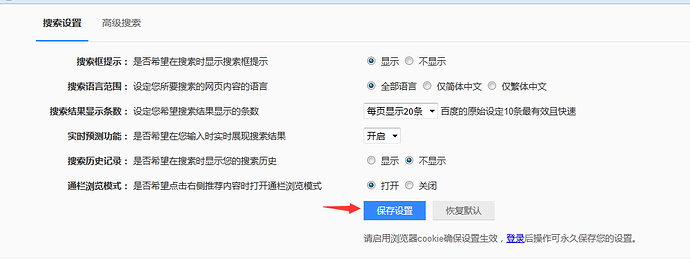
1.在操作百度设置里面,点击“保存设置”按钮时,alert弹出框没有弹出来。(Ie浏览器是可以的)
2.分析原因:经过慢慢调试后发现,在点击"保存设置"按钮时,由于前面的select操作后,失去了焦点
3.解决办法:在select操作后,做个click()点击操作
s = driver.find_element_by_id("nr")
Select(s).select_by_visible_text("每页显示20条")
time.sleep(3)
s.click()
六、最终代码
# coding:utf-8
from selenium import webdriver
from selenium.webdriver.common.action_chains import ActionChains
from selenium.webdriver.support.select import Select
import time
driver = webdriver.Firefox()
url = "https://www.baidu.com"
driver.get(url)
driver.implicitly_wait(20)
# 鼠标移动到“设置”按钮
mouse = driver.find_element_by_link_text("设置")
ActionChains(driver).move_to_element(mouse).perform()
driver.find_element_by_link_text("搜索设置").click()
# 通过text:select_by_visible_text()
s = driver.find_element_by_id("nr")
Select(s).select_by_visible_text("每页显示20条")
time.sleep(3)
s.click()
driver.find_element_by_link_text("保存设置").click()
time.sleep(5)
# 获取alert弹框
t = driver.switch_to_alert()
print t.text
t.accept()
Selenium2学习(十二)-- alert\confirm\prompt的更多相关文章
- Python脚本控制的WebDriver 常用操作 <二十二> 处理alert / confirm / prompt
测试用例场景 webdriver中处理原生的js alert confirm 以及prompt是很简单的.具体思路是使用switch_to.alert()方法定位到alert/confirm/prom ...
- Python+Selenium学习--alert/confirm/prompt 处理
场景 webdriver 中处理JavaScript 所生成的alert.confirm 以及prompt 是很简单的.具体思路是使用switch_to.alert()方法定位到alert/confi ...
- 2.11 alert\confirm\prompt
2.11 alert\confirm\prompt 前言 不是所有的弹出框都叫alert,在使用alert方法前,先要识别出到底是不是alert.先认清楚alert长什么样子,下次碰到了,就可以用 ...
- selenium自动化测试入门 Alert/Confirm/Prompt 弹出窗口处理
一.Alert/Confirm/Prompt弹出窗口特征说明 Alert弹出窗口: 提示用户信息只有确认按钮,无法通过页面元素定位,不关闭窗口无法在页面上做其他操作. Confirm 弹出窗口: 有确 ...
- alert/confirm/prompt 处理
webdriver 中处理JavaScript 所生成的alert.confirm 以及prompt 是很简单的.具体思路是使用switch_to_alert()方法定位到alert/confirm/ ...
- 转:python webdriver API 之alert/confirm/prompt 处理
webdriver 中处理 JavaScript 所生成的 alert.confirm 以及 prompt 是很简单的.具体思路是使用switch_to.alert()方法定位到 alert/conf ...
- selenium python (十一)alert/confirm/prompt的处理(js中的弹出框)
webdriver中处理js所生成的alert.confirm以及prompt,采用switch_to_alert()方法定位到alert/confirm/prompt.然后使用text/accept ...
- Java Selenium - 几种对话框处理Alert\confirm\prompt
1. Alert , 先用常规办法定位到能触发alert的按钮 , 然后 Alert alert = driver.switchTo().alert(); alert.accept(); 如果aler ...
- 如何模拟alert/confirm/prompt实现阻断程序运行
场景:在执行js的时候,我们希望运行到某处,进行用户交互,根据交互的内容,运行下面的程序:下面的js程序需要用的和用户交互的内容,所以,和用户交互时,后面的程序必须停止运行 方案: 1. 原生的ale ...
随机推荐
- 【算法笔记】B1004 成绩排名
1004 成绩排名 (20 分) 读入 n(>0)名学生的姓名.学号.成绩,分别输出成绩最高和成绩最低学生的姓名和学号. 输入格式: 每个测试输入包含 1 个测试用例,格式为 第 1 行:正整数 ...
- HDU - 4699 对顶栈
Get到了全新O(1)替代部分伸展树功能的姿势 左栈stk1维护当前信息,右栈stk2维护历史删除信息 题目求的是严格的前缀和(且小于当前指针)那就每次左栈新增时再更新前缀和信息就好 即使把题面换成最 ...
- Hibernate 4 Second Level Caching With EHCache
Hibernate 4 Second Level Caching With EHCache [From] http://www.codesenior.com/en/tutorial/Hibernate ...
- Spark遇到的报错和坑
1. Java版本不一致,导致启动报错. # 解决方法: 在启动脚本最前边添加系统参数,指定Java版本 export JAVA_HOME=/usr/java/jdk1..0_181-amd64/jr ...
- while循环案例
class While05{ public static void main(String[ ]args){ //练习1:使用while循环完成输出1------10中的每个数 /*int i =1; ...
- oracle 基础知识(十二)----索引
一, 索引介绍 索引与表一样,也属于段(segment)的一种.里面存放了用户的数据,跟表一样需要占用磁盘空间.索引是一种允许直接访问数据表中某一数据行的树型结构,为了提高查询效率而引入,是一个独立于 ...
- Java基础23-main方法
/* 主函数(主方法) 1.public(访问修饰符,公共的)代表类或者该函数访问权限是最大的 2.static 代表主函数随着类的加载就已经存在了 3.void 代表主函数没有具体的返回值 4.ma ...
- 转-------基于R-CNN的物体检测
基于R-CNN的物体检测 原文地址:http://blog.csdn.net/hjimce/article/details/50187029 作者:hjimce 一.相关理论 本篇博文主要讲解2014 ...
- 【计算机网络】详解HttpURLConnection
请求响应流程 设置连接参数的方法 setAllowUserInteraction setDoInput setDoOutput setIfModifiedSince setUseCaches setD ...
- pat1009. Product of Polynomials (25)
1009. Product of Polynomials (25) 时间限制 400 ms 内存限制 65536 kB 代码长度限制 16000 B 判题程序 Standard 作者 CHEN, Yu ...