
Android 简单适配器(SimpleAdapter)
1.介绍

2.简单适配器的实现方法

3.XML文件
(1)主页面布局
<?xml version="1.0" encoding="utf-8"?>

<LinearLayout xmlns:android="http://schemas.android.com/apk/res/android"

    xmlns:app="http://schemas.android.com/apk/res-auto"

    xmlns:tools="http://schemas.android.com/tools"

    android:layout_width="match_parent"

    android:layout_height="match_parent"

    tools:context=".MainActivity">

    <ListView

        android:id="@+id/listview1"

        android:layout_width="match_parent"

        android:layout_height="wrap_content">

    </ListView>

</LinearLayout>
(2)子项布局
<?xml version="1.0" encoding="utf-8"?>

<LinearLayout

    xmlns:android="http://schemas.android.com/apk/res/android"

    xmlns:app="http://schemas.android.com/apk/res-auto"

    android:layout_width="match_parent"

    android:layout_height="match_parent">

    <TextView

        android:id="@+id/textView"

        android:layout_width="wrap_content"

        android:layout_height="wrap_content"

        android:layout_weight="1"

        android:text="TextView" />

    <ImageView

        android:id="@+id/imageView"

        android:layout_width="wrap_content"

        android:layout_height="wrap_content"

        android:layout_weight="1"

        app:srcCompat="@mipmap/img01" />

</LinearLayout>
4.java后台
package com.lucky.test29simpleadapter;

import android.support.v7.app.AppCompatActivity;

import android.os.Bundle;

import android.widget.ListView;

import android.widget.SimpleAdapter;

import java.util.ArrayList;

import java.util.HashMap;

import java.util.List;

import java.util.Map;

public class MainActivity extends AppCompatActivity {

    ListView listView;  //列表视图

    SimpleAdapter simpleAdapter; //简单适配器可以将图片和文件组合起来

    List<Map<String,Object>> list1;

    //Android studio工程将图片转变为的数字

    int[] images={R.mipmap.img01,R.mipmap.img02,R.mipmap.img03,R.mipmap.img04,R.mipmap.img05,R.mipmap.img06,R.mipmap.img07,R.mipmap.img08};

    String[] contentstr={"虎扑","头条","QQ","微信","百度","起点","美团","滴滴"};

    @Override

    protected void onCreate(Bundle savedInstanceState) {

        super.onCreate(savedInstanceState);

        setContentView(R.layout.activity_main);

        listView=findViewById(R.id.listview1);

        list1=new ArrayList<>();  //实例化list1

        for (int i = 0; i <images.length ; i++) {

            Map<String,Object> map=new HashMap<>();  //实例化map

            map.put("001",images[i]);   //给map添加值,参数1为代号,参数2为数据值

            map.put("002",contentstr[i]);

            list1.add(map);

        }

        //实例化simpleAdapter,并设置参数,参数2为数据,参数3为子项的布局文件,参数4为数据的代号,参数5为组件的id

        simpleAdapter=new SimpleAdapter(MainActivity.this,list1,R.layout.itemsimple,new String[]{"001","002"},new int[]{R.id.imageView,R.id.textView});

        listView.setAdapter(simpleAdapter); //设置适配器

    }

}
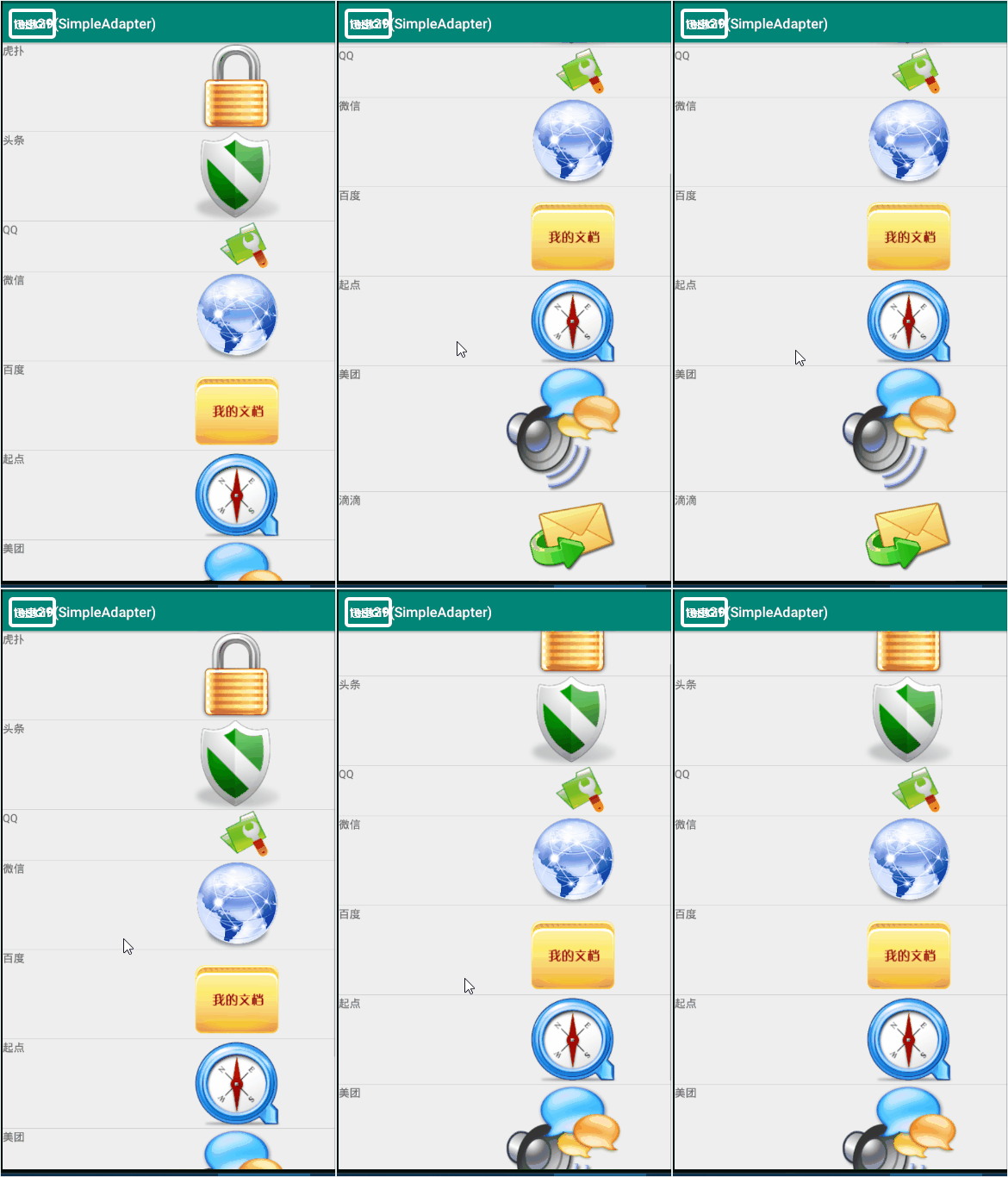
5.效果图
Android 简单适配器(SimpleAdapter)的更多相关文章
- Android简易实战教程--第十八话《ListView显示,简单的适配器SimpleAdapter》
本篇介绍Listview的显示,对于listview有许多的适配器,如ArrayAdapter,BaseAdapter,SimpleAdapter等等.本篇先热身一下,介绍最简单的SimpleAdap ...
- android 适配器simpleadapter和baseadapter区别
android 适配器 simpleadapter 和 baseadapter 设计网络程序或者数据处理显示程序的时候,常常会使用 simpleadapter 和baseadapter 来实现. ad ...
- Android 数据适配器
把复杂的数据(数组.链表.数据库.集合等)填充到指定的视图界面上. arrayAdapter(数组适配器): 用于绑定一些格式单一的数据,数据源:数据或者集合. private Li ...
- [置顶] Android常用适配器控件
Android常用适配器控件 列表控件用于显示数据集合,Android不是使用一种类型的控件管理显示和数据,而是将这两项功能分布用列表控件和适配器来实现.列表控件扩展了android.widget.A ...
- Android简单文件浏览器源代码 (转)
Android简单文件浏览器源代码 (转) activity_main .xml <LinearLayout xmlns:android="http://schemas.android ...
- Android进阶笔记10:Android 万能适配器
1. Android 万能适配器 项目中Listview GridView几乎是必用的组件,Android也提供一套机制,为这些控件绑定数据,那就是Adapter.用起来虽然还不错,但每次都 ...
- Android简单逐帧动画Frame的实现(二)
Android简单逐帧动画Frame的实现 Android简单逐帧动画Frame的实现 1.逐帧动画 即是通过播放预先排序好的图片来实现动态的画面,感觉像是放电影. 2.实现步骤: 1. 在工程里 ...
- Android进阶笔记09:Android 万能适配器
1. Android 万能适配器 项目中Listview GridView几乎是必用的组件,Android也提供一套机制,为这些控件绑定数据,那就是Adapter.用起来虽然还不错,但每次都 ...
- Android中GridView的使用——使用自带的SimpleAdapter(简单适配器)
GridView一直是一个系统登录后以九宫格方式展现功能子模块的最佳选择,经过试验和网上资料的查阅,现把实现方式总结一下: 一直是通过自定义Adapter方式,在getView()方法中设置图片的显示 ...
随机推荐
- SESSION的知识
android模拟表单用到了httpclient,但是需要了解Jsessionid的相关知识 如下是从一篇博文摘抄来的 在web应用的开发中我们会经常看到这样的url:http://www.xxx.c ...
- js,javascript生成 UUID的四种方法
全局唯一标识符(GUID,Globally Unique Identifier)也称作 UUID(Universally Unique IDentifier) . GUID是一种由算法生成的二进制长度 ...
- 现代C++学习笔记之一入门篇:智能指针(C++ 11)
原始指针:通过new建立的*指针 智能指针:通过智能指针关键字(unique_ptr, shared_ptr ,weak_ptr)建立的指针 在现代 C++ 编程中,标准库包含智能指针,该指针用于确保 ...
- linux学习1----初涉linux
linux因其稳定高效的特点,受到很多开发者的青睐,因此将其作为服务器的操作系统. 作为一名开发者,程序员,掌握了一定的linux知识和技巧,程序的开发部署和运行也有不小的帮助. linux由于其开源 ...
- [原创]java:Stream、Socket等源码分析
一.对于java启动之后的线程的说明 java在启动后会有几个特殊线程: 1.main线程,主线程 2.JVM线程,虚拟机的线程 3.GC垃圾回收线程,是个守护线程 4.EDT&Toolkit ...
- hibernate的获取session的两方法比较,和通过id获取对象的比较,一级缓存二级缓存
opensession与currentsession的联系与区别 在同一个线程中opensession的session是不一样的,而currentsession获取的session是一样的,这就保证了 ...
- 【C#】CLR内存那点事(初级)
最近回头看了一下书,对内存的理解又有新的认识.我所关注的内存里面说没有寄存器的,所以我关注的只有 托管堆(heap),栈(stack), 字符串常量池(string是一个很特殊的对象) 首先我们看两个 ...
- 【学习】CodeUi
关于这个,博客园里有很多初级的教程,我是看这篇: http://www.cnblogs.com/luminji/archive/2010/11/18/1880452.html 初学的可以跟着这个做一边 ...
- .Net高级面试宝典
1.in/exists/join 执行效率? 答:用法 select * from HK_UsersBasic where Users_ID in (select AccEmail from dbo ...
- IT学习资源
介绍个人微信公众平台:Web开发笔记 含有免费学习资源,个人学习笔记,技术文章分享 资源篇 1.webapp书城开发 链接: https://pan.baidu.com/s/1pMHGKrh 密码: ...