
Android API Level在11前后及16之后时Notification的不同用法
作为刚入门Android的小白,最近在按照郭大神的《第一行代码》在练习,在用到Notification时遇到了一些问题,网上资料比较零散,我这里做了一个总结分析给各位,若有错误,恳请指正~
Notification是一种具有全局效果的通知,程序一般通过NotificationManager服务来发送Notification。
Notification支持文字内容显示、震动、三色灯、铃声等多种提示形式,在默认情况下,Notification仅显示消息标题、消息内容、送达时间这3项内容。
以下就是通知的基本布局:
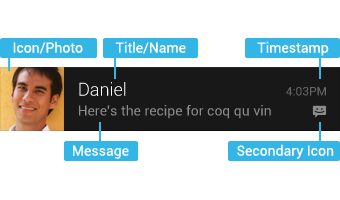
不同API level的区别主要是Notification的构造方法、得到实例的方法,这里顺便总结一下Notification的用法,按照步骤分别给出不同API level下的做法:
1、获取Notification管理器
NotificationManager noteManager = (NotificationManager)getSystemService(NOTIFICATION_SERVICE);
获取管理器的方式都一样,没有改变。
2、新建一个Notification,设置状态栏显示样式
这里只列举了最简单的样式设置,具体的大家可以参考API文档。
// API Level < 11 (Android 3.0)

Notification notification = new Notification(

		   R.mipmap.ic_launcher, "This is ticker text",

		   System.currentTimeMillis());
API<11时,可以直接用Notification的构造方法新建一个Notification,十分方便。
ps:我用的IDE是AndroidStudio,所以icon的id是R.mipmap.***。
// API Level >= 11 (Android 3.0) && API Level < 16 (Android 4.1)

Notification.Builder builder = new Notification.Builder(this)

                     .setSmallIcon(R.mipmap.ic_launcher)

                     .setTicker("This is ticker text")

                     .setWhen(System.currentTimeMillis());

Notification note = builder.getNotification(); // 调用getNotification()来生成Notification
API>11后,就要用Notification.Builder()来代替了,官方API是这样说的:
Notification(int icon, CharSequence tickerText, long when)
Notification.Builder instead.NotificationCompat.Builder, available in the Android Support library.//API Level >= 4 (Android 1.6) && API Level < 16 (Android 4.1)
NotificationCompat.Builder builder = new NotificationCompat.Builder(this)
.setSmallIcon(R.mipmap.ic_launcher)
.setTicker("This is ticker text")
.setWhen(System.currentTimeMillis());
Notification note =builder.getNotification(); //调用builder.getNotification()来生成Notification
因此推荐用NotificationCompat.Builder这种方式。
注意到我在注释里写的 "&& API Level < 16 (Android 4.1)" 了吗?这是因为在Google官方API文档上是这么说的:
public Notification getNotification () Added in API level 11
This method was deprecated in API level .
Use build() instead
因此,当API>=16即Android4.1之后,就要用build()来代替了,使用方法一样,在此就不赘述了。
3、设置Notification的触发事件
点击Notification后,一般都是触发一个新的Activity:
Intent intent = new Intent(this, AnotherActivity.class);

PendingIntent pi = PendingIntent.getActivity(this, 0, intent,

                  PendingIntent.FLAG_CANCEL_CURRENT);
这里不同API版本都一样。
4、设置Notification在通知栏里的样式
// API Level < 11 (Android 3.0)

note.setLatestEventInfo(this, "This is content title", "This is content text", pi);
API<11时,调用的是Notification类的setLatestEventInfo方法。
// API Level >= 11 (Android 3.0)

builder.setContentIntent(pi)

                 .setContentTitle("This is content title")

                 .setContentText("This is content text");
而当API>=11时,设置通知栏中的样式是调用Builder的setContentIntent方法,设置好之后在调用build()方法生成Notification实例。
类似的,NotificationCompat.Builder也是调用同样的方法,这里就不赘述了。
5、发布该Notification
第一个参数为该notification的ID
noteManager.notify(1, note);
总结一下:
低版本(API低于11、16)中的部分方法已经被弃用:
(1)Notification.Builder(this).getNotification()
(2)mNotification.setLatestEventInfo(this, "title", "content", null);
建议开发过程中尽量使用NotificationCompat.Builder(this)的构建方法去创建一个通知类。
Android API Level在11前后及16之后时Notification的不同用法的更多相关文章
- Call requires API level 21(Current min is 16)
Call requires API level 21(Current min is 16) Android开发中,遇到类似这种问题,如何处理? 一种办法是提升sdk最低版本到21,在Android s ...
- Android api level对照表
转自:blog.csdn.net/lihenair/article/details/49869299 Platform Version API Level VERSION_CODE Notes And ...
- Android API level 版本对应关系
详情地址:http://developer.android.com/guide/topics/manifest/uses-sdk-element.html Platform Version API L ...
- Android API level 与version对应关系
https://www.cnblogs.com/jinglecode/p/7753107.html Platform Version API Level VERSION_CODE 中文名称 Andro ...
- android api level对应表(copy)
Platform Version API Level VERSION_CODE Notes Android 4.4 19 KITKAT Platform Highlights Android 4.3 ...
- Android API Level与sdk版本对照表
API等级1: Android 1.0 API等级2: Android 1.1 Petit Four 花式小蛋糕 API等级3: Android 1.5 Cupcake 纸杯蛋糕 API等级4: An ...
- Android API Guides 学习笔记---Application Fundamentals(一)
今天开始学习google官网上的API guides ,主要读了Application Fundamentals这一章节,此章节介绍了一个App的基本组成,共包括四大部分内容. 1. App ...
- Android Call requires API level 11 (current min is 8)的解决方案
[错误描述] 在用Eclipse开发过程中,为了兼容Android2.2和4.0以上版本,我在使用Notification类时做了2个版本的代码,代码根据系统版本不同执行相应模块,结果,等我输完代码, ...
- Android版本和API Level对应关系
http://developer.android.com/guide/topics/manifest/uses-sdk-element.html Platform Version API ...
随机推荐
- Hive 4、Hive 的安装配置(远端MyMql模式)
1.remote一体 这种存储方式需要在远端服务器运行一个mysql服务器,并且需要在Hive服务器启动meta服务.这里用mysql的测试服务器,ip位192.168.1.214,新建hive_re ...
- 自制证书搭建https服务
第一步,自制CA证书和Server证书,私钥 自制CA私钥 openssl genrsa -des3 -out ca.key 4096 自制CA证书 openssl req -new -x509 -d ...
- 设置ListView的item多选
一,首先定义一个类来关联Adapter和Activity能够记住点击的位置 public class MyViewHoler{ public CheckBox cb; public TextView ...
- hdu 4521 线段树改点求点的应用
小明系列问题——小明序列 Time Limit: 3000/1000 MS (Java/Others) Memory Limit: 65535/32768 K (Java/Others) Tot ...
- Asp.Net(C#) MD5 加密
/// <summary> /// MD5 字符串加密 /// </summary> /// <param name="str">需要加密的字 ...
- ARC、MRC混编
Xcode5之后,新建iOS工程,默认都是ARC模式,但是有时候我们的项目中需要用到一些第三方框架,我们下载下来却发现是非ARC的,这时候我们需要进行ARC和MRC混编. 第一种方式: Edit-&g ...
- 一个Socket连接管理池(心跳机制)
一个Socket连接管理池(心跳机制) http://cuisuqiang.iteye.com/blog/1489661
- C++<algorithm>中sort的比较函数写法(转)
转自:http://www.wl566.com/biancheng/98907.html C++<algorithm>中sort的比较函数写法,有需要的朋友可以参考下. 定义排序函数: 方 ...
- 代码编辑器的最终选择Sublime Text 2
对于程序员,不是每一种语言都有很好的代码编辑器,VS这样的编辑环境+编译器也不能适合所有的语言,同时VS占用内存量很大,开几个VS,计算机就开始有点吃不消了.所以简便的代码编辑器很重要. 再Windo ...
- [iOS]リソースファイルの取得方法
リソースファイルのパスを取得するためには下記のように実装する. -------------------------------------------------------------------- ...