
Android API Level在11前后及16之后时Notification的不同用法
作为刚入门Android的小白,最近在按照郭大神的《第一行代码》在练习,在用到Notification时遇到了一些问题,网上资料比较零散,我这里做了一个总结分析给各位,若有错误,恳请指正~
Notification是一种具有全局效果的通知,程序一般通过NotificationManager服务来发送Notification。
Notification支持文字内容显示、震动、三色灯、铃声等多种提示形式,在默认情况下,Notification仅显示消息标题、消息内容、送达时间这3项内容。
以下就是通知的基本布局:
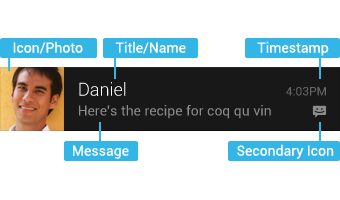
不同API level的区别主要是Notification的构造方法、得到实例的方法,这里顺便总结一下Notification的用法,按照步骤分别给出不同API level下的做法:
1、获取Notification管理器
NotificationManager noteManager = (NotificationManager)getSystemService(NOTIFICATION_SERVICE);
获取管理器的方式都一样,没有改变。
2、新建一个Notification,设置状态栏显示样式
这里只列举了最简单的样式设置,具体的大家可以参考API文档。
// API Level < 11 (Android 3.0)

Notification notification = new Notification(

		   R.mipmap.ic_launcher, "This is ticker text",

		   System.currentTimeMillis());
API<11时,可以直接用Notification的构造方法新建一个Notification,十分方便。
ps:我用的IDE是AndroidStudio,所以icon的id是R.mipmap.***。
// API Level >= 11 (Android 3.0) && API Level < 16 (Android 4.1)

Notification.Builder builder = new Notification.Builder(this)

                     .setSmallIcon(R.mipmap.ic_launcher)

                     .setTicker("This is ticker text")

                     .setWhen(System.currentTimeMillis());

Notification note = builder.getNotification(); // 调用getNotification()来生成Notification
API>11后,就要用Notification.Builder()来代替了,官方API是这样说的:
Notification(int icon, CharSequence tickerText, long when)
Notification.Builder instead.NotificationCompat.Builder, available in the Android Support library.//API Level >= 4 (Android 1.6) && API Level < 16 (Android 4.1)
NotificationCompat.Builder builder = new NotificationCompat.Builder(this)
.setSmallIcon(R.mipmap.ic_launcher)
.setTicker("This is ticker text")
.setWhen(System.currentTimeMillis());
Notification note =builder.getNotification(); //调用builder.getNotification()来生成Notification
因此推荐用NotificationCompat.Builder这种方式。
注意到我在注释里写的 "&& API Level < 16 (Android 4.1)" 了吗?这是因为在Google官方API文档上是这么说的:
public Notification getNotification () Added in API level 11
This method was deprecated in API level .
Use build() instead
因此,当API>=16即Android4.1之后,就要用build()来代替了,使用方法一样,在此就不赘述了。
3、设置Notification的触发事件
点击Notification后,一般都是触发一个新的Activity:
Intent intent = new Intent(this, AnotherActivity.class);

PendingIntent pi = PendingIntent.getActivity(this, 0, intent,

                  PendingIntent.FLAG_CANCEL_CURRENT);
这里不同API版本都一样。
4、设置Notification在通知栏里的样式
// API Level < 11 (Android 3.0)

note.setLatestEventInfo(this, "This is content title", "This is content text", pi);
API<11时,调用的是Notification类的setLatestEventInfo方法。
// API Level >= 11 (Android 3.0)

builder.setContentIntent(pi)

                 .setContentTitle("This is content title")

                 .setContentText("This is content text");
而当API>=11时,设置通知栏中的样式是调用Builder的setContentIntent方法,设置好之后在调用build()方法生成Notification实例。
类似的,NotificationCompat.Builder也是调用同样的方法,这里就不赘述了。
5、发布该Notification
第一个参数为该notification的ID
noteManager.notify(1, note);
总结一下:
低版本(API低于11、16)中的部分方法已经被弃用:
(1)Notification.Builder(this).getNotification()
(2)mNotification.setLatestEventInfo(this, "title", "content", null);
建议开发过程中尽量使用NotificationCompat.Builder(this)的构建方法去创建一个通知类。
Android API Level在11前后及16之后时Notification的不同用法的更多相关文章
- Call requires API level 21(Current min is 16)
Call requires API level 21(Current min is 16) Android开发中,遇到类似这种问题,如何处理? 一种办法是提升sdk最低版本到21,在Android s ...
- Android api level对照表
转自:blog.csdn.net/lihenair/article/details/49869299 Platform Version API Level VERSION_CODE Notes And ...
- Android API level 版本对应关系
详情地址:http://developer.android.com/guide/topics/manifest/uses-sdk-element.html Platform Version API L ...
- Android API level 与version对应关系
https://www.cnblogs.com/jinglecode/p/7753107.html Platform Version API Level VERSION_CODE 中文名称 Andro ...
- android api level对应表(copy)
Platform Version API Level VERSION_CODE Notes Android 4.4 19 KITKAT Platform Highlights Android 4.3 ...
- Android API Level与sdk版本对照表
API等级1: Android 1.0 API等级2: Android 1.1 Petit Four 花式小蛋糕 API等级3: Android 1.5 Cupcake 纸杯蛋糕 API等级4: An ...
- Android API Guides 学习笔记---Application Fundamentals(一)
今天开始学习google官网上的API guides ,主要读了Application Fundamentals这一章节,此章节介绍了一个App的基本组成,共包括四大部分内容. 1. App ...
- Android Call requires API level 11 (current min is 8)的解决方案
[错误描述] 在用Eclipse开发过程中,为了兼容Android2.2和4.0以上版本,我在使用Notification类时做了2个版本的代码,代码根据系统版本不同执行相应模块,结果,等我输完代码, ...
- Android版本和API Level对应关系
http://developer.android.com/guide/topics/manifest/uses-sdk-element.html Platform Version API ...
随机推荐
- 24点游戏&&速算24点(dfs)
24点游戏 Time Limit: 3000/1000MS (Java/Others) Memory Limit: 65535/65535KB (Java/Others) Submit Sta ...
- 聚类算法初探(六)OPTICS
最近由于工作需要,对聚类算法做了一些相关的调研.现将搜集到的资料和自己对算法的一些理解整理如下,供大家参考. 另外在算法代码方面,我也做了一些实现(包括串行和并行),欢迎感兴趣的朋友探讨和交流. 第一 ...
- RAID技术
RAID:其基本思想就是把多个相对便宜的硬盘组合起来,成为一个硬盘阵列组,使性能达到甚至超过一个价格昂贵.容量巨大的硬盘.所以称为廉价磁盘冗余数组 RAID级别: RAID 0亦称为带区集.它是将多个 ...
- 【矩阵乘法经典应用】【ZOJ3497】【Mistwa】
题意:给定一个有向图(最多25个节点,每个节点的出度最多为4),给定起点和终点,然后从起点开始走,走到终点就停止,否则一直往下走,问能不能P步到达终点.也就是说从起点出发,走一条长度为P的路径,路径中 ...
- RSA不对称加密,公钥加密私钥解密,私钥加密公钥解密
RSA算法是第一个能同时用于加密和数字签名的算法,也易于理解和操作. RSA是被研究得最广泛的公钥算法,从提出到现在已近二十年,经历了各种攻击的考验,逐渐为人们接受,普遍认为是目前最优秀的公钥方案之一 ...
- .NET程序性能优化基本要领
想了解更多关于新的编译器的信息,可以访问 .NET Compiler Platform ("Roslyn") 基本要领 在对.NET 进行性能调优以及开发具有良好响应性的应 ...
- SVG彩虹字
<!DOCTYPE html><html lang="en"><head> <meta charset="UTF-8" ...
- Type.GetType()在跨程序集反射时返回null的解决方法
在开发中,经常会遇到这种情况,在程序集A.dll中需要反射程序集B.dll中的类型.如果使用稍有不慎,就会产生运行时错误.例如使用Type.GetType("BNameSpace.Class ...
- QT-Creator C/C++ 打地鼠小游戏
废话少说先上图: 这个游戏纯属土鳖思路,没有用到什么游戏引擎. 1.使用按钮或QLabel铺满窗口. 2.通过简单算法随机动态的设置按钮矩阵中某个按钮的背景图像. 3.同步2过程反复设置多个按钮背景实 ...
- SQL Server 创建作业系列问题
一.从IClassFactory为CLSID为{AA40D1D6-CAEF-4A56-B9BB-D0D3DC976BA2}的COM组件创建实例失败. 尊重原著作:本文转载自http://www.hao ...