
Oracle11g客户端for centos 5.5安装文档
前提:安装centos的时候,最好把系统的所有的安装包都安装上。以下命令需手动输入,不要复制粘贴。
1.以root用户登录centos5.5的操作系统;创建oracle用户组和用户。
groupadd oinstall
useradd –g oinstall –s /bin/bash –d /opt/oracle oracle
passwd oracle
2.以root用户登录系统,修改系统内核参数,添加以下内容:
vi /etc/sysctl.conf
fs.file-max = 6815744
fs.aio-max-nr = 1048576
kernel.shmall = 2097152
kernel.shmmax = 2147483648
kernel.shmmni = 4096
kernel.sem = 250 32000 100 128
net.ipv4.ip_local_port_range = 9000 65500
net.core.rmem_default = 4194304
net.core.rmem_max = 4194304
net.core.wmem_default = 262144
net.core.wmem_max = 1048576
3.要使 /etc/sysctl.conf 更改立即生效,执行以下命令。 输入:sysctl -p
4.编辑/etc/security/limits.conf,添加以下内容:
vi /etc/security/limits.conf
oracle soft nproc 2047
oracle hard nproc 16384
oracle soft nofile 1024
oracle hard nofile 65536
5.编辑/etc/pam.d/login,添加以下内容:
vi /etc/pam.d/login
session required pam_limits.so
6.编辑系统环境配置文件/etc/profile,在最后添加如下内容:
if [ $USER = "oracle" ]; then

    if [ $SHELL = "/bin/ksh" ]; then

           ulimit -p

               ulimit -n

    else

            ulimit -u  -n

    fi

fi
编辑完成后,执行source profile,使其生效。
7.编辑/etc/csh.login,在最后添加如下内容:
if ( $USER == "oracle") then

    limit maxproc

    limit descriptors

endif
8.以orcale用户登录系统,编辑/opt/oracle/.bash_profile,在最后添加如下内容,使用 source /opt/oracle/.bash_profile使之生效。
umask

export  ORACLE_BASE=/opt/oracle

export  ORACLE_HOME=$ORACLE_HOME/app/product/11.2.

export  ORACLE_SID=orcl

export  PATH=$PATH:$HOME/bin:$ORACLE_HOME/bin
注:这里的ORACLE_SID的值,是需要用到的数据库的SID。
9.以oracle用户登录系统,将oracle11g客户端的包上传到/opt目录下解压;修改解压后包的文件权限。
unzip linux_11gR2_client.zip

chmod –R  client
10.进入安装目录,执行./runInstall;
cd client
./ runInstall
启动图形化界面,点击下一步;
11.语言默认的English,下一步;
12.选择”Administrator(1.38GB)”安装类型,点击下一步;
13.设置Oracle base目录和Oracle home目录,点击下一步;
14.安装程序自动读取oracle用户环境变量中设置的目录和用户组;
选择目录/opt/oracle/ oraInventory目录,用户组默认为oinstall,点击下一步
15.校验安装oracle的安装环境发现内核缺少部分参数,系统缺少某些安装包,如果缺少,请安装。
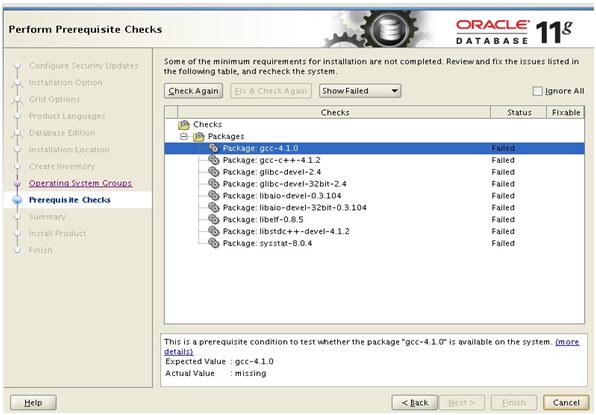
16.安装完成后,再次检查是否存在失败的情况,若无,执行下一步;
17.系统开始安装,到最后的时候,系统会先提示你需要用root权限执行2个shell脚本:
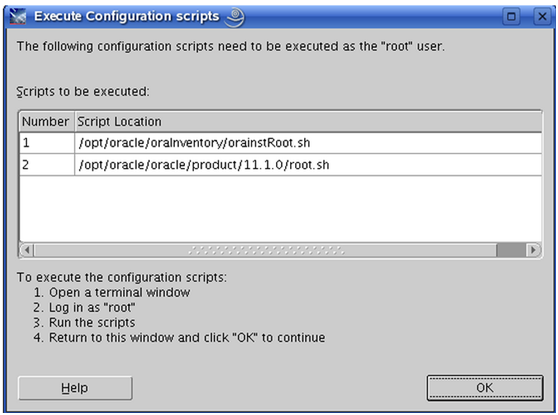
打开终端,切换到root用户,根据路径执行两个脚本;如下所示:
# /opt/oracle/oraInventory/orainstRoot.sh
Changing permissions of /opt/oracle/oraInventory to 770.
Changing groupname of /opt/oracle/oraInventory to dba.
The execution of the script is complete
# /opt/oracle/oracle/product/11.1.0/root.sh
Running Oracle 11g root.sh script...
The following environment variables are set as:
ORACLE_OWNER=oracle
ORACLE_HOME=/opt/oracle/oracle/product/11.1.0
Enter the full pathname of the local bin directory: [/usr/local/bin]: [直接回车即可]
Copying dbhome to /usr/local/bin ...
Copying oraenv to /usr/local/bin ...
Copying coraenv to /usr/local/bin ...
Creating /etc/oratab file...
Entries will be added to the /etc/oratab file as needed by Database Configuration Assistant when a database is created Finished running generic part of root.sh script. Now product-specific root actions will be performed.
18.点击finsh,完成安装。
19.重新打开一个新的终端,使用netca命令配置监听和本地的net服务.
20.本地net服务配置完成之后,用sqlplus连接测试是否成功。
2015-01-20 13:11:28
Oracle11g客户端for centos 5.5安装文档的更多相关文章
- SAP_ECC6_EHP7_IDES安装文档ORACLE11G+WINDOWS2012 R2 问题总结
SAP_ECC6_EHP7_IDES安装文档ORACLE11G+WINDOWS2012 R2 问题总结 1.注意密码不能带@等特殊符号,否则会报如下错误,因为ORACLE数据是不容许密码带@的.@是一 ...
- win10操作系统下oracle11g客户端/服务端的下载安装配置卸载总结
win10操作系统下oracle11g客户端/服务端的下载安装配置卸载总结 一:前提 注意:现在有两种安装的方式 1. oracle11g服务端(64位)+oracle客户端(32位)+plsql(3 ...
- zabbix 4.04 安装文档 - 基于CentOS 7.6
1 安装前准备: 1.1 安装JDK 卸载openjdk # rpm -qa | grep java # yum remove java-1.8.0-openjdk # yum remove ...
- Apache Hadoop 集群安装文档
简介: Apache Hadoop 集群安装文档 软件:jdk-8u111-linux-x64.rpm.hadoop-2.8.0.tar.gz http://www.apache.org/dyn/cl ...
- ORACLE LINUX 6.3 + ORACLE 11.2.0.3 RAC + VBOX安装文档
ORACLE LINUX 6.3 + ORACLE 11.2.0.3 RAC + VBOX安装文档 2015-10-21 12:51 525人阅读 评论(0) 收藏 举报 分类: Oracle RA ...
- _00024 尼娜抹微笑伊拉克_云计算ClouderaManager以及CHD5.1.0群集部署安装文档V1.0
笔者博文:妳那伊抹微笑 itdog8 地址链接 : http://www.itdog8.com(个人链接) 博客地址:http://blog.csdn.net/u012185296 博文标题:_000 ...
- HAProxy安装文档
HAProxy安装文档 [toc][TOC] 一.环境说明 系统环境:CentOS Linux release 7.2.1511 (Core) 系统内核:3.10.0-327.el7.x86_64 软 ...
- ELK Stack 5.2.2 安装文档
简介: ELK Stack 安装文档,这次都使用最新版本(5.2.2).RPM 包的方式搭建 ELK Stack. 下载地址: https://artifacts.elastic.co/downloa ...
- [转载]linux+nginx+python+mysql安装文档
原文地址:linux+nginx+python+mysql安装文档作者:oracletom # 开发包(如果centos没有安装数据库服务,那么要安装下面的mysql开发包) MySQL-devel- ...
随机推荐
- GitCam一款Gif动画制作软件
本篇文章由:http://www.sollyu.com/gitcam-a-gif-animation-software/ 说明 GifCam是一款小巧.免费的录制电脑屏幕并制作成GIF动画的软件,具有 ...
- Mac OS 安装 Port
简介 MacPorts类似与apt-get以及yum等软件包管理工具,可以方便的进行安装与卸载软件的功能,同时可以自动安装软件包的依赖,非常方便,同类的还有brew等工具. 安装 下载MacPorts ...
- 尝试设计LFSR加密器,并用CAP4验证随机性
在CPA4软件中有提供设计LFSR加密器的功能: 输入LFSR的大小,初始密钥,还有反馈密钥. 点击Set Key后点击Show LFSR 观察LFSR,发现初始密钥是1101,转成十六进制是D,反馈 ...
- ASP.NET获取上传图片的大小
1.采用客户端javascript可以取得图片大小 <input id="FileUpload" type="file" size="30&qu ...
- ezSQL 数据库操作类
http://justinvincent.com 官网,一切尽在里面的下载帮助文件中,妙哉也!! ez_sql_core.php <?php /************************* ...
- 获取DOM的真实节点
<script type="text/babel"> var Myelement=React.createClass({ handleClick:function(){ ...
- js 中对象的特性
用Object.definedproperties 一次性添加或修改多个属性的特性和值. <script> var obj ={} Object.defineProperties(obj, ...
- [简历] PHP 技能关键字列表
本技能关键字列表是从最近招聘PHP的数百份JD中统计出来的,括号中是出现的词频.如果你的简历要投递给有机器(简历分选系统)和不如机器(不懂技术的HR)筛选简历环节的地方,请一定从下边高频关键词中选择5 ...
- HDU 1394 Minimum Inversion Number 线段树
题目: http://acm.hdu.edu.cn/showproblem.php?pid=1394 没看到多组输入,WA了一万次...... 其实很简单,有人暴力过得,我感觉归并排序.二叉排序树求逆 ...
- LightOj_1317 Throwing Balls into the Baskets
题目链接 题意: 有N个人, M个篮框, 每个人投进球的概率是P. 问每个人投K次后, 进球数的期望. 思路: 每个人都是相互独立的, 求出一个人进球数的期望即可. 进球数和篮框的选择貌似没有什么关系 ...