
Java + maven + httpclient + testng + poi实现接口自动化
一、maven中引入httpclient、testng、poi依赖包


<project xmlns="http://maven.apache.org/POM/4.0.0" xmlns:xsi="http://www.w3.org/2001/XMLSchema-instance"

  xsi:schemaLocation="http://maven.apache.org/POM/4.0.0 http://maven.apache.org/xsd/maven-4.0.0.xsd">

  <modelVersion>4.0.0</modelVersion>

  <groupId>com.lemon</groupId>

  <artifactId>interfaceDemo</artifactId>

  <version>0.0.1-SNAPSHOT</version>

  <packaging>jar</packaging>

  <name>interfaceDemo</name>

  <url>http://maven.apache.org</url>

  <properties>

    <project.build.sourceEncoding>UTF-8</project.build.sourceEncoding>

  </properties>

  <dependencies>

    <dependency>

      <groupId>junit</groupId>

      <artifactId>junit</artifactId>

      <version>3.8.1</version>

      <scope>test</scope>

    </dependency>

    <dependency>

      <groupId>org.apache.httpcomponents</groupId>

      <artifactId>httpclient</artifactId>

      <version>4.5.2</version>

    </dependency>

    <dependency>

            <groupId>org.testng</groupId>

         <artifactId>testng</artifactId>

             <version>6.8.8</version>

         <scope>test</scope>

    </dependency>

    <dependency>

        <groupId>org.apache.poi</groupId>

        <artifactId>poi-ooxml</artifactId>

        <version>3.15</version>

    </dependency>

  </dependencies>

</project>
二、准备测试数据

三、poi读取Excel文件
package com.lemon;

import java.io.File;

import org.apache.poi.ss.usermodel.Cell;

import org.apache.poi.ss.usermodel.CellType;

import org.apache.poi.ss.usermodel.Row;

import org.apache.poi.ss.usermodel.Row.MissingCellPolicy;

import org.apache.poi.ss.usermodel.Sheet;

import org.apache.poi.ss.usermodel.Workbook;

import org.apache.poi.ss.usermodel.WorkbookFactory;

public class ExcelUtil {

    public static Object[][] read(int startRow,int endRow,int startCell,int endCell){

        Object [][] datas = new Object [endRow-startRow+1][endCell-startCell+1];

        try {

            //获取WorkBook对象

            Workbook workbook = WorkbookFactory.create(new File("src/test/java/test.xlsx"));

            //获取sheet,0表示第一个

            Sheet sheet = workbook.getSheetAt(0);

            for(int i = startRow; i <= endRow;i++){

                //取出每一行

                Row row = sheet.getRow(i-1);

                for (int j = startRow; j <= endCell;j++){

                    //取出每一列,先指定不会返回空对象,防止单元格为空时,报空指针异常

                    Cell cell = row.getCell(j-1,MissingCellPolicy.CREATE_NULL_AS_BLANK);

                    //把每列当字符串处理,并取出字符串的值

                    cell.setCellType(CellType.STRING);

                    String value = cell.getStringCellValue();

                    datas[i-startRow][j-startCell] = value;

                }

            }

        } catch (Exception e) {

            e.printStackTrace();

        }

        return datas;

    }

    //测试

    public static void main(String[] args) throws Exception {

        Object[][] datas = read(2, 7, 2, 5);

        for(Object[] objects:datas){

            for(Object object:objects){

                System.out.print("【"+object+"】");

            }

            System.out.println();

        }

    }

}
四、编写接口自动化脚本
package com.lemon;

import java.io.UnsupportedEncodingException;

import java.util.*;

import java.util.regex.Matcher;

import java.util.regex.Pattern;

import org.apache.http.client.entity.UrlEncodedFormEntity;

import org.apache.http.client.methods.CloseableHttpResponse;

import org.apache.http.client.methods.HttpGet;

import org.apache.http.client.methods.HttpPost;

import org.apache.http.client.utils.URLEncodedUtils;

import org.apache.http.impl.client.CloseableHttpClient;

import org.apache.http.impl.client.HttpClients;

import org.apache.http.message.BasicNameValuePair;

import org.apache.http.util.EntityUtils;

import org.testng.Assert;

import org.testng.annotations.DataProvider;

import org.testng.annotations.Test;

public class Demo {

    @Test(dataProvider="datas")

    public static void test(String url,String mobileCode,String userID,String type,String response) throws Exception {

        System.out.println("url:"+url+",mobileCode:"+mobileCode+",userID:"+userID+",type:"+type);

        if("post".equalsIgnoreCase(type)){

            String resp = doPost(url,mobileCode,userID);

            Assert.assertEquals(resp, response);

        }else {

            String resp = doGet(url,mobileCode,userID);

            Assert.assertEquals(resp, response);

        }

    }

    @DataProvider

    public static Object [][] datas(){

        /* Object [][] datas = {

        {"http://ws.webxml.com.cn/WebServices/MobileCodeWS.asmx/getMobileCodeInfo","15578581","","post"},

        {"http://ws.webxml.com.cn/WebServices/MobileCodeWS.asmx/getMobileCodeInfo","18381485","","get"},

        {"http://ws.webxml.com.cn/WebServices/MobileCodeWS.asmx/getMobileCodeInfo","15084258","","post"}

        }; */

        Object[][] datas = ExcelUtil.read(2, 5, 2, 6);

        return datas;

    }

    /*

     * 实现get类型接口的调用

     */

    private static String doGet(String url,String mobileCode,String userID) throws Exception {

        //准备参数

        List<BasicNameValuePair> params = new ArrayList<BasicNameValuePair>();

        BasicNameValuePair mobile = new BasicNameValuePair("mobileCode",mobileCode);

        BasicNameValuePair ID = new BasicNameValuePair("userID",userID);

        params.add(mobile);

        params.add(ID);

        String paramsString = URLEncodedUtils.format(params, "UTF-8");

        url += "?" + paramsString;

        //创建get对象

        HttpGet get = new HttpGet(url);

        //创建Httpclient对象

        CloseableHttpClient httpclient = HttpClients.createDefault();

        //提交请求

        CloseableHttpResponse response = null;

        try {

            response = httpclient.execute(get);

            //获取状态码及响应数据

            int status = response.getStatusLine().getStatusCode();

            System.out.println("状态码为:" + status);

            String result = EntityUtils.toString(response.getEntity());

            System.out.println("响应数据为:" + result);

            //创建Pattern对象

            Pattern pat = Pattern.compile(">(.*)</");

            //创建matcher对象

            Matcher m = pat.matcher(result);

            if (m.find( )){

                return m.group(1);

            }

        } catch (Exception e) {

            e.printStackTrace();

        }finally {

            if (response != null) {

                response.close();

            }

            //相当于关闭浏览器

            httpclient.close();

        }

        return null;

    }

    /*

     * 实现post类型接口的调用

     */

    private static String doPost(String url,String mobileCode,String userID) throws Exception {

        //创建post对象

        HttpPost post = new HttpPost(url);

        //准备参数

        List<BasicNameValuePair> params = new ArrayList<BasicNameValuePair>();

        BasicNameValuePair mobile = new BasicNameValuePair("mobileCode",mobileCode);

        BasicNameValuePair ID = new BasicNameValuePair("userID",userID);

        params.add(mobile);

        params.add(ID);

        //将参数封装到请求体当中

        post.setEntity(new UrlEncodedFormEntity(params));

        //创建httpclient对象发送请求

        CloseableHttpClient httpclient = HttpClients.createDefault();

        CloseableHttpResponse response = null;

        try {

            response = httpclient.execute(post);

            //获取状态码及响应数据

            int status = response.getStatusLine().getStatusCode();

            System.out.println("状态码为:" + status);

            String result = EntityUtils.toString(response.getEntity());

            System.out.println("响应数据为:" + result);

            // 创建 Pattern对象

            Pattern pat = Pattern.compile(">(.*)</");

            // 现在创建 matcher对象

            Matcher m = pat.matcher(result);

            if (m.find( )) {

               return m.group(1);

            }

        } catch (UnsupportedEncodingException e) {

            e.printStackTrace();

        }finally {

            if (response != null) {

                response.close();

            }

            //相当于关闭浏览器

            httpclient.close();

        }

        return null;

    }

}
五、执行测试套
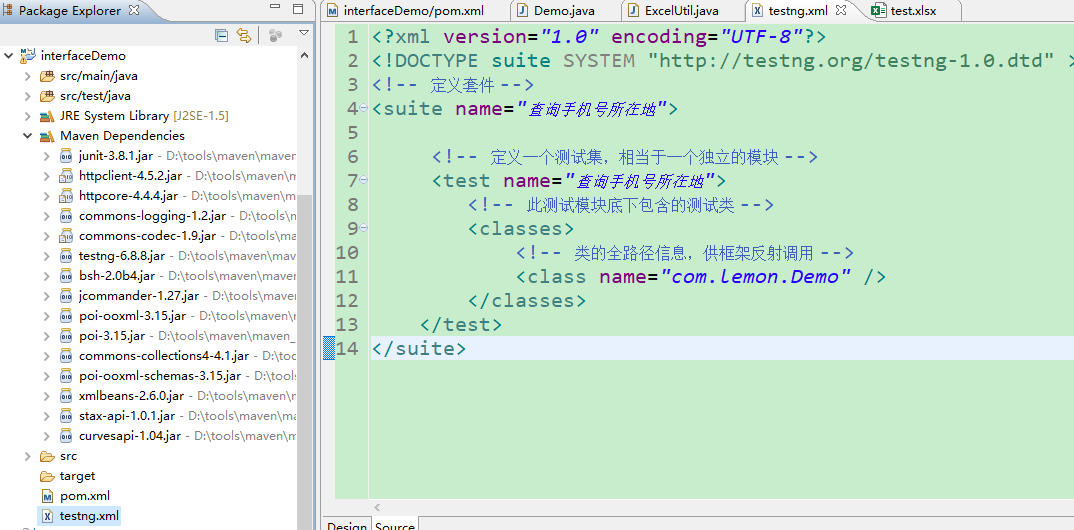
六:执行结果

Java + maven + httpclient + testng + poi实现接口自动化的更多相关文章
- 接口测试框架开发(三):maven+restAssured+Excel(jxl)+testng+extentreports的接口自动化
1.http://www.cnblogs.com/lin-123/p/7151031.html 2.http://www.cnblogs.com/lin-123/p/7151046.html 3.ht ...
- Java+maven+selenium3+testng 自动化测试环境IDEA
idea .java环境变量jdk maven安装及环境变量配置这里就不多说了,网上有很多教程 这里我们只检测一下java.maven环境是否安装成功 win+R,运行cmd命令行:mvn -v ...
- java maven项目testng执行时使用的是test-classes下的文件,共享main下方resource的配置
在pom.xml中配置 <build> <testResources> <testResource> <directory>${project.base ...
- 接口自动化:HttpClient + TestNG + Java(二) - 第一个接口测试:get请求
在上一篇中,我们搭建好了HttpClient + TestNG + Java的自动化接口测试环境,这一篇我们就赶紧开始编写我们的第一个接口测试用例. 本篇会对问题解决的思路进行更详尽的阐述. 2.1 ...
- 接口自动化:HttpClient + TestNG + Java(一) - 接口测试概述+自动化环境搭建
1.1 接口测试简介 1.1.1 什么是接口测试 开始学习接口自动化测试之前,我们先要来了解什么是接口,以及什么是接口测试. 我们都知道,测试从级别上划分可以分为 组件测试 集成测试 系统测试 验收测 ...
- 接口自动化框架(java)--5.通过testng.xml生成extentreport测试报告
这套框架的报告是自己封装的 由于之前已经通过Extentreport插件实现了Testng的IReport接口,所以在testng.xml中使用listener标签并指向实现IReport接口的那个类 ...
- Java接口自动化测试之HTTPClient学习(四)
pom.xml 文件中dependency <dependencies> <dependency> <groupId>org.testng</groupId ...
- 接口测试 java+httpclient+testng+excel
最近项目不忙,研究了下java实现接口自动化,借助testng+excel实现数据驱动 目前只用post方式测试,返回结果列没有通过列名去找 另外,请求参数是转义之后的,接口之间的依赖也是个问题,批量 ...
- 接口自动化框架(java)--1.项目概述
项目github地址: https://github.com/tianchiTester/API_AutoFramework 这套框架的报告是自己封装的 1.测试基类TestBase: 接口请求的te ...
随机推荐
- SharedPreferences源码分析
分析达成目标 了解基本实现 SharePreferences是否线程安全 SharePreferences的mode参数是什么 了解apply与commit的区别 导致ANR的原因 Android8. ...
- AtCoder Grand Contest 013D: Piling Up 题解
题意简化: [luogu] Piling Up 一开始有n个颜色为黑白的球,但不知道黑白色分别有多少,m次操作,每次先拿出一个球,再放入黑白球各一个,再拿出一个球,最后拿出的球按顺序排列会形成一个颜色 ...
- CSS动画之过渡模块
:hover伪类选择器可以用于所有的选择器(只有在悬停时,执行选择器的属性)CSS3中新增过渡模块:transition property(属性)duration(过渡效果花费的时间)timing-f ...
- uniapp微信小程序canvas隐藏
HTML 我是把canvas嵌套在view里并被view设置id <view id="canvas"> <canvas style="width: 35 ...
- Spark集群和任务执行
[前言:承接<Spark通识>篇] Spark集群组件 Spark是典型的Master/Slave架构,集群主要包括以下4个组件: Driver:Spark框架中的驱动器,运行用户编写Ap ...
- 重磅解读:K8s Cluster Autoscaler模块及对应华为云插件Deep Dive
摘要:本文将解密K8s Cluster Autoscaler模块的架构和代码的Deep Dive,及K8s Cluster Autoscaler 华为云插件. 背景信息 基于业务团队(Cloud BU ...
- CORS与Django
前言 在前后端分离项目中,如何解决跨域请求是一个必须要面对的问题.因为前端和后端的数据交互会被浏览器的同源策略所挟持,在很早之前我在博客园发了一篇文章,大概就说了一下如何简单粗暴的解决跨域. 其实那种 ...
- 《Machine Learning in Action》—— 剖析支持向量机,单手狂撕线性SVM
<Machine Learning in Action>-- 剖析支持向量机,单手狂撕线性SVM 前面在写NumPy文章的结尾处也有提到,本来是打算按照<机器学习实战 / Machi ...
- 1,认识web
主要记录黄勇的视频讲解.CSDN:https://blog.csdn.net/nunchakushuang/article/list/1? 他的文档大纲为: video3 拓展1:HTTP与HTTPS ...
- mysql中key和index的关系
原文链接:https://blog.csdn.net/top_code/article/details/50599840