
SpringCloud和SpringBoot对应的版本选型
SpringBoot版本选择:
官网地址:https://spring.io/projects/spring-boot
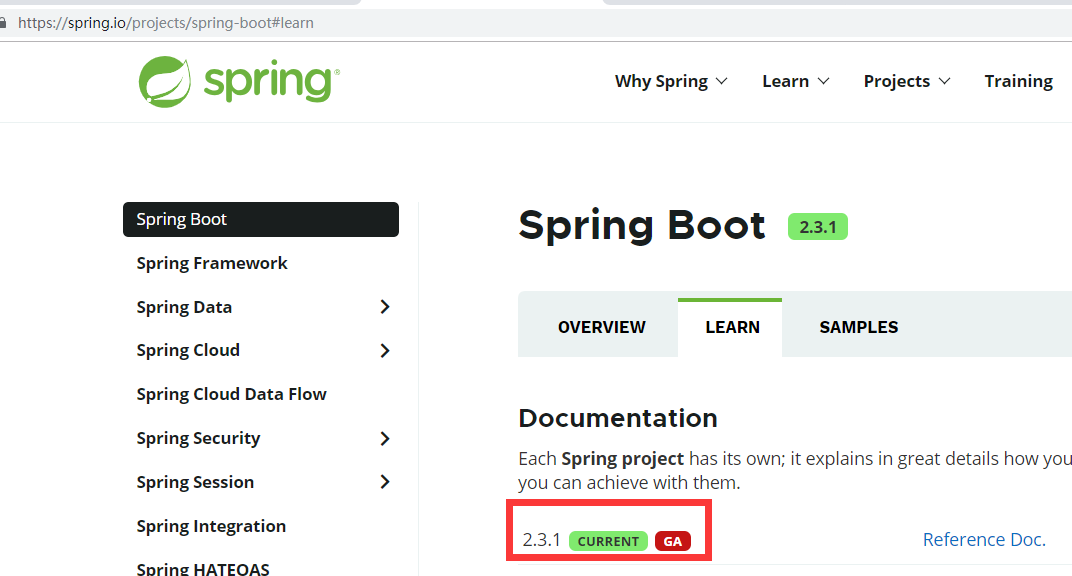
SpringBoot官方目前最新最稳定版:2.3.1,如果单独使用SpringBoot的话,建议就可以选择官方指定的最新最稳定版。
但是,如果需要和SpringCloud整合,就得看SpringCloud的版本需要适配SpringBoot的哪个版本了。
SpringCloud版本选择:
官网地址:https://spring.io/projects/spring-cloud
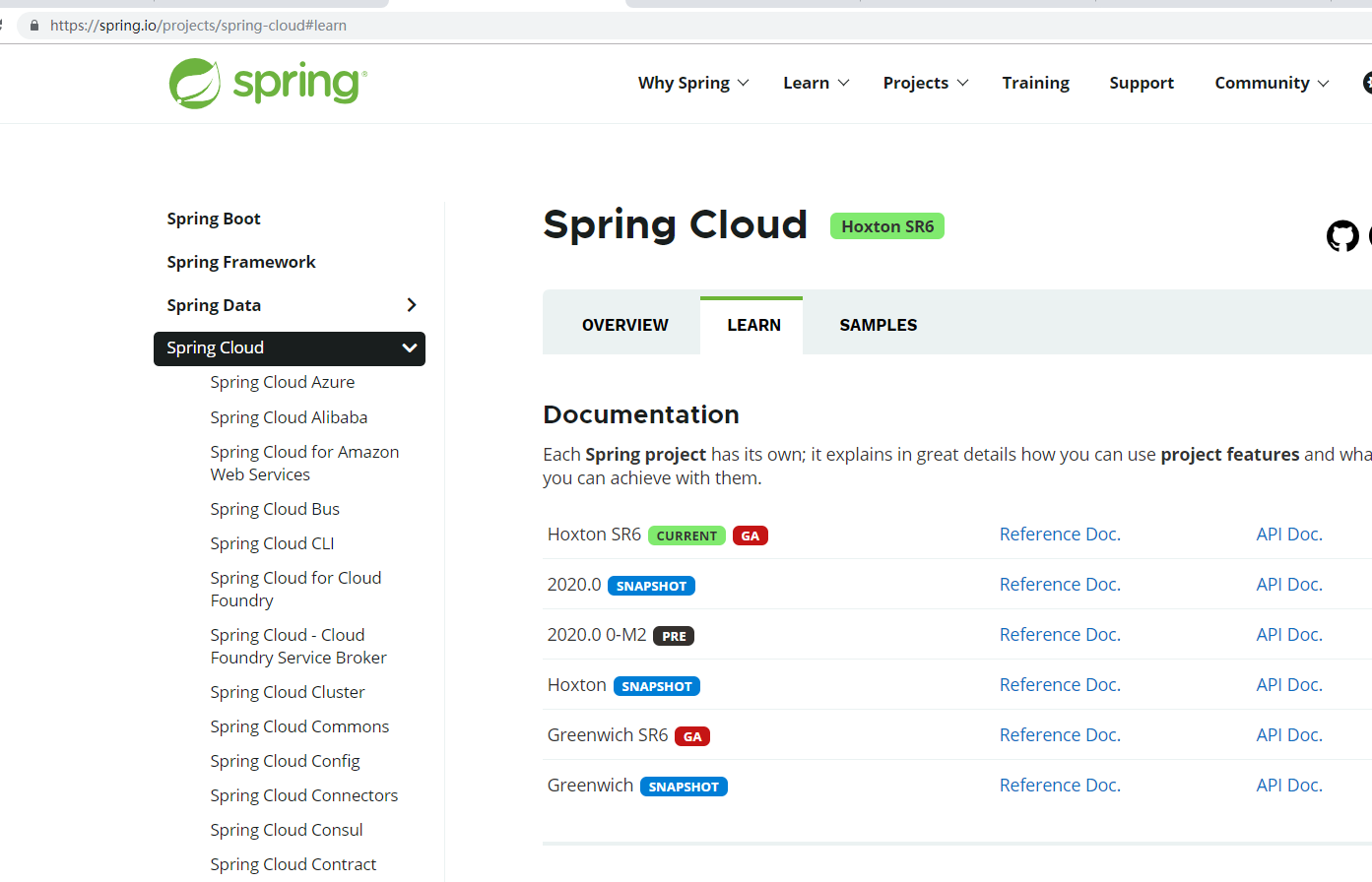
SpringCloud采用了 英国伦敦地铁站 的名称来命名,并由地铁站名称首字母 A-Z 一次类推的形式来发布迭代版本。例如 Angel 是第一个版本,Brixton 是第二个版本...,目前最新版本是Hoxton。
另外,当SpringCloud的发布内容积累到临界点或者一个重大BUG被解决后,会发布一个“service releases” 版本,简称 SRX 版本,比如当前的 Hoxton SR6,就是SpringCloud发布的Hoxton版本的第6个SRX版本。
一步到位选择SpringBoot版本的办法:https://spring.io/projects/spring-cloud#learn
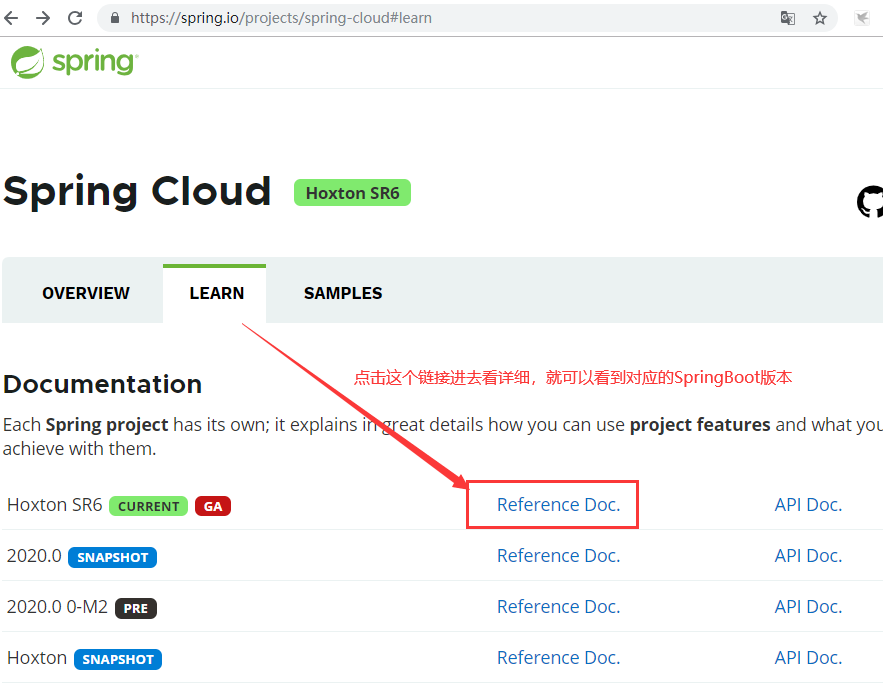
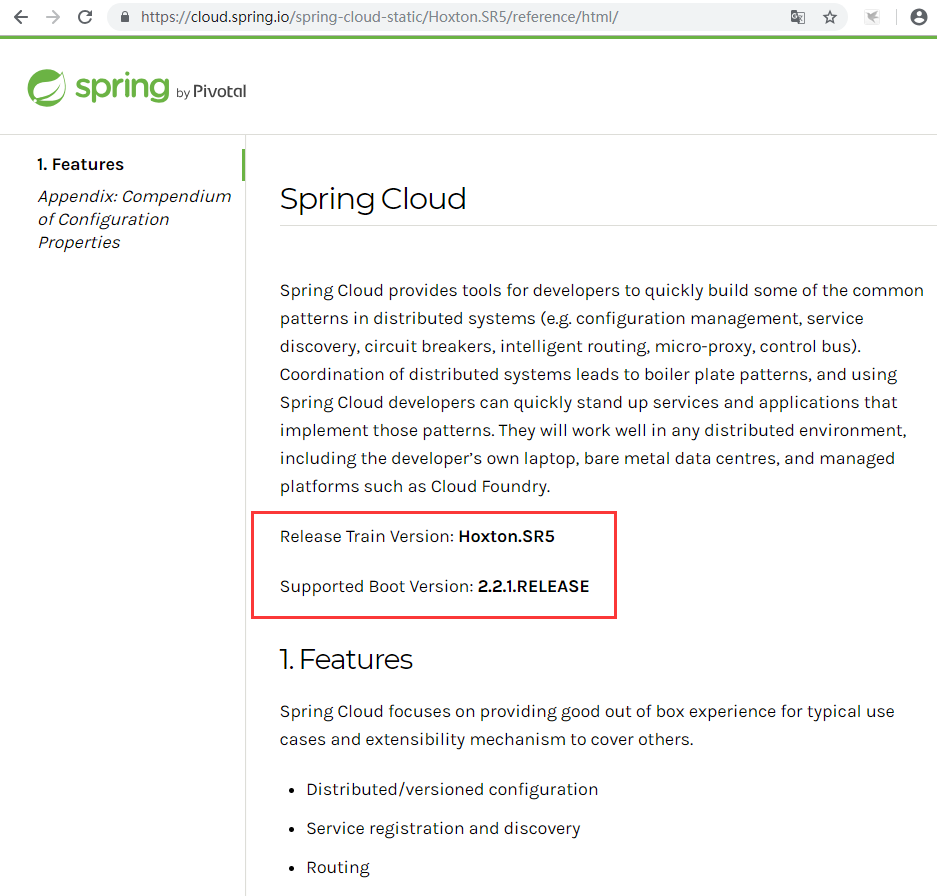
不知道为啥,我从第一个页面看到的是Hoxton SR6版本,点进去后成了SR5版本,估计是刚发布SR6版本,对应的还没更新...
通过下面其他方式,也可以看到对应的版本信息,但是没有上面这个详细:
在 https://spring.io/projects/spring-cloud#overview 中指定了不同的SpringCloud版本对应的SpringBoot版本:
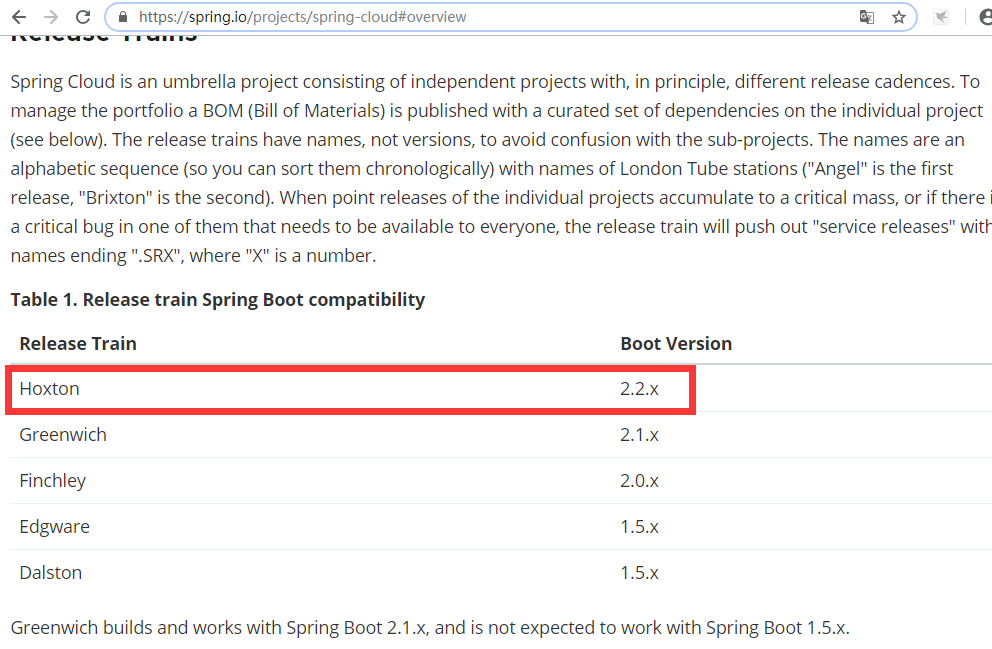
官网建议:Hoxton版本的SpringCloud,需要对应2.2.x 版本的SpringBoot。
更详细的版本对应查看方法:
查看地址:https://start.spring.io/actuator/info
返回内容:

这里就可以看到详细的对应关系。


{

  "git": {

    "branch": "2221108afdb26533bcbde43d88651c3a0735c92b",

    "commit": {

      "id": "2221108",

      "time": "2020-07-01T13:12:10Z"

    }

  },

  "build": {

    "version": "0.0.1-SNAPSHOT",

    "artifact": "start-site",

    "versions": {

      "spring-boot": "2.3.1.RELEASE",

      "initializr": "0.9.0.BUILD-SNAPSHOT"

    },

    "name": "start.spring.io website",

    "time": "2020-07-01T13:13:18.488Z",

    "group": "io.spring.start"

  },

  "bom-ranges": {

    "azure": {

      "2.0.10": "Spring Boot >=2.0.0.RELEASE and <2.1.0.RELEASE",

      "2.1.10": "Spring Boot >=2.1.0.RELEASE and <2.2.0.M1",

      "2.2.4": "Spring Boot >=2.2.0.M1 and <2.3.0.M1",

      "2.3.1": "Spring Boot >=2.3.0.M1"

    },

    "codecentric-spring-boot-admin": {

      "2.0.6": "Spring Boot >=2.0.0.M1 and <2.1.0.M1",

      "2.1.6": "Spring Boot >=2.1.0.M1 and <2.2.0.M1",

      "2.2.3": "Spring Boot >=2.2.0.M1"

    },

    "solace-spring-boot": {

      "1.0.0": "Spring Boot >=2.2.0.RELEASE and <2.3.0.M1",

      "1.1.0": "Spring Boot >=2.3.0.M1"

    },

    "solace-spring-cloud": {

      "1.0.0": "Spring Boot >=2.2.0.RELEASE and <2.3.0.M1"

    },

    "spring-cloud": {

      "Finchley.M2": "Spring Boot >=2.0.0.M3 and <2.0.0.M5",

      "Finchley.M3": "Spring Boot >=2.0.0.M5 and <=2.0.0.M5",

      "Finchley.M4": "Spring Boot >=2.0.0.M6 and <=2.0.0.M6",

      "Finchley.M5": "Spring Boot >=2.0.0.M7 and <=2.0.0.M7",

      "Finchley.M6": "Spring Boot >=2.0.0.RC1 and <=2.0.0.RC1",

      "Finchley.M7": "Spring Boot >=2.0.0.RC2 and <=2.0.0.RC2",

      "Finchley.M9": "Spring Boot >=2.0.0.RELEASE and <=2.0.0.RELEASE",

      "Finchley.RC1": "Spring Boot >=2.0.1.RELEASE and <2.0.2.RELEASE",

      "Finchley.RC2": "Spring Boot >=2.0.2.RELEASE and <2.0.3.RELEASE",

      "Finchley.SR4": "Spring Boot >=2.0.3.RELEASE and <2.0.999.BUILD-SNAPSHOT",

      "Finchley.BUILD-SNAPSHOT": "Spring Boot >=2.0.999.BUILD-SNAPSHOT and <2.1.0.M3",

      "Greenwich.M1": "Spring Boot >=2.1.0.M3 and <2.1.0.RELEASE",

      "Greenwich.SR6": "Spring Boot >=2.1.0.RELEASE and <2.1.16.BUILD-SNAPSHOT",

      "Greenwich.BUILD-SNAPSHOT": "Spring Boot >=2.1.16.BUILD-SNAPSHOT and <2.2.0.M4",

      "Hoxton.SR6": "Spring Boot >=2.2.0.M4 and <2.3.2.BUILD-SNAPSHOT",

      "Hoxton.BUILD-SNAPSHOT": "Spring Boot >=2.3.2.BUILD-SNAPSHOT and <2.4.0.M1",

      "2020.0.0-SNAPSHOT": "Spring Boot >=2.4.0.M1"

    },

    "spring-cloud-alibaba": {

      "2.2.1.RELEASE": "Spring Boot >=2.2.0.RELEASE and <2.3.0.M1"

    },

    "spring-cloud-services": {

      "2.0.3.RELEASE": "Spring Boot >=2.0.0.RELEASE and <2.1.0.RELEASE",

      "2.1.7.RELEASE": "Spring Boot >=2.1.0.RELEASE and <2.2.0.RELEASE",

      "2.2.3.RELEASE": "Spring Boot >=2.2.0.RELEASE and <2.3.0.M1"

    },

    "spring-statemachine": {

      "2.0.0.M4": "Spring Boot >=2.0.0.RC1 and <=2.0.0.RC1",

      "2.0.0.M5": "Spring Boot >=2.0.0.RC2 and <=2.0.0.RC2",

      "2.0.1.RELEASE": "Spring Boot >=2.0.0.RELEASE"

    },

    "vaadin": {

      "10.0.17": "Spring Boot >=2.0.0.M1 and <2.1.0.M1",

      "14.2.3": "Spring Boot >=2.1.0.M1 and <2.4.0-M1"

    },

    "wavefront": {

      "2.0.0-SNAPSHOT": "Spring Boot >=2.1.0.RELEASE"

    }

  },

  "dependency-ranges": {

    "okta": {

      "1.2.1": "Spring Boot >=2.1.2.RELEASE and <2.2.0.M1",

      "1.4.0": "Spring Boot >=2.2.0.M1 and <2.4.0-M1"

    },

    "mybatis": {

      "2.0.1": "Spring Boot >=2.0.0.RELEASE and <2.1.0.RELEASE",

      "2.1.3": "Spring Boot >=2.1.0.RELEASE and <2.4.0-M1"

    },

    "geode": {

      "1.2.8.RELEASE": "Spring Boot >=2.2.0.M5 and <2.3.0.M1",

      "1.3.0.RELEASE": "Spring Boot >=2.3.0.M1 and <2.4.0-M1"

    },

    "camel": {

      "2.22.4": "Spring Boot >=2.0.0.M1 and <2.1.0.M1",

      "2.25.1": "Spring Boot >=2.1.0.M1 and <2.2.0.M1",

      "3.3.0": "Spring Boot >=2.2.0.M1 and <2.3.0.M1",

      "3.4.0": "Spring Boot >=2.3.0.M1 and <2.4.0-M1"

    },

    "open-service-broker": {

      "2.1.3.RELEASE": "Spring Boot >=2.0.0.RELEASE and <2.1.0.M1",

      "3.0.4.RELEASE": "Spring Boot >=2.1.0.M1 and <2.2.0.M1",

      "3.1.1.RELEASE": "Spring Boot >=2.2.0.M1 and <2.4.0-M1"

    }

  }

}
返回json
SpringCloud和SpringBoot对应的版本选型的更多相关文章
- Spring Cloud Alibaba (一): SpringCloud与SpringBoot版本选型
前言 近年SpringCloud与SpringBoot更新迭代非常频繁,导致我们对两者的版本选型非常的困难.若是版本选择有问题, 会导致开发中调试兼容性占用非常多的得必要时间. SpringClo ...
- [SpringCloud教程]2. 版本选型和项目搭建
Spring Cloud Alibaba 版本选型 建议先选择Spring Cloud Alibaba的大版本,方便兼容 选择 Spring Cloud Alibaba 大版本 访问链接,找到标题&q ...
- springcloud和springboot是什么关系?
[学习笔记] 4)springcloud和springboot是什么关系? 马克-to-win@马克java社区:springboot可以快速开发单个微服务.springcloud是一个基于sprin ...
- SpringBoot与Cloud版本匹配问题
在使用SpringCloud的时候需要在SpringBoot工程的pom.xml中引入 <dependencyManagement> <dependencies> <de ...
- Springcloud 中 SpringBoot 配置全集 (收藏版)
Springcloud 中 SpringBoot 配置全集 (收藏版) 疯狂创客圈 Java 高并发[ 亿级流量聊天室实战]实战系列 [博客园总入口 ] 前言 疯狂创客圈(笔者尼恩创建的高并发研习社群 ...
- SpringCloud和Springboot
SpringBoot+SpringCloud+SpringMVC+SpringData 我们把这种架构也称之为spring全家桶 什么是SpringCloudSpring Cloud是一系列框架的有序 ...
- SpringBoot thymeleaf模板版本,thymeleaf模板更换版本
SpringBoot thymeleaf模板版本 thymeleaf模板更换版本 修改thymeleaf模板版本 ================================ ©Copyright ...
- SpringBoot 2.x 版本以put方式提交表单不生效的问题详解
在使用SpringBoot 2.x版本时,原有springboot 1.x 版本的通过在表单中添加 input框隐藏域指定_method = put 的方式失效. 虽然浏览器传参的确是带上了这个参数, ...
- SpringCloud 与 SpringBoot版本问题
如果SpringBoot版本与SpringCloud版本不一致,SpringBoot应用启动会报错: 解决方案: 版本对应关系可以在 https://start.spring.io/info 上查看: ...
随机推荐
- STM32的8*8点阵屏开发(小项目)
基础认识 实现效果 项目实现STM32点阵屏的操作,自动更改显示内容和串口控制显示内容 STM32上电后: 1) 程序将进行行和列的刷新 2) 自动递增显示0-9变化 3) 进行矩形由内向 ...
- 使用nodejs的puppeteer库爬取瓜子二手车网站
const puppeteer = require('puppeteer'); (async () => { const fs = require("fs"); const ...
- rust 学习之旅一, rust编程环境相关
Mac rust环境 rust安装: curl --proto '=https' --tlsv1.2 -sSf https://sh.rustup.rs | sh rust更新: rustup upd ...
- ADB命令 使用
简介 ADB,即 Android Debug Bridge ,它是 Android 开发/测试人员不可替代的强大工具 .安卓调试桥 (Android Debug Bridge, adb),是一种可以 ...
- 多语言工作者の十日冲刺<10/10>
这个作业属于哪个课程 软件工程 (福州大学至诚学院 - 计算机工程系) 这个作业要求在哪里 团队作业第五次--Alpha冲刺 这个作业的目标 团队进行Alpha冲刺--第十天(05.09) 作业正文 ...
- 上位机面试必备——TCP通信灵魂二十问【上】
关注公众号获取更多干货 TCP通信协议应该是上位机开发中应用最广泛的协议,无论是西门子S7协议.三菱MC协议或者是欧姆龙的Fins-TCP协议等,都是TCP通信协议的典型应用.很多人在上位机面试时,都 ...
- 深度解剖dubbo源码---01dubbo的架构原理-探索.mp4
02内核解剖-dubbo自己的SPI实现.mp4 https://blog.csdn.net/prestigeding/article/details/80795708 https://segment ...
- java面试基础必备
一.Java基础 1. String类为什么是final的. 2. HashMap的源码,实现原理,底层结构. 3. 说说你知道的几个Java集合类:list.set.queue.map实现类咯... ...
- Idea激活JRebel
选择license激活 UUID 生成地址: http://www.uuid.online 激活地址 http://jrebel-license.jiweichengzhu.com/ UUID
- Linux安装docker笔记
更新yum操作 yum -y update 安装docker yum install -y docker 或者yum install -y docker-engine 启动docker servic ...